Meta Tester 5 Agent Manager does not run?
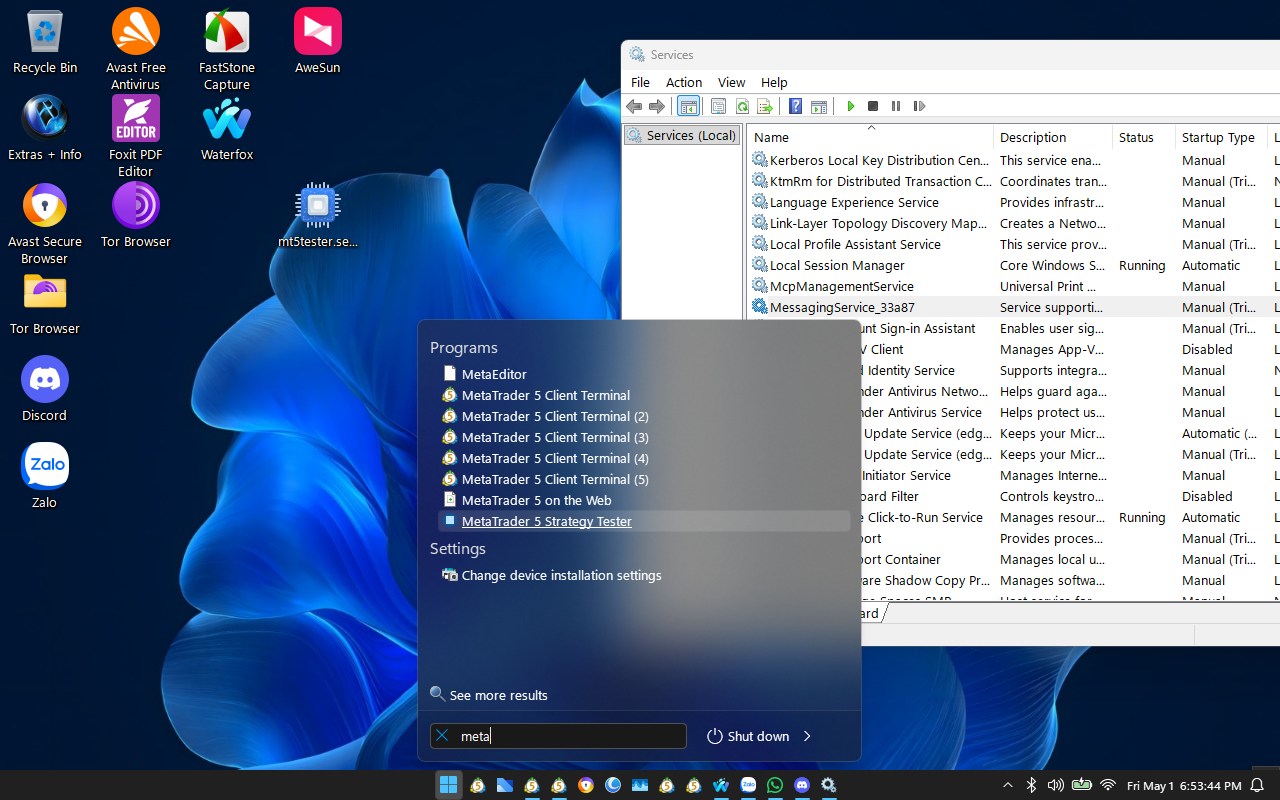
Hi all, anyone in that case ỏ have any ideal please help me. I can install but when I open MetaTrader 5 Strategy Tester it not open/not run normal. Please help me out of this problem. Many thanks
Hi all, anyone in that case ỏ have any ideal please help me. I can install but when I open MetaTrader 5 Strategy Tester it not open/not run normal. Please help me out of this problem. Many thanks
Hi all, anyone in that case ỏ have any ideal please help me. I can install but when I open MetaTrader 5 Strategy Tester it not open/not run normal. Please help me out of this problem. Many thanks
check your firewall and anti-virus logs for issues there. you may need to add metatester to exception rules for both firewall and anti-virus.
if these do not show issues, then, i assume that what Shalem has suggeted -- is correct. However i used slimmed down versions of both windows 10 and 11 last year with no such issues, so if you continue to have this issue, then i would suggest the one you are using is rubbish. Imo, it is always better, if you dont like full versions of windows, then, create your own custom windows that is specially made for your pc that include all drivers and windows components that your pc needs -- which slimmed down, custom windows will often do not include all components for "power users".
Hi Shalem Loritsch and Michael Charles Schefe,
Thanks for your reply. Currently, as you mentioned, I am using the Windows X-Lite "Optimum 11" 26H1 v2. https://windowsxlite.com/26H1. However, I installed it on three different computers, and only this one is having problems, whereas previously, when I installed "Optimum 11" 24H2Pro v4.4b, all of them ran normally. The file on the desktop is "mt5tester.setup.exe" that I just downloaded to install on that machine, and as you can see, I have installed it, but it won't run. I don't know if I accidentally deleted something on this machine that is causing MetaTrader 5 Strategy Tester to not run like the other two! Please guide me on how to check and install the missing (I accidentally deleted) components that it requires so that it can run normally. Furthermore, you can install this on any partition or folder and it will run ok; it doesn't necessarily have to be installed on the default path. I've been using this version for many years, along with Avast Premium for computers used for non-essential tasks unrelated to bank account numbers or wallet codes, and I haven't encountered any leaks or security vulnerabilities (to date). Therefore, I still trust it because, honestly, I've tried creating a custom Windows version for my computer before without success; it's too complicated given my limited time. Thank you everyone.

Hi Shalem Loritsch and Michael Charles Schefe,
Thanks for your reply. Currently, as you mentioned, I am using the Windows X-Lite "Optimum 11" 26H1 v2. https://windowsxlite.com/26H1. However, I installed it on three different computers, and only this one is having problems, whereas previously, when I installed "Optimum 11" 24H2Pro v4.4b, all of them ran normally. The file on the desktop is "mt5tester.setup.exe" that I just downloaded to install on that machine, and as you can see, I have installed it, but it won't run. I don't know if I accidentally deleted something on this machine that is causing MetaTrader 5 Strategy Tester to not run like the other two! Please guide me on how to check and install the missing (I accidentally deleted) components that it requires so that it can run normally. Furthermore, you can install this on any partition or folder and it will run ok; it doesn't necessarily have to be installed on the default path. I've been using this version for many years, along with Avast Premium for computers used for non-essential tasks unrelated to bank account numbers or wallet codes, and I haven't encountered any leaks or security vulnerabilities (to date). Therefore, I still trust it because, honestly, I've tried creating a custom Windows version for my computer before without success; it's too complicated given my limited time. Thank you everyone.
if you could tell me the component of windows that is missing then i am sure that i could find out what dism command for you to run and install the missing part; but without know that then there are too many possibilities... sorry.
did you try deleting the file on your desktop and redownloading the file again, but to a different folder? sometimes folder permissions can be screwed up and frozen, so that even if you delete a file and copy the same file to same location, the new file retains the screwed up permissions of the deleted file.
But note that i think it is obvious that there is 2 issues. these do not necessarily have to be related to each other. your tester installation is broken, OR, windows is broken. You say that you have used this for years, and yet it is 26h1 with obvious reference to the windows update. but this update was released for a very specific group of hardware. I am sure that it could be hacked to be made to update the other 90% of windows installs, but it is still a hacked update, not done by normal ms developers. This increases chances of this sort of thing happening 10 fold, as they say.
i am willing to help out with windows stuff via dm, but this is my final msg regarding this thread, as i am sure that moderators will not like that this thread has been hijacked by stuff unrelated to trading.
check your firewall and anti-virus logs for issues there. you may need to add metatester to exception rules for both firewall and anti-virus.

- Free trading apps
- Over 8,000 signals for copying
- Economic news for exploring financial markets
You agree to website policy and terms of use
And numbers in Overview always zero, seems doesn't run.
How to Run Meta Tester 5 Agent Manager for earning momey?