 MetaTrader 5
 Experts
 Indicators
 Scripts
 Libraries
 Storage
Watch how to download trading robots for free
Find us on Facebook!
Join our fan page
Join our fan page
You liked the script? Try it in the MetaTrader 5 terminal

Prop Daily Loss Meter - indicator for MetaTrader 5
Amedeo Nustriani

MQL5 / MQL4 developer. I build exactly what the specification says, and I
test it before I hand it over.
WHAT I BUILD
Expert Advisors for MT4 and MT5, single or multi-symbol
Custom indicators, scripts, panels
MT4 to MT5 conversion, TradingView (Pine) logic rebuilt in MQL5
test it before I hand it over.
WHAT I BUILD
Expert Advisors for MT4 and MT5, single or multi-symbol
Custom indicators, scripts, panels
MT4 to MT5 conversion, TradingView (Pine) logic rebuilt in MQL5
- Views:
- 926
- Rating:
- Published:
-
 You are missing trading opportunities:
- Free trading apps
- Over 8,000 signals for copying
- Economic news for exploring financial markets
Registration Log inYou agree to website policy and terms of use
If you do not have an account, please register -
 Need a robot or indicator based on this code? Order it on Freelance
Go to Freelance
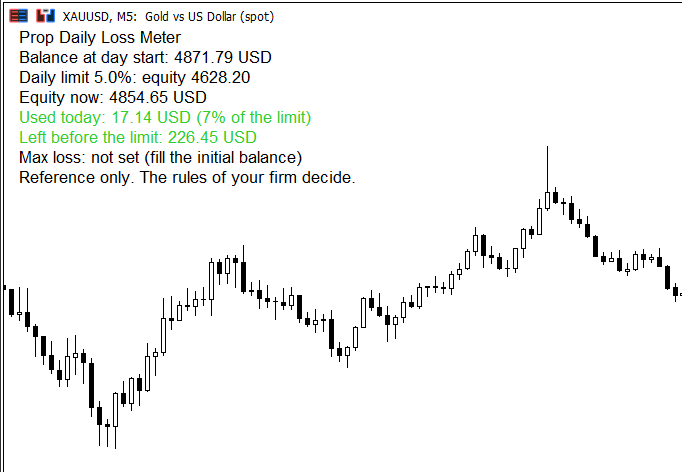
Many prop firms close the account when the daily loss limit is touched. This indicator shows the numbers on the chart, so you do not have to calculate them.
It shows:
- the balance at the start of the day (calculated from the account history),
- the equity level of the daily loss limit,
- the loss used so far, in money and as a percentage of the limit,
- the money left before the limit,
- optionally, the equity level of the maximum loss limit.
The colour changes from green to orange to red as the limit gets closer. A popup alert appears once per day when the warning level is reached (80% by default).
Inputs: daily loss limit in percent, maximum loss limit in percent, initial balance of the challenge, hour when your firm's day starts (server time), warning level, position of the panel.
Notes: it reads the account only and never opens, closes or modifies a trade. Prop firms calculate the day differently (balance or equity, reset time). Set the day start hour to match your firm and use the values as a reference only.
If you find it useful, a rating or a comment helps a lot. Other tools for prop firm traders are in my author profile.
 Server Clock Check
Measures how far your PC clock is from the trade server's clock, from the server time stamped on live ticks, and tells you how to fix it.
Multi-Indicator Divergence Detector
Regular and hidden divergences between price and ten oscillators calculated inside the indicator: MACD, MACD histogram, RSI, Stochastic, CCI, Momentum, OBV, VWMACD, Chaikin Money Flow and MFI. Lines on price, a box naming every oscillator that agrees, and alerts.
 Broker Clock Auditor
Reads the server clock from the symbol's own H1 history. The forex and CME week closes at 17:00 New York, so the server time of every weekly close gives the server's UTC offset for that week. Over 60 weeks it flags irregular closes, dates every clock change and tests it against the US and European daylight saving calendars, cross-checks TimeTradeServer minus TimeGMT, and lists the server time of the London, New York, Tokyo and Sydney opens for the coming weeks. Writes every close to CSV. Read only: no trade function, no DLL, no network.
DailyLossGuard — Hard Daily Loss Protection
DailyLossGuard — Hard Daily Loss Protection (Prop-Firm Challenge Essential)