 MetaTrader 5
 Experts
 Indicators
 Scripts
 Libraries
 Storage
Join our fan page

PropGuard - account risk manager for prop firm accounts - expert for MetaTrader 5

- Views:
- 20
- Published:
-
 You are missing trading opportunities:
- Free trading apps
- Over 8,000 signals for copying
- Economic news for exploring financial markets
Registration Log inYou agree to website policy and terms of use
If you do not have an account, please register -
 Need a robot or indicator based on this code? Order it on Freelance
Go to Freelance
Need a robot or indicator based on this code? Order it on Freelance
Go to Freelance
PropGuard watches the whole account, not one chart. Attach one copy to any chart and it checks every position on the account, whatever EA or magic number opened it, and closes everything when a prop firm style limit is reached.
What it enforces: a daily loss limit on equity including floating profit, with a reset at a server time you set; a maximum loss measured either from the initial balance or trailing from the equity peak; a lot cap per position; an optional trading window; an optional Friday close; and an optional blackout around high impact news from the MT5 economic calendar. After a breach it flattens the account, cancels pending orders and keeps closing anything new until the next daily reset, so another EA cannot trade you into a second breach on the same day.
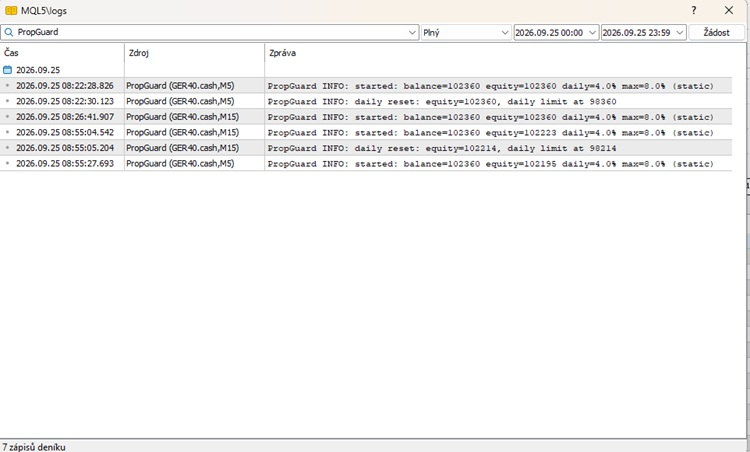
Everything it does is written to the Experts log, to a CSV file in MQL5\Files named after the account login, and optionally sent as a push notification.
Symbol and timeframe do not matter, the guard works on the account. It runs on a timer as well as on ticks, so it keeps checking during quiet markets.
Inputs:
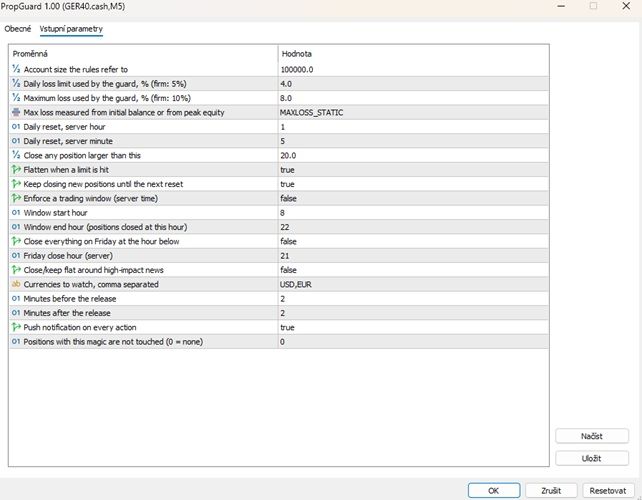
InpInitialBalance, the account size the firm's rules refer to.
InpDailyLossPct and InpMaxLossPct, the guard's own limits in percent. Set them a little below the firm's, for example 4 and 8 on an account with 5 and 10 percent rules, so you stop before the firm stops you.
InpMaxLossMode, static from the initial balance or trailing from the equity peak.
InpResetHour and InpResetMinute, the daily reset in server time.
InpMaxLotsPerPos, any position larger than this is closed.
InpCloseOnBreach and InpBlockAfterBreach, flatten on a breach and keep the account flat until the next reset.
InpUseWindow with start and end hour, InpFridayClose with its hour, both in server time.
InpUseNewsFilter, InpNewsCurrencies, InpNewsMinutesBefore and After, the calendar blackout.
InpPushAlerts, push notification on every action.
InpMagicToIgnore, positions with this magic number are left alone.
Tested on an FTMO trial account.
NeonDesk - Neon Manual Trading Panel with Multi-Timeframe Bias
Draggable on-chart manual trading panel with multi-timeframe bias, ATR SL/TP hints, a trailing stop and one-click BUY/SELL/CLOSE ALL.
 Price Action Volumetric Order Blocks MT5
Open-source MT5 indicator for confirmed market structure, volumetric order blocks and estimated buy/sell activity.
Accelerator Oscillator (AC)
The Acceleration/Deceleration Indicator (AC) measures acceleration and deceleration of the current driving force.
MACD Signals
Indicator edition for new platform.