 MetaTrader 5
 Experts
 Indicators
 Scripts
 Libraries
 Storage
Join our fan page

MSNR Key Levels MTF - indicator for MetaTrader 5

- Views:
- 1968
- Rating:
- Published:
- Updated:
-
 You are missing trading opportunities:
- Free trading apps
- Over 8,000 signals for copying
- Economic news for exploring financial markets
Registration Log inYou agree to website policy and terms of use
If you do not have an account, please register -
 Need a robot or indicator based on this code? Order it on Freelance
Go to Freelance
Need a robot or indicator based on this code? Order it on Freelance
Go to Freelance


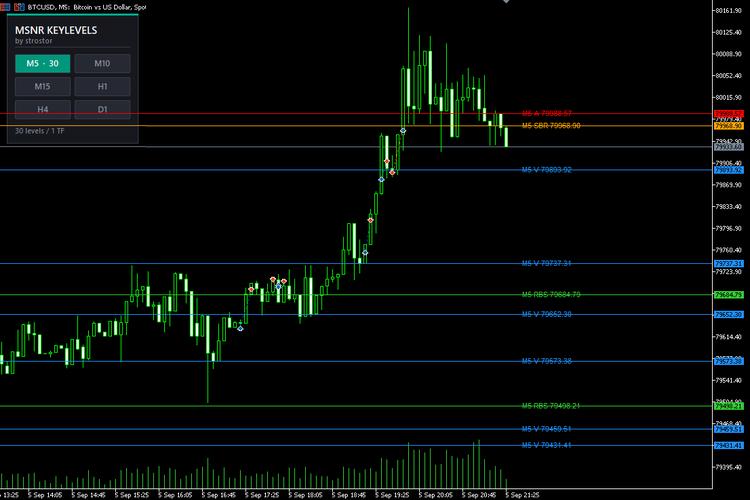
Malaysian SNR is one of the cleanest ways to read a chart: no lagging averages, no oscillators, just the price levels where the market actually turned. The hard part has never been the concept. The hard part is marking every A and V level by hand, tracking which ones are still fresh, flipping resistance into support after a break, and then doing all of it again on every timeframe you trade.
MSNR KeyLevels MultiTF does that work for you, continuously, on six timeframes at once.
What it draws
The indicator reads closed candles and marks the four classic MSNR level types:
- A levels: a bullish candle followed by a bearish candle. The level is the close of the bullish candle. Resistance.
- V levels: a bearish candle followed by a bullish candle. The level is the close of the bearish candle. Support.
- SBR: support that has been broken and now acts as resistance.
- RBS: resistance that has been broken and now acts as support.
Every level is tracked from the moment it is created. When price closes through it, the level flips type and becomes fresh again. When price only touches it without breaking, the level loses its freshness and, by default, disappears. What stays on your chart is the set of untested levels that still have something to say.
The control panel
The HUD sits on the chart, not in the settings window. Six buttons, one per timeframe, each showing the number of levels that timeframe currently contributes. Click M5 to hide the noise, click H4 and D1 to see where the real reaction zones are, click them off again when you are done. The chart redraws instantly, no restart, no re-attach, no digging through input tabs.
Your button choices are remembered per symbol, so every chart comes back the way you left it.
Built for real chart work
- Independent of your chart timeframe. Attach it to an M1 scalping chart or a Daily swing chart, the levels are the same. The indicator calculates each timeframe from its own data.
- Instantly readable. Colour tells you the level type, line style tells you the timeframe: M5 solid, M10 and M15 dotted, H1 and H4 dashed, D1 dash-dot. Every line carries a tooltip and a price label prefixed with its timeframe, for example H1 A 1.09442.
- No chart clutter. Separate history depth and a separate maximum level count for each timeframe, so higher timeframes stay selective while M5 stays detailed.
- Closed candles only. The current, unfinished candle never creates a level. Levels appear when a candle actually closes, exactly as you would mark them by hand.
- Self-healing. Switch timeframes, re-attach the indicator, clear the chart, it rebuilds itself. Objects are namespaced per copy, so nothing collides and nothing is left behind.
- Light on your terminal. No indicator buffers, no tick-by-tick recalculation. Levels are rebuilt when a candle closes, not on every price change.
Fully configurable
- Show or hide A, V, SBR and RBS independently
- Freshness rule: any wick touch invalidates a level, or only a candle body touch
- Show only fresh levels, or keep tested ones on the chart
- Colour per level type, width and line style per timeframe
- History depth and maximum visible levels per timeframe
- Price labels: on or off, font size, horizontal offset
- Complete HUD styling: position, grid layout (2x3 grid, single column or one row), button size, fonts, panel and accent colours, and your own panel title
Who it is for
Traders who work with support and resistance, supply and demand, or price action in general, and who want higher timeframe context without opening four extra charts. It works on any symbol and any broker: forex, indices, metals, crypto, futures. Scalpers use the M5 and M15 layers, swing traders use H4 and D1, and everyone benefits from seeing when a fresh M5 level sits exactly on an untested Daily one.
Please note
This is an analysis tool, not a signal service and not an automated trading system. It marks levels objectively and consistently; entries, exits and risk remain your decisions. Before first use, make sure your terminal has downloaded history for the timeframes you enable, so every layer has data to work with.
MSNR KeyLevels MultiTF. Mark once, see everything, trade the levels that are still untouched.
MSNR logic
- FreshOnly : show only untested levels; when off, tested levels stay on the chart
- WickMakesUnfresh : true = any wick touch invalidates a level, false = only a candle body touch
- ShowA , ShowV , ShowSBR , ShowRBS : show or hide each level type
Level type colors
- AColor , VColor , SBRColor , RBSColor : colour of each level type
- LineWidth : line thickness; keep it at 1 if you want dotted and dashed styles to render
Line style per timeframe
- StyleM5 , StyleM10 , StyleM15 , StyleH1 , StyleH4 , StyleD1 : line style used by each timeframe layer
History depth per timeframe (bars)
- LookbackM5 , LookbackM10 , LookbackM15 , LookbackH1 , LookbackH4 , LookbackD1 : how many candles of that timeframe are scanned
Max visible levels per timeframe
- MaxLevelsM5 , MaxLevelsM10 , MaxLevelsM15 , MaxLevelsH1 , MaxLevelsH4 , MaxLevelsD1 : newest levels are kept, older ones are dropped
Price labels
- ShowLabels : draw the text label next to each level
- LabelFontSize : label font size
- LabelShiftBars : how many bars to the right of the last candle labels are placed
HUD: position and size
- HudX , HudY : panel position in pixels from the top left corner
- HudColumns : 2 = 2x3 grid, 1 = single column, 6 = one row
- HudBtnWidth , HudBtnHeight , HudGap , HudPadding : button size, spacing and panel padding
HUD: text
- HudTitle , HudSubTitle : panel title and subtitle
- HudFont , HudTitleSize , HudSubSize , HudBtnFontSize : font family and sizes
HUD: colors
- HudPanelColor , HudBorderColor , HudAccentColor : panel background, border and accent bar
- HudTitleColor , HudSubColor , HudFooterColor : header and footer text
- HudOnColor , HudOnTextColor , HudOffColor , HudOffTextColor : enabled and disabled button colours
Button start-up state
- StartM5 , StartM10 , StartM15 , StartH1 , StartH4 , StartD1 : which layers are on at first launch
- RememberState : remember button choices per symbol between sessions
Stability
- CleanupOldObjects : remove objects left by a previous copy of the indicator
- SelfHealSeconds : interval of the self-check that rebuilds the panel and lines if the chart drops them
RJO Daily Pivot Levels Classic and Fibonacci for MT5
Daily Pivot Points indicator for MetaTrader 5 with Classic and Fibonacci methods. Displays PP, R1-R3 and S1-S3 using the previous completed daily candle.
Gueta Position Sizer: Risk and Lot Guard HUD
Real-time risk calculator and lot size guard HUD for MT5. Computes exact lot sizing based on account balance, target risk %, and dynamic ATR Stop Loss with minimum lot overshoot warning.
 PropFirm Defense
A library of 24 MQL5 classes that watches a prop-firm rulebook -- drawdown, daily loss, payout consistency, minimum trading days, news blackout -- against any account, and flattens on breach without ever opening a position of its own.
Range compression percentile
Ranks the current period's range-so-far against the full historical distribution of past ranges — a true percentile, not just a comparison to the average like ADR% — and flags statistical compression or expansion on a compact live panel with a percentile gauge.