 MetaTrader 5
 Experts
 지표
지표
 스크립트
스크립트
 라이브러리
라이브러리
 보관함
보관함
당사 팬 페이지에 가입하십시오

MSNR Key Levels MTF - MetaTrader 5용 지표

- 조회수:
- 8
- 평가:
- 게시됨:
-
 이 코드를 기반으로 한 로봇이나 지표가 필요하신가요? 프리랜스로 주문하세요
프리랜스로 이동
이 코드를 기반으로 한 로봇이나 지표가 필요하신가요? 프리랜스로 주문하세요
프리랜스로 이동


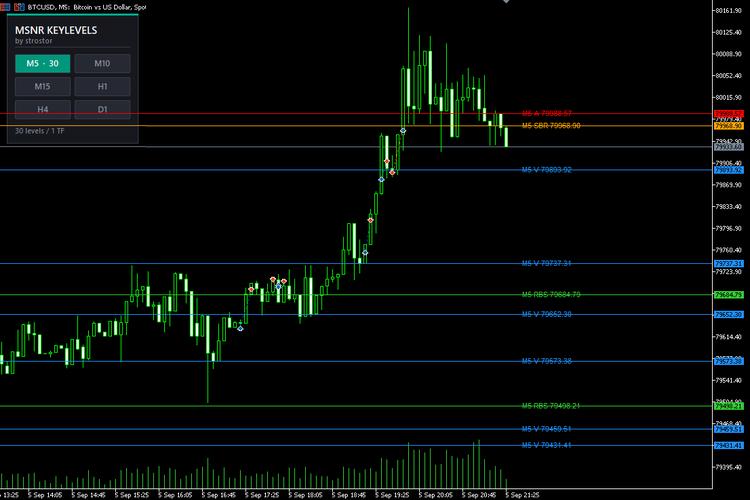
말레이시아식 SNR은 차트를 분석하는 가장 깔끔한 방법 중 하나입니다. 지연되는 이동평균도, 오실레이터도 없이, 시장이 실제로 반전된 가격 수준만을 보여줍니다. 어려운 점은 결코 개념 자체가 아니었습니다. 어려운 점은 모든 A 레벨과 V 레벨을 수작업으로 표시하고, 어떤 레벨이 여전히 유효한지 추적하며, 저항선이 돌파된 후 지지선으로 전환되는 과정을 확인한 뒤, 거래하는 모든 시간대에서 이 모든 과정을 반복해야 한다는 것입니다.
MSNR KeyLevels MultiTF는 6개의 시간대를 동시에 대상으로 이러한 작업을 지속적으로 대신 수행해 줍니다.
표시 내용
이 지표는 종가 캔들을 분석하여 네 가지 고전적인 MSNR 레벨 유형을 표시합니다:
- A 레벨: 강세 캔들 뒤에 약세 캔들이 이어지는 경우. 이 레벨은 강세 캔들의 종가입니다. 저항선.
- V 레벨: 약세 캔들 뒤에 강세 캔들이 이어지는 경우. 이 레벨은 약세 캔들의 종가입니다. 지지선.
- SBR: 지지선이 돌파되어 현재 저항선으로 작용하는 수준.
- RBS: 돌파된 후 현재 지지선으로 작용하는 저항선.
모든 레벨은 형성되는 순간부터 추적됩니다. 가격이 해당 레벨을 뚫고 마감하면 레벨의 유형이 반전되어 다시 새로운 레벨로 재설정됩니다. 가격이 레벨을 뚫지 않고 단지 스치거나 접촉하기만 하면, 해당 레벨은 유효성을 잃고 기본적으로 사라집니다. 차트에 남아 있는 것은 아직 검증되지 않았으나 여전히 의미 있는 정보를 담고 있는 레벨들입니다.
제어판
HUD는 설정 창이 아닌 차트 위에 표시됩니다. 6개의 버튼(시간대별로 하나씩)이 있으며, 각 버튼은 해당 시간대가 현재 기여하고 있는 레벨 수를 보여줍니다. M5를 클릭하여 잡음을 숨기고, H4와 D1을 클릭하여 실제 반응 구역이 어디인지 확인한 뒤, 작업이 끝나면 다시 클릭하여 숨기세요. 차트는 즉시 다시 그려지며, 재시작이나 재연결, 입력 탭을 일일이 뒤질 필요가 없습니다.
버튼 선택 사항은 종목별로 저장되므로, 모든 차트가 사용자가 마지막으로 설정해 둔 상태로 복원됩니다.
실제 차트 작업을 위해 설계됨
- 차트 시간대와 무관합니다. M1 스캘핑 차트나 일봉 스윙 차트에 적용하더라도 레벨은 동일합니다. 이 지표는 각 시간대의 데이터를 기반으로 레벨을 계산합니다.
- 한눈에 파악 가능. 색상은 레벨 유형을, 선 스타일은 시간대를 나타냅니다: M5는 실선, M10 및 M15는 점선, H1 및 H4는 파선, D1은 점선-파선입니다. 모든 선에는 툴팁과 시간대가 접두사로 붙은 가격 라벨이 표시됩니다(예: H1 A 1.09442).
- 차트가 복잡해지지 않습니다. 각 시간대별로 별도의 과거 데이터 깊이와 최대 레벨 수를 설정할 수 있으므로, M5는 세부적인 정보를 유지하면서도 더 높은 시간대는 선택적인 정보만 표시됩니다.
- 마감된 캔들만 표시됩니다. 현재 진행 중인 캔들은 절대 레벨을 생성하지 않습니다. 레벨은 캔들이 실제로 마감되었을 때만 나타나며, 이는 마치 수작업으로 표시하는 것과 정확히 동일합니다.
- 자동 복구 기능. 시간대를 전환하거나, 지표를 다시 적용하거나, 차트를 지워도 자동으로 재구성됩니다. 객체는 복사본별로 네임스페이스가 지정되어 있으므로 충돌이 발생하지 않으며, 잔여 데이터도 남지 않습니다.
- 터미널 부하가 가볍습니다. 지표 버퍼가 없으며, 틱 단위로 재계산하지 않습니다. 레벨은 가격이 변할 때마다 재계산되는 것이 아니라, 캔들이 마감될 때만 재구축됩니다.
완벽한 사용자 정의 기능
- A, V, SBR 및 RBS를 개별적으로 표시하거나 숨길 수 있습니다
- 신선도 규칙: 촛대 꼬리가 레벨에 닿으면 무효화되거나, 촛대 몸통만 닿았을 때만 무효화
- 최신 레벨만 표시하거나, 검증된 레벨을 차트에 계속 유지
- 레벨 유형별 색상, 시간대별 선 너비 및 선 스타일
- 시간대별 기록 보관 기간 및 표시 가능한 최대 레벨 수
- 가격 라벨: 표시/숨기기, 글꼴 크기, 수평 오프셋
- HUD 전체 스타일 설정: 위치, 그리드 레이아웃(2x3 그리드, 단일 열 또는 단일 행), 버튼 크기, 글꼴, 패널 및 강조색, 사용자 지정 패널 제목
대상 사용자
지지선과 저항선, 매수·매도 세력, 또는 전반적인 가격 움직임을 분석하며, 별도의 차트 4개를 추가로 열지 않고도 더 높은 시간대의 맥락을 파악하고자 하는 트레이더를 위한 도구입니다. 외환, 지수, 금속, 암호화폐, 선물 등 모든 종목과 모든 브로커에서 작동합니다. 스캘퍼는 M5 및 M15 레이어를, 스윙 트레이더는 H4 및 D1 레이어를 사용하며, 모든 트레이더는 새로운 M5 레벨이 아직 테스트되지 않은 일봉 레벨과 정확히 일치하는 시점을 파악함으로써 이점을 얻을 수 있습니다.
유의사항
이 도구는 분석 도구일 뿐, 신호 서비스나 자동 거래 시스템이 아닙니다. 이 도구는 레벨을 객관적이고 일관되게 표시해 주지만, 진입, 청산 및 리스크 관리는 전적으로 사용자의 판단에 달려 있습니다. 처음 사용하기 전에, 활성화한 시간대의 시세 기록이 거래 플랫폼에 다운로드되었는지 확인하여 모든 레이어가 분석에 필요한 데이터를 확보할 수 있도록 하십시오.
MSNR KeyLevels MultiTF. 한 번 표시하면 모든 것을 파악하고, 아직 테스트되지 않은 레벨에서 거래하세요.
MSNR 로직
- FreshOnly : 테스트되지 않은 레벨만 표시합니다. 비활성화 시, 테스트된 레벨은 차트에 그대로 남아 있습니다.
- WickMakesUnfresh : true = 촛대 꼬리가 레벨에 닿으면 레벨이 무효화됨, false = 촛대 몸통이 레벨에 닿은 경우에만 무효화됨
- ShowA, ShowV, ShowSBR, ShowRBS: 각 레벨 유형을 표시하거나 숨깁니다.
레벨 유형별 색상
- AColor, VColor, SBRColor, RBSColor: 각 레벨 유형의 색상
- LineWidth : 선 두께; 점선 및 파선 스타일이 표시되도록 하려면 1로 유지하십시오
시간대별 선 스타일
- StyleM5, StyleM10, StyleM15, StyleH1, StyleH4, StyleD1: 각 시간대 레이어에서 사용되는 선 스타일
시간대별 히스토리 깊이 (봉)
- LookbackM5, LookbackM10, LookbackM15, LookbackH1, LookbackH4, LookbackD1: 해당 시간대의 캔들 수만큼 스캔
시간대별 최대 표시 레벨
- MaxLevelsM5, MaxLevelsM10, MaxLevelsM15, MaxLevelsH1, MaxLevelsH4, MaxLevelsD1: 최신 레벨만 유지하고, 오래된 레벨은 삭제됩니다.
가격 레이블
- ShowLabels : 각 레벨 옆에 텍스트 레이블을 표시합니다
- LabelFontSize : 레이블 글꼴 크기
- LabelShiftBars : 마지막 캔들 라벨의 오른쪽으로 몇 바만큼 라벨을 배치할지
HUD: 위치 및 크기
- HudX, HudY : 왼쪽 상단 모서리를 기준으로 한 패널 위치(픽셀 단위)
- HudColumns : 2 = 2x3 격자, 1 = 단일 열, 6 = 한 행
- HudBtnWidth, HudBtnHeight, HudGap, HudPadding: 버튼 크기, 간격 및 패널 패딩
HUD: 텍스트
- HudTitle, HudSubTitle: 패널 제목 및 부제목
- HudFont, HudTitleSize, HudSubSize, HudBtnFontSize: 글꼴 종류 및 크기
HUD: 색상
- HudPanelColor, HudBorderColor, HudAccentColor: 패널 배경, 테두리 및 강조 표시 막대
- HudTitleColor, HudSubColor, HudFooterColor: 헤더 및 푸터 텍스트
- HudOnColor, HudOnTextColor, HudOffColor, HudOffTextColor: 활성화 및 비활성화 버튼 색상
버튼 시작 상태
- StartM5, StartM10, StartM15, StartH1, StartH4, StartD1: 첫 실행 시 활성화되는 레이어
- RememberState : 세션 간에 심볼별 버튼 선택 사항을 기억
안정성
- CleanupOldObjects : 이전 버전의 지표가 남긴 객체를 제거
- SelfHealSeconds : 차트에서 패널과 선이 사라졌을 때 이를 재구성하는 자체 점검 간격
MetaQuotes Ltd에서 영어로 번역함.
원본 코드: https://www.mql5.com/en/code/76993
VelaMayor MTF - Higher Timeframe Candle Overlay
Overlay higher timeframe candles directly onto your lower timeframe charts with customizable body fills, independent borders, and precise wicks. Effortlessly spot macro bias, session openings, and liquidity ranges without switching screens. Ultra-lightweight engine featuring separated box bounds and rock-solid chart change auto-recovery.
 Risk-Based Lot Size Calculator Script with On-Chart Panel
Calculates the lot size for a chosen risk percent and stop loss distance, and shows the result in a clean panel on the chart.
RJO Daily Pivot Levels Classic and Fibonacci for MT5
클래식 및 피보나치 방식을 지원하는 MetaTrader 5용 일일 피벗 포인트(PP) 지표입니다. 이전에 마감된 일봉을 기반으로 PP, R1-R3 및 S1-S3을 표시합니다.
Gueta Position Sizer: Risk and Lot Guard HUD
MT5용 실시간 리스크 계산기 및 랏 사이즈 가드 HUD입니다. 계좌 잔고, 목표 리스크 비율, 동적 ATR 스톱로스(최소 랏 오버슈트 경고 기능 포함)를 기반으로 정확한 랏 크기를 계산합니다.