 MetaTrader 5
 Experts
 Indicators
 Scripts
 Libraries
 Storage
Watch how to download trading robots for free
Find us on Facebook!
Join our fan page
Join our fan page
You liked the script? Try it in the MetaTrader 5 terminal

Spread Monitor for Scalpers - indicator for MetaTrader 5

- Views:
- 1155
- Rating:
- Published:
-
 You are missing trading opportunities:
- Free trading apps
- Over 8,000 signals for copying
- Economic news for exploring financial markets
Registration Log inYou agree to website policy and terms of use
If you do not have an account, please register -
 Need a robot or indicator based on this code? Order it on Freelance
Go to Freelance
Need a robot or indicator based on this code? Order it on Freelance
Go to Freelance
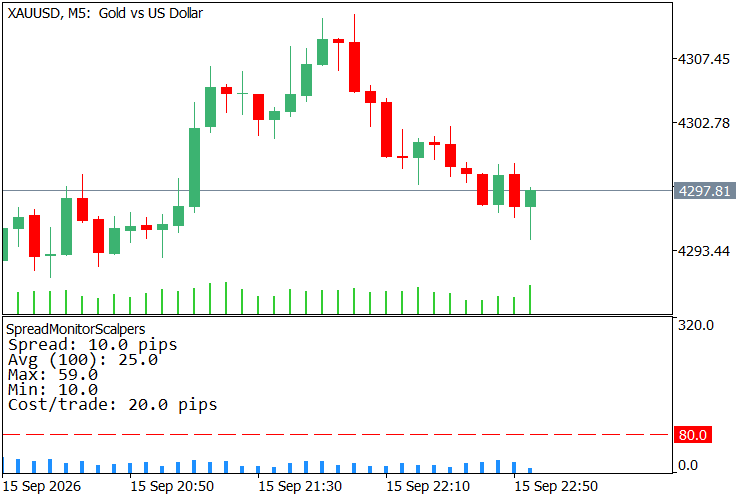
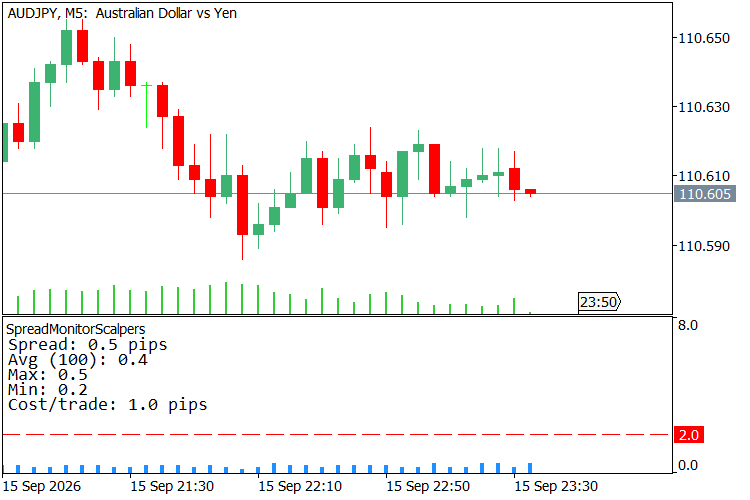
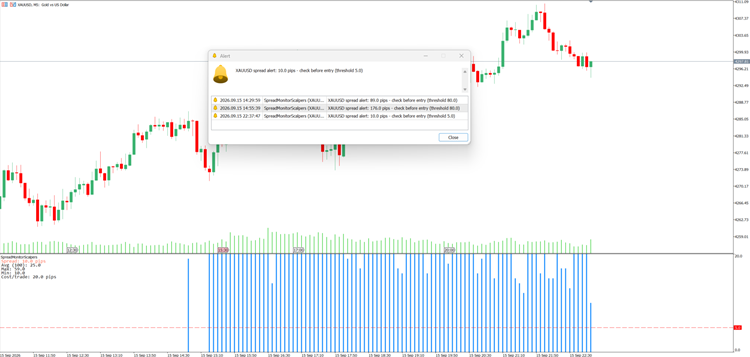
A sub-window indicator for scalpers that plots the live spread as a histogram, draws a horizontal threshold line, and shows current / average / max / min spread over a configurable lookback plus the round-trip spread cost per trade — the number of pips you must clear just to break even. It alerts (popup, log, optional push) when the spread climbs above a threshold you set, with a cooldown so it stays quiet while the spread stays wide. Spread is reported in pips, correct on any symbol via Digits() adaptation (5/3-digit and JPY brokers read right). It reads and displays only — it never sends, modifies or closes an order.
Features
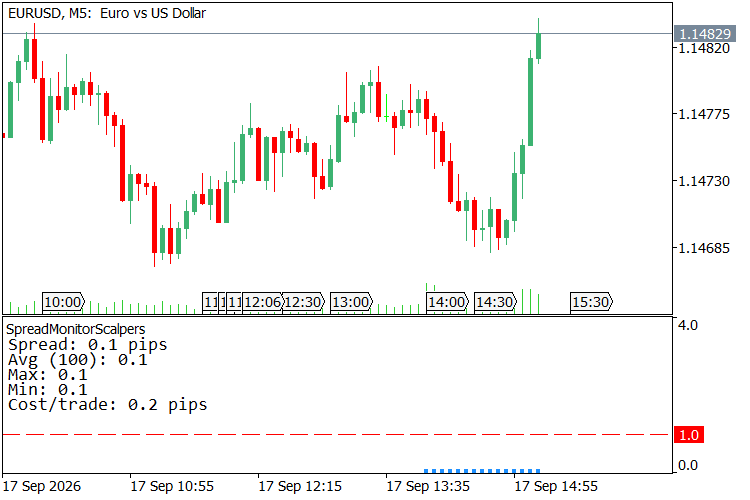
- Spread histogram in a sub-window — the live spread is drawn as a vertical bar in its own pane below the chart, so it never covers candles. MT5 keeps no per-bar spread history, so bars from before you attach the indicator are left empty rather than faked; from the moment you attach it, each new bar records its own spread and the forming bar tracks the live spread tick by tick — and that recorded history stays put for the rest of the session.
- Fixed vertical scale, no flicker — the histogram's Y-axis is pinned ( 0 to 4× your alert threshold by default, or set Histogram scale ceiling (pips) yourself) instead of auto-fitting to visible data, so bar heights and the threshold line stay visually stable tick to tick.
- History survives a timeframe switch — recorded spread is saved to a small file per symbol+timeframe ( Remember spread history , on by default). Switch M5→M15 and back and your M5 bars are still there instead of starting blank; a different symbol always gets its own separate history, never mixed with another chart's.
- Threshold line on the histogram — a dashed horizontal line at your Spread threshold (pips) sits on the histogram, so you can see at a glance whether the current bar is above or below your limit.
- Statistics panel (current / avg / max / min) — a corner panel shows the live spread plus the average, max and min over the last Lookback bars , so a widening spread is visible as a number, not just a taller bar.
- Round-trip cost per trade — spread × 2 (entry + exit) shown in the panel as Cost/trade : the exact number of pips a single trade must clear just to break even. Most free spread monitors stop at the raw spread; this one tells you what it costs you.
- Spread-threshold alert with cooldown — when the spread exceeds your limit you get a popup and a log line ( spread alert: X.X pips - check before entry (threshold Y.Y) ); a configurable cooldown (seconds) stops it from spamming while the spread stays wide.
- Optional push notifications — the spread alert can be pushed to the MetaTrader mobile app ( SendNotification ); off by default.
- Spread in pips, correct on any symbol — the raw point spread from SymbolInfoInteger(SYMBOL_SPREAD) is converted to pips using the symbol's digit count, so 5-digit and 3-digit (JPY) brokers read correctly, and so do metals when you attach it there.
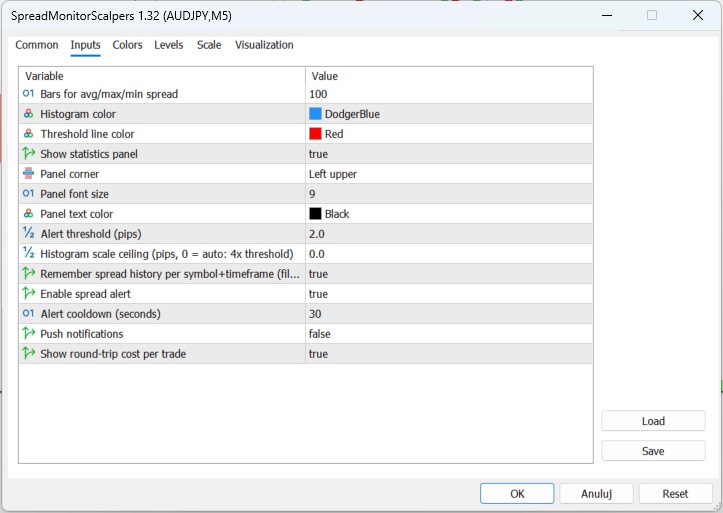
- Configurable panel — selectable data location, font size and text colour. Histogram colour and threshold-line colour are inputs too.
- Single file, no dependencies, no external includes. Compiles with 0 errors and 0 warnings.
How to use
- Attach the indicator to any chart. A spread histogram appears in a sub-window below the chart, a dashed threshold line sits on it, and a statistics panel appears in the corner.
- Set Lookback bars to the window over which you want the average / max / min spread computed (default 100 bars).
- Set Alert threshold (pips) to the level above which you don't want to enter — the histogram bar crosses the dashed line, the panel's Spread: line turns red, and an alert fires when the live spread exceeds it. Histogram scale ceiling (pips) defaults to 4× this threshold; raise it manually if your spread regularly spikes past that.
- Tune Alert cooldown (seconds) so repeated alerts don't spam while the spread stays wide.
- Leave Show cost per trade on to see Cost/trade (round-trip spread) in the panel — the pips you must clear before a trade is in profit (its break-even).
- Optionally turn on Push notifications to receive spread alerts on your phone.
- Leave Remember spread history on to keep your recorded bars across a timeframe switch (or turn it off if you'd rather not write a small file per symbol+timeframe to MQL5\Files ).
Why use it
For a scalper, the spread is not a fee — it is the trade. A 1.5-pip spread is 1.5 pips you must earn before a single position turns green, and a spread that quietly triples around a rollover or a news print turns a good entry into a loss before the candle even forms. The raw spread number in the status bar tells you none of this; a histogram does. This puts the spread in its own pane where it belongs, next to the average and the extremes over your lookback, with the round-trip cost spelled out as a break-even number — the one figure that decides whether a scalping setup is even worth taking. No settings to trade, nothing sent to the broker — just the cost of entering, on the screen, before you click.
Screenshots
 RiskGuard Lite - Percent-Risk EMA/ATR EA
Educational MT5 EA: closed-bar EMA crossover entries, ATR-based stop loss and take profit, lot size from a fixed percent of equity via OrderCalcProfit, spread filter, magic-number isolation and server return-code checks. A clean template for building risk-controlled EAs. No profit claim.
Session Candle Counter: candles numbered from the cash open, DST aware
Numbers every candle of the current trading day starting at the cash open of Frankfurt, London, New York or Tokyo. The anchor is converted from exchange local time to broker server time with automatic daylight saving, so the first candle after the open is always number one, in summer and in winter.
PropFirm Risk Guardian MT5 – Account-Wide Risk Protection EA
Account-wide MT5 risk protection EA for prop-firm and personal accounts. Monitors daily and overall drawdown, position losses, safety buffers, and automatically protects the account when configured limits are reached.
EA Trend Follower
TREND Follower (Daily) is a lightweight, development-oriented Expert Advisor (EA) created as a base trading architecture for research, learning, experimentation, and further development. The EA is intentionally designed around a simple concept: follow the market direction using the relationship between price and the Parabolic SAR. It is not presented as a fully optimized or finished trading system. Instead, it provides a clean and accessible foundation that developers can study, modify, test, and expand.