 MetaTrader 5
 Experts
 지표
 스크립트
 라이브러리
 보관함
거래 로봇을 무료로 다운로드 하는 법을 시청해보세요
당사를 Facebook에서 찾아주십시오!
당사 팬 페이지에 가입하십시오
당사 팬 페이지에 가입하십시오
스크립트가 마음에 드시나요? MetaTrader 5 터미널에서 시도해보십시오

Spread Monitor for Scalpers - MetaTrader 5용 지표

- 조회수:
- 18
- 평가:
- 게시됨:
-
 이 코드를 기반으로 한 로봇이나 지표가 필요하신가요? 프리랜스로 주문하세요
프리랜스로 이동

스캘퍼를 위한 서브 윈도우 지표로, 실시간 스프레드를 히스토그램 형태로 표시하고, 수평 기준선을 그으며, 사용자 지정 가능한 룩백 기간 동안의 현재/평균/최대/최소 스프레드와 거래당 왕복 스프레드 비용(손익분기점을 맞추기 위해 청산해야 하는 핍 수)을 보여줍니다. 설정한 임계값을 초과하여 스프레드가 상승할 경우 알림(팝업, 로그, 선택적 푸시 알림)을 제공하며, 스프레드가 넓은 상태에서는 알림이 반복되지 않도록 쿨다운 기능이 적용됩니다. 스프레드는 핍 단위로 표시되며, Digits() 기능을 통해 모든 종목에서 정확하게 표시됩니다(5자리/3자리 및 JPY 브로커의 경우 올바르게 읽힘). 이 지표는 읽기 및 표시 기능만 수행하며, 주문을 전송, 수정 또는 청산하지 않습니다.
기능
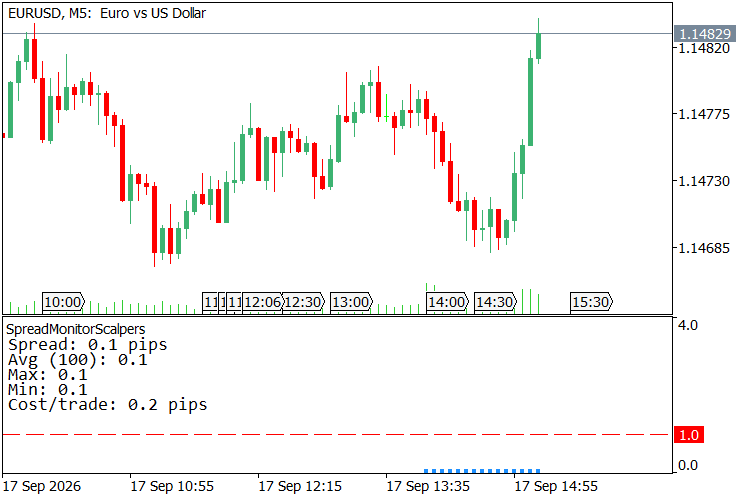
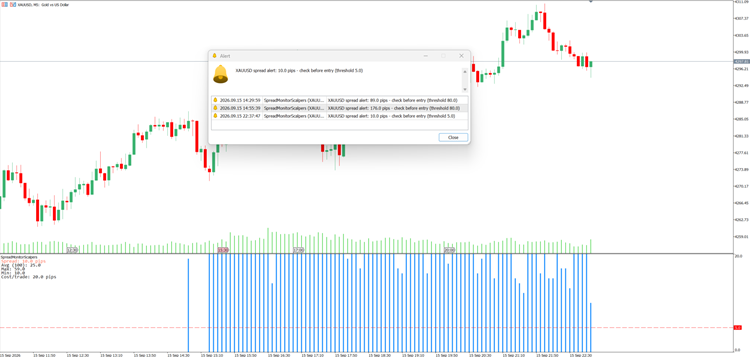
- 서브 윈도우의 스프레드 히스토그램 — 실시간 스프레드는 차트 하단의 별도 창에 수직 막대 형태로 표시되므로 캔들을 가리지 않습니다. MT5는 막대별 스프레드 이력을 저장하지 않으므로, 지표를 적용하기 전의 막대는 임의의 값으로 채워지지 않고 비워집니다. 지표를 적용한 순간부터 각 새로운 막대는 자체 스프레드를 기록하며, 형성 중인 막대는 틱 단위로 실시간 스프레드를 추적합니다. 또한 기록된 이력은 해당 세션이 끝날 때까지 유지됩니다.
- 고정된 수직 축, 깜빡임 없음 — 히스토그램의 Y축은 표시된 데이터에 자동으로 맞춰지는 대신 고정되어 있습니다(기본값은 0에서 알림 임계값의 4배까지이며, ‘히스토그램 축 상한(핍)’을 직접 설정할 수도 있음). 따라서 막대 높이와 임계값 선은 틱 단위로 시각적으로 안정적으로 유지됩니다.
- 시간대 변경 시 기록 유지 — 기록된 스프레드는 심볼+시간대별로 작은 파일에 저장됩니다(‘스프레드 기록 유지’ 기능, 기본적으로 켜짐). M5에서 M15로 전환했다가 다시 돌아와도 M5 바가 비어 있는 상태로 시작되지 않고 그대로 유지됩니다. 서로 다른 심볼은 항상 별도의 기록을 가지며, 다른 차트의 기록과 혼합되지 않습니다.
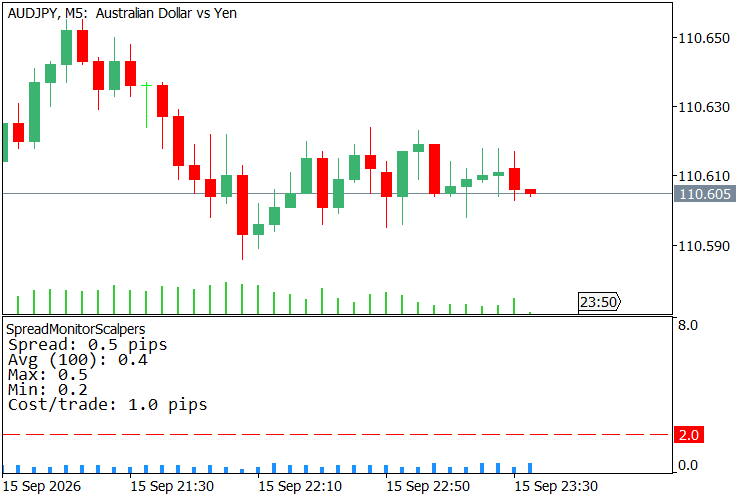
- 히스토그램의 임계값 선 — 스프레드 임계값(핍)에 해당하는 점선 수평선이 히스토그램 위에 표시되므로, 현재 막대가 설정된 한도보다 높은지 낮은지를 한눈에 확인할 수 있습니다.
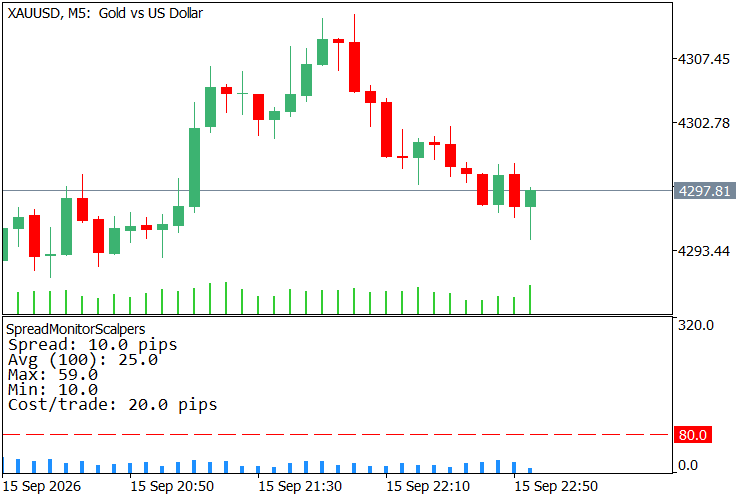
- 통계 패널(현재 / 평균 / 최대 / 최소) — 모서리 패널에는 실시간 스프레드와 함께 지난 룩백 바(Lookback bars) 기간의 평균, 최대, 최소 값이 표시되므로, 스프레드가 확대되는 현상을 단순히 바가 높아지는 형태로만 보는 것이 아니라 숫자로도 확인할 수 있습니다.
- 거래당 왕복 비용 — 스프레드 × 2(진입 + 청산)가 패널에 ‘거래당 비용’으로 표시됩니다. 이는 단일 거래가 손익분기점을 맞추기 위해 달성해야 하는 정확한 핍 수를 의미합니다. 대부분의 무료 스프레드 모니터는 단순한 스프레드 수치만 표시하지만, 이 도구는 실제 비용이 얼마인지 알려줍니다.
- 쿨다운 기능이 포함된 스프레드 임계값 알림 — 스프레드가 설정된 한도를 초과하면 팝업 알림과 로그 메시지가 표시됩니다 ( 스프레드 알림: X.X 핍 - 진입 전 확인 (임계값 Y.Y) ); 설정 가능한 쿨다운(초) 기능으로 스프레드가 넓은 상태에서도 알림이 과도하게 표시되는 것을 방지합니다.
- 선택적 푸시 알림 — 스프레드 알림을 MetaTrader 모바일 앱으로 전송할 수 있습니다(SendNotification); 기본적으로 비활성화되어 있습니다.
- 모든 종목에서 정확한 핍 단위 스프레드 — SymbolInfoInteger(SYMBOL_SPREAD)에서 반환되는 원시 포인트 스프레드는 종목의 자릿수를 사용하여 핍으로 변환되므로, 5자리 및 3자리(JPY) 브로커에서 정확하게 표시되며, 금속 종목에 적용할 때도 마찬가지입니다.
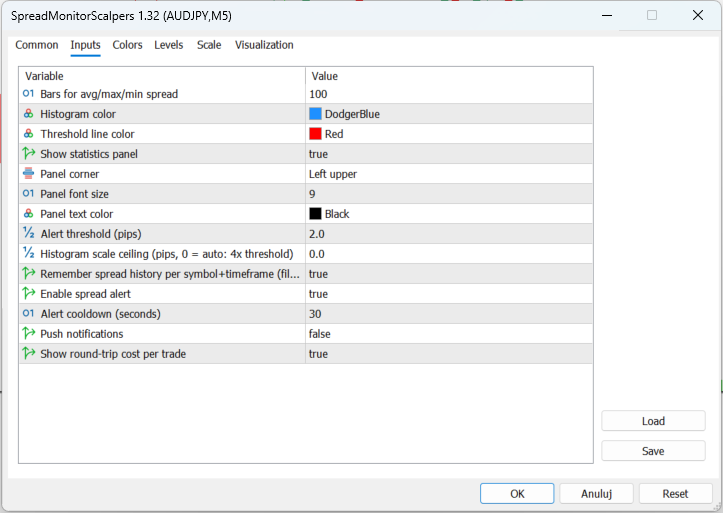
- 설정 가능한 패널 — 데이터 위치, 글꼴 크기 및 텍스트 색상을 선택할 수 있습니다. 히스토그램 색상과 임계값 선 색상도 입력 가능합니다.
- 단일 파일로 구성되어 있으며, 종속성이나 외부 포함 파일이 없습니다. 컴파일 시 오류 및 경고가 전혀 발생하지않습니다.
사용 방법
- 지표를 아무 차트에나 적용하십시오. 차트 하단의 하위 창에 스프레드 히스토그램이 나타나고, 그 위에 점선 임계값 선이 표시되며, 모서리에는 통계 패널이 나타납니다.
- 평균/최대/최소 스프레드를 계산할 기간(기본값 100봉)을 ‘Lookback bars’에 설정하세요.
- '알림 임계값(pips) '을 진입을 원하지 않는 수준 이상으로 설정하세요. 스프레드 히스토그램 막대가 점선을 넘으면 패널의 '스프레드:' 라인이 빨간색으로 바뀌며, 실시간 스프레드가 이 값을 초과하면 알림이 발동됩니다. 히스토그램 스케일 상한(핍)은 기본적으로 이 임계값의 4배로 설정되어 있습니다. 스프레드가 이 수준을 정기적으로 초과하는 경우 수동으로 상한을 높여주세요.
- 스프레드가 넓게 유지되는 동안 반복적인 알림이 과도하게 발생하지 않도록 알림 대기 시간(초)을 조정하십시오.
- '거래당 비용 표시'를 켜두면 패널에서 거래당 비용(왕복 스프레드)을 확인할 수 있습니다. 이는 거래가 수익을 내기 전에(손익분기점) 청산해야 하는 핍 수입니다.
- 선택적으로 푸시 알림을 켜면 휴대폰으로 스프레드 알림을 받을 수 있습니다.
- '스프레드 기록 기억'을 켜두면 시간대 전환 시에도 기록된 바를 유지할 수 있습니다(또는 심볼+시간대별로 MQL5\Files에 작은 파일을 작성하는 것을 원치 않는 경우 이 기능을 끄세요).
이 기능을 사용해야 하는 이유
스캘퍼에게 스프레드는 수수료가 아니라 바로 ‘거래’ 그 자체입니다. 1.5 핍의 스프레드는 단일 포지션이 흑자로 전환되기 전에 반드시 벌어들여야 하는 1.5 핍이며, 롤오버나 뉴스 발표 시점에 스프레드가 은근히 3배로 늘어나면 캔들이 형성되기도 전에 좋은 진입점이 손실로 바뀌게 됩니다. 상태 표시줄에 표시된 단순한 스프레드 수치만으로는 이러한 사실을 알 수 없지만, 히스토그램은 이를 보여줍니다. 이를 통해 스프레드는 룩백 기간 동안의 평균 및 극값과 함께, 본래 있어야 할 위치인 별도의 패널에 표시되며, 왕복 비용은 손익분기점으로 명확히 표시됩니다. 바로 이 수치가 스캘핑 진입 기회를 잡을 가치가 있는지 여부를 결정하는 핵심 지표입니다. 거래를 위한 설정도, 브로커로 전송되는 정보도 없습니다. 클릭하기 전, 화면상에 진입 비용만 표시될 뿐입니다.
스크린샷 출처:
MetaQuotes Ltd에서 영어로 번역함.
원본 코드: https://www.mql5.com/en/code/76557
 FxCraft Example EA – Range Breakout with pending orders
Educational Expert Advisor: daily range breakout with BuyStop/SellStop pending orders, risk-reward take profit and trading days. Clean, commented MQL5 code with margin and stop level checks. Demo and Strategy Tester only.
FxCraft Example EA – Bollinger Bands mean reversion
Educational Expert Advisor: Bollinger Bands return to the mean with an optional RSI filter and trading hours. Clean, commented MQL5 code with margin, volume and stop level checks. Demo and Strategy Tester only.
RiskGuard Lite - Percent-Risk EMA/ATR EA
교육용 MT5 EA: 클로즈드 바 EMA 크로스오버 진입, ATR 기반 손절매 및 익절, OrderCalcProfit을 통한 순자산의 고정 비율에 따른 로트 크기 설정, 스프레드 필터, 매직 넘버 분리 및 서버 반환 코드 확인 기능을 제공합니다. 리스크 관리가 가능한 EA를 구축하기 위한 깔끔한 템플릿입니다. 수익 보장 없음.
Spread Monitor
Spread Monitor is an MQL5 Expert Advisor that draws a colour-coded panel on the chart. The panel shows the current spread of the attached symbol in points, along with the average, minimum, and maximum over a rolling history. It also counts how many stored samples exceeded a warning level, and turns the status row red when the current spread is above that level. The utility does not place orders. Inputs control the warning level, the history size, the refresh interval, and the panel position. Panel objects are removed when the EA is detached.