TrendPlator
30 USD
Demo heruntergeladen:
34
Veröffentlicht:
30 Mai 2023
Aktuelle Version:
1.3
Keinen passenden Roboter gefunden?
Geben Sie Ihren Eigenen in Auftrag
auf Freelance!
Gehen Sie zu Freelance
Geben Sie Ihren Eigenen in Auftrag
auf Freelance!
Wie man einen Roboter oder Indikator kaufen kann
Starte Deinen EA im
Virtual Hosting
Virtual Hosting
Teste einen Indikator/Roboter vor dem Kauf
Möchtest Du Geld im Market verdienen?
Wie man Produkte richtig präsentiert

Sie verpassen Handelsmöglichkeiten:
- Freie Handelsapplikationen
- Über 8.000 Signale zum Kopieren
- Wirtschaftsnachrichten für die Lage an den Finanzmärkte
Registrierung
Einloggen
Sie stimmen der Website-Richtlinie und den Nutzungsbedingungen zu.
Wenn Sie kein Benutzerkonto haben, registrieren Sie sich
hello Junki, try to instal directly from your metatrader 4:
press ctrl+T
go to Market tab
write TrendPlator on search
click on install
click on Install:
click on Open, and it must be on path "Indicators --> Market --> TrendPlator "
here is the official MetaTrader4 way to Install products from Market https://www.metatrader4.com/en/market/robots-indicators
thanks for your feedback, to use it is just put on chart
the indicator has 3 paramters:
Using the default parameters you can see the down trendlines from diary timeframe as resistances plator on your current chart
so you can insert other indicator on your chart and change the Applied Parameter to LOW, so you will see the up trendlines from diary timeframe on your current chart
You have the flexibility to insert as many indicators as you like on your chart, allowing you to create various virtual trendlines that align with your current timeframe. This is especially useful before entering a trade, as it enables you to observe potential support or resistance levels based on trendlines from timeframe parameter.
Thank you for answer.
Time frame set to 1 day?
This is the m1 chart I want to use.
Please tell me the best settings for the usdjpy m1 chart.
Thank you for answer.
Time frame set to 1 day?
This is the m1 chart I want to use.
Please tell me the best settings for the usdjpy m1 chart.
What does the color of the line mean?
What does the color of the line mean?
the color is one for each virtual trendline
They are automatic trendlines, so you do not need to plot trendlines on your chart anymore because this indicator can show them for you.
Thank you for answer.
Time frame set to 1 day?
This is the m1 chart I want to use.
Please tell me the best settings for the usdjpy m1 chart.
You can use the "Current" parameter to create trendlines that correspond to the current timeframe of the chart. For example, if you are using the D1 (daily) chart, the "Current" parameter will generate trendlines based on that daily timeframe, and it should work well. However, for the M1 (1-minute) chart, as you mentioned earlier, it might not be as effective, as the price action can be very volatile at such short intervals.
To find the best parameter for the USD/JPY M1 chart, you'll need to conduct some testing and experimentation. Try different timeframes and observe how the trendlines behave and whether they provide meaningful insights. You can start by using larger timeframes, like M5, M15, or even H1, and see if the generated trendlines align with significant price movements. Fine-tune the parameter until you find the most suitable one for your trading strategy and goals.
Remember that each trading instrument and timeframe might require different parameter settings, so it's essential to adapt and adjust accordingly. Always practice risk management and monitor the performance of your strategy over time to ensure its effectiveness.
Please explain how to see the trend line on the D1 chart.
I wonder in what order they are drawn.
Thank you for answer. So, which line has the highest reliability? What line do you have the most faith in??
None, the color is neither strong nor reliable; the color serves solely as a means to identify which trendline corresponds to that price point. There are 8 trendlines, allowing you to zoom out. If the price is respecting these trendlines, it possibly indicates an important point of support or resistance. This occurs because the market has already acknowledged these trendlines and is adhering to them. However, it's crucial to recognize that when an important trendline is blocked, it implies that the price will go up like this image:
this chart is D1 using Timeframe D1 as paramer
now you can go to you H1 chart using the same parameters: look what happens:
the same thing know using M15
now using M5

Note that there is a space; it is due to the offset of the indicator on the chart. So, if the current chart does not have enough bars to complete 2 or more full D1 bars, you can request your MetaTrader to display more bars on the chart. Therefore:your metatrade can have more bars now
and now I have a M5 with those plators
and finally the M1 chart, these lines are the points from that last bar on D1 chart
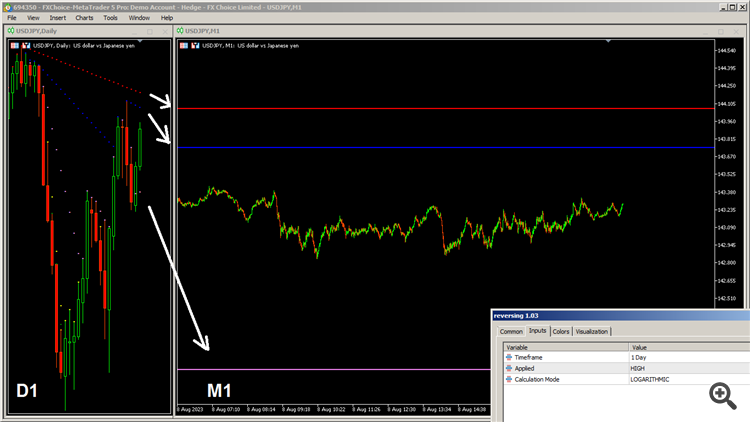
Note, these points are very far from the current price, and to see those plots, I have to scroll my vertical MetaTrader scale. You can do this using your mouse by clicking and moving the vertical scale to up or down.Helo Junki, I think this can be useful, and it is free https://www.mql5.com/en/market/product/107361