Ultimate Trailing Stop EA

100 USD
Demo heruntergeladen:
701
Veröffentlicht:
21 Juli 2020
Aktuelle Version:
2.92
Keinen passenden Roboter gefunden?
Geben Sie Ihren Eigenen in Auftrag
auf Freelance!
Gehen Sie zu Freelance
Geben Sie Ihren Eigenen in Auftrag
auf Freelance!
Wie man einen Roboter oder Indikator kaufen kann
Starte Deinen EA im
Virtual Hosting
Virtual Hosting
Teste einen Indikator/Roboter vor dem Kauf
Möchtest Du Geld im Market verdienen?
Wie man Produkte richtig präsentiert

Sie verpassen Handelsmöglichkeiten:
- Freie Handelsapplikationen
- Über 8.000 Signale zum Kopieren
- Wirtschaftsnachrichten für die Lage an den Finanzmärkte
Registrierung
Einloggen
Sie stimmen der Website-Richtlinie und den Nutzungsbedingungen zu.
Wenn Sie kein Benutzerkonto haben, registrieren Sie sich
Thank you for making this awesome tool available. It's awesome, I manage my manual trade positions using trailing stops based with indicators like MAs and Bollingers and Candle bar counts. After some settings adjustments to fit my trading style, I have found this to be amazingly accurate and time saving. I have dreamt of something like this for the longest time and this is reality now. There are other products for trailing stops but most of them are % or fixed value, some are trendlines stops, well most are just useless and basic, at least for in retail trading world. But UTS EA has such advanced detailed features and functions that make life much much easier. Adjusting many stops manually is a pain sometimeswhen you happen to work on some other trades at the same time and u forget to move your stops in a timely manner, you can end up losing a lot of $$$. So to me UTS' pays for itself in the long run ! there are many EAs for entry into trade but the other half of the money making is trade management and it seems that's been a forgotten art...
Here are my humble user suggestions to authors for future update version improvements:
1.please make 'dashboard' not so big it covers most of charts space, or changeable background color, or could be semi-transparent ?
2. provide a way to change trailing stop type and/or period values for indicator stops directly from dashboard buttons/menu maybe, not from settings popup window.
3 Also if u could create a visual 'virtual' line or arrow representation of any virtual stops that displays on the chart while in live open positions management instead of just having the current plain numbers displayed. it would help to see at a glance where the virtual EA stop would execute at.
4. A 'check' marker next to each positions line for the UTS EA to select positions we want to manage or not.
5. The possibility to 'split'-manage many partial portions of same position with different trailing stop type for each portions. exp: full 1lot EURUSD = .30 trail w/ EMA20 + .40 trail w/bollingerband2std + .30 trail w/ last5barbreak + etc.... from same chart.( currently i would need to open a new chart for each portion sizes of the same FX pairs I want to manage with its own new UTS EA instance running, that's so cumbersome!)
6.I would love to have it also be able ENTER trades to OPEN positions using similar various indicator/bars/lines/etc trailing stop methods in same manner that UTS ea currently does too. Great for discretionary entry trigger techniques.
I believe the possibilities are endless for UTS EA , it is the best EA for productively increasing trading profits!
Cheers !
Thank you for making this awesome tool available. It's awesome, I manage my manual trade positions using trailing stops based with indicators like MAs and Bollingers and Candle bar counts. After some settings adjustments to fit my trading style, I have found this to be amazingly accurate and time saving. I have dreamt of something like this for the longest time and this is reality now. There are other products for trailing stops but most of them are % or fixed value, some are trendlines stops, well most are just useless and basic, at least for in retail trading world. But UTS EA has such advanced detailed features and functions that make life much much easier. Adjusting many stops manually is a pain sometimeswhen you happen to work on some other trades at the same time and u forget to move your stops in a timely manner, you can end up losing a lot of $$$. So to me UTS' pays for itself in the long run ! there are many EAs for entry into trade but the other half of the money making is trade management and it seems that's been a forgotten art...
Here are my humble user suggestions to authors for future update version improvements:
1.please make 'dashboard' not so big it covers most of charts space, or changeable background color, or could be semi-transparent ?
2. provide a way to change trailing stop type and/or period values for indicator stops directly from dashboard buttons/menu maybe, not from settings popup window.
3 Also if u could create a visual 'virtual' line or arrow representation of any virtual stops that displays on the chart while in live open positions management instead of just having the current plain numbers displayed. it would help to see at a glance where the virtual EA stop would execute at.
4. A 'check' marker next to each positions line for the UTS EA to select positions we want to manage or not.
5. The possibility to 'split'-manage many partial portions of same position with different trailing stop type for each portions. exp: full 1lot EURUSD = .30 trail w/ EMA20 + .40 trail w/bollingerband2std + .30 trail w/ last5barbreak + etc.... from same chart.( currently i would need to open a new chart for each portion sizes of the same FX pairs I want to manage with its own new UTS EA instance running, that's so cumbersome!)
6.I would love to have it also be able ENTER trades to OPEN positions using similar various indicator/bars/lines/etc trailing stop methods in same manner that UTS ea currently does too. Great for discretionary entry trigger techniques.
I believe the possibilities are endless for UTS EA , it is the best EA for productively increasing trading profits!
Cheers !
Hi Cool2bTony,
I'm very pleased to see your grateful, detailed and thoughtful comment. It reveals a professional trader who knows the real differences between the mountain of "same-old" trailing stop indicators out there and the hard work we tried to put into this one to reach well beyond the competition to provide something useful and unique.
I also love your suggestions for improvement. I'll add my thoughts to each.
1.please make 'dashboard' not so big it covers most of charts space, or changeable background color, or could be semi-transparent ?
Yes, our dashboard is currently 640 pixels wide, as you can see when I put a ruler on the display:
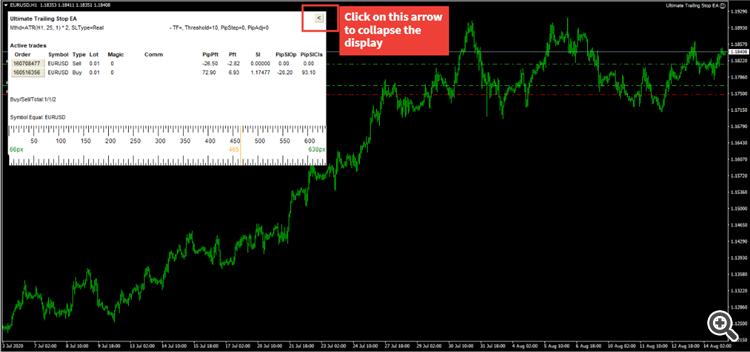
We are packing alot of useful information into this display, as you are aware, and we were aware that the display could be rather big, so we added the collapse button (marked in the picture above) in a previous update. When the collapse button is clicked, it generates the following display:

Now it you can see more of your screen :)
However, I do like your idea of adding different skins to the display, even a semi-transparent skin would be cool, and I'll explore this option. Thanks.
2. provide a way to change trailing stop type and/or period values for indicator stops directly from dashboard buttons/menu maybe, not from settings popup window.
Yes, I'm in total conconsurance with you on this. We will indeed have a future update to add interactive global and indicator value controls into dashboard GUI and not just from inputs. It would make this EA much more quickly customizable. Thanks.
Excellent idea. I can see how a visual "virtual" horizontal line of the virtual stops on the chart would be very helpful. I'll add this in a future update. Thanks.
4. A 'check' marker next to each positions line for the UTS EA to select positions we want to manage or not.
This is an interesting thought. Yes, one can use our advanced filtering system (Symbol-Magic-Comment-Ticket equals-notequals-contains-notcontains) to select all the positions for the UTS-EA to control and include in the EA, but I believe your thought is an extension to this idea, proposing that these filtered positions have a check next to them, allowing the user (yourself) to uncheck any one of them if he doesn't want those particular positions to be controlled. Makes sense. We will do that in in a future update. Thanks.
We had intitally thought that we can split manage these different configurations from different charts, but I can see your point on how it would be cool to split mangement them on the same chart. This would be an challenging and interesting task. I'll explore it and hopefully add it to a future update. Thanks.
Yes, this is a very cool idea. Your proposal would convert this EA from a very advanced order management tool for handling exits to something bigger, to be an advanced Trade Panel that allows for these indicators to be the engines of exit AND entry. We can do that in a future update. Thanks.
Your suggestions show intelligence and creativity. I like how you can see already that our product is the best out there in terms of All-in-One or Universal Trailing stops, and yet you can imagine many possilibilies for improvement. It will be a pleasure to work with you to help make this product become the gold standard in the industry.
Cheers,
Blake Rodger
Hi Cool2bTony,
I'm very pleased to see your grateful, detailed and thoughtful comment. It reveals a professional trader who knows the real differences between the mountain of "same-old" trailing stop indicators out there and the hard work we tried to put into this one to reach well beyond the competition to provide something useful and unique.
I also love your suggestions for improvement. I'll add my thoughts to each.
Yes, our dashboard is currently 640 pixels wide, as you can see when I put a ruler on the display:
We are packing alot of useful information into this display, as you are aware, and we were aware that the display could be rather big, so we added the collapse button (marked in the picture above) in a previous update. When the collapse button is clicked, it generates the following display:
Now it you can see more of your screen :)
However, I do like your idea of adding different skins to the display, even a semi-transparent skin would be cool, and I'll explore this option. Thanks.
Yes, I'm in total conconsurance with you on this. We will indeed have a future update to add interactive global and indicator value controls into dashboard GUI and not just from inputs. It would make this EA much more quickly customizable. Thanks.
Excellent idea. I can see how a visual "virtual" horizontal line of the virtual stops on the chart would be very helpful. I'll add this in a future update. Thanks.
This is an interesting thought. Yes, one can use our advanced filtering system (Symbol-Magic-Comment-Ticket equals-notequals-contains-notcontains) to select all the positions for the UTS-EA to control and include in the EA, but I believe your thought is an extension to this idea, proposing that these filtered positions have a check next to them, allowing the user (yourself) to uncheck any one of them if he doesn't want those particular positions to be controlled. Makes sense. We will do that in in a future update. Thanks.
We had intitally thought that we can split manage these different configurations from different charts, but I can see your point on how it would be cool to split mangement them on the same chart. This would be an challenging and interesting task. I'll explore it and hopefully add it to a future update. Thanks.
Yes, this is a very cool idea. Your proposal would convert this EA from a very advanced order management tool for handling exits to something bigger, to be an advanced Trade Panel that allows for these indicators to be the engines of exit AND entry. We can do that in a future update. Thanks.
Your suggestions show intelligence and creativity. I like how you can see already that our product is the best out there in terms of All-in-One or Universal Trailing stops, and yet you can imagine many possilibilies for improvement. It will be a pleasure to work with you to help make this product become the gold standard in the industry.
Cheers,
Blake Rodger
My kind Sir,
I thank you for taking time to answer my many suggestions...I will be looking forward to see how things progress for UTS-EA ! It seems like you are very passionate about your project and willing to explore new possibilities in this realm. The attention to details is what sets it appart. Now everytime I am in a trade I can't wait to launch UTS-EA because it means I am locking in a profitable situation ! and who doesn't like to bank their gains? UTS-EA provides much needed flexibility and control over my trades until closure. With less manual adjustments to each new candles, I can focus better brain activity towards analyzing the market and preparing my next moves, that's increasing my my productivity and reducing stress therefore consequently increasing my trade timing edge.
I am indeed a very grateful and excited UTS-EA user . I hope you'll take this baby to another level of greatness. I have plenty more suggestions to propose but I think you already have much work to do as of now. so I will slow down the output of ideas for now with this one : -there are a multitude variety of indicators objects types to base trailing stops from, like Keltner channels, VWAP, fibonacci's%, Pitchforks medianLines, even Heikin Ashi bar color change, etc . I mean the name says 'Ultimate' so why not let it be so. One really can go crazy here but so far noone else's really done it under one roof either.
Anyhow, I wish you the best of success !
I have a few queries in regard to set up, if you are able to assist:
1) I am looking to move to BE when in profit by a certain amount of PIPS, am I able to do this via threshold in some way?
2) I am then looking to trail using ATR, do I still dynamically trail using step up? Or does it follow ATR but not move backwards once profits are locked in?
3) Does MT4 need to be open and left running for the EA to work properly?
4) How does the EA work with Indices, is the PIP amount entered accordingly?
5) I received an error code 4109. What does this signify?
6) Do I need to manually place the EA onto each chart, or can I include an EA as part of a template? Excuse my ignorance, have very rarely used EA's.
7) Lastly, I trade FX pairs and Indices on H1, H4 & D1. In your opinion is ATR best to use for trailing and if so, are the default setting best suited to these timeframes/pairs?
Regards
Julian
Hi Julian,
I'm glad you like the product thus far, and I will answer each one of your questions as best I can:
Currently, UTS does not have a BE feature, but that is simple to add, and I'll add it to the EA for the next update which should come out in next 24 hours.
When you trail using ATR, it will follow the ATR and not move backwards once profits are locked in.
Yes, MT4 needs to be open and left running for the EA to work properly.
Most of the indicator based Trailing stops work just fine with the indices. Where you will need to have knowledge on your particular indice pip movement is when you are working with the Threshold pip, SL adjustment in pips, SL in pips and TP in pips, and the trailing method "fixed distance in pips". I would advise you test the EA on a demo account with a few trades of the indices you are using, and there is a display that allows you to see the SL value, along with fixed Pips Stop Loss to Open (PipSlOp) and dynamic Pips Stop Loss to Close (PipSlCl), so that should give you a clear idea of the pip value of your particular index. For instance, when I open up a S&P trade on IC Markets demo just now, it opens up up at 3406.15 without a stop loss; when I configure the UTS EA for the the trailing method of fixed distance of pips = 100 pips, I can see that it immediately puts a SL at 3396.15, and the Pips Stop Loss to Open (PipSlOp) says -100.
5) I received an error code 4109. What does this signify?
Fix Error 4109 – Trade Is Not Allowed – is very simple and only requires to change 2 options.
The two options above result in having the smiling face next to the EA name when dropped on the chart.
Yes, in my opinion, ATR is one of good method of trailing, though I cannot say for certain it is the best method. It depends on your time frame and trading style. Personally I trade FX pairs and indexes on the H1 time frame, and my style is trend trading, so I'm trying to get 300+ pip profit trades with a 150 pip stop loss. I have tested all the methods and I have found that a pip threshold of 100 pips with a 100-period Exponential Moving Average works best for me. Ideally, you want to be able to test using the MT4 backtester with visual mode what is the best trailing method for your strategy or trading style.
Since you are knew to all this, maybe you will be benefit from me showing you around the EA and how to get the most from it. Please skype me at falconeer333.
Cheers,
Blake
I just released a new and improved version of UTS EA, Version 2.2 with TWO major enhancements:
- added pips to breakeven
The previous update fulfills some suggestions from our users.
Cool2beTony had 6 suggestions, and this last update solves two of them:
1. The ability to hide magic or comments greatly reduces the size of the dashboard (solution to suggsestion1)
2. We have added visualization of real or virtual trailing stop loss, along with take profit and open price with distance in Pips/Profit to reach the lines (solution to suggestion3)
We are still working on the suggestions :)
Julian asked about the breakeven function, and we added it in this update.
The other day Cool2beTony informed me that my new version interfered with his existing indicator templates. That is because it injected its own template to match the indicator trailing method being used.
I should have made that an option instead of a hard rule.
So I just now uploaded a new version with this new input:
Apply indicator template = false // true applies the indicator trailing stop method to chart.
For example, if using MA method, then you will see the MA on chart adjusted to the parameters you have defined.
Because the option is defaulted as false, when Tony (and others like him) uploads the new version, it will not interfere with their existing templates.
But for those who want to see the trailing stop indicator represented on their chart, you now have that option.
Here is a gif on that (just click on the image to see the gif run):
If you update to version 2.7, you will see that I've added visual support for the ATR and Candle trailing stop methods when applying the template (Apply Indicator Template = true). In order for the template to work on ATR method, the indicator ATR-Exit needs to be installed on your MT4; in order to work on Candle method, the indicator Candle-High-Low-Exit needs to be installed.
If you update to UTS version 2.7, you will see that I've added the Chandelier Exit method (so now 12 methods).
ATR multiplier is fully adjustable, not fixed. See the inputs here in the screenshot:

Here is how the Chandelier Exit appears on my GBPJPY trade, with trail on touch:
One more thing. In order to visualize the indicator on the chart when Apply indicator template=true, you will have to have the chandelier-exit.ex4 (I uploaded it to my drive in the hyperlink) already installed on your MT4. You don't need to have the indicator installed to run this trailing method; you just need it for the visual part.
Additional note: It was once asked of me about the ability to work with SL on touch or when bar closes beyond the trailing stop line.
We have this option, but I have to make it clear how it works.
In the inputs, there is the Touch or Close dropdown, but that input option can only work if Stop Loss Type = Virtual.
When Stop Loss Type = Real (default), then it works on a touch basis only, as the SL is controlled by the broker.
But if Stop Loss Type = Virtual, you can use the dropdown Touch or Close, and choose to exit when the bar closes beyond the trailing stop line.

In the newest update, 2.10, I have added Alerts Option (On,Off,Only) for popup, email, push, and sound (sonar ping).
What does this look like in the inputs?
Alerts leads to a dropdown of Alert ON (default), Alert OFF, Alert Only.
If you set Alert ON, then you can indicate if you want Alert popup, email, push notification, or sound by toggling true/false on each. Only the Sound Alert (sonar ping) is defaulted as true, the others are defaulted as false. Turn any or all to true to get the notifications you want.
If you set Alert OFF, then you won't get any Alerts, even if any of them are set to true.
If set set Alert Only, then the EA will not exit the trade when the SL is hit. Instead, you will only get an alert about it, depending on the alerts you set. I added this feature because a gentleman requested it. He wanted to be notified first that his trade hit the SL so he could manually take action on it or not.
I hope you all enjoy the update :)
Hi Arnel,
I'm imaginging from what you are describing that have various symbols you want to control with various magic numbers.
If this is the case, use these filter settings:
Filter Symbol condition = Equals
Filter Symbol Value = * // * allows you to control all symbols
Filter Magic Numbers condition = Equals
Filter Magic Number values = 4300, 3400, 5800 // put in your magic numbers, separated by commas
With the above filters, you will be telling the EA that you want to control all symbols that have the magic numbers 4300, 3400, 5800.
Please let me know if these filters work for you. Message me your experiments, and I can help you directly.
Hi Arnel,
I'm imaginging from what you are describing that have various symbols you want to control with various magic numbers.
If this is the case, use these filter settings:
Filter Symbol condition = Equals
Filter Symbol Value = * // * allows you to control all symbols
Filter Magic Numbers condition = Equals
Filter Magic Number values = 4300, 3400, 5800 // put in your magic numbers, separated by commas
With the above filters, you will be telling the EA that you want to control all symbols that have the magic numbers 4300, 3400, 5800.
Please let me know if these filters work for you. Message me your experiments, and I can help you directly.
Hello Blake
I have an EA which is trading 28 pairs at the same time depending on the signal. From that EA I have 1 magic no. I want to use use UTS to monitor all the trades opened by my EA using 1 magic no only. I dont have to open each chart and load UTS just to monitor all the trades. Otherwise I will have 28 pairs chart opened in my mt4 platform.
Hello Blake
I have an EA which is trading 28 pairs at the same time depending on the signal. From that EA I have 1 magic no. I want to use use UTS to monitor all the trades opened by my EA using 1 magic no only. I dont have to open each chart and load UTS just to monitor all the trades. Otherwise I will have 28 pairs chart opened in my mt4 platform.
Got it Thank you.
I have bought the EA today. Great experience so far!
Is it possible to add a close partial (percentage) at a predefined level functionality?
From what I see you can now only close partial once price hits your trailing stop.
But I am looking at following scenario:
Trade reaches a profit of 20 pips: close 50% of the order.
Rest of the trade continues with the defined trailing stop.
Would be great! Cheers.
I have bought the EA today. Great experience so far!
Is it possible to add a close partial (percentage) at a predefined level functionality?
From what I see you can now only close partial once price hits your trailing stop.
But I am looking at following scenario:
Trade reaches a profit of 20 pips: close 50% of the order.
Rest of the trade continues with the defined trailing stop.
Would be great! Cheers.
Hi eowe,
We have reserved the partial profit close mechanisms for other product, Ultimate Partial Close EA, which handles partial closes in a more robust fashion.
However, we can build a simple, 3-level partial take profit mechanism to UTS that can work for you and others:
TP1 = false;
TP1_Pips = 0;
TP1_Percent= 50;
TP2 = false;
TP2_Pips =false;
TP2_Percent=50;
TP3=false;
TP3_Pips=0;
TP3_Percent=50;
In your use case, you would set TP1 = true, TP1_Pips=20, TP1_Percent=50;
Would that work for you?
Hi eowe,
We have reserved the partial profit close mechanisms for other product, Ultimate Partial Close EA, which handles partial closes in a more robust fashion.
However, we can build a simple, 3-level partial take profit mechanism to UTS that can work for you and others:
TP1 = false;
TP1_Pips = 0;
TP1_Percent= 50;
TP2 = false;
TP2_Pips =false;
TP2_Percent=50;
TP3=false;
TP3_Pips=0;
TP3_Percent=50;
In your use case, you would set TP1 = true, TP1_Pips=20, TP1_Percent=50;
Would that work for you?
But since I have UTS already running on my chart, the basic partial close would be of great help.
So what you suggested looks great!
Cheers, Eric