ICT Power of 3

35 USD
Demo heruntergeladen:
90
Veröffentlicht:
22 Dezember 2023
Aktuelle Version:
1.4
Keinen passenden Roboter gefunden?
Geben Sie Ihren Eigenen in Auftrag
auf Freelance!
Gehen Sie zu Freelance
Geben Sie Ihren Eigenen in Auftrag
auf Freelance!
Wie man einen Roboter oder Indikator kaufen kann
Starte Deinen EA im
Virtual Hosting
Virtual Hosting
Teste einen Indikator/Roboter vor dem Kauf
Möchtest Du Geld im Market verdienen?
Wie man Produkte richtig präsentiert

Sie verpassen Handelsmöglichkeiten:
- Freie Handelsapplikationen
- Über 8.000 Signale zum Kopieren
- Wirtschaftsnachrichten für die Lage an den Finanzmärkte
Registrierung
Einloggen
Sie stimmen der Website-Richtlinie und den Nutzungsbedingungen zu.
Wenn Sie kein Benutzerkonto haben, registrieren Sie sich
I purchased this indicator and when I add this to the chart, the chart shift pushes to left half of the screen. When I try manually to move it to the right, and change timeframe it again pushes to the left. Is this a bug or by design and if this can be corrected?
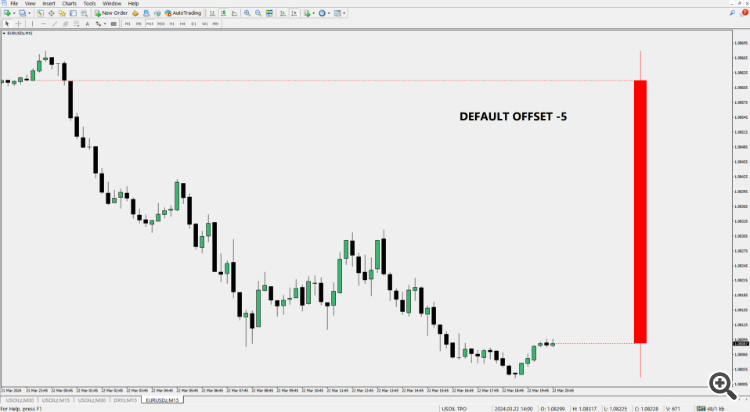
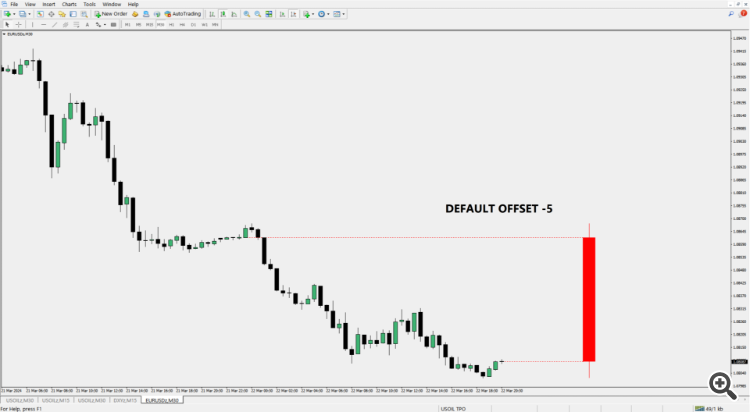
Hi there, I tested here and it's working perfectly, as it should. I think you might have misunderstood how to use the "offset" input? A negative value will shift the indicator to the left, and a positive value will shift it to the right. The default value is "-5" (minus 5), here is how it looks with default value, the distance from current price will be the same in any timeframe, below is M15 and M30 with a Daily PO3:
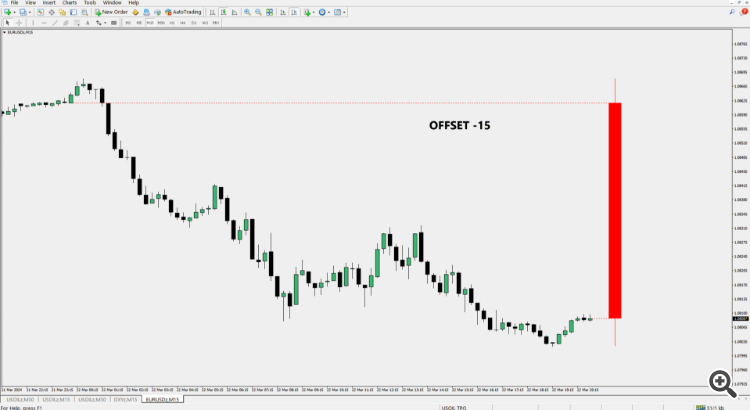
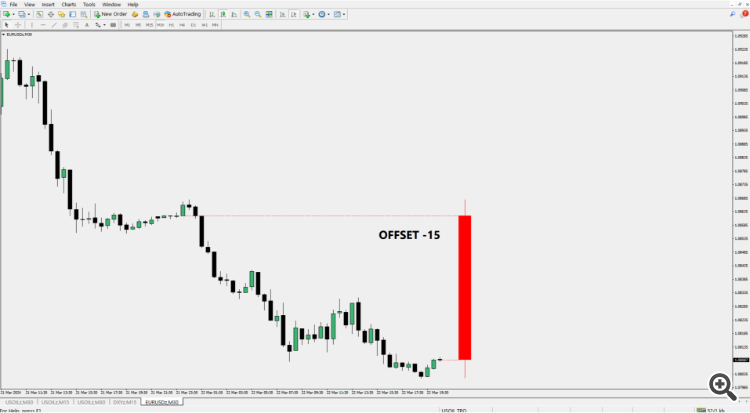
Now I changed the offset to -15 (minus 15) so you can really see it, notice how price now is very close to current price on both timeframes:
Now I have changed the offset to 10 (positive 10), that's the only way the indicator will be "pushed to the right", otherwise it's impossible:
Hi there, I tested here and it's working perfectly, as it should. I think you might have misunderstood how to use the "offset" input? A negative value will shift the indicator to the left, and a positive value will shift it to the right. The default value is "-5" (minus 5), here is how it looks with default value, the distance from current price will be the same in any timeframe, below is M15 and M30 with a Daily PO3:
Now I changed the offset to -15 (minus 15) so you can really see it, notice how price now is very close to current price on both timeframes:
Now I have changed the offset to 10 (positive 10), that's the only way the indicator will be "pushed to the right", otherwise it's impossible:
Thank you for testing and verifying. This is what is showing for me, not sure what can I do to correct this?
These are my settings:
There is no issue at all in there, from what I am seeing the candle is respecting the chart shift arrow in all the screenshots you posted, the only thing that will ever change is where the PO3 candle is gonna be printed and that is determined by the offset input.
There is nothing to correct, I am not really sure about what you want.
There is no issue at all in there, from what I am seeing the candle is respecting the chart shift arrow in all the screenshots you posted, the only thing that will ever change is where the PO3 candle is gonna be printed and that is determined by the offset input.
There is nothing to correct, I am not really sure about what you want.
It appears you are not understanding the issue I am trying to explain, I am not saying that PO3 candle is not respecting the chart shift arrow. I am saying that the chart shift is moving to the half of the screen automatically when applying the indicator and even after manually adjusting the chart shift arrow to the right, and after changing the timeframe the chart shift arrow is shifting to the half of the screen again. The PO3 candle is respecting the chart shift arrow but it makes the indicator unusable if the chart keeps moving the half of the screen on the left where I cannot see the whole chart in the first place. I can disable the chart auto scroll feature to work around it but it certainly is an issue on my end. As a seller I expect a good customer service from you at least to understand your customer's concerns with the indicator if any for continued business. If there is nothing that can be done about it, then I guess it was a worthless purchase if I cannot even use it optimally.
It appears you are not understanding the issue I am trying to explain, I am not saying that PO3 candle is not respecting the chart shift arrow. I am saying that the chart shift is moving to the half of the screen automatically when applying the indicator and even after manually adjusting the chart shift arrow to the right, and after changing the timeframe the chart shift arrow is shifting to the half of the screen again. The PO3 candle is respecting the chart shift arrow but it makes the indicator unusable if the chart keeps moving the half of the screen on the left where I cannot see the whole chart in the first place. I can disable the chart auto scroll feature to work around it but it certainly is an issue on my end. As a seller I expect a good customer service from you at least to understand your customer's concerns with the indicator if any for continued business. If there is nothing that can be done about it, then I guess it was a worthless purchase if I cannot even use it optimally.
The thing is that you created a problem that does not exist. I don't have this issue here, and no one else who purchased the indicator ever complained about that.
It's a problem on your end, I tried to reproduce your "problem" here and was not successful.
Also, that arrow only determines where you want the current candle to be when you auto scroll the chart, nothing else. The indicator has nothing to do with this mechanic, the only thing that the indicator does is to plot drawings on the chart which are away from current price by a user determined amount, the indicator has no "power" to move your chart left or right, it's impossible.
Mine does not have instance No. how did you add weekly and daily candle on the same chart. teach us on the overview section. make it easier for us traders..we traders are battling with the market already. i have searched for this power of 3 indicator for a long time now i have seen it here. most of your customers are not coders. i have searched everywhere for magic number. teach your customers
Hi there, I have just updated the indicator with the latest version which has the "Instance No." input, I had updated MT5 and forgot about this one. Please update the indicator.

To have daily and weekly on the same chart, you just need to load the indicator two times on the same chart and assign a different "Instance No." for each. You also have to adjust the "offset" setting to your liking. Positive values slide the indicator to the right, negative values slide the indicator to the left. Check the chart below with the settings I used here:
Change the values in Offset input (-10, 0, 5, 10, 15, etc..) and you will see what it's doing.
Hi there, I have just updated the indicator with the latest version which has the "Instance No." input, I had updated MT5 and forgot about this one. Please update the indicator.
To have daily and weekly on the same chart, you just need to load the indicator two times on the same chart and assign a different "Instance No." for each. You also have to adjust the "offset" setting to your liking. Positive values slide the indicator to the right, negative values slide the indicator to the left. Check the chart below with the settings I used here:
Change the values in Offset input (-10, 0, 5, 10, 15, etc..) and you will see what it's doing.
thank you so much sir, you have just made my day...