Alle Aufträge
 Regeln
Auftrag beendet

Spezifikation
Job Description:
I am seeking a highly skilled MQL4 developer to build a custom, high-performance dashboard indicator for MetaTrader 4 (MT4). This project is strictly for a visual/analytical dashboard indicator to assist with manual trading entry; this is NOT an Expert Advisor (EA).
The indicator will be hosted and run continuously on a Windows VPS environment, so the code must be exceptionally lightweight, memory-efficient, and free of memory leaks.
Please make sure that you are comfortable working on a VPS, as testing and final deployment will happen directly in this environment. Because the core software—FX Agency 3—is a strictly licensed copy registered to my system, it cannot be transferred, shared, or provided to you externally. You will be given secure access to develop, test, and compile the code directly on the live VPS environment where the license is active.
(Note: Please refer to the attached screenshots and the included .tpl chart template to see the exact visual layout of the FX Agency III system and the specific parameter settings for each custom indicator).
📈 Chart Framework & Core Filter Rule
-
Operational Chart: The dashboard logic and core entries will be executed and monitored strictly on a 15-minute (M15) chart.
-
Signal Filter: If FX Agency prints an alert, the trade/alert must be strictly blocked unless all three confirmation indicators completely align according to the exact parameters detailed below. Once all conditions are met on the live candle, the system must trigger an on-screen pop-up alert and an audible voice alert.
📋 Indicator Settings & Matrix Specifications
The custom dashboard must systematically parse data, evaluate rules, and align signals across the following indicators matching the exact parameters shown in the attached settings screenshots and the provided MT4 template file:
-
Core Engine: FX Agency 3
-
Timeframes Used: M15, M30, H1, H4
-
-
Confirmation Filter 1: Cynthia_BB
-
Timeframes Used: Applied across all operational timeframes.
-
Required Settings:
-
bolPrd = 5
-
bolDev = 2.0
-
KeltPrd = 3
-
KeltFactor = 1.5
-
momPrd = 3
-
-
-
Confirmation Filter 2: Cynthia_MTF_ZeroLag-MACD
-
Timeframe 1 Default: H1
-
Timeframe 2 Default: H1
-
-
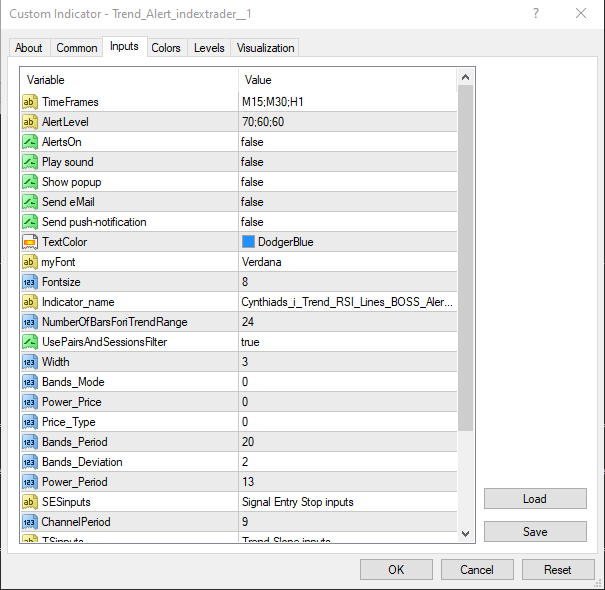
Confirmation Filter 3: Trend Alert Matrix
-
Timeframes Evaluated: M15, M30, H1
-
Structural Resolution States: The indicator displays a matrix on the chart outputting string statuses: "Trending Up" , "Trending Down" , or "Range Bound" .
-
💻 Architectural & Logic Requirements:
-
Expose Input Parameters: All indicator variables listed above (including the Trend Alert target timeframes) must be exposed as clean external inputs in the indicator settings panel.
-
Strict Filter Integration:
-
Confirmed Buy Entries/Alerts: Only allowed on the M15 chart if FX Agency triggers a "Look to Buy" alert AND Cynthia_BB aligns on M30 AND Cynthia_MTF_ZeroLag aligns AND all 3 Trend Alert timeframes (M15, M30, H1) concurrently return a "Trending Up" status.
-
Confirmed Sell Entries/Alerts: Only allowed on the M15 chart if FX Agency triggers a "Look to Sell" alert AND Cynthia_BB aligns on M30 AND Cynthia_MTF_ZeroLag aligns AND all 3 Trend Alert timeframes (M15, M30, H1) concurrently return a "Trending Down" status.
-
The Kill Switch: If any single one of the three chosen timeframes on the Trend Alert matrix reads "Range Bound", trade execution and alerts must be strictly prohibited, completely overriding the FX Agency alert.
-
-
Alert Trigger Requirements: The exact instant all conditions align on a live candle, the system must trigger a standard MT4 pop-up alert box and play a local .wav voice alert file. Include true / false toggles for both alert types in the settings.
-
Live Candle Checking (Bar 0): This setup is verified non-repainting. The code must evaluate all structural and mathematical states on the current, live forming bar (Bar 0) for maximum execution speed.
-
Data Extraction: Handle matrix data extraction cleanly. If the data uses standard buffers, use iCustom() . If it prints as graphical object text, you must use high-performance object text parsing ( ObjectGetString() ) to prevent MT4 chart freezing.
📦 Deliverables & Provided Attachments:
-
Provided by Client:
-
Custom .ex4 / .mq4 files for the confirmation indicators.
-
Screenshots of the input parameters.
-
A pre-configured .tpl (MetaTrader Template) file containing the exact chart layout and parameters.
-
-
Required from Developer: Updated, fully working, fully commented .mq4 source code file integrating the dashboard rules above, optimized for the MT4 Strategy Tester.
Developer Requirements:
-
Deep mastery of MQL4 and working with custom chart graphics/sub-windows.
-
Proven experience writing indicators explicitly optimized for 24/7 VPS resource management and remote development setups.
-
Expertise in object-to-text parsing and reading buffer values from closed-source or complex indicators.
-
Note: To ensure you have actually read this specification, please begin your application with the phrase "FX AGENCY". Applications without this phrase will be automatically filtered out