 Alle Aufträge
 Regeln
Auftrag beendet

Spezifikation
To develop a script that upon pressing a shortcut key, and clicking on a specific candle, an object(rectangle) is to be drawn on the chart on that specific candle.
I have the source code examples to aid in the development of this indicator as attached. You just need to use the onchartevent click and drawing of objects. No logic/validation is required.
**to use the example indicator attached, once loaded, press "Z" and click anywhere on the chart. it will plot rectanglse 200 bars to the left based on the place you've clicked. What i need is just plot the rectangle based on that Candle i have clicked. Strictly.
Detail Specifications
Part 1
- Assign 2 x hotkey "S" and "D" where S plots a rectangle on the upper wick(high to mathsMax value) and D plots a rectangle on the lower wick(mathsMin to low value)
- When i press S and click on a specific candle, a rectangle shall be drawn on the upper wick "zone" and extended to the right side of chart(source code provided on the object extension)
- When i press D and click on a specific candle, a rectangle shall be drawn on the lower wick "zone" and extended to the right side of chart(source code provided on the object extension)
- Assign 2 x hotkey "C" and "V" where C plots a rectangle on half of the upper wick((high-mathsMax/2) + mathsMax to mathsMax) and C plots a rectangle on the lower wick(mathsMin to (mathsmin-low/2)+low)
- When i press C and click on a specific candle, a rectangle shall be drawn on the upper wick "zone" and extended to the right side of chart(source code provided on the object extension)
- When i press V and click on a specific candle, a rectangle shall be drawn on the lower wick "zone" and extended to the right side of chart(source code provided on the object extension)
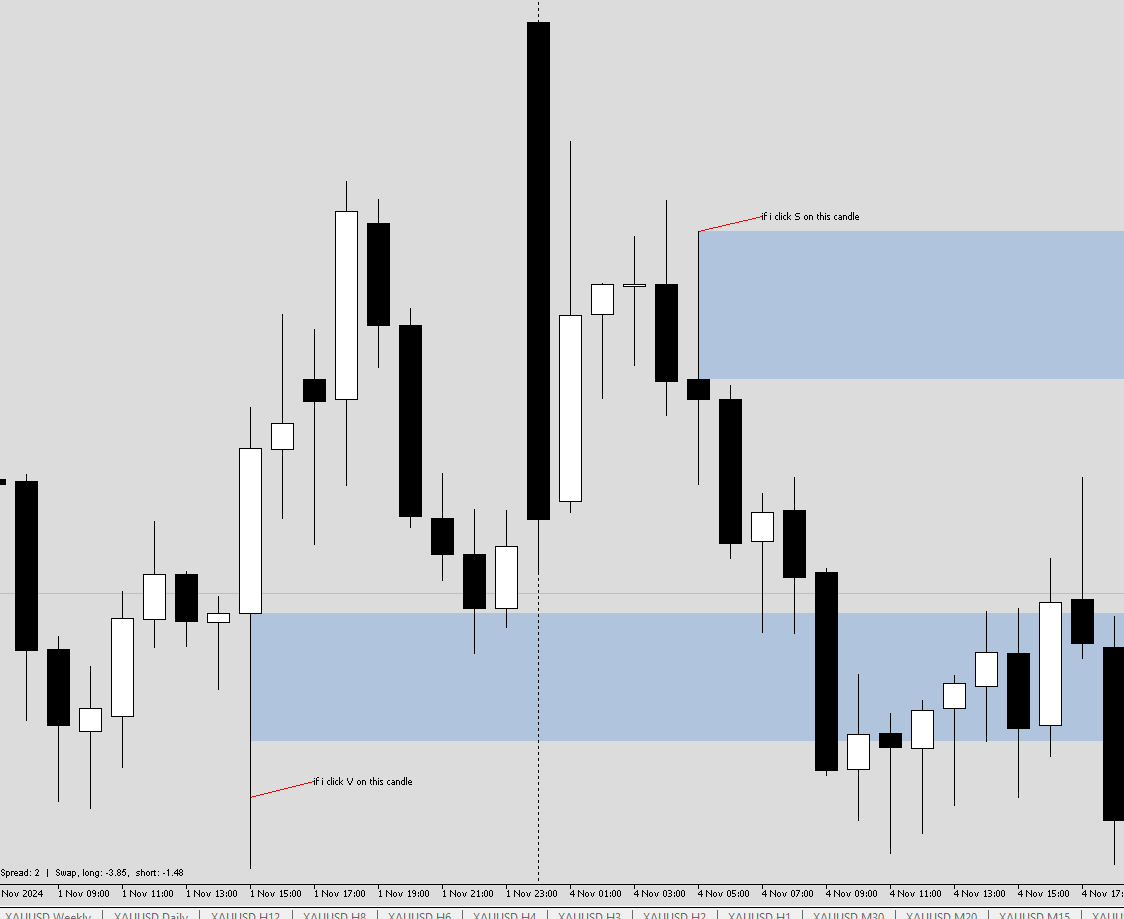
-Individually all 4 hotkeys shall have input parameters to determine color, style, line thickness
- a global input to choose if all rectangles created shall be unselectable or selectable
- a user input parameter to determine how long the extension of the rectangle is to the right
- a global delete hotkey "x" to delete all rectangles created using SDCV
- the indicator shall be able to "refresh" itself if i click it on the same candle again. For example, if a live candle is still running and have yet to close, and i clicked and plotted, the rectangle zone may not be the same as when the candle closed.
Also, if a rectangle is drawn already, there should not be a duplicate rectangle plotted/overlapped if i clicked on the same candle again.