Andrei Novichkov / 个人资料
- 信息
|
9+ 年
经验
|
18
产品
|
38
演示版
|
|
6
工作
|
0
信号
|
0
订阅者
|
Translations from Pine.
Telegram: https://t.me/fxstill (Literature on cryptocurrencies, development and code)
YouTube: https://www.youtube.com/@FxStill
Discord: https://discord.gg/EejeSfqU
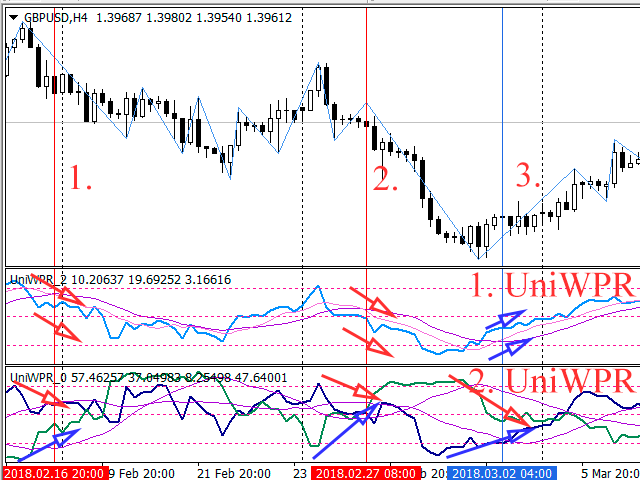
跟随我们以前关于货币篮子交易原理的文章, 这里我们将分析交易者可以检测的形态。我们还将研究每种形态的优点和缺点, 并就其使用提供一些建议。基于威廉姆斯振荡器的指标将用作分析工具。
If a complex grid with specified stop loss and take profit levels has been created in the wrong place by mistake, it is not necessary to remove it and start over again. The grid can be moved to a new place using the mouse. Drag the script to the chart and drop it where the grid should be moved. The grid will be moved, keeping the distance between orders, distances to stop loss and take profit. The script works exclusively with pending orders , market orders will be left unchanged. Input
The script allows to use the mouse for placing a grid of orders with fixed or variable step quickly and with as few mistakes as possible. Drag the script to the chart using the left mouse button and release. The grid will be plotted starting from that point. If the current price is lower than the grid start point, the grid will be placed "to the north" towards the buys, and if higher - towards the sells, "to the south". Setting take profit and stop loss is left to trader's discretion. Input
Модифицируйте тейк профит и стоп лосс сети ордеров с помощью мыши. Перетащите скрипт на график левой кнопкой мыши и отпустите. Скрипт выставляет всем рыночным и отложенным ордерам раздельно, единый стоп лосс и единый тейк профит, используя величину цены в точке окончания перетаскивания. Входные параметры Buy or sell - Ордера какого типа подлежат модификации. Возможны два варианта: All BUY - все ордера на покупку All SELL - все ордера на продажу По умолчанию значение этого параметра All BUY. What
Modify the take profit and stop loss of orders grid using the mouse. Drag the script to the chart using the left mouse button and release. The script sets a single stop loss and take profit to all positions and pending orders separately, using the price value at the final point of dragging. Input Parameters Buy or sell - the type to be modified. There are two options: All BUY - all buy orders and positions (this parameter is set to All BUY by default.) All SELL - all sell orders and positions
本文论述了如何将货币对分组 (篮子), 以及如何使用某些指标来获取它们的有关状态数据 (例如, 超买和超卖), 以及如何在交易中应用此数据。
本文描述应用文本文件保存动态对象, 数组和其它作为智能交易程序, 指标和脚本属性的变量。这些文件为 MQL 语言的标准工具提供了便利的附加功能。