市场 / MetaTrader 4 / 指标 / DrawDown 4 FREE 已发布: 21 十二月 2022 当前版本: 2.10 找不到合适的EA交易?请在自由职业者服务中订购您自己的EA交易 进入自由职业者服务 如何 购买 自动交易或指标 在 虚拟 主机运行您的EA 购买之前测试一个指标/EA交易 想要在市场 赚钱 吗? 如何介绍 用于流通销售的产品 概述 评分 (1) 评论 (4) 新特性 只有购买或租用产品的用户才可以进行评论 NZShareman 2023.01.12 10:10 #1 Very important indicator Along with another indicator Screenshot Customizer you can automatically take screen shots of the trade at the chart interval and see the draw down as well as profit when you go too the folder and click through the screen shots to see how the trade faired. Not many indicators show draw down. On the ScreenShot Customizer Do a google search to find it Adjust Size X to 2000 Size y to 1000 Gives better proportioned image. Good man Irwan Adnan 2023.03.03 13:18 #2 NZShareman #: Very important indicator Along with another indicator Screenshot Customizer you can automatically take screen shots of the trade at the chart interval and see the draw down as well as profit when you go too the folder and click through the screen shots to see how the trade faired. Not many indicators show draw down. On the ScreenShot Customizer Do a google search to find it Adjust Size X to 2000 Size y to 1000 Gives better proportioned image. Good man Thanks for your comment. I've just upload a new version that use a panel. Clay Pot 2023.06.07 09:14 #3 Hi, Nice indicator thanks. If you can could you be able include visual $ amount for Drawdown and Highest DD as well. Cheers. Lamyaii 2026.03.04 22:18 #4 Clay Pot #: Hi, Nice indicator thanks. If you can could you be able include visual $ amount for Drawdown and Highest DD as well. Cheers. Yes, I agree so and I about to comment this. Highest DD in both %DD and $DD , it would be great. 只有购买或租用产品的用户才可以进行评论 您错过了交易机会: 免费交易应用程序 8,000+信号可供复制 探索金融市场的经济新闻 注册 登录 拉丁字符(不带空格) 密码将被发送至该邮箱 发生错误 使用 Google 登录 您同意网站政策和使用条款 如果您没有帐号,请注册 可以使用cookies登录MQL5.com网站。 请在您的浏览器中启用必要的设置,否则您将无法登录。 忘记您的登录名/密码? 使用 Google 登录
NZShareman 2023.01.12 10:10 #1 Very important indicator Along with another indicator Screenshot Customizer you can automatically take screen shots of the trade at the chart interval and see the draw down as well as profit when you go too the folder and click through the screen shots to see how the trade faired. Not many indicators show draw down. On the ScreenShot Customizer Do a google search to find it Adjust Size X to 2000 Size y to 1000 Gives better proportioned image. Good man
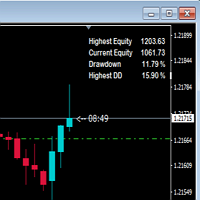
Irwan Adnan 2023.03.03 13:18 #2 NZShareman #: Very important indicator Along with another indicator Screenshot Customizer you can automatically take screen shots of the trade at the chart interval and see the draw down as well as profit when you go too the folder and click through the screen shots to see how the trade faired. Not many indicators show draw down. On the ScreenShot Customizer Do a google search to find it Adjust Size X to 2000 Size y to 1000 Gives better proportioned image. Good man Thanks for your comment. I've just upload a new version that use a panel.
Clay Pot 2023.06.07 09:14 #3 Hi, Nice indicator thanks. If you can could you be able include visual $ amount for Drawdown and Highest DD as well. Cheers.
Lamyaii 2026.03.04 22:18 #4 Clay Pot #: Hi, Nice indicator thanks. If you can could you be able include visual $ amount for Drawdown and Highest DD as well. Cheers. Yes, I agree so and I about to comment this. Highest DD in both %DD and $DD , it would be great.

Very important indicator
Along with another indicator Screenshot Customizer you can automatically take screen shots of the trade at the chart interval
and see the draw down as well as profit when you go too the folder and click through the screen shots to see how the trade faired.
Not many indicators show draw down.
On the ScreenShot Customizer
Do a google search to find it
Adjust
Size X to 2000
Size y to 1000
Gives better proportioned image.
Good man
Very important indicator
Along with another indicator Screenshot Customizer you can automatically take screen shots of the trade at the chart interval
and see the draw down as well as profit when you go too the folder and click through the screen shots to see how the trade faired.
Not many indicators show draw down.
On the ScreenShot Customizer
Do a google search to find it
Adjust
Size X to 2000
Size y to 1000
Gives better proportioned image.
Good man
Thanks for your comment. I've just upload a new version that use a panel.
Hi,
Nice indicator thanks. If you can could you be able include visual $ amount for Drawdown and Highest DD as well.
Cheers.
Hi,
Nice indicator thanks. If you can could you be able include visual $ amount for Drawdown and Highest DD as well.
Cheers.