DrawDown
FREE
Published:
21 December 2022
Current version:
2.10
Didn't find a suitable robot?
Order your own one
on Freelance
Go to Freelance
Order your own one
on Freelance
How to buy а trading robot or an indicator
Run your EA on
virtual hosting
virtual hosting
Test аn indicator/trading robot before buying
Want to earn in the Market?
How to present a product for a sell-through

You are missing trading opportunities:
- Free trading apps
- Over 8,000 signals for copying
- Economic news for exploring financial markets
Registration
Log in
You agree to website policy and terms of use
If you do not have an account, please register
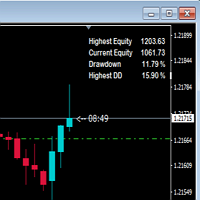
Very important indicator
Along with another indicator Screenshot Customizer you can automatically take screen shots of the trade at the chart interval
and see the draw down as well as profit when you go too the folder and click through the screen shots to see how the trade faired.
Not many indicators show draw down.
On the ScreenShot Customizer
Do a google search to find it
Adjust
Size X to 2000
Size y to 1000
Gives better proportioned image.
Good man
Very important indicator
Along with another indicator Screenshot Customizer you can automatically take screen shots of the trade at the chart interval
and see the draw down as well as profit when you go too the folder and click through the screen shots to see how the trade faired.
Not many indicators show draw down.
On the ScreenShot Customizer
Do a google search to find it
Adjust
Size X to 2000
Size y to 1000
Gives better proportioned image.
Good man
Thanks for your comment. I've just upload a new version that use a panel.
Hi,
Nice indicator thanks. If you can could you be able include visual $ amount for Drawdown and Highest DD as well.
Cheers.
Hi,
Nice indicator thanks. If you can could you be able include visual $ amount for Drawdown and Highest DD as well.
Cheers.