I have it on on my OANDA MT4 Platform but not sure how to install it on my other HankoTrade Mt4 Platform. When I try to download directly, it goes into Oanda Platform even though it's closed . Can you tell me on how to download it to my Desktop so that I can drag it to my other Platform.
I have it on on my OANDA MT4 Platform but not sure how to install it on my other HankoTrade Mt4 Platform. When I try to download directly, it goes into Oanda Platform even though it's closed . Can you tell me on how to download it to my Desktop so that I can drag it to my other Platform.
Thanks.
Hello. In order not to waste activation, try copying the indicator file from one terminal to another.
Activation works with binding to hardware and windows, so normal copying should work
Open Data Folder. Then MQL4 > Indicators > Market
Find the indicator, copy it and paste it in the new terminal in the same way
There is also a Market tab in the terminal itself. But, there is a possibility that in this way, the activation will be spent.
Thank you for choosing my indicator. If possible, then rate the product
can you please add a hide/show button like implemented in your other indicators? I would love to hide/show ALL the information the indicator shows with a single click without removing boxes. Would be super convenient. :) Thank you
can you please add a hide/show button like implemented in your other indicators? I would love to hide/show ALL the information the indicator shows with a single click without removing boxes. Would be super convenient. :) Thank you
Hi, I'll think about the external menu, but I don't promise a quick implementation
Здравствуйте добавьте пожалуйста сколько было контрактов на объёмах заранее спасибо на скрине интернете увидел этот индикатор похоже на вашим индикатор
Джони FX #: Здравствуйте добавьте пожалуйста сколько было контрактов на объёмах заранее спасибо на скрине интернете увидел этот индикатор похоже на вашим индикатор
Привет. Спасибо за проявленный интерес. Тот не мой индикатор. Если можете, скиньте в личку подробности о нём, как называется, может сам файл. Посмотрю, что за контракты считает. Запланирую на будущее обновление.
Был бы рад, если поставите оценку и отзыв о продукте.
Can you have a range as well if we decide to use it say 100 candles that allows the profile move with price within this range of candles, such that it don't need to be adjusted to the right part of the box when price goes over the profile box? The Indicator is really excellent, and very good value for the spend. Thanks a million.
76773 #: Can you have a range as well if we decide to use it say 100 candles that allows the profile move with price within this range of candles, such that it don't need to be adjusted to the right part of the box when price goes over the profile box? The Indicator is really excellent, and very good value for the spend. Thanks a million.
Hi. For such functionality, there is an UPD1 Profile Levels. If you liked the indicator, I will be glad if you rate it
Oh yes Author I really like your mt4 volume box, please code mt5 I will purchase your mt5 volume box also and give you 5 stars amazing review so that you will get more sales for the new launch mt5 volume box also, win win, please start coding volume box mt5 ok please help?
Moreover now your mt4 volume box also getting popular many purchase monthly, I'm sure many existing mt4 volume box customer will purchase and support your mt5 volume box too :)
Oh yes Author I really like your mt4 volume box, please code mt5 I will purchase your mt5 volume box also and give you 5 stars amazing review so that you will get more sales for the new launch mt5 volume box also, win win, please start coding volume box mt5 ok please help?
Moreover now your mt4 volume box also getting popular many purchase monthly, I'm sure many existing mt4 volume box customer will purchase and support your mt5 volume box too :)
Hi. I am currently working on an important project for myself. I have already scheduled the work on MT5, but do not wait for an early implementation, it may be fast or long, you will not guess

The vertical step is selected automatically, so the POC may be in a different place when changing the step.
HI,
I bought her volume box.
Can you please describe to me exactly how I have to do this and when I have to act.
What are the blue lines for?
What are the yellow lines for?
When do I have to trade on which line long or short?
Where do I put my stop?
When do I have to adjust the box or do I let the box run for a complete (day) period?
I look forward to your answers
Many Thanks
bg
Philip
HI,
I bought her volume box.
Thank you for your interest. I will be glad if you rate the product
What are the blue lines for?
This is a 70% Area volume, you can enable it in the settings
What are the yellow lines for?
These are Medians, that is, a high volume. There may also be a price reaction to it
When do I have to trade on which line long or short?
Where do I put my stop?
When do I have to adjust the box or do I let the box run for a complete (day) period?
Things like this are mostly about the strategy you are using. I presented the indicator, but did not describe in detail any strategy.
I myself am looking for a flat / box and throw an indicator on it. When the price comes out of the box and tests the POC, I can enter the rebound.
I am looking for take profit on the minimum volume from the indicator UPD1 Profile Level or Murray combo.
It's hard to describe everything I do for analysis. Experience is needed here.
Hello Dear,
I have it on on my OANDA MT4 Platform but not sure how to install it on my other HankoTrade Mt4 Platform. When I try to download directly, it goes into Oanda Platform even though it's closed . Can you tell me on how to download it to my Desktop so that I can drag it to my other Platform.
Thanks.
Hello Dear,
I have it on on my OANDA MT4 Platform but not sure how to install it on my other HankoTrade Mt4 Platform. When I try to download directly, it goes into Oanda Platform even though it's closed . Can you tell me on how to download it to my Desktop so that I can drag it to my other Platform.
Thanks.
Hello. In order not to waste activation, try copying the indicator file from one terminal to another.
Activation works with binding to hardware and windows, so normal copying should work
Open Data Folder. Then MQL4 > Indicators > Market
Find the indicator, copy it and paste it in the new terminal in the same way
There is also a Market tab in the terminal itself. But, there is a possibility that in this way, the activation will be spent.
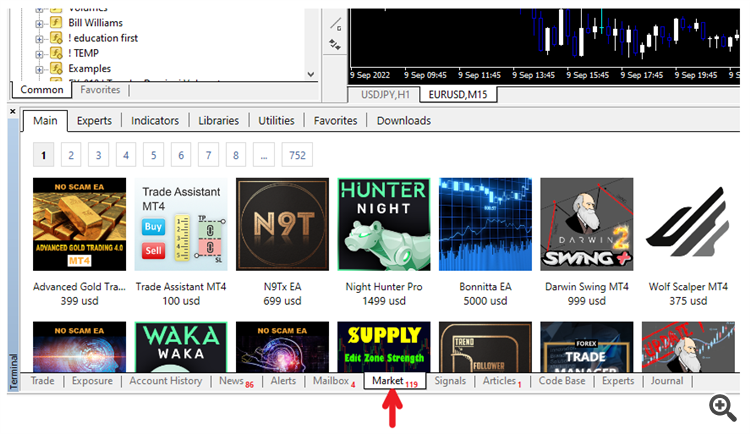
Thank you for choosing my indicator. If possible, then rate the productHi,
can you please add a hide/show button like implemented in your other indicators? I would love to hide/show ALL the information the indicator shows with a single click without removing boxes. Would be super convenient. :) Thank you
Hi,
can you please add a hide/show button like implemented in your other indicators? I would love to hide/show ALL the information the indicator shows with a single click without removing boxes. Would be super convenient. :) Thank you
Hi, I'll think about the external menu, but I don't promise a quick implementation
Здравствуйте добавьте пожалуйста сколько было контрактов на объёмах заранее спасибо на скрине интернете увидел этот индикатор похоже на вашим индикатор
Привет. Спасибо за проявленный интерес. Тот не мой индикатор. Если можете, скиньте в личку подробности о нём, как называется, может сам файл. Посмотрю, что за контракты считает. Запланирую на будущее обновление.
Был бы рад, если поставите оценку и отзыв о продукте.
Please, if you find any bug, then write a sequence to reproduce it. I will be glad to have new ideas for improvement.
_____
Can you have a range as well if we decide to use it say 100 candles that allows the profile move with price within this range of candles, such that it don't need to be adjusted to the right part of the box when price goes over the profile box? The Indicator is really excellent, and very good value for the spend. Thanks a million.
Hi. For such functionality, there is an UPD1 Profile Levels. If you liked the indicator, I will be glad if you rate it
Oh yes Author I really like your mt4 volume box, please code mt5 I will purchase your mt5 volume box also and give you 5 stars amazing review so that you will get more sales for the new launch mt5 volume box also, win win, please start coding volume box mt5 ok please help?
Moreover now your mt4 volume box also getting popular many purchase monthly, I'm sure many existing mt4 volume box customer will purchase and support your mt5 volume box too :)
Oh yes Author I really like your mt4 volume box, please code mt5 I will purchase your mt5 volume box also and give you 5 stars amazing review so that you will get more sales for the new launch mt5 volume box also, win win, please start coding volume box mt5 ok please help?
Moreover now your mt4 volume box also getting popular many purchase monthly, I'm sure many existing mt4 volume box customer will purchase and support your mt5 volume box too :)
Hi. I am currently working on an important project for myself. I have already scheduled the work on MT5, but do not wait for an early implementation, it may be fast or long, you will not guess
its... buggy. the
1. i had reset the settings
2. close and re-open the mt4
3. change bg color
the histogram doesnt show
Hi. There shouldn't be a bug. Boxing takes quotes from M1 on M5 Timeframe. So there's something wrong with them.
There are three possible solutions:
1) Press F2 and download M1 quotes for the desired currency
2) In the frame settings, select the same timeframe you are on, so as not to depend on the quotes of lower timeframes if they are leaky and incomplete
3) You can choose the work of the frame according to the Market profile. In this case, the frame will only work on the current bars on the chart.
It Should be R1 Color. Also is that possible to add Histogram beside line graph? Thank you.
It Should be R1 Color.
Hi. Thank you for the inaccuracy found. I will fix it in the new update
Also is that possible to add Histogram beside line graph?
Draw what you mean
Hi. Thank you for the inaccuracy found. I will fix it in the new update
Draw what you mean
I obtained the Histogram Point. But I believe there is a bug. One chart displays a text POC, but another MT4 chart does not.
I obtained the Histogram Point. But I believe there is a bug. One chart displays a text POC, but another MT4 chart does not.
This is not a bug. Turn off the description of objects. It is disabled by default.