Trade Manager MT5 by TrendPax
- 实用工具
-
ARUKADIA SOCIEDAD LIMITADA
 TrendPax builds MetaTrader 5 tools for EA traders and manual traders. Trade Manager: drag the setup box (entry, stop loss and targets) and the lot is calculated for your risk, with partial take profits, breakeven and trailing stop. DD Protector: daily and total loss limits that act before your
- 版本: 1.10
- 激活: 10
Order panel for manual traders: lot from your risk, setup box with draggable lines, up to 4 partial take profits, breakeven, trailing stop (fixed, ATR or candles) and strategy templates.
TrendPax Trade Manager is an order panel and trade manager for manual traders. You choose how much you want to risk, place the stop loss and the targets on the chart, and the panel calculates the lot and manages the trade for you.
Risk and lot
- Risk as a percentage of the balance, as an amount of money, or a fixed lot.
- The lot is always rounded down to the volume step, so the actual risk is never above the risk you asked for. The panel shows the actual risk after rounding.
- The commission is included (taken from your last closed trade on the symbol, or typed in the inputs). The spread is included: buys enter at the ask and are stopped at the bid.
- Risk cap per trade: an order above the cap is never sent, even if you make a typing mistake.
Orders and setup box
- Market, limit and stop orders with stop loss and take profit. With a pending entry, the order type is chosen from the price: below the market a buy is a Buy Limit, above it a Buy Stop.
- Setup box on the chart: red zone for the loss, green zone for the profit. Drag the entry, the stop loss or any target and the lot is recalculated at once.
- After sending, the box goes away and the lines of the real order are drawn. Dragging them changes the real stop loss, take profit, partial targets or pending entry. A change that is not valid (wrong side, too close to the price, or a stop above the risk cap) is refused and the line goes back.
- Confirmation window with a summary before each order: lot, actual risk in money and percent, each target and the expected profit.
Trade management
- Up to 4 partial take profits, each as a multiple of the risk (R) and a percentage of the volume.
- Breakeven at TP1 or at a multiple of the risk, with a few points of margin to cover costs.
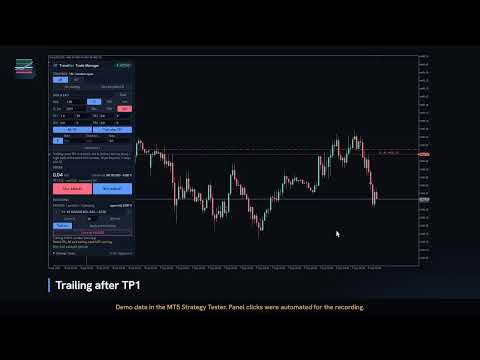
- Trailing stop at a fixed distance, in points or in multiples of the risk, starting from a profit distance or after TP1, moving in steps and at most once every few seconds.
- Partial closes with the trailing: each trailing step closes a part of the position.
- Advanced mode ("Advanced +" button): initial stop loss at a multiple of the ATR, and trailing by ATR (the stop at a multiple of the ATR from the price) or by candles (the stop at the low or high of the last closed candles, with a few points of margin). The stop only moves in your favour.
- Open trades keep their plan: after restarting MetaTrader, the panel keeps managing them as they were opened.
- By default the partial targets are taken inside one position, so your history shows one trade. On hedging accounts you can choose one position per target instead, each with its own take profit on the broker server.
- The stop loss, and the last take profit when it closes everything, are always on the broker server.
- Buttons to close the percentage you choose ("Close %"), move to breakeven now ("BE now") or close everything opened by the panel on the symbol.
- The RISK & EXIT section folds ("Hide") into a one-line summary, so the panel takes less room on the chart.
- Open risk of the account: what you would lose if every stop loss were hit, and how many positions have no stop loss.
Strategy codes (optional)
- Up to 10 strategy buttons. The code of the active strategy is placed at the start of the order comment (for example "LN" for the London open), so you can group your manual trades by strategy in any trade journal.
- Strategy templates: save the panel setup of each strategy (risk, stop loss, targets, breakeven and trailing) with the "Save template" button, and pressing the strategy loads it. They are stored on your computer and shared by all charts and terminals.
Accounts and languages
- Hedging and netting accounts (detected automatically).
- English and Spanish.
Important
- Partial take profits, breakeven and trailing are managed by the program: MetaTrader 5 must be running (or on a VPS). The stop loss and the last take profit are on the broker server and work with the terminal closed.
- The panel only manages the orders and positions it opened itself.
- Slippage on entry and price gaps over the stop loss are not part of the calculated risk.
Frequently asked questions
- Why is the actual risk lower than the risk I asked for? The lot is always rounded down to the broker's volume step, so the risk can only be the same or lower. The panel shows the actual risk after rounding, with the commission and the spread included.
- What if I close MetaTrader? The stop loss and the last take profit are on the broker server and keep working. Partial take profits, breakeven and trailing need the terminal running (or a VPS); when it opens again, the panel picks up its trades where it left them.
- Can I move the stop loss or a target after sending? Yes: drag its line on the chart and the real order changes. A change that is not valid is refused and the line goes back.
- How does it know my commission? From your last closed trade on the symbol. Without history, write it in the inputs (commission per lot, round turn).
- Hedging or netting? Both, detected automatically. One position per target is available on hedging accounts only.
- Several charts? Each chart manages the orders it sent. If a chart is closed, a Trade Manager on another chart of the same account takes over its open trades after two minutes.
- Where are the templates stored? In a file on your computer (the MetaTrader 5 common folder). To use them on another computer or a VPS, copy that file. They are not sent anywhere.
- When should I use the candle or ATR trailing? When you want the stop to adapt to volatility or to the price structure instead of a fixed distance. They are in the "Advanced +" section.
- Which symbols? Any MetaTrader 5 symbol: forex, metals, indices and other CFDs. It was checked on EURUSD, USDJPY, GBPJPY, XAUUSD, GDAXI and NDX, with small and large accounts.
- Does it ever trade by itself? No. It only sends the orders you confirm. In the Strategy Tester it opens sample orders so that its management can be seen and validated.