FlowBias Trader
- 专家
-
WaveTiming Management
 WaveTiming Management 是一家由经验丰富的交易员和程序员创办的荷兰公司。
自 1990 年代以来,我们一直活跃于市场,经历了爆炸性上涨、互联网泡沫破裂、银行危机以及新冠疫情引发的市场崩溃。我们庆祝过盈利,但更重要的是:我们也经历过亏损的痛苦。
我们的动力 —— 或者说是执着 —— 更多地源于亏损而非盈利。
这些经历激发了我们变得更好、更聪明、更有目标地交易。
2020 年,我们决定以 WaveTiming Management 的名义联合起来。
我们已在荷兰工商局正式注册,并将长期发展。
我们的交易方案特点: - 版本: 1.0
- 激活: 10
An EA that waits until a market has stretched too far in one direction, trades the turn, and manages all positions as one basket.
FlowBias Trader is a configurable Expert Advisor (EA) for MetaTrader 5. It looks for markets that have moved far in one direction and counts repeated overbought or oversold extremes against an oscillator of your choice. When enough extremes have been counted and the filters allow it, the EA opens a position against the preceding move.
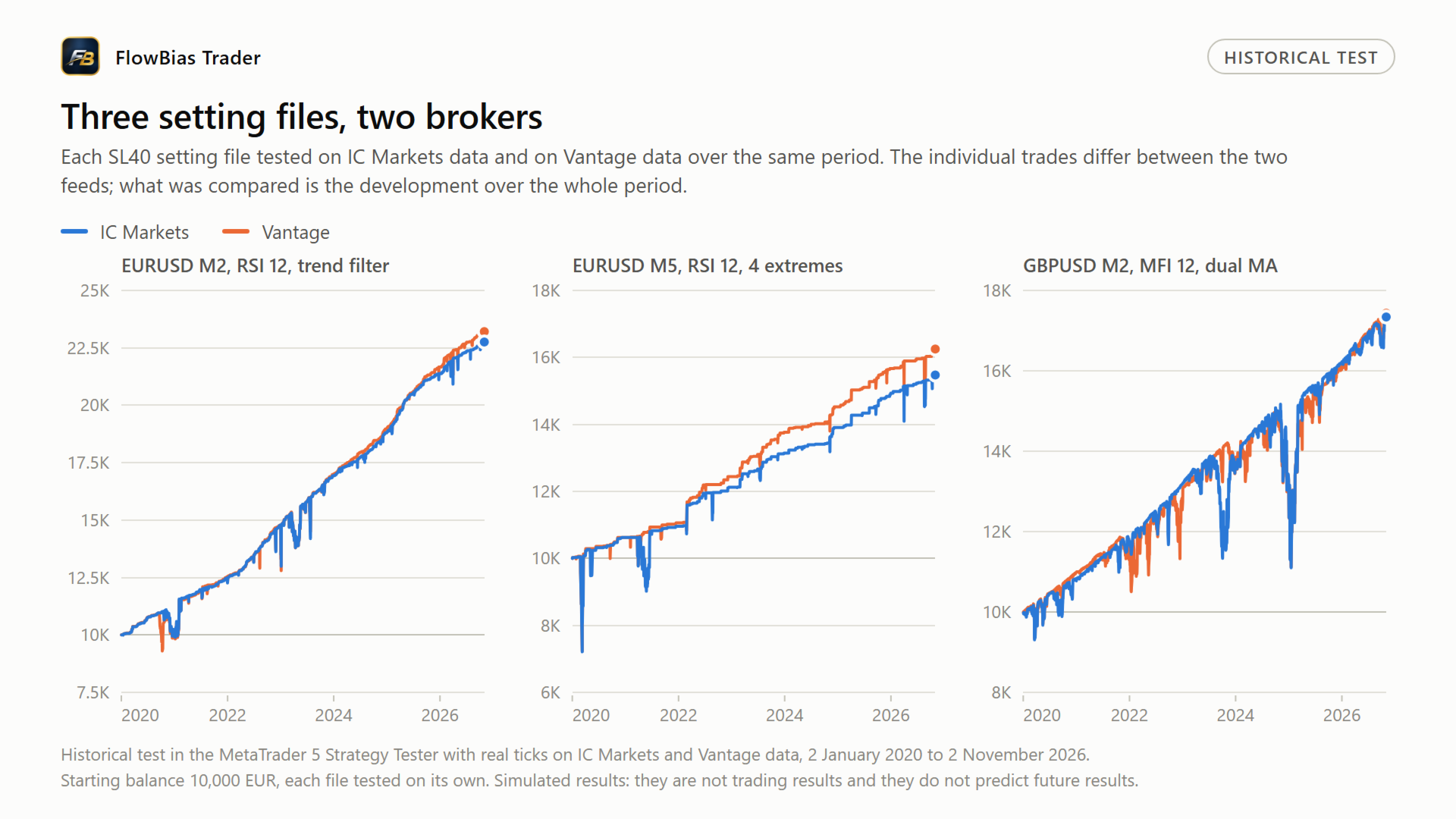
Choose between RSI, MFI, CCI and Stochastic. Decide how an extreme must be confirmed, which filters apply, whether further positions may be added, and how the basket is closed. Five setting files for EURUSD and GBPUSD are published in my blog, developed and checked on data from two different brokers.
What you get
- The EA for MetaTrader 5, with 10 activations per purchase
- A user manual in English that covers installation, every setting and how the settings interact
- Five setting files for EURUSD and GBPUSD, published in my blog: https://www.mql5.com/en/blogs/post/774524
- All future updates at no extra cost
- Personal support through the comments section and private messages on MQL5
Launch price
The first 10 copies are sold at 35 USD. After that the price goes up. Every copy, whatever price it was bought at, receives all future updates.
No blocked dates, no tester tricks
The EA contains no hard-coded dates and no hidden filters that switch trading off in selected periods. The only time filter is the session window, and you set that yourself. The trading logic in the Strategy Tester is the same as on a live chart.
The free demo on this page is the complete EA; MQL5 only limits it to the Strategy Tester. Test it over any period on your own broker's data and judge the result yourself. The published setting files were checked over the full period from January 2020 to November 2026, not over a selected run of good months.
What you can control
- Signal detection: Four oscillators, period, both thresholds, and the number of extremes required
- Signal confirmation: Confirmation by price (a higher high or a lower low) or by divergence against the oscillator
- Trend confirmation: Moving average on a higher timeframe, and a separate dual moving average filter
- Position sizing: Fixed lot size, or scaled to balance or equity, with minimum, maximum and rounding
- Basket entries: Whether adds are allowed, at what price, at what distance, and for how long
- Basket exits: Profit target as a percentage, in points or in ATR, or on an opposite extreme
- Risk management: Loss limit per basket, an optional broker-side stop loss as a fallback, maximum number of open positions, spread and slippage limits
- Trading hours: A session window in broker time
- Basket management: Reduce, Scalp and break-even levels, each switched off by default
How a signal is formed
The selected oscillator measures overbought and oversold conditions against two thresholds. An extreme is counted once the oscillator returns to neutral.
Each following extreme must continue the pattern. Depending on the settings, that means either a higher high or a lower low in price, or divergence against the oscillator. When divergence is required, each new extreme must move further in price while the oscillator moves the other way.
Once the required number of extremes has been counted, the EA is armed. The entry filters are then applied, and a position is opened against the preceding move.
Positions are managed in baskets
A basket is the group of positions the EA has open, managed and closed as a whole rather than trade by trade. This is the part of the EA you have the most control over.
A position can be built up in steps, while the profit target and the loss limit are measured over the whole basket. You decide when a basket may be extended, when it closes in profit, and what happens when it moves against you.
Three optional features can act while a basket is under pressure. All three are switched off by default.
- Reduce closes the worst positions once drawdown reaches a threshold you set
- Scalp takes profit on the best position in the basket
- Break-even levels protect profit already gained on added positions
Adding to a basket, and why this is not a grid
After the first entry, the EA can open further positions. An add is not triggered by price distance alone. It requires a new valid signal: another extreme that meets the same conditions as the first entry. An optional setting makes every add require the full count of extremes again.
On top of that you can require a better price, set a minimum distance in points or in Average True Range (ATR), and limit how long after the first entry adds remain possible. Adds can also be switched off completely.
Lot size does not increase after a loss. Entries and adds use the same calculation, which does not look at the result of earlier trades. When the size is scaled to the account, a smaller balance produces a smaller lot. There is no martingale progression and no fixed price grid.
Adds at a better price do improve the average entry price of the basket. That is a deliberate part of the method and should be understood before use.
Ready-to-test setting files
Five setting files for EURUSD and GBPUSD are published in my blog on this site: https://www.mql5.com/en/blogs/post/774524
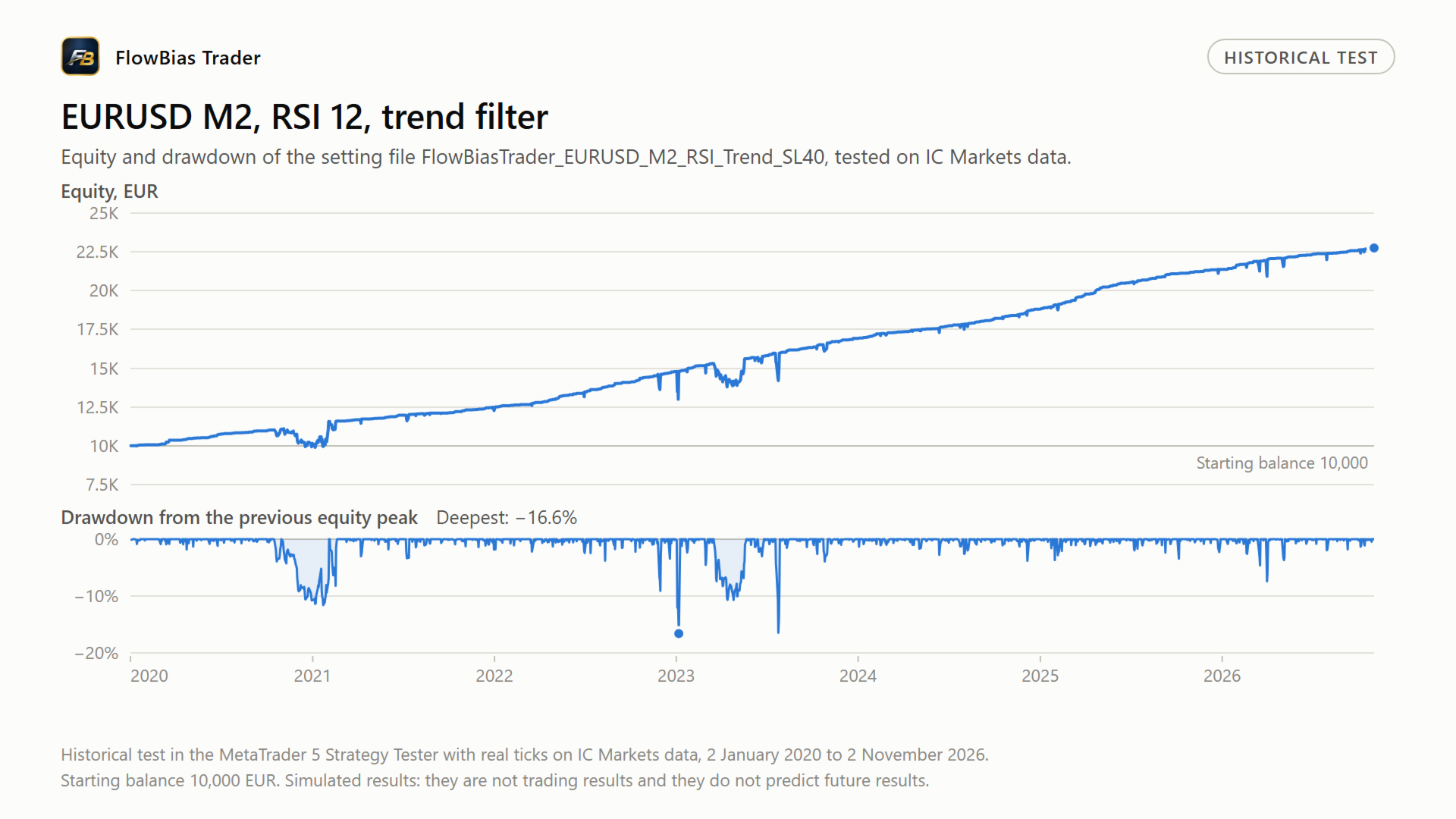
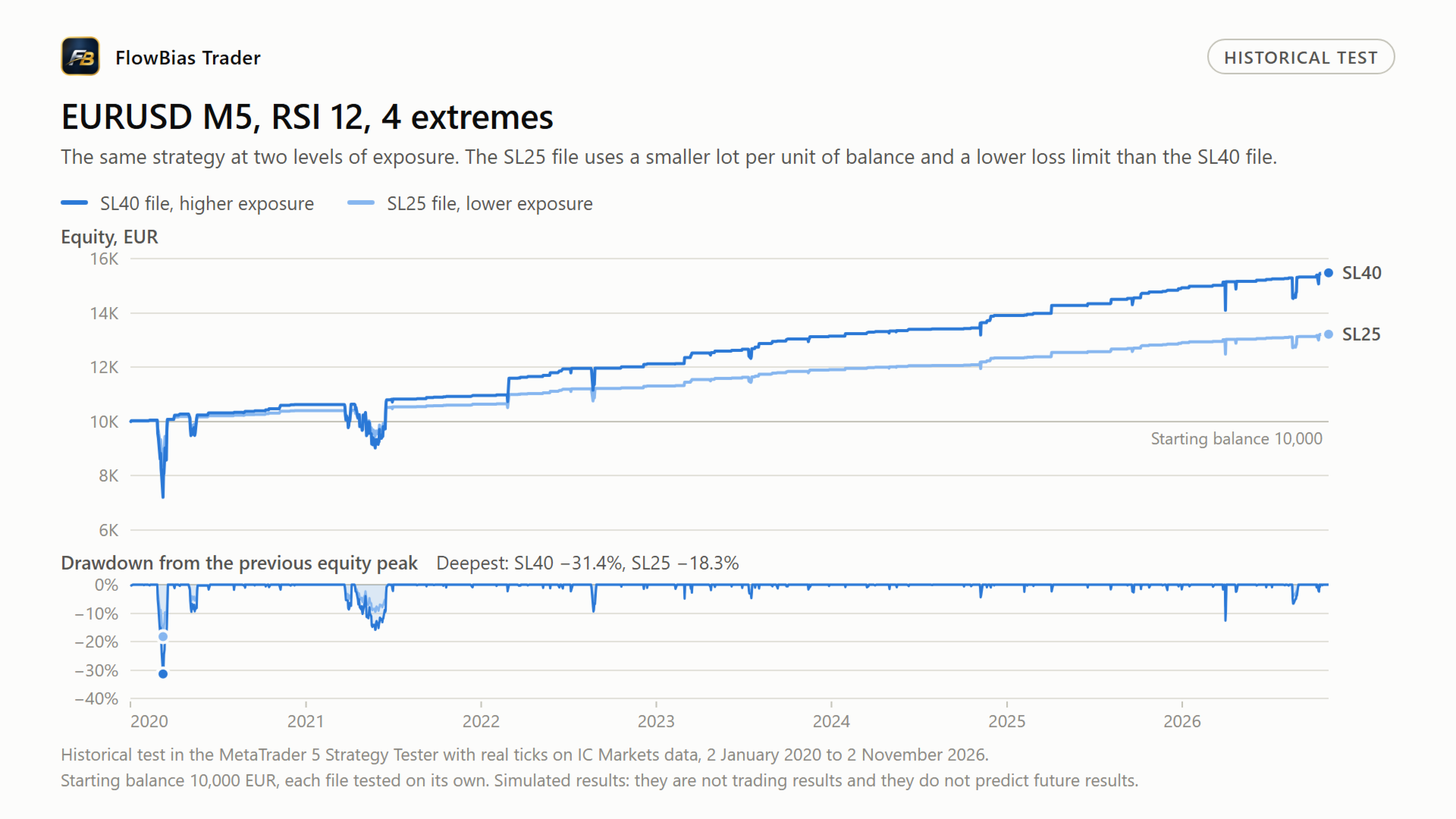
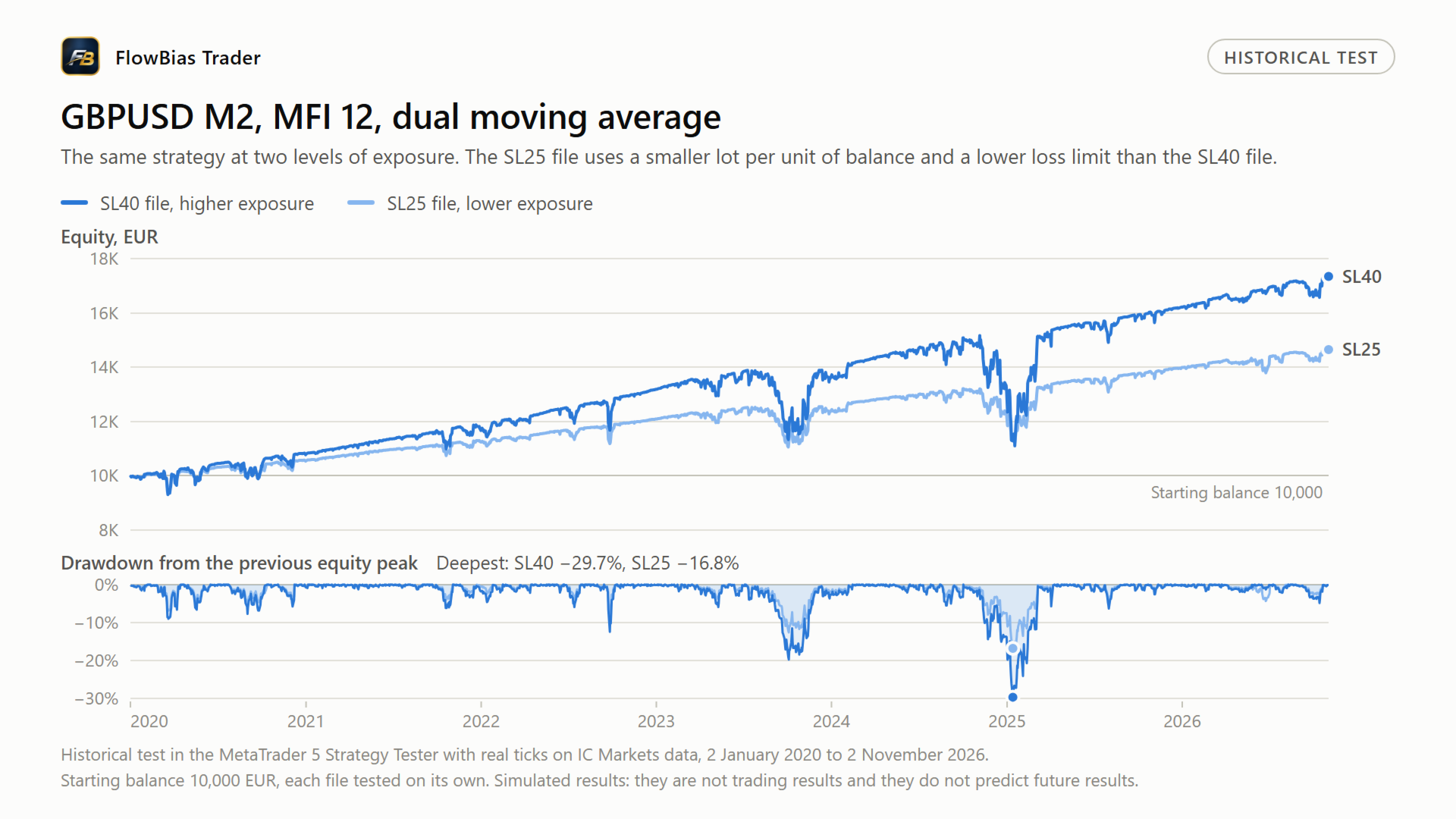
They cover three configurations, two of which are offered at two levels of exposure. Each file states the symbol, the timeframe and the conditions it was built for. They are a starting point for your own testing, not a finished configuration, and they do not produce a guaranteed result.
Markets
FlowBias Trader is intended for currency pairs. It has been developed and tested mainly on EURUSD and GBPUSD. Other pairs can be tested. Use on indices and commodities is possible, but the supplied settings are built for currency pairs.
Settings and broker differences
Every broker builds its own candles from its own feed, and the server time offset shifts where a bar begins. The same pair over the same period therefore looks slightly different at two brokers, and the oscillator values differ with it. A setting file that works on one feed does not automatically behave the same on another.
For that reason the published settings are developed and checked on data from more than one broker. The blog post linked above names the brokers used, describes the checks, and explains what to adjust for your own account.
Requirements
- MetaTrader 5 on a hedging account. On a netting account, positions in the same symbol are merged into one net position and the basket logic behaves differently
- A running terminal or VPS, for the reason given above
- The EA is supplied as a compiled Expert Advisor. Source code is not included
Important risk information
Read this before you buy.
By default the EA places no stop loss order with the broker. It manages profit targets and loss limits itself, at basket level, so the terminal has to be running for those exits to be applied. A VPS is recommended.
An optional broker-side stop loss is available. Switch it on and the EA places a real stop loss order on every open position of the basket, an adjustable margin beyond the price at which the basket as a whole reaches its loss limit, and moves it whenever a position is added or closed. Because of that margin, under normal conditions the EA closes the basket first and the broker order acts as a fallback for the case where your terminal is not running. It is switched off by default, and the published setting files do not switch it on.
The loss limit is calculated from your account balance, but it protects only the basket of this EA. When a basket opens, the EA turns the percentage into a fixed amount: with a limit of 40 per cent and a balance of 10,000, the basket is closed once its loss reaches 4,000. That amount covers all open positions of this EA instance, long and short together. Positions of other instances, other EAs or manual trades are not counted and are not closed, so the combined drawdown on an account can be larger than the limit set in a single file.
The limit is a trigger, not a guarantee. The basket is closed at market when the limit is reached. Spread, slippage and the speed of execution can make the realised loss larger than the figure set.
Positions are built up in steps. A basket can stay open for a long time and can sit at a loss before it closes. Not every month is positive.
Testing and results
Results from historical tests are shown in the screenshots, each labelled with symbol, timeframe, period and starting balance. Historical tests are simulations. They are not trading results and they do not predict future results.
Getting started
Install the EA on an MT5 hedging account and open the blog post linked above. Download the setting file for the pair you want, load it onto a chart or into the Strategy Tester, and run it on your own broker's historical data first.
Compare the result with the conditions described in the blog post before you consider trading it. The included manual explains every setting and how the settings interact, so you can adjust a file to your own account rather than use it as it comes.
Support
Questions are answered in the comments section of this product and by private message on MQL5. I help with installing the EA, loading the setting files, and adapting them to your broker's server time and symbol names. If something does not work as described, send the symbol, timeframe, setting file and the journal of the EA, so the problem can be reproduced and fixed.
Updates
Every future version is free for buyers. Before a new version is released, the published setting files are run on the old and the new version and the results are compared. If a change affects how a setting file trades, the release notes say so. New setting files are only added to the blog after they have been checked on two brokers.
Risk
Trading on financial markets carries substantial risk, including the loss of invested capital. This EA is a software tool. It does not guarantee a profit and it does not prevent losses. Results can differ from historical tests because of market conditions, spread, commission, execution, slippage and broker conditions. Use a risk level that suits your own account.