 MetaTrader 5
 Uzmanlar
 Göstergeler
 Komut dosyaları
 Kütüphaneler
 Depo
Depo
Fan sayfamıza katılın

ATS Prop Rules Monitor - prop firm challenge scoreboard with the room left on every rule - MetaTrader 5 için gösterge

- Görüntülemeler:
- 30
- Derecelendirme:
- Yayınlandı:
-
 Alım-satım fırsatlarını kaçırıyorsunuz:
- Ücretsiz alım-satım uygulamaları
- İşlem kopyalama için 8.000'den fazla sinyal
- Finansal piyasaları keşfetmek için ekonomik haberler
Kayıt Giriş yapWeb sitesi politikasını ve kullanım şartlarını kabul edersiniz
Hesabınız yoksa, lütfen kaydolun -
 Bu koda dayalı bir robota veya göstergeye mi ihtiyacınız var? Freelance üzerinden sipariş edin
Freelance'e git
Bu koda dayalı bir robota veya göstergeye mi ihtiyacınız var? Freelance üzerinden sipariş edin
Freelance'e git

Most prop firm tools show one number, usually the daily loss. A challenge fails on any of five rules, so ATS Prop Rules Monitor shows all five on one panel, each with the room left.
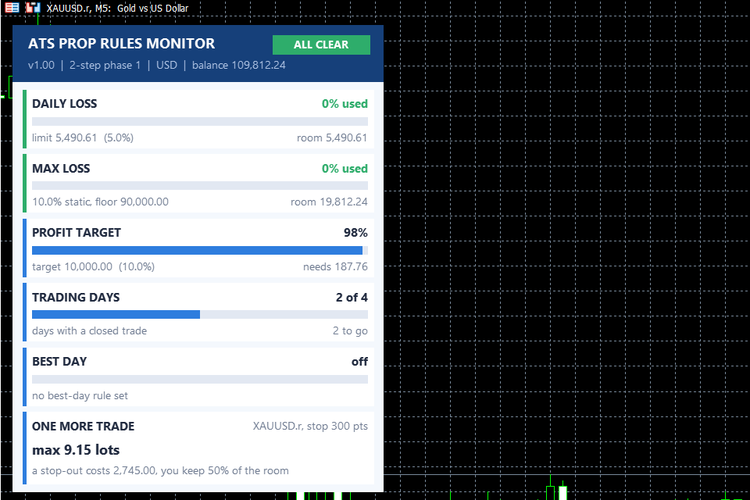
The five rules
1. DAILY LOSS - share of the day's loss limit already used, and the money left today. The limit is a % of the day-start balance. Open profit/loss counts (you can turn that off). You set the server hour at which a new day starts.
2. MAX LOSS - static (from the initial balance) or trailing on equity or balance. Shows the floor, the room left and the share used.
3. PROFIT TARGET - progress to the target and the money still needed.
4. TRADING DAYS - days with at least one closed trade, against the minimum required.
5. BEST DAY - your best day as a share of the total profit, against the limit of rules that ask for consistency. It stays "off" if your rule has none.
Colours: green = inside, amber = warning (70% of a loss limit used, by default), red = limit reached. The badge at the top sums it up: ALL CLEAR, WARNING, LIMIT BREACHED or TARGET MET.
ONE MORE TRADE
For the symbol of the chart and the stop you set (in points), it gives the largest lot size that keeps a stop-out inside a share of the smaller of the two rooms (50% by default). If the limit is already reached it says so. It uses the lot rule of the ATS Risk Library: the lot is never rounded up.
Presets and Custom
The presets (2-step phase 1, 2-step phase 2, a 1-step style with a trailing loss and a best-day rule, funded) hold typical industry values. Firms change their rules, and the exact definitions differ (how the day is cut, whether the floor trails equity or balance, what counts as a trading day), so ALWAYS read the rules of your own challenge and enter them with the Custom preset. Set the initial balance by hand if the deposit is not found in the account history.
Inputs
InpPreset, InpInitialBal (0 = detected from the deposit), InpStart (challenge start date, server time), InpTargetPct, InpDailyPct, InpMaxPct, InpMaxMode, InpMinDays, InpBestDayPct, InpDayStartHour, InpFloating, InpStopPoints, InpRoomShare, InpWarn, InpX, InpY.
Files
- ATS_Prop_Rules_Monitor.mq5 - the indicator.
- ATS_RiskLib.mqh - the library it uses. Keep it in the same folder as the .mq5.
For programmers
The panel is drawn on a CCanvas. Sizes are scaled by the screen DPI, and the font is measured once at start so the text has the same size on every screen. The state of the guards is saved in GlobalVariables and is deleted when you remove the indicator from the chart. The rules are measured with the classes CAtsDayGuard and CAtsDrawdownGuard of the library; the rest (profit, days, best day) is read from the account history since the start date.
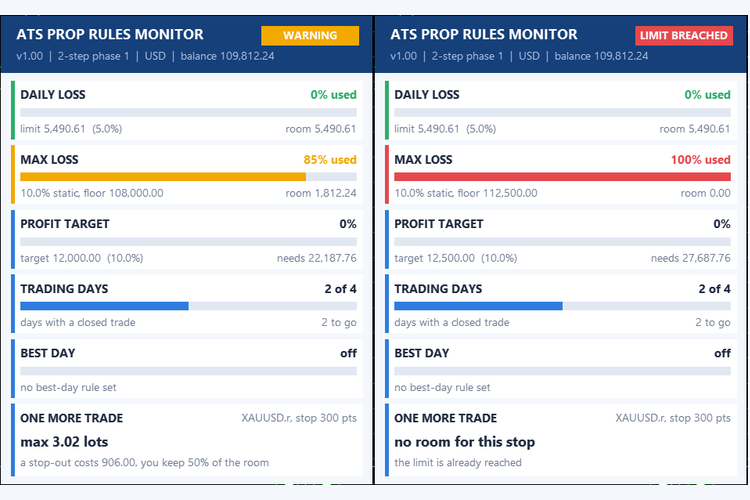
A note on honesty
This is a scoreboard, not a guard: it cannot stop a trade and it does not know your firm's exact definitions. Numbers come from your terminal's history and may differ from the firm's own dashboard (server time, swaps, commissions, how floating profit is counted). Use it to see the room you have, and check the firm's dashboard before you rely on a number.
Notes
This is an indicator. It never opens, modifies or closes trades. It works on any symbol and timeframe; the "one more trade" line uses the symbol of the chart.
 ATS Risk Library - lot size from the stop, daily loss, drawdown and exposure guards
A small include file for Expert Advisors and trade managers. It turns your risk rules into yes/no answers: how many lots does this stop allow, is the daily loss limit reached, is the maximum drawdown (static or trailing) reached, how much is at risk across all open positions, and are spread and session acceptable. The lot is never rounded up: if the broker minimum lot would risk more than allowed, the trade is skipped and the reason is returned. Limits survive a terminal restart. The library only measures: it sends no order. Includes a demo account guard (no trading by default) and a self-test with 78 checks.
Trend BOSS
The Trend BOSS Indicator identifies regimes such as trending, ranging or volatile using a Bag-of-SFA-Symbols (BOSS) classifier. Gate your strategies behind specific regimes or use the indicator to identify various market conditions.
Accelerator Oscillator (AC)
The Acceleration/Deceleration Indicator (AC) measures acceleration and deceleration of the current driving force.
MACD Signals
Indicator edition for new platform.