 MetaTrader 5
 Uzmanlar
 Göstergeler
 Komut dosyaları
 Kütüphaneler
 Depo
Depo
Fan sayfamıza katılın

Trading Tool Assistant v2 - MetaTrader 5 için uzman

- Görüntülemeler:
- 17
- Derecelendirme:
- Yayınlandı:
-
 Alım-satım fırsatlarını kaçırıyorsunuz:
- Ücretsiz alım-satım uygulamaları
- İşlem kopyalama için 8.000'den fazla sinyal
- Finansal piyasaları keşfetmek için ekonomik haberler
Kayıt Giriş yapWeb sitesi politikasını ve kullanım şartlarını kabul edersiniz
Hesabınız yoksa, lütfen kaydolun -
 Bu koda dayalı bir robota veya göstergeye mi ihtiyacınız var? Freelance üzerinden sipariş edin
Freelance'e git
Bu koda dayalı bir robota veya göstergeye mi ihtiyacınız var? Freelance üzerinden sipariş edin
Freelance'e git
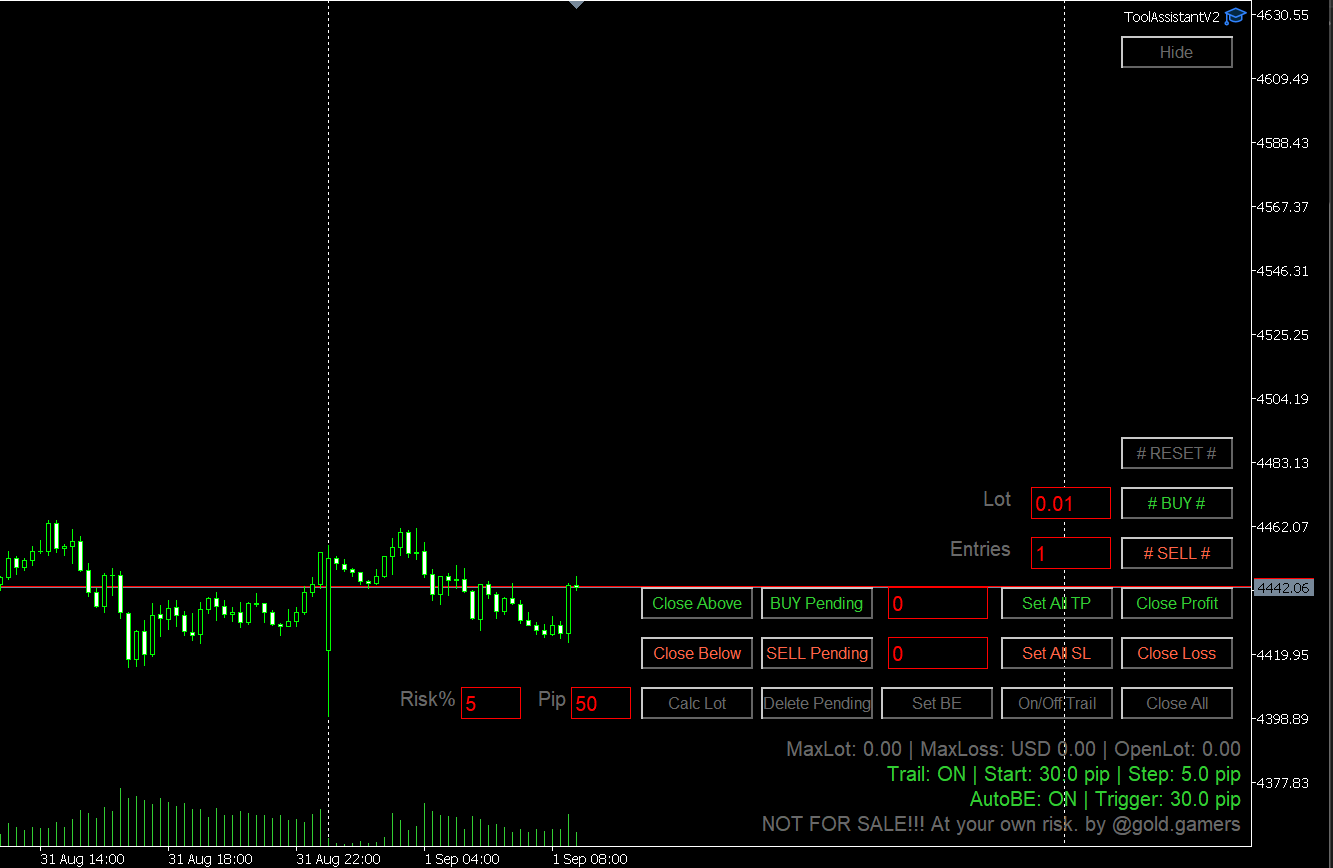
Pozisyonlar : #AL# ve #SAT# düğmelerine tıklandığında açılacak pozisyonsayısı .
# AL # Lot ve giriş sayısına göre AL girişleri açar .
# SAT # Lot ve giriş sayısına göre SAT girişleri açar .
Kârla Kapat: Şu anda kârda olan TÜM emirleri kapatır.
Zararla Kapat : Şu anda zararda olan TÜM emirlerikapatır .
TÜMÜNÜ KAPAT Şu anda açık olan TÜM emirleri kapatır .
Tüm TP'yi Ayarla Kar Al değerinigirin (sol düğme) ve Tüm TP'yi Ayarla düğmesine tıklayarak bunu şu anda açık olan TÜM emirlere uygulayın.
Tüm SL'yi Ayarla Stop Loss değerini (sol düğmede) girin ve Tüm SL'yi Ayarla düğmesine tıklayarak bunu şu anda açık olan TÜM emirlere uygulayın.
Takip İşlevini Aç/Kapat : Takipişlevini AÇIK veya KAPALI konuma getirin.
Bekleyen Al : Sağdaki düğmeye fiyatıgirerek Al Limit emri oluşturun
Satış Bekleyen: Sağdaki düğmeye fiyatı girerek Satış Limit emri oluşturun
Bekleyen Emirleri Sil : Tüm bekleyen emirlerisilin
Yukarıdaki Fiyatın Üzerinde Kapat: Sağdaki düğmeye (ortadaki metin kutusu) girdiğiniz fiyatın üzerindeki tüm emirlerikapatır
Altında Kapat : Sağdaki düğmeye (ortadaki metin kutusuna) girdiğiniz fiyatın altındaki tüm emirlerikapatır
EA Parametre Açıklamaları
TimerSecondRun Trailing (ifActive/True, girilen değere göre her saniye çalışır.
Break Even trueise , Stop Loss'u boş olan tüm emirler BE olarak ayarlanacaktır
Trailing default: Trailing Default parametresi True (Etkin) olarak ayarlanmışsa
Bekleyen Emir: Bu pip cinsinden Stop Loss ve Take Profit değeri, Alım Bekleyen / Satım Bekleyen düğmesi için kullanılacaktır
Lot Büyüklüğü Hesaplayıcı
Risk % ve Pip (Stop Loss) değerlerini girin, ardından "Lot Hesapla" düğmesine basın; maksimum Lot ve Zarar bilgileri aşağıda görüntülenecektir
MetaQuotes Ltd tarafından İngilizceden çevrilmiştir.
Orijinal kod: https://www.mql5.com/en/code/76806
GDS Renko SuperTrend Demo EA
MetaTrader 5 için, klasik sabit boyutlu Renko bloklarını SuperTrend tarzı bir trend durumuyla birleştirmenin basit bir yolunu gösteren küçük bir eğitim amaçlı Uzman Danışman.
Alpha Engine: Intrinsic-Time Coastline Trader
A port of the Olsen group's Alpha Engine: eight limit-order agents trade intrinsic-time directional changes on a hedging account. They add on overshoots and trim at a profit on reversals.
 Prop Firm Risk Calculator - Position Size and Loss Limits
Calculates position size and daily / max loss limits for prop firm accounts and shows them in a panel on the chart.
Stochastic Daily Breakout for Gold, +245 Percent in a 2021-2026 Backtest
Gold EA that trades both directions: when the stochastic signal line turns, it places a stop order at yesterday's high or low, filtered by a Bollinger band. Self-contained, no custom indicators. Backtest on XAUUSD H1, July 2021 to September 2026: +245% on a 1,000 USD deposit at a fixed 0.01 lot, 23.9% maximum equity drawdown.