 MetaTrader 5
 Uzmanlar
 Göstergeler
 Komut dosyaları
 Kütüphaneler
 Depo
Depo
Fan sayfamıza katılın

Market Session Separator Indicator - MetaTrader 5 için gösterge

- Görüntülemeler:
- 14
- Derecelendirme:
- Yayınlandı:
-
 Alım-satım fırsatlarını kaçırıyorsunuz:
- Ücretsiz alım-satım uygulamaları
- İşlem kopyalama için 8.000'den fazla sinyal
- Finansal piyasaları keşfetmek için ekonomik haberler
Kayıt Giriş yapWeb sitesi politikasını ve kullanım şartlarını kabul edersiniz
Hesabınız yoksa, lütfen kaydolun -
 Bu koda dayalı bir robota veya göstergeye mi ihtiyacınız var? Freelance üzerinden sipariş edin
Freelance'e git
Bu koda dayalı bir robota veya göstergeye mi ihtiyacınız var? Freelance üzerinden sipariş edin
Freelance'e git

Piyasa Oturumu Ayırıcısı
Arkasındaki fikir
Hangi seansın aktif olduğunu bilmek, neredeyse her gün içi karar için önemlidir — Asya seansı Londra seansına, Londra seansı ise New York seansına geçerken volatilite, likidite ve tipik davranışlar değişir. Çoğu yatırımcı, saate bakarak anında sunucu saatine çevirip bu hesaplamayı kafasında yapar. Bu gösterge, bu adımı tamamen ortadan kaldırır: Her gün otomatik olarak, dikey çizgiler ve/veya gölgelendirilmiş arka plan rengi kullanarak, yapılandırılabilir üç seansın sınırlarını doğrudan grafiğe çizer; böylece aktif seans bir bakışta görsel olarak açıkça anlaşılır.
Buradaki her şey tamamen görseldir — en yüksek, en düşük veya başka herhangi bir türetilmiş değer hesaplaması yapılmaz; bu da göstergeyi hafif tutar ve tek bir işi iyi yapmaya odaklanmasını sağlar: seans sınırlarının gözden kaçmasını imkansız hale getirmek. Seans kutuları, grafiğin kendi yakınlaştırma ve kaydırma hareketlerini takip eder (CHART_PRICE_MIN / CHART_PRICE_MAX değerlerinden yeniden oluşturulur); bu sayede, grafik nasıl çerçevelenirse çerçevelensin, her zaman görünür fiyat aralığının tamamını kapsar.
Nasıl yorumlanır
- Dikey noktalı çizgiler — etkinleştirilmiş her seansın tam başlangıç ve bitiş zamanlarını gösterir; bu çizgiler, kayan pencerede her gün için tekrarlanır.
- Gölgelendirilmiş arka plan şeritleri — her seans süresince görünür fiyat aralığının tamamını kapsayan renkli bir bölgedir; böylece ekseni okumadan bile aktif pencere açıkça görülür.
- Seans etiketi — o seansa verdiğiniz ad (örn. "Londra"), seansın başlangıç saatinde, şeridin üst kısmına yakın bir yerde yazdırılır.
- Bağımsız olarak yapılandırılabilen üç seans — varsayılan olarak Asya, Londra ve New York seansları ayarlanmıştır; ancak her başlangıç/bitiş saati, renk ve etiket tamamen düzenlenebilir; böylece aynı gösterge, herhangi bir özel pencere grubu (belirli bir haber dönemi, çakışan bir pencere vb.) için de kullanılabilir.
- Gece seansları — bir seansın bitiş saati başlangıç saatinden önceyse (örn. 21:00 → 05:00), otomatik olarak gece yarısını aşarak ertesi güne uzanan bir seans olarak değerlendirilir.
Harici değişkenler (girdiler)
| Giriş | Varsayılan | Amaç |
|---|---|---|
| InpEnableSession1/2/3 | true / true / true | Üç oturumun her birini bağımsız olarak etkinleştirir veya devre dışı bırakır. |
| InpSession1/2/3StartHour, StartMin | 0:00 / 8:00 / 13:00 | Her oturumun başlangıç saati, sunucu saati. |
| InpSession1/2/3EndHour, EndMin | 8:00 / 16:00 / 21:00 | Her oturumun bitiş saati, sunucu saati. Başlangıç saatinden daha erken ise otomatik olarak gece olarak kabul edilir. |
| InpSession1/2/3Color | Çelik Mavisi / Altın Sarısı / Orta Deniz Yeşili | O oturumun çizgileri, kutusu ve etiketi için kullanılan renk. |
| InpSession1/2/3Label | "Asian" / "London" / "New York" | O oturumun etiketinde gösterilen metin. |
| InpDrawMode | Çizgiler + Kutular | Yalnızca dikey ayırıcı çizgilerin mi, yalnızca gölgeli kutuların mı yoksa her ikisinin birden mi çizileceği. |
| InpShowLabels | true | Oturum adı etiketlerini gösterir veya gizler. |
| InpLabelFontSize | 8 | Etiketler için kullanılan yazı tipi boyutu. |
| InpDaysToDraw | 10 | Ayırıcıların çizileceği takvim günlerinden oluşan kayan pencere (bugünden geriye doğru); zaman geçtikçe daha eski günler otomatik olarak silinir. |
| InpSkipWeekends | true | Cumartesi ve Pazar günleri ayırıcıların çizilmesini atlar — hafta sonu boyunca işlem gören semboller için (ör. bazı kripto para akışları) bu seçeneği devre dışı bırakın. |
| InpLineStyle | Nokta | Dikey ayırıcılar için kullanılan çizgi stili. |
Önerilen kullanım
Herhangi bir sembol ve herhangi bir gün içi zaman diliminde çalışır (M1–H4 tipiktir; D1 ve üzeri zaman dilimlerinde, tek bir mum çubuğu zaten birden fazla seansı kapsadığından, ayırıcılar işlevselliğini yitirir). Her zaman, işaretlemek istediğiniz gerçek seans saatleriyle brokerınızın sunucu saatini karşılaştırarak doğrulayın — sunucu saati farkları brokera göre değişir ve Londra/New York'un her iki tarafındaki yaz saati uygulaması değişikliklerine göre değişir; bu nedenle varsayılan saatler bir başlangıç noktasıdır, evrensel bir sabit değildir.
InpDaysToDraw, göstergenin ne kadar süredir çalıştığına bakılmaksızın nesne sayısını sınırlı ve öngörülebilir tutar: kayan pencereden daha eski günlere ait nesneler, yeni bir çubuk her kapandığında otomatik olarak temizlenir; bu sayede göstergeyi aylarca açık bırakmak, grafik nesnelerinin sınırsız bir şekilde birikmesine neden olmaz. Bu gösterge yalnızca görsel işaretler çizer ve hiçbir zaman emir açmaz, değiştirmez veya kapatmaz; bu nedenle her türlü hesap türünde güvenle çalıştırılabilir.
Tüm grafik nesneleri tek bir dahili isim öneki altında oluşturulur ve gösterge ayrıldığında OnDeinit() içindeki ObjectsDeleteAll() aracılığıyla tamamen kaldırılır; böylece grafikte hiçbir iz bırakmaz.
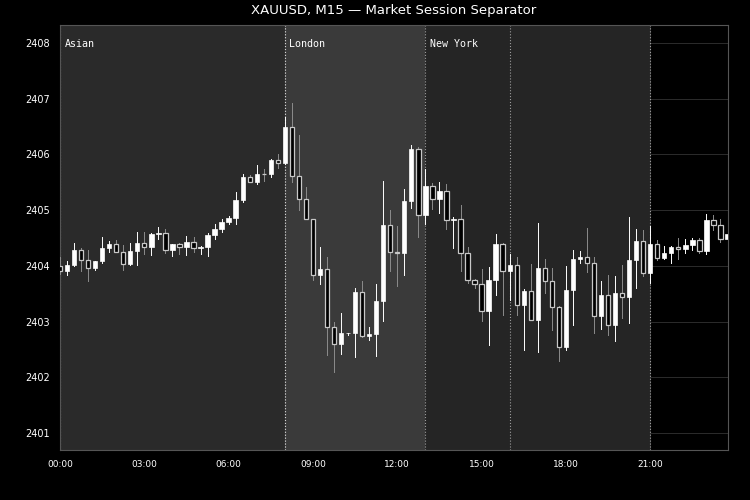
Şekil 1. XAUUSD M15 grafiğinde gölgelendirilmiş ve birbirinden ayrılmış Asya, Londra ve New York seansları. Code Base görsel yönergelerine (750×500 px) uygun olarak siyah-beyaz olarak işlenmiştir.
MetaQuotes Ltd tarafından İngilizceden çevrilmiştir.
Orijinal kod: https://www.mql5.com/en/code/76715
Sensible Guide Confluence
H1 indicator that combines support/resistance confluence from H4, D1 and W1 with EMA trend alignment and candlestick confirmation. Shows non-repainting BUY/SELL arrows with ATR-based stop and reward/risk filtering.
 Global Variable Inspector: list, export, delete and restore terminal global variables with filters
Script that lists the global variables of the terminal with value, last access time and age, filtered by prefix, substring and age. It exports them to CSV, deletes the matching ones after a confirmation and a backup, and restores them from a CSV file.
Elliott Wave Auto Counter / Automatic Wave Labeling
Salınım pivot noktalarını otomatik olarak algılar ve kurallara uygun bir Elliott Dalga sayımını (1-2-3-4-5 itici dalga ve A-B-C düzeltme) Fibonacci bilgi paneli eşliğinde doğrudan grafik üzerinde etiketler. Bu yalnızca kılavuz amaçlıdır; her zaman manuel olarak doğrulayın.
Symbol Spec Auditor
A chart panel that shows the contract specification details that decide position size and trading cost (point value, spread cost, margin, swap, execution rules) in the account currency, warns about broker settings that silently break lot-size code, and exports the audit of every Market Watch symbol to CSV.