Tarnix Evenlock
- Утилиты
-
AL MOOSAWI ABDULLAH JAFFER BAQER
 To trade successfully we need to go through the proven path that others had gone and reached!
Here are 17 quotes from such successful investors:
1- Limit your size in any position so that fear does not become the prevailing instinct guiding your judgment.
Joe Vidich - Версия: 1.0
- Активации: 5
A BREAKEVEN STOP THAT STILL LOSES THE COMMISSION IS NOT BREAKEVEN. TARNIX EVENLOCK LOCKS THE REAL ONE.
Tarnix Evenlock is a breakeven lock for MetaTrader 5 that counts what the trade really costs. When a position in scope, opened by hand or by another Expert Advisor, has moved in its favour by the trigger you choose (N x ATR, stored the moment the trade is first seen, or a fixed number of points), its stop loss is moved to the entry plus a buffer that pays the spread cushion, the round-turn commission and any negative swap. If the market then comes back, the trade closes at net zero or better, not a few dollars in the red.
Built for traders on commission accounts (ECN, raw spread, prop-firm accounts) and for anyone who holds trades overnight, where a classic "move stop to entry" quietly turns into a small loss after commission and swap. One promise: a stop is only ever tightened, never loosened. In the Strategy Tester runs below, 346 stop moves were made and the built-in check counted 0 loosened stops.
The rule in one line: when profit reaches the trigger, stop = entry + spread + commission + swap + optional extra points; with the step lock on, every further X ATR in profit moves the lock by Y ATR.
From the Strategy Tester log (XAUUSD H1, 1 June 2026, trigger 0.8 x ATR, commission 7 USD per lot, extra 20 points): a gold sell opened at 4520.76 with its own stop at 4562.48. At 09:36 it was 1745 points in profit, past its trigger of 1660 points, and the stop was moved to 4520.30: entry minus a buffer of 46 points (19 spread + 7 commission + 20 extra). An hour later, 2832 points in profit, the step lock moved it again to 4511.99.
Works with: manual trades, other Expert Advisors and trade copiers on the same terminal (symbol scope and magic filter decide which trades are handled), hedging and netting accounts, every symbol (forex, gold, indices, crypto). It never opens a trade on your account, never closes one and never touches the take profit: it only moves the stop loss in the direction of profit.
Try it free first: run Tarnix Evenlock in the Strategy Tester with visual mode on. There it opens a small demo trade every third hour on weekdays, so you can watch each trade's bar fill up on its way to the trigger and its stop jump to net breakeven.
Why commission and swap matter: on a typical raw-spread account a round turn costs about 7 USD per lot. A trade "locked at entry" that comes back to the entry closes at minus 7 USD per lot plus the spread it paid; after three nights of negative swap on gold it is worse. Tarnix Evenlock reads the entry commission of the position from the account history (and doubles it for the exit), reads the swap the trade has collected so far, converts both into points for that symbol and lot size, and adds them to the stop distance. If your broker shows no commission in the history, one input lets you type the round-turn cost per lot.
Why the ATR is frozen at entry: the trigger is measured once, when the lock first sees the position, and kept for the life of the trade. A live ATR would stretch during a fast move and keep pushing the lock away exactly when the trade has run. A frozen ATR gives every trade a fixed, known target you can read on the panel from the first second.
Who this is NOT for: traders looking for an entry robot or a full trailing system with many modes. Evenlock does one job: protect the trade at its true breakeven, then optionally step the lock behind the price.
A worked example (default settings)
EURUSD, ATR(14) on H1 = 80 points when the trade opens, so the trigger is 1.0 x 80 = 80 points. A sell opens at 1.16502 with a stop at 1.16673. The panel bar starts at 0 percent and fills as price falls. At 16:05 the trade is 80 points in profit: the spread is 12 points, the account has no commission and no swap yet, so the stop moves to 1.16490 (entry minus 12 points). The row turns green, the state reads LOCKED and the action history shows LOCK. If price comes back up, the trade is closed by your broker at 1.16490: the spread is paid and nothing is lost. That example is a real line from the tester journal.
In short
- Trigger per position = multiplier x ATR(period, timeframe), stored at first sight and kept after a terminal restart; or a fixed trigger in points.
- Net breakeven buffer = spread cushion + round-turn commission + negative swap + optional extra lock points, each one can be switched on or off.
- Optional step lock: every further X ATR in profit the lock moves by Y ATR.
- Never loosens a stop: an existing tighter stop is left alone, and the stop is read again right before every change.
- Only positions opened after you attached it are handled; one switch also includes positions that were already open.
- Alert-only mode: shows and announces where the stop would go, sends nothing.
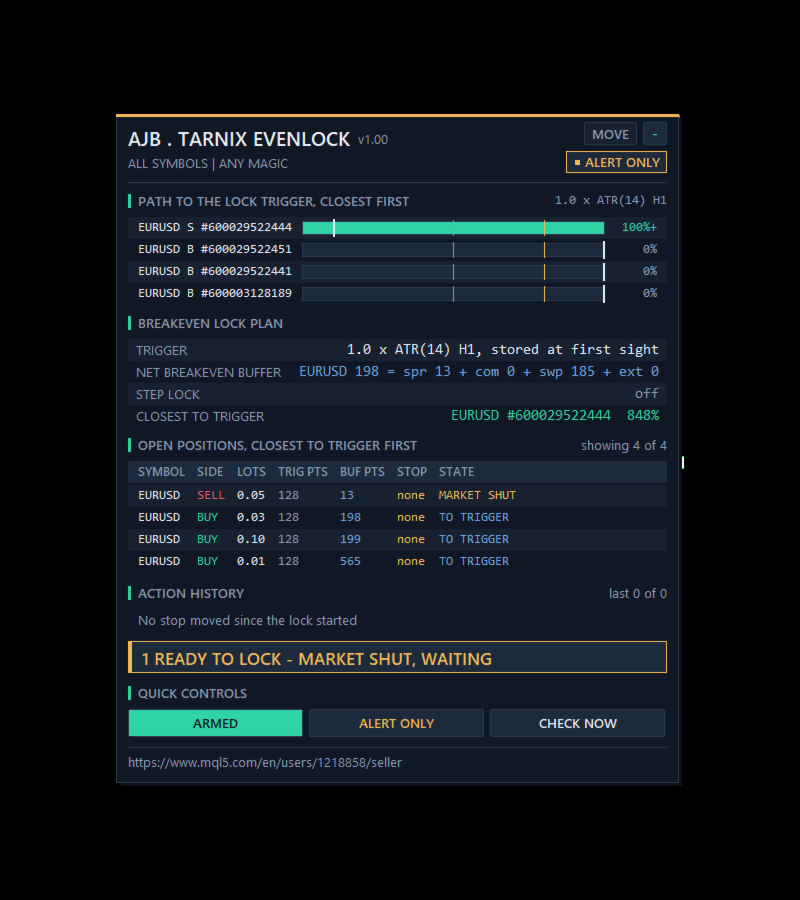
- Panel with real trading data: a path-to-trigger bar per position with a white notch where the buffer sits, the buffer split into spread, commission and swap, and the stop of every position.
- Not a grid, no martingale, no DLLs, no web requests.
START HERE
Attach it to one chart, for example EURUSD H1. One copy handles every symbol of the account unless you limit it. Turn on Algo Trading. To watch first, switch to ALERT ONLY with the panel button. The first setting to look at is the trigger: 1.0 x ATR is a calm default for intraday trades; lower it to 0.6 for scalps that should be protected early, raise it to 1.5 for swing trades that need room to breathe. If your account charges commission but the history shows 0, type your round-turn cost per lot into InpCommissionPerLot.
How one position is handled
First sight. The lock sees a new position in scope, measures ATR on its symbol and timeframe and reads its commission; both are stored with the position id.
On the way. On every tick and every second it measures how far price has moved in favour of the trade (bid for a buy, ask for a sell) and shows it as a percent of the trigger. At 80 percent the bar turns amber and the state reads NEAR TRIGGER (one optional alert).
Lock. At the trigger the stop loss moves to entry plus the net breakeven buffer. The stop always stays at least the broker's stops level and freeze level away from the price; if the buffer does not fit yet, the state reads TOO CLOSE TO LOCK and it waits.
Steps. With the step lock on, every further step in profit moves the lock again. A level that was already set is not moved again just because the spread widened by a point.
Already tighter. If your own stop is already better than the lock, nothing is changed and the state reads SL ALREADY TIGHTER or LOCKED.
From earlier. A position opened before the lock was attached is shown with a grey bar and BEFORE START, and is never touched unless you turn on InpIncludeExisting.
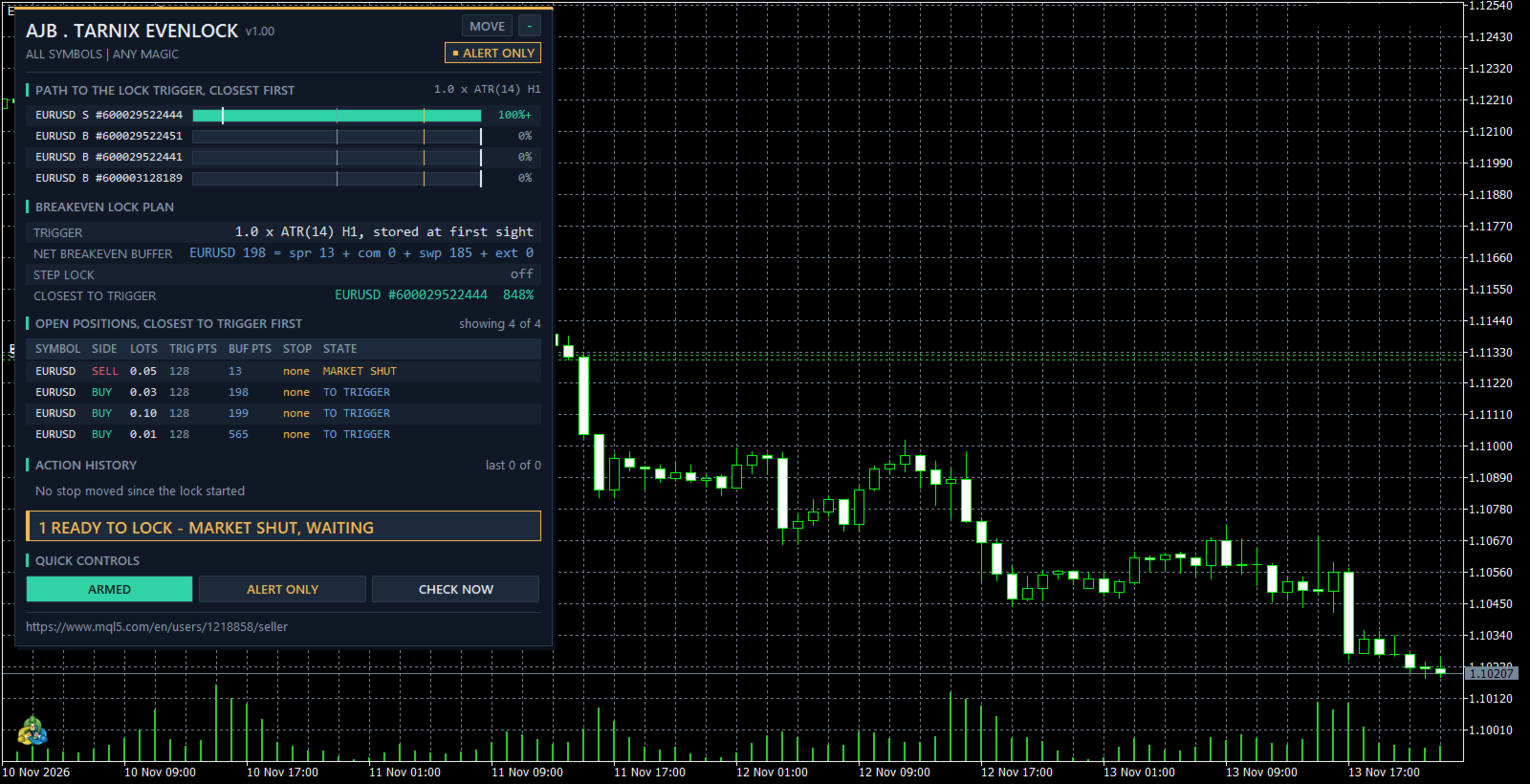
Market closed. Nothing is sent while the symbol session is closed or the quote is older than 5 minutes; the banner reads READY TO LOCK - MARKET SHUT, WAITING and the stop is moved when trading opens.
Safety patterns inside
Before any change it checks that Algo Trading is allowed, that the symbol session is open and that the last quote is fresh. Right before each change the position is selected again, its symbol, magic and position id are compared with the plan, and its current stop is read again: if the new stop would not be tighter, nothing is sent. After a change the stop is read back and compared, and the tester summary prints how many stops moved the wrong way (0 in every run). A refused change is retried with a growing pause up to 2 minutes, with one alert after a set number of failures. The ATR, the commission and the lock level are kept in GlobalVariables whose keys contain the chart symbol, the magic filter, the magic number and the position id, so two copies never share a key and a restart neither changes the trigger nor repeats a lock. Wrong input values stop it at start with a clear message instead of guessing.
Inputs, every one explained
BREAKEVEN LOCK RULES
InpMode = 1. 0 alert only, 1 lock (move the stop loss).
InpAtrTF = H1. Timeframe of the ATR; the current chart timeframe can be chosen too.
InpAtrPeriod = 14. Number of closed bars in the ATR.
InpTriggerAtr = 1.0. The lock is set when the trade is this many ATRs in profit.
InpTriggerPts = 0. A trigger in points instead of ATR; 0 = use the ATR.
InpCoverSpread = true. Adds the current spread to the buffer as an exit cushion.
InpCoverCommission = true. Adds the round-turn commission (entry commission from the history, doubled).
InpCommissionPerLot = 0. Round-turn commission per lot in account currency, used when the history shows less; 0 = history only.
InpCoverSwap = true. Adds a negative swap the trade has collected; a positive swap is never used to loosen the lock.
InpExtraLockPts = 0. Extra points locked beyond net breakeven.
InpIncludeExisting = false. Also handle positions that were already open when you attached it.
STEP LOCK
InpStepLock = false. Step lock after the breakeven lock.
InpStepAtr = 0.5. Every further X ATR in profit ...
InpStepLockAtr = 0.5. ... the lock moves by Y ATR (not more than the step).
EXECUTION
InpFailAlertAt = 3. One alert after this many failed attempts.
FILTER - WHICH TRADES ARE COUNTED
InpSymbolScope = all symbols or the chart symbol only. InpMagicFilter = any magic, only manual trades (magic 0), or only the magic number InpMagic.
ALERTS
InpAlertPopup = true. InpAlertPush = false (push to the MetaTrader app on your phone). InpAlertNear = false (one alert when a position reaches 80 percent of its trigger). Every lock is written to the journal and, with pop-up on, announced.
PANEL
ShowPanel = true. PanelX = 12, PanelY = 15, PanelFontSize = 9, MaxTableRows = 6, MaxHistoryRows = 4. The MOVE button drags the panel; on a short chart it drops its least important rows first.
STRATEGY TESTER DEMO
InpTesterDemo = true. Strategy Tester only: Monday to Friday one demo trade every third hour (01, 04, 07 ... 22) with a stop 2 ATR and a take profit 3 ATR away, at most 5 open, margin checked x 1.5, closed after 1 day, stopped after a 20 percent balance loss. This code never runs on a live or demo chart.
The panel
PATH TO THE LOCK TRIGGER, CLOSEST FIRST: one bar per position with symbol, side and ticket, grey below 50 percent, blue past 50, amber past 80, teal at the trigger and solid green once locked, with a white notch showing where the net breakeven buffer sits on the way. BREAKEVEN LOCK PLAN: the trigger rule, the buffer of the first position split into spread, commission, swap and extra points, the step lock, the position closest to its trigger, how many are locked now, stops moved, open profit, mode, last action, Algo Trading, failed sends and totals. OPEN POSITIONS: symbol, side, lots, trigger in points, buffer in points, current stop and state, with a green edge on locked rows. ACTION HISTORY lists every lock, step, alert and button press with server time. QUICK CONTROLS: ARMED or PAUSED, the mode button and CHECK NOW. The right side of the chart stays clear.
Common questions
Does it replace my stop loss? No. It moves your stop on the broker's server, so once a lock is set it also works when your terminal is off. Before the trigger it does nothing to your stop.
Will it make my stop wider? Never. A stop is only moved in the direction of profit.
Does it open or close trades? No. On a live or demo chart it only modifies the stop loss. Demo trades exist only inside the Strategy Tester.
What if my broker shows no commission in the history? Type your round-turn cost per lot in InpCommissionPerLot; the larger of the two is used.
What it cannot do
A stop is a market order once it is hit, so a gap or a fast spike can fill beyond it; the spread cushion and the extra points give room for that, but no tool can promise a fill price. Swap that is charged after the lock is set is covered only by the next step; switch the step lock on or add extra points for trades you hold for many nights. It only moves stops while it runs: keep the terminal on, for example on a VPS.
What was and was not tested
Tested in the Strategy Tester on a hedging account, 1 to 30 June 2026, 1-minute OHLC, H1, deposit 10000, leverage 100, with no journal error and no failed send. EURUSD defaults: 160 demo trades, 83 breakeven locks, 0 loosened stops. XAUUSD with a 0.8 x ATR trigger, step lock 0.5 / 0.4 ATR, 7 USD commission per lot and 20 extra points: 166 demo trades, 114 breakeven locks, 149 step moves, 97 near-trigger alerts, 0 loosened stops. On a demo chart the panel ran in alert-only mode with InpIncludeExisting on, beside 4 EURUSD positions from earlier, on a weekend with the market closed: one was past its trigger and waiting, nothing was sent.
Not tested at the time of writing: real stop changes on a live or demo broker, retries after a broker refusal, commission read from a real broker history (the tester used the per-lot input), chart symbol scope, magic filters, pop-up and push alerts and a terminal restart. These paths exist in the code and are described by design. Please try them on a demo account with your own broker first.
Try it in the Strategy Tester
Choose Tarnix Evenlock, EURUSD or XAUUSD, H1, any recent month, visual mode, and press Start. Watch the bars fill, the stops jump to net breakeven and, with the step lock on, follow the price.
If the lock saved a trade from turning into a small loss, or you think it should treat a case differently, an honest review on the product page helps other traders decide and tells me what to improve next.