Position Time Exit Manager
- Утилиты
-
AL MOOSAWI ABDULLAH JAFFER BAQER
 To trade successfully we need to go through the proven path that others had gone and reached!
Here are 17 quotes from such successful investors:
1- Limit your size in any position so that fear does not become the prevailing instinct guiding your judgment.
Joe Vidich - Версия: 1.0
- Активации: 5
EVERY TRADE GETS AN EXPIRY DATE - AND THIS UTILITY ENFORCES IT
Position Time Exit Manager is a trade-management utility for MetaTrader 5. It never opens a trade of its own. It watches the positions you choose and closes them, completely or by a percentage, the moment they have been open longer than you allow, before the Friday weekend gap, or at a fixed server time each day.
See it working before you decide: load the utility in the MetaTrader 5 Strategy Tester with visual mode ticked. Inside the tester only, it places a few minimum-size demonstration positions so you can watch the age bars fill, the countdown run down to zero and each exit land in the journal. Nothing of this kind ever happens on a live or demo chart.
- Maximum hold time in minutes, with an optional profit-only or loss-only condition.
- Full exit or partial exit by percent; after a partial cut the remainder starts a fresh hold window.
- Friday cutoff and daily close time, both in broker server time.
- Early warning a chosen number of minutes ahead, as a terminal alert and/or a push message to your phone.
- Live panel: every tracked position with age, time left, P/L and a coloured age bar, plus a ticking NEXT EXIT countdown.
- Filters for this symbol or the whole account, one magic number or all, with or without manual trades.
THE PROBLEM IT SOLVES
Most trading plans say something about time: a scalp that has not worked within an hour is no longer a scalp, an intraday idea should not sleep through the rollover, and a swing position should not be left exposed to a Monday opening gap. Writing that rule down is easy. Remembering it at 23:55, or while you are away from the screen, is the hard part. Positions that were meant to last minutes quietly turn into positions that last days, collecting swap and drifting away from the reason they were opened.
This utility takes that one job off your hands. It does not judge entries, does not move stops and does not try to forecast the market. It reads the clock, compares it with the rule you set, and acts when the time has come.
GETTING STARTED IN FIVE MINUTES
- Attach: drop it on any chart. The chart symbol matters only when SymbolScope is set to this chart's symbol.
- Allow algo trading: the utility needs permission to close positions. If it is missing, the panel turns red and says so.
- Pick the scope: leave MagicFilter at 0 to look after every position, or enter the magic number of one Expert Advisor to manage only its trades.
- Watch before you arm: set StartArmed to false, or press the ARMED button once, to run in scan-only mode. The panel shows every countdown, yet nothing gets closed.
- Arm it: press the button again when the countdowns look right to you.
HOW AN EXIT IS DECIDED
1. Collecting. Every second the utility lists the open positions that pass your symbol and magic filters. Positions outside the scope are never touched and never shown.
2. Scheduling. For each position it calculates up to three deadlines: opening time plus MaxHoldMinutes, the first Friday cutoff after the position was opened, and the first daily close time after it was opened. The earliest active one wins and becomes the position's exit time, together with a reason label (MAX HOLD, FRIDAY or DAILY).
3. Warning. When a position enters the warning window it is announced once, with ticket, symbol, reason, remaining time and current P/L.
4. Checking the condition. For a hold-time exit you may require profit (optionally above a minimum amount of money) or loss. If the condition is not met when the time is up, the row reads WAIT and the position stays open until the condition becomes true or a calendar exit takes over. Calendar exits ignore the condition unless you ask otherwise.
5. Closing. The close is sent with the filling mode your broker supports for that symbol, within your slippage limit, and is retried on requotes. When it still fails, for example because the market is closed, the position is left alone for a cooldown period and then tried again, so the journal is never flooded.
PARTIAL EXITS DONE PROPERLY
With ClosePercent below 100, the hold-time rule takes only part of the position. The volume is rounded down to the symbol's lot step and is never smaller than the minimum lot. If what would remain is too small to exist on its own, the whole position is closed instead of leaving an orphan that cannot be traded. After each cut the remainder gets a brand-new hold window, so a 50 percent setting halves a long-running trade at every interval until it is gone. Friday and daily exits always close the full volume.
THE PANEL
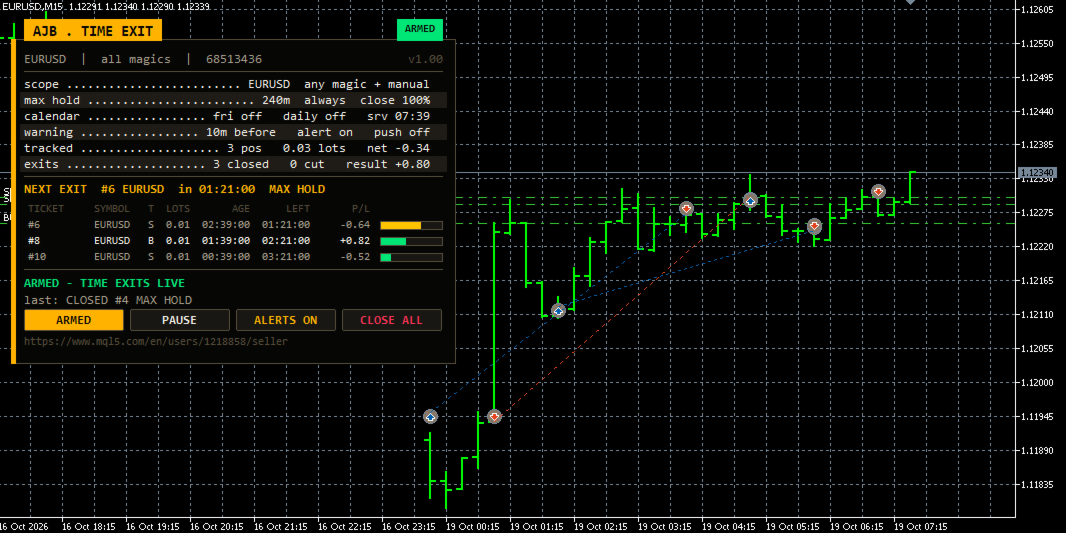
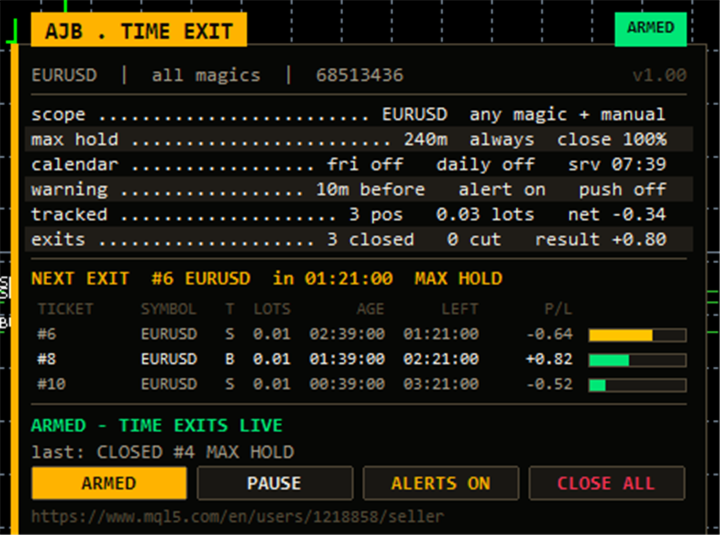
The panel sits in the top-left corner, keeping the right side of the chart and the price scale free. It shows the account number, symbol and magic filter; the active scope; the hold rule with its condition and percent; the calendar exits beside the current server time; the warning settings; the tracked count with total lots and net P/L; and a running tally of exits, cuts and their combined result.
Below that, the gold NEXT EXIT row counts down second by second to the very next exit and turns amber inside the warning window and red when the exit is due. Each position row lists ticket, symbol, side, lots, age, time left and P/L, followed by an age bar that fills from green to amber to red as the deadline approaches. Four buttons switch ARMED / SCAN ONLY, PAUSE / RESUME, mute or unmute alerts, and CLOSE ALL, which needs a second click within six seconds as confirmation. The panel measures its own text, shrinks or drops rows on small screens, and is not drawn at all during non-visual optimisation.
INPUTS, ONE BY ONE
Scope
- SymbolScope - watch only the chart's symbol, or every symbol on the account.
- MagicFilter - magic number to look after; 0 accepts any magic number.
- IncludeManual - also manage positions opened by hand (magic 0). Default on.
- StartArmed - start ready to close (true) or in scan-only mode (false). Your later button choice is remembered.
Maximum hold time
- MaxHoldMinutes - how long a position may stay open, in minutes (240). 0 disables the rule.
- CloseCondition - always close, close only in profit, or close only in loss when the time is up.
- MinProfitMoney - with the profit-only condition, the smallest profit in account currency that counts (0 = any profit).
- ClosePercent - share of the volume closed when the time is up, from 1 to 100 (100 = full exit).
Calendar exits
- FridayCloseEnabled - close positions before the weekend. Off by default.
- FridayCutoffTime - Friday cutoff as HH:MM in server time (21:00).
- DailyCloseEnabled - close positions at the same time every day. Off by default.
- DailyCloseTime - daily close time as HH:MM in server time (23:30).
- CalendarUsesCondition - also apply the profit/loss condition to Friday and daily exits.
Early warning
- WarnMinutesBefore - minutes ahead of an exit when the warning fires (10); 0 turns warnings off.
- WarnAlert - show the warning as a terminal alert window.
- WarnPush - send warnings and exit messages to the MetaTrader app on your phone (MetaQuotes ID must be set in the terminal options).
- NotifyOnClose - write a message whenever a position is closed or cut.
Execution
- SlippagePoints - accepted price deviation in points (20).
- MaxRetries - attempts per close before giving up for now (3).
- RetryDelayMs - pause between those attempts in milliseconds (400).
- FailCooldownSec - seconds to wait after a failed close before trying that position again (30).
Strategy Tester
- TesterDemoTrades - only inside the Strategy Tester: opens minimum-lot demonstration positions so the exits can be observed. Ignored on every real chart.
Panel and chart
- ShowPanel - show or hide the panel.
- PanelX, PanelY - distance from the chart edges in pixels.
- PanelFontSize - base font size (9); it shrinks automatically when the window is too small.
- ShowArabic - add Arabic captions under the console rows and the status line.
- ShowAgeBars - draw the coloured age bar beside each position.
- MaxTableRows - most position rows listed (13); the rest are counted in a "more" line.
- PanelCorner - move the panel to another corner if your chart is busy there.
QUESTIONS TRADERS ASK
Can it run next to my Expert Advisor? Yes. Put the utility on its own chart, enter that EA's magic number and switch IncludeManual off, and it will manage only that EA's positions. Several copies with different magic numbers can run side by side; panel objects and saved values are keyed to account, symbol and magic, so they never mix.
Which clock does it use? Broker server time, the same time shown in Market Watch. The panel prints it on the calendar row so you can check your HH:MM values.
What if the terminal was off when a deadline passed? On the next start the overdue position is seen at once and closed on the first opportunity, provided the market is open.
Hedging and netting accounts? Both are supported. No DLLs and no extra files are needed.
WHAT TO EXPECT
A time exit is a discipline tool, not a profit engine. It can close a position just before price would have turned in your favour, and it can lock in a loss that a little more patience might have repaired; that is the price of a rule that is actually followed. Spreads widen near rollover and on Friday evenings, so leave a margin before those moments. Test your chosen times and percentages in the Strategy Tester on your own broker's data before you rely on them live.
When the utility has been running on your charts for a while, an honest review telling other traders what worked for you and what did not is genuinely appreciated. It is the most useful feedback for shaping the next version.