Grid Momentum EA
- Эксперты
-
AL MOOSAWI ABDULLAH JAFFER BAQER
 To trade successfully we need to go through the proven path that others had gone and reached!
Here are 17 quotes from such successful investors:
1- Limit your size in any position so that fear does not become the prevailing instinct guiding your judgment.
Joe Vidich - Версия: 3.10
- Активации: 5
Grid Momentum EA: Momentum-Armed ATR Dual Grid Expert Advisor with Fragment Closing for MT5
Stop running blind, fixed-step grids. Grid Momentum EA v3.10 hands the timing of every grid cycle to the classic Momentum indicator. When Momentum crosses its 100 baseline, the EA plants the first level; from there an ATR-spaced dual grid builds the ladder and a fragment closer harvests small profits by pairing old and new orders. It is an MT5 Momentum grid robot for traders who want entries with a reason and exits with a plan.
Test it for free. Run the demo version of Grid Momentum EA in the MT5 Strategy Tester on the symbol and timeframe you actually trade. Follow every level, partial close and banked profit on screen before you commit any capital.
Gift for buyers: send me a screenshot of your order and I will personally choose a free product from my catalogue to send you as a gift.
The idea in plain words
Most grid robots start whenever you press the button. Here the baseline cross is the starter pistol, and a 30-bar gate stops signals from stacking on top of each other. After the start the engine is mechanical and transparent: ATR sets the distance between levels, the lot ladder grows by a small additive step, and the fragment scanner closes combinations of orders so the book stays light.
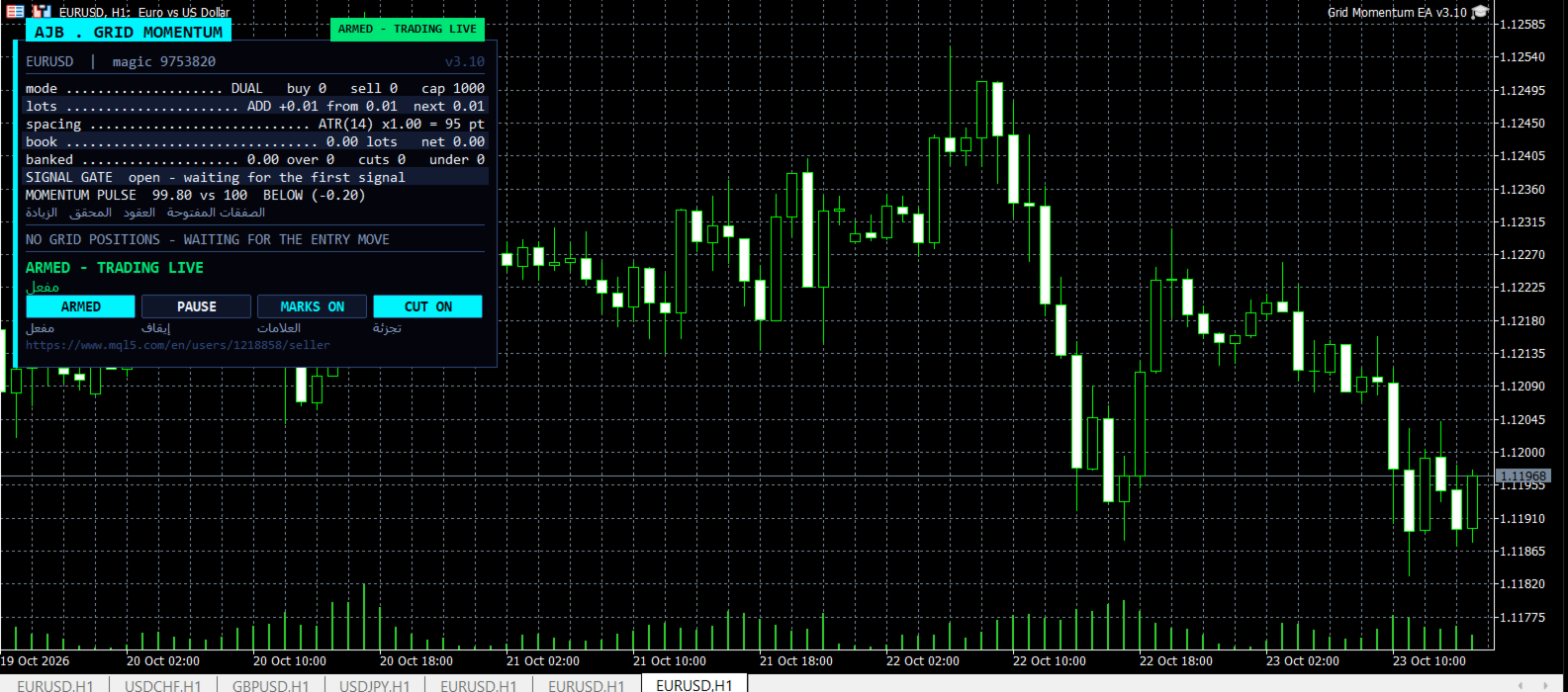
- Momentum-timed entries: a cross of the 100 baseline starts each cycle, and arrows on the candles show where.
- Independent BUY and SELL ladders, each with its own anchor, counter and plan.
- ATR spacing with floor and ceiling, so levels follow volatility.
- Fragment scanner plus target slicing: multi-order closures and partial closes of the oldest order bank profit step by step.
- Reopen guard prevents a closure that would instantly rebuild the same level.
- No stop loss and no forced close-all; protection blocks new levels through margin, risk and net-margin inputs.
- Free margin is verified before every level is sent, on hedging and netting accounts.
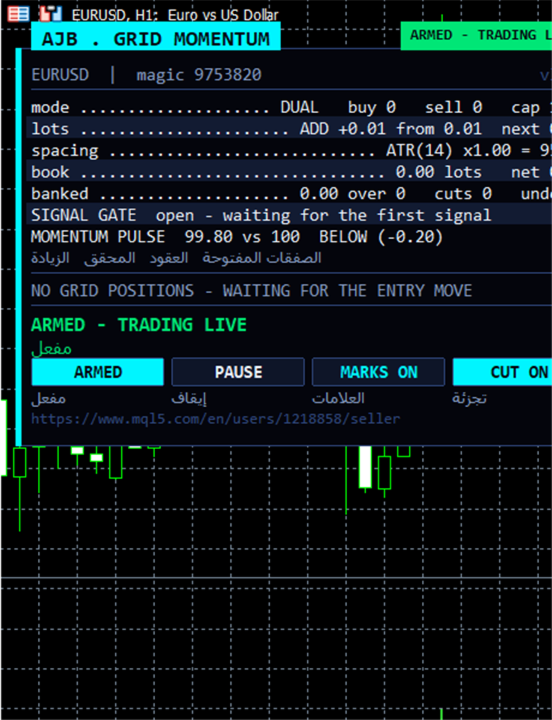
- MOMENTUM PULSE panel row shows the live Momentum value against 100 with an ABOVE / BELOW tag, and a SIGNAL GATE row counts bars to the next accepted signal.
- Cool excitonic-cyan panel on the left with an Arabic line under each label. The right side of the chart stays empty so price remains readable.
- Optional hedge cycle volume engine for IB and rebate traders, off by default.
Setup in minutes
- Drop Grid Momentum EA on one chart; EURUSD H1 is a gentle starting point, XAUUSD suits a bigger balance.
- Allow Algo Trading and keep the default inputs (first lot 0.01, additive step 0.01).
- To observe first, choose Scan only in RunMode; the EA plans and draws without sending orders. Press ARMED on the panel when ready.
- Panel buttons: ARMED / SCAN ONLY, PAUSE / RESUME, MARKS ON / OFF, CUT ON / OFF; CLOSE PLAN fires the displayed plan for a side.
- Give each chart its own magic number and run on a VPS for uninterrupted cycles.
Inputs, one by one
Grid. TradeMode picks dual or single-side grid. GridSpacePoints is the fixed distance in points when ATR spacing is off; GridSpaceMultiplier stretches each next level (1.0 keeps them equal). MaxGridLevels limits levels per grid and MaxTotalOrders caps orders per side. UpDirectionIsBuy chooses which side an upward move arms. EAMagicNumber and GridOrderComment tag the orders. OneOrderPerBar permits at most one new level per bar.
Lot ladder. InitialLotSize is the first lot. LotSizingMode selects additive (LotAddStep per level) or multiply (LotMultiplier per level). MaxOrderVolume caps any single order. UseAutoLot scales the first lot with the balance relative to AutoLotBaseBalance, and AutoLotAllowDecrease lets it shrink as well.
ATR spacing. GridSpacingMode switches fixed or ATR spacing. ATRTimeframe, ATRPeriod, ATRSpacingFactor and ATRBarShift define the measurement. ATRMinSpacingPts and ATRMaxSpacingPts set floor and ceiling. ATRFreezeOnStart locks one spacing for the entire cycle.
Profit target. DesiredProfitPerClosure is the base money banked per closure and ProfitMultiplier scales it. ProfitTargetMode selects fixed or scaled targets; ProfitVolumePower, ProfitDepthBonus, ProfitMaxMultiple and ProfitMaxReachFraction shape the scaled target and keep it reachable within a single grid step.
Fragment scanner. UseMultiLegScan searches multi-order closures before the plain pair. MaxOldestLegs and MaxNewestLegs bound a closure. ScanPriority ranks candidates, while NeverBankLessThanPair, RequireCloseVolumeExceedsTarget and MinCloseVolumeRatio keep every closure meaningful.
Target slicing. EnableTargetSlicing buys a slice of the oldest order when it cannot be closed whole. FragProfitWeightPower, FragMinSlicePercent, FragAllowMultiCloser and FragPreferFullClosure tune those partial closes.
Reopen guard. ReopenGuard and ReopenGuardCushion refuse closures that would immediately reopen a level.
Account protection. MinMarginLevelPercent blocks new levels under a margin level; MaxAccountRiskPercent blocks them above a floating loss percentage of balance (0 disables each). NetMaxMarginPercent limits the net position margin on netting accounts. All of them only block new levels and never close a trade at a loss.
Execution and verification. RunMode (Armed or Scan only), CloseSequence, MaxSlippagePoints, MaxSpreadPoints, MinSecondsBetweenClosures, CloseAttemptsPerLeg, VerifyTimeoutSeconds, DeferWhenMarketClosed, MarketClosedRetrySeconds, AutoResumeAfterSeconds, AbortIfBookChanged, UseFullCommission, CommissionPerLot and CloseOrderComment govern how closing legs are sent, verified and retried, so nothing stays half-closed.
Hedge cycle. EnableHedgeCycle turns the optional volume engine on. HedgeSymbols, HedgeSymbolRotation and HedgeMaxSymbolsInTester choose symbols; HedgeCycleLots and HedgeSliceLots size the pair and its slices; HedgeFragmentBonus, HedgeBonusIsPercent, HedgeMaxSurcharge and HedgeMaxSurchargePercent set what it adds to closure targets; HedgeMagicNumber, HedgeReopenOnFinish, HedgeStartRequiresTrade, HedgeIntegritySeconds, HedgeAutoRepair, HedgeNakedAction, HedgeMaxSpreadPoints, HedgeSlippagePoints, HedgeAttemptsPerLeg, HedgeVerifyTimeout, HedgeCommissionPerLot and HedgeOrderComment keep both legs equal and safe. It is off by default.
Weekly cash day. WeeklyCashDay, CashDayOfWeek and CashCutoffHour pause new cycles and slices around your withdrawal window.
Panel and chart. ShowPanel, PanelX, PanelY, PanelFontSize, PanelCorner, ShowArabic, ShowChartMarks and MaxTableRows control what is drawn and where.
Entry trigger. EntryTriggerMode chooses what arms the first level. SignalBarShift selects the bar read, SignalBarsDelay sets the minimum bars between accepted signals (30 by default), SignalValidBars keeps a signal alive for a few bars, SignalAllowBuy and SignalAllowSell enable each side, and SignalReverse flips the direction.
Momentum signal. InpMomPeriod sets the Momentum length (14 by default), InpMomPrice the applied price and InpMomTF the timeframe it is read on, so you can time a lower-timeframe grid with a higher-timeframe pulse. A cycle is armed when Momentum crosses its 100 baseline: up for a BUY, down for a SELL. InpShowSignalArrows draws an arrow on the candle where each signal armed. Optimise the period in the Strategy Tester for your symbol.
Debug. DebugMode writes a detailed journal of every decision.
Good to know
Grid trading rewards a well-funded account, a low-spread broker and patience. Start with small lots and test your exact settings in the Strategy Tester first. Past results never guarantee future results.
Remember: send me a screenshot of your order and I will personally pick a free product from my catalogue and send it to you as a gift.