Nguyen Thanh Trieu / 프로필
- 정보
|
1 년도
경험
|
20
제품
|
11
데모 버전
|
|
3
작업
|
0
거래 신호
|
0
구독자
|
시장 구조, 프라이스 액션 로직, 리스크 시각화, 커스텀 지표와 유틸리티를 주로 다룹니다.
깨끗한 코드, 안정적인 실행, 보기 쉬운 화면을 중요하게 생각합니다. 제품 하나마다 하나의 구체적인 문제를 해결합니다. 수익을 약속하지 않습니다.
좋은 도구는 당신을 대신해 결정하지 않습니다. 더 잘 보고 판단하도록 돕는 것입니다.
개발, 테스트, 유지보수는 모두 제가 직접 합니다. 아이디어가 있거나 맞춤 제작이 필요하시면 메시지 주세요. 함께 이야기 나눠보죠.
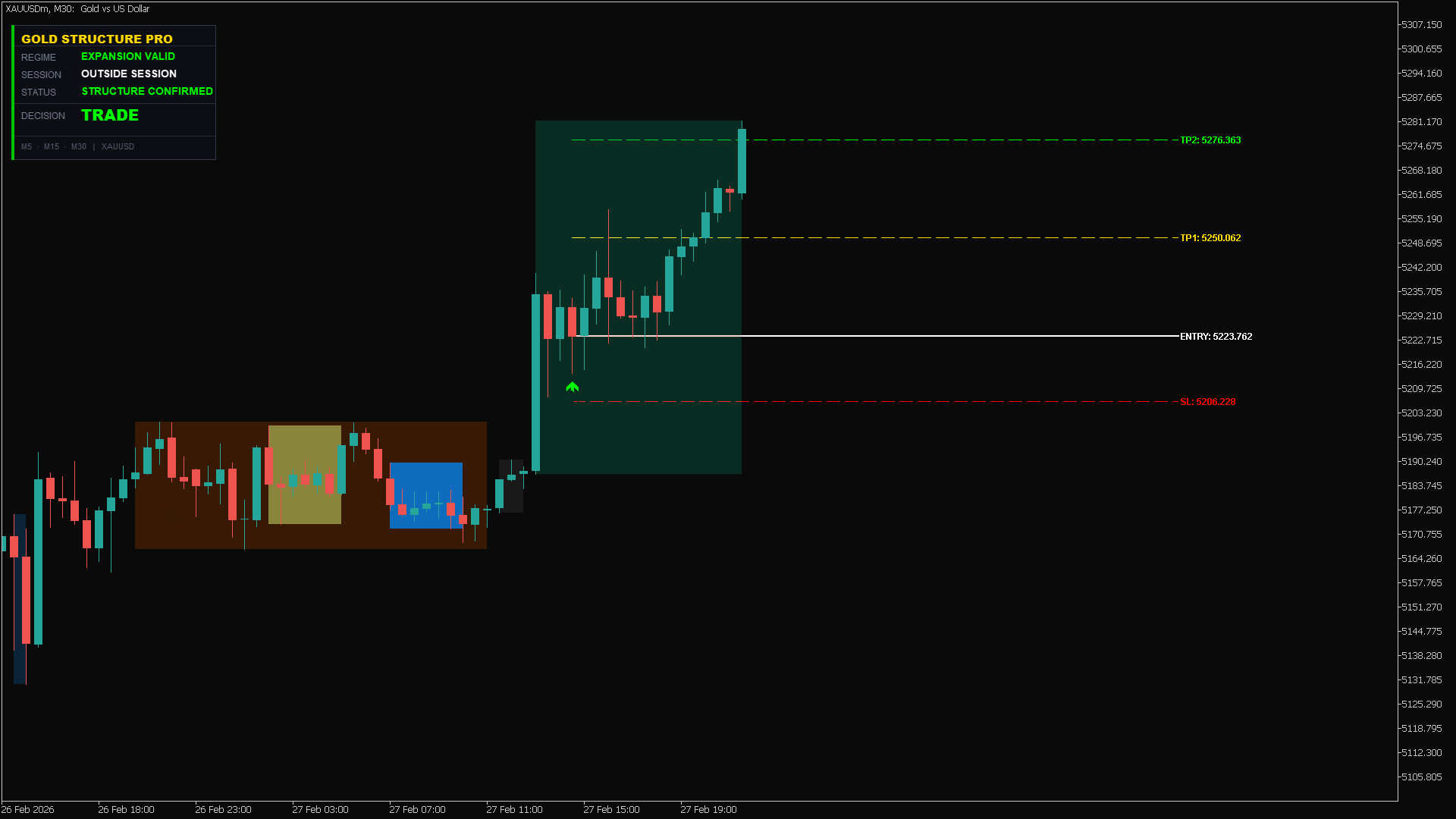
High-precision structure confirmation in action. As shown in the dashboard, the "Structure Confirmed" status gave us the green light to trade with confidence.
Asset: XAUUSD
Signal: Expansion Valid
Result: TP2 Hit perfectly 🎯
Stop guessing the trend. Let the algorithm do the heavy lifting.
👉 Try here: https://www.mql5.com/en/market/product/162441
Trade Command Center is now live on the MQL5 Market.
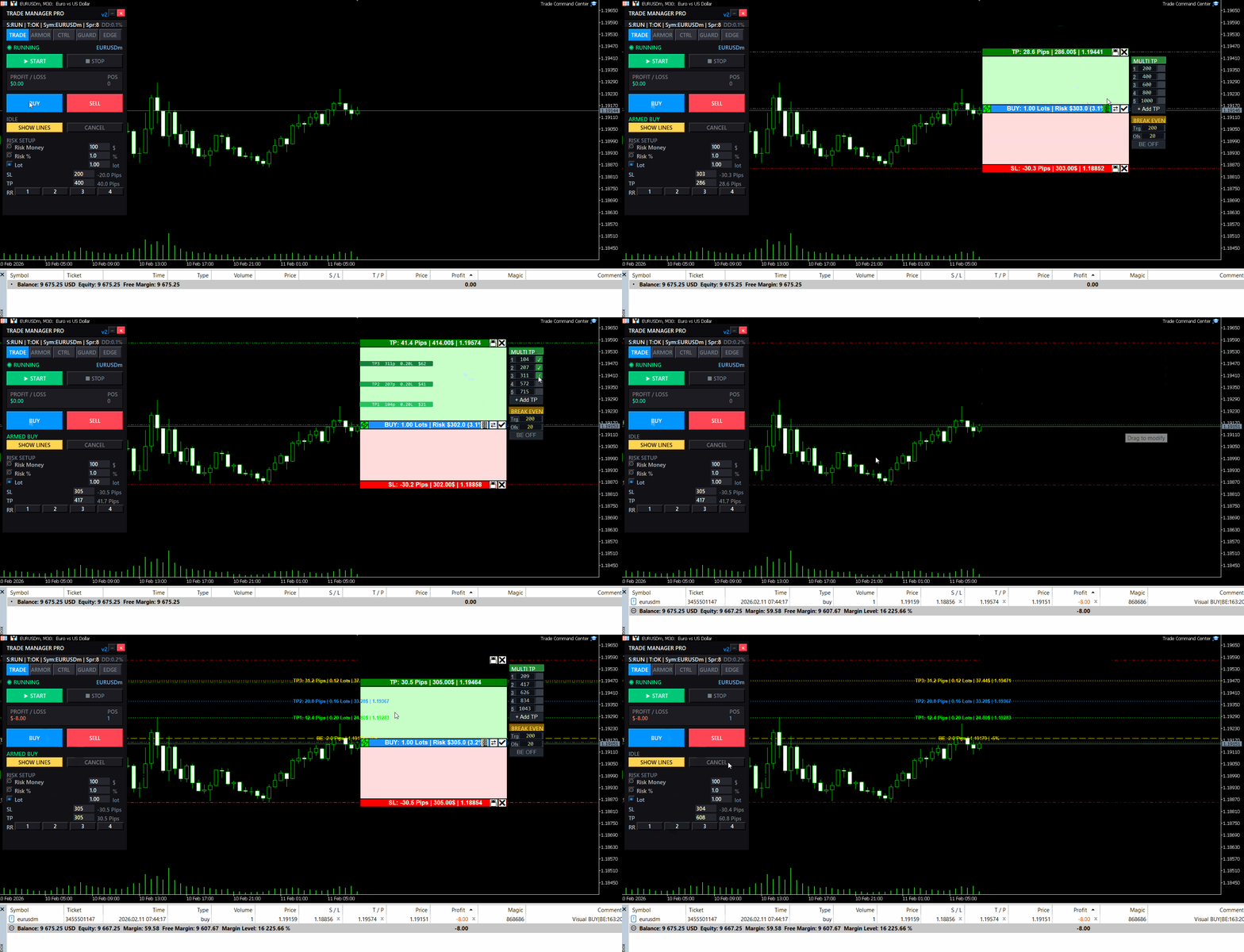
It is a visual trade execution and risk management panel built for manual traders who want precise control over every order.
What it does:
You place Entry, Stop Loss, and Take Profit directly on the chart as draggable boxes. The EA calculates your lot size automatically based on SL distance and your chosen risk mode (percent, dollar, or fixed lot). You see the exact dollar risk, pip distance, and R:R ratio before you click confirm.
Once the trade is open, automated management takes over:
- Break-even with per-trade override
- Trailing stop with step control
- Up to 5 partial take profit levels, each with its own trigger and close percentage
Risk Guard monitors your account across 6 timeframes: hourly, daily, weekly, monthly loss limits, equity drawdown percentage, and floating loss. A floating mini dashboard shows color-coded progress bars for each metric. When any limit is hit, all positions close immediately. Quick presets for FTMO and MFF rules are included.
Five tabs, one panel:
- TRADE — visual planning, risk calculator, one-click execution
- ARMOR — break-even, trailing, multi-level TP
- CTRL — position navigator, partial close, modify SL/TP, quick-close filters
- GUARD — drawdown limits, daily auto-close, advanced monitor
- EDGE — session stats, win rate, streaks, trade quality metrics
The panel uses chart objects.
It does not generate signals. It does not trade for you. It gives you the tools to execute and manage your own trades with precision.
Full feature demonstration available on the product page. Questions or feedback — use the Comments section.
Trade Command Center
👉 https://www.mql5.com/en/market/product/164935
추가 자료 및 안내서 설치 안내서 - 데모 계좌용 체험 버전 ; 공식 정보 공식 채널 판매자 프로필 랏 수 계산의 고민은 이제 그만. 모든 거래를 완벽하게 통제하십시오. 외부 계산기 웹사이트에서 랏 수를 계산하느라 15초를 낭비하다 눈앞에서 완벽한 진입 타점을 놓쳐본 적 있으신가요? 아니면 골드(XAUUSD)에서 랏 수를 잘못 입력해 단 한 번의 실수로 몇 주 동안 쌓아온 원칙과 수익을 허무하게 날려버린 적은 없으신가요? Trade Command Center (TCC) 는 여러분의 MetaTrader 5 차트를 전문가 수준의 트레이딩 콕핏으로 바꿔줍니다. 복잡한 암산과 계산기를 완전히 없애고, 강력한 하드 리스크 규칙으로 소중한 자본을 지키며, 차트 위에서 단 1클릭으로 즉각적인 주문 실행을 지원합니다. 초 단위로 승부하는 고속 스캘핑부터 여러 통화쌍의 스윙 트레이딩, 그리고 엄격한 드로우다운 규칙이 적용되는 프랍펌(Prop Firm) 펀디드 계좌 에 이르기까지, TCC는 주문
You know that feeling when you enter a clean setup, only to watch it reverse 30 seconds later?
Not because your analysis was wrong.
Because the spread spiked. Or news dropped. Or the session died. Or volatility exploded while you weren't looking.
The chart showed movement. But movement without the right conditions is just noise.
I built something for that.
Market Bias Monitor MT5 — a real-time regime classifier that reads the market environment and tells you when conditions are actually favorable.
Four regime states: TREND, RANGE, TRANSITION, HIGH RISK.
A composite quality score from 0-100.
When conditions turn hostile, it shows you exactly why — spread, news, volatility, session, regime shift.
Multi-timeframe bias panel (M5 to W1). You see when lower timeframes conflict with higher ones before you enter.
Visual structure layer: swing zones, compression detection, ATR corridors.
Post-volatility stabilization logic — it won't let conditions flip back to "favorable" immediately after a spike. Forces you to wait.
Execution history strip — shows the last 5 bars as green (favorable) or red (unfavorable). Most traders are surprised how rarely conditions actually align.
This doesn't generate signals. It doesn't predict direction. It doesn't place trades.
It classifies the environment. You decide what to do with that information.
Demo available for testing. Works in Strategy Tester visual mode.
👉 Link: https://www.mql5.com/en/market/product/163815
Questions welcome in the comments.
좋은 셋업. 잘못된 시장 상태. 거래는 실행되기 전에 무효화된다. 넓은 스프레드, 거래 시간 외 시간대, 변동성 급등, 그리고 고영향 뉴스와의 근접성은 실행 전에 우위를 파괴한다. Market Bias Monitor는 실시간 환경을 분류하고, 실행 품질을 0에서 100까지 평가하고, 조건이 변할 때 즉시 알려줍니다. 금(XAUUSD), Forex 통화 쌍, 그리고 지수를 M5에서 W1 타임 프레임에서 분석하는 재량 및 반자동 트레이더를 위해 설계되었습니다. 레짐, 세션, 스프레드, 뉴스 위험, 그리고 다중시간 프레임워크 편향 정렬을 실시간으로 모니터링합니다. 무엇을 보여주는가: 시장 레짐 분류: ATR 변동성과 이동 평균에서의 가격 편차를 사용하여 TREND, RANGE, TRANSITION 또는 HIGH RISK를 식별 — 불안정한 레짐 중 실행을 피할 수 있도록. Market Quality Score (0-100): 레짐, 스프레드, 변동성, 세션, 편향 명확성, 뉴스
| 상세내용의 질 | 5.0 | |
| 결과 확인의 질 | 5.0 | |
| 능력과 커뮤니케이션 스킬 | 5.0 |
Volume Pressure Meter MT5 캔들은 강해 보였습니다. 거래량은 높아 보였습니다. 당신은 돌파에서 진입했습니다. 가격은 몇 분 만에 반전되었습니다. 그 움직임에는 실제 참여가 없었습니다. Volume Pressure Meter는 기관이 보는 것을 보여줍니다: 가격 움직임 뒤에 실제 매수 또는 매도 압력이 존재하는지, 아니면 빈 거래량에 대해 거래하고 있는지. M5에서 H4 시간프레임에 걸쳐 금(XAUUSD), 지수 및 주요 외환 쌍을 분석하는 일중 및 스윙 트레이더를 위해 설계되었습니다. AI 패턴 인식 및 실시간 확률 계산을 갖춘 하나의 통합 시스템에 8개의 기관급 거래량 분석 도구를 결합합니다. 표시 내용 HUD(헤드업 디스플레이) 인터페이스: 시그널 상태: 현재 시장 권장 사항(BUY, SELL, WAIT, AVOID)을 실시간으로 업데이트 압력 균형 게이지: 색상으로 구분된 강도로 매수자 대 매도자 참여도의 시각적 표현 시그널 점수: 여러 거래량 확인 요소를
리소스 및 빠른 링크 데모 버전 다운로드 PropFirm Risk Guard 는 거래 계정에 엄격한 리스크 관리 및 자본 보존 프로토콜을 적용하기 위해 설계된 고급 유틸리티입니다. 자동화된 규정 준수(컴플라이언스) 레이어로 작동하여 자산(에퀴티)이 미리 정의된 일일 및 전체 드로우다운 한도 내로 유지되도록 보장합니다. 드로우다운 가이드라인이 엄격한 계정, 자금 지원 챌린지 평가(프롭 펌 챌린지) 및 전문적인 자본 관리 요구 사항에 이상적입니다. 이 유틸리티는 차트나 통화쌍에 관계없이 계정 전체의 모든 포지션을 실시간(100ms마다)으로 모니터링합니다. 백그라운드에서 조용히 작동하며, 임계값에 도달하거나 초과할 때 자본 보호 작업을 실행합니다. --- 주요 기능 표 기능 카테고리 기술 사양 / 메커니즘 운용상 이점 드로우다운 가드 일일 및 전체 자산 손실을 실시간으로 추적(USD 또는 %) 한도 도달 시 모든 거래를 청산하여 계정 규칙 위반을 방지합니다. 자산 추적 잠금 트레일링
Hello traders, a friendly update is now available:
- Compact dialog UI docked to the right, stable on chart resizes
- Two-page Settings (Prev/Next) so the panel stays the same height
- Configure on the panel: Break-even (enable, trigger, offset), Trailing (enable, distance, step), Partial (enable, trigger, percent), default SL/TP,
- Your choices persist across timeframe/symbol changes and chart reloads
- Layout polish: cleaner spacing/alignment; lot block and Settings button slightly lower; dialog a bit wider
- Cleanup under the hood to keep things smooth and compliant
Tip: To keep only default SL/TP, leave Break-even, Trailing, and Partial all OFF.
Backwards compatible with previous behavior when features are enabled. Please test in the Strategy Tester or on a demo first. Thanks for your feedback and support!
👉 https://www.mql5.com/en/market/product/152607
Hello traders, a small update is now available:
- New toggles: Enable_BreakEven and Enable_Trailing
- Partial Close is off by default to avoid unintended closes
- Break-even and trailing only run when enabled (no auto SL move if disabled)
- Inputs are grouped for faster, cleaner setup
Tip: To keep only default SL/TP, set Enable_BreakEven = false, Enable_Trailing = false, Enable_Partial_Close = false.
Backwards compatible with previous behavior when features are enabled. Please test settings in the Strategy Tester or on a demo first. Thanks for your feedback and support!
👉 https://www.mql5.com/en/market/product/152607
Hello traders,
I’m excited to share the latest improvements to TradeManagerLite for MetaTrader 5. This update focuses on usability and clarity, making position management even more efficient.
What’s new:
- Added four quick lot adjustment buttons (+0.01, +0.1, -0.01, -0.1) for faster trade sizing.
- The lot adjustment buttons are now neatly aligned and sized for a cleaner panel layout.
- Font size for these buttons is reduced for a more compact appearance.
- Improved panel and button placement for better visibility and workflow.
- Enhanced break-even logic to help minimize loss from slippage when moving stops.
- Fixed all known compilation and UI errors for smoother operation.
Thank you for your feedback and support!
Updated version of the Volume Pressure Meter with additional features:
New Features:
- Visual Gauge Bar - Displays buy/sell pressure with a horizontal bar that changes color and size based on market pressure.
- Simplified Alerts - Alert system provides notifications when pressure crosses the 70% threshold.
- Performance Optimization - Code has been optimized for better performance when running on multiple charts.
- Smart Caching - Caching system reduces CPU usage for traders monitoring multiple timeframes.
The visual gauge displays market pressure with a green bar for buying pressure and red bar for selling pressure.
The indicator works with all symbols and timeframes. No repainting, no DLL dependencies.
Please provide feedback on the new visual gauge and any improvements you would like to see.
The update is available for download.
Smart Session Box 시드니, 도쿄, 런던, 뉴욕 거래 세션을 차트에 박스로 표시하고, 시장 시간과 카운트다운 라이브 패널을 제공합니다. 시장 시간 및 카운트다운 대시보드는 각 세션 시간을 UTC와 브로커 시간으로 보여줍니다. 진행 중인 세션은 마감까지 남은 시간을 표시하고, 강조된 줄에서 다음에 열리는 세션과 남은 시간을 보여줍니다. 참고용으로 도쿄, 런던, 뉴욕, 시드니 증권거래소 시간도 포함되어 있습니다. 세션 박스 각 세션은 고가와 저가 라인이 있는 박스를 그리며, 장중 지지와 저항으로 활용할 수 있습니다. 세션 겹침 구간은 음영 처리되어 하루 중 유동성이 가장 풍부한 시간대를 표시합니다. 종료된 세션의 고가나 저가를 가격이 돌파하면 돌파선이 그려집니다. 박스는 채우기 또는 테두리만 표시할 수 있습니다. 거래 세션 세션 겨울 UTC(기본값) 겹침 시드니 21:00 - 06:00 도쿄: 00:00 - 06:00 도쿄 00:00 - 09:00 런던: 08:00 -
수동으로 포지션을 관리하다 보면 늦은 청산, 감정적인 망설임, 그리고 손절가(SL) 누락으로 인한 불필요한 손실이 발생하기 쉽습니다. Trade Manager Lite 는 MetaTrader 5에서 열려 있는 모든 포지션의 손절매(Stop Loss), 익절매(Take Profit), 본전 이동(Break-Even), 트레일링 스탑(Trailing Stop), 분할 청산(Partial Close)을 전자동으로 제어해 주는 필수 포지션 관리 유틸리티입니다. PC에서 직접 주문하거나 MT5 모바일 앱으로 진입하든, 혹은 외부 지표나 신호로 진입하든 관계없이 Trade Manager Lite는 보호 설정이 없는 포지션을 즉시 감지하여 사전 설정된 리스크 보호 기준을 자동으로 적용합니다. 핵심 주요 기능 (무료 버전) 자동 SL & TP 세팅: 손절매나 익절매가 걸려있지 않은 포지션을 실시간으로 감지하여 설정된 포인트 거리로 자동 입력합니다. 스마트 본전 이동 (Break-Even)
Volume Pressure Meter breakdown tick volume to reveal the buying and selling pressure inside every candle. Unlike standard volume which only shows total activity, this indicator splits volume to show who is actually in control of the market. It helps you identify trend strength and spot potential reversals through volume divergence. Key Features: Pressure Gauge: Visual bar showing real-time Buy vs Sell percentages. Trend Bias: Automatically identifies if the market is dominated by Buyers or