Status of the EA after installation is "Not Passed".
Hi Babs, I think the error is due to too old terminal build, Nesco marked your value 3631 in red. The minimum value must be at least 3900. The terminal is being updated, and along with this, new technologies appear, some functions do not work in older versions, probably because an error appears. Therefore, it is recommended to update the terminal, it is not difficult, while large updates are not released so often, once every six months. Below I will show you how to check and install updates on your terminal.
hi bro, can you help to provide a sample set file?
I am not very clear about how to setup. Should I only attach to one single chart (EURUSD)? Will it trade GBPUSD as well when I only attached to EURUSD?
hi bro, can you help to provide a sample set file?
I am not very clear about how to setup. Should I only attach to one single chart (EURUSD)? Will it trade GBPUSD as well when I only attached to EURUSD?
And how do you calculate the Risk?
I recommend setting each strategy on a separate chart to track the individual result, but you can also set it on one chart. The main thing is that it should be in accordance with the symbol, that is, the strategy for EURUSD should be set on the EURUSD M5 chart. Many recommendations are already specified in the parameters of the EA.
Regarding risks, there are recommendations for each strategy. 0.01 lot for every 250 USD means that if you have 1000 USD, then the maximum lot is recommended 0.04, everything is simple 1000/250*0.01 Alternatively, you can simply select the MID or LOW risk in the settings, and the EA will set the risk itself.
An update with some more fixes will be released today. I apologize for the frequent updates within a few days after the release, but it's normal when it's a complex new project, there are always small errors, I think everything will be fixed in just a couple of days. If you have any problem, warnings or errors, please report it. Thanks for understanding.
Bought straight away for a good price! Installed it yesterday and after 1 trading day already over 1% in profit on a demo account! Stenvall algorithm on this EA seems a bit less agressive then the original on MT5 that is working amazing the last week with the provided settings. After adding the needed URL in MT5 everything seems to work well(IC markets) Thanks! Will trade on demo for at least this month.
I wonder if you can help. I have "1 problem" on the terminal, it appears to be related to DLL. If I check the box under options it appears, if I uncheck it also appears.
I recommend setting each strategy on a separate chart to track the individual result, but you can also set it on one chart. The main thing is that it should be in accordance with the symbol, that is, the strategy for EURUSD should be set on the EURUSD M5 chart. Many recommendations are already specified in the parameters of the EA.
Regarding risks, there are recommendations for each strategy. 0.01 lot for every 250 USD means that if you have 1000 USD, then the maximum lot is recommended 0.04, everything is simple 1000/250*0.01 Alternatively, you can simply select the MID or LOW risk in the settings, and the EA will set the risk itself.
bro, there's one thing that i am not very clear. about 'mid/low' auto risk setting part. how it calculate the finial lot size when changing mid/low? there's no concrete formular to it
I wonder if you can help. I have "1 problem" on the terminal, it appears to be related to DLL. If I check the box under options it appears, if I uncheck it also appears.
Many thanks
Hi Ahmed, you just need to re-attach the EA to the chart.
When automatic risk is enabled and MID or LOW or LOWEST is selected, the EA Nesco distributes PRE-set risk values for each strategy; These are just pre-prepared risks; AUTOMATIC: MID; Pilot R11 = 0.03; Stenvall = 0.04; Pilot R7 = 0.02; If you include all strategies, your risk will be equal to: 0.03+0.04+0.02=0.09 lot; If you include only one strategy (Pilot R11) then your risk will be: 0.03 lot;
The AUTOMATIC mode is designed more for risk distribution, since different strategies have different trading activity and danger; The AUTOMATIC mode means that if you enable all strategies at the same time, you will not go beyond the established risks;
What does CUSTOM mode mean?
This means that you can use individual risk settings for each strategy: CUSTOM mode: Pilot R11 Fixed lot & Risk = RISK; Value Risk / Lot = 0.1; This means that your lot will grow as the deposit increases, in the ratio of approximately 0.1 lot for every 1000 USD or equivalent;
CUSTOM mode: Pilot R11 Fixed lot & Risk = FIX LOT; Value Risk / Lot = 0.1; This means that your lot will be all the same in the amount of 0.1, regardless of the size of your deposit;
What does the information panel show ?
The information that is displayed on the panel is a priority and shows your real risk. As well as your total LOT for all strategies.
You can wreak havoc in the settings, set CUSTOM mode: Stenvall fixed lot 0.03; Pilot R11 risk 0.05; Pilot R7 fixed lot 0.01; after that, run this and panel will display what risk you are actually using, regarding your deposit and the deposit currency; And also what cumulative lot you are using;
I have recently purchased and installed the EA - I have few doubts
A. I read that that only 1 strategy will be implemented ! should i mark them all TRUE and the system will apply only one at a time? Currently R11 is true and rest all are false - please advise
B. If I am using only R11 how many trades should I expect per day. Its been over 1.5 hours and no trade has been made and therefore i am not sure if I have applied the EA correctly.
C. For testing I have put US$ 2000 and my screen looks like this, pls confirm all is in order. thanks
I have recently purchased and installed the EA - I have few doubts
A. I read that that only 1 strategy will be implemented ! should i mark them all TRUE and the system will apply only one at a time? Currently R11 is true and rest all are false - please advise
B. If I am using only R11 how many trades should I expect per day. Its been over 1.5 hours and no trade has been made and therefore i am not sure if I have applied the EA correctly.
C. For testing I have put US$ 2000 and my screen looks like this, pls confirm all is in order. thanks
Hello,
A)The choice of strategy remains on the trader's side as a risk, but if you just need recommendations, then I recommend that you install all 3 strategies EURUSD. Below, I attached a set file to this comment that has already included 3 strategies with low-risk . You just need to upload it to the EA.
B)Trading activity depends on market conditions, and can vary in a fairly wide range, you may not get a single trade in a few days or get 5-10 in one day.
A)The choice of strategy remains on the trader's side as a risk, but if you just need recommendations, then I recommend that you install all 3 strategies EURUSD. Below, I attached a set file to this comment that has already included 3 strategies with low-risk . You just need to upload it to the EA.
B)Trading activity depends on market conditions, and can vary in a fairly wide range, you may not get a single trade in a few days or get 5-10 in one day.
C)It seems you have everything set up perfectly!
thank you soo much.. could you pls also guide how to import the set file to EA.. thanks in advance
Hi can we use Nesco with other EAs? I can't find the setting for the Magic number so is the magic number automatically set? Is it possible for the Magic number to be manually set in future updates? Thanks in advance.
Berwyn Riveral #: Hi can we use Nesco with other EAs? I can't find the setting for the Magic number so is the magic number automatically set? Is it possible for the Magic number to be manually set in future updates? Thanks in advance.
Hello, Of course you can use this with other EA's. magic numbers are static, 14000, 14001, 14002..... It is not difficult to implement manual input, but, when using multiple strategies on a single symbol, you can get confused in the magic numbers and make a mistake, it was hidden in order to simplify the interface.
Yes of course. Expert List > Properties > Load settings > OK Screenshots below.
thankyou, i did exactly that but somehow unable to identify / see the new settings if applied correctly. I guess it would make the necessary changes automatically and i just need to deploy the EA again
Gaurav Arora #: thankyou, i did exactly that but somehow unable to identify / see the new settings if applied correctly. I guess it would make the necessary changes automatically and i just need to deploy the EA again
Nothing but a visual inspection. Below I attach a screenshot of what this set file looks like.
p.s. all settings in the EA are intuitive, and it is quite easy to understand what is responsible for what.


Status of the EA after installation is "Not Passed".
Status of the EA after installation is "Not Passed".
Hi Babs, I think the error is due to too old terminal build, Nesco marked your value 3631 in red. The minimum value must be at least 3900.
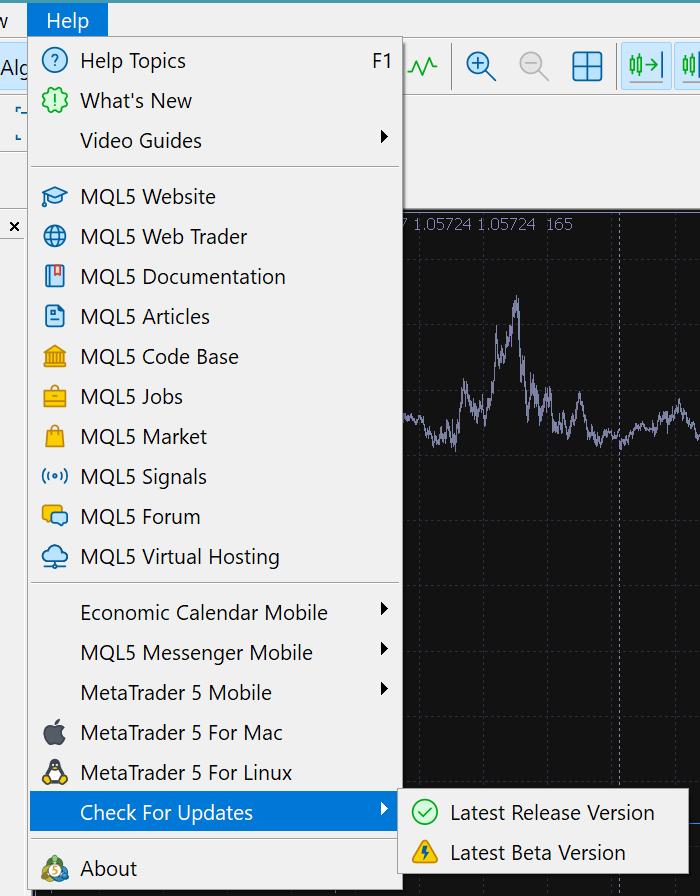
The terminal is being updated, and along with this, new technologies appear, some functions do not work in older versions, probably because an error appears. Therefore, it is recommended to update the terminal, it is not difficult, while large updates are not released so often, once every six months.
Below I will show you how to check and install updates on your terminal.
hi bro, can you help to provide a sample set file?
I am not very clear about how to setup. Should I only attach to one single chart (EURUSD)? Will it trade GBPUSD as well when I only attached to EURUSD?
And how do you calculate the Risk?
hi bro, can you help to provide a sample set file?
I am not very clear about how to setup. Should I only attach to one single chart (EURUSD)? Will it trade GBPUSD as well when I only attached to EURUSD?
And how do you calculate the Risk?
I recommend setting each strategy on a separate chart to track the individual result, but you can also set it on one chart. The main thing is that it should be in accordance with the symbol, that is, the strategy for EURUSD should be set on the EURUSD M5 chart.
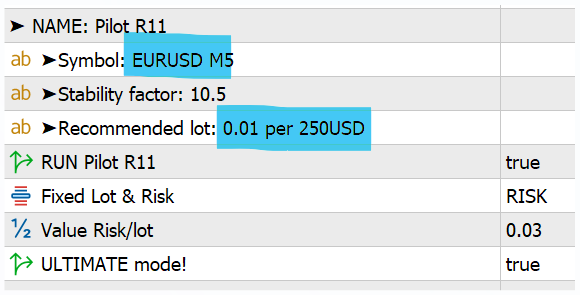
Many recommendations are already specified in the parameters of the EA.
Regarding risks, there are recommendations for each strategy.
0.01 lot for every 250 USD means that if you have 1000 USD, then the maximum lot is recommended 0.04, everything is simple 1000/250*0.01
Alternatively, you can simply select the MID or LOW risk in the settings, and the EA will set the risk itself.
I apologize for the frequent updates within a few days after the release, but it's normal when it's a complex new project, there are always small errors, I think everything will be fixed in just a couple of days.
If you have any problem, warnings or errors, please report it.
Thanks for understanding.
Hello Gennady,
I wonder if you can help. I have "1 problem" on the terminal, it appears to be related to DLL. If I check the box under options it appears, if I uncheck it also appears.
Many thanks
I recommend setting each strategy on a separate chart to track the individual result, but you can also set it on one chart. The main thing is that it should be in accordance with the symbol, that is, the strategy for EURUSD should be set on the EURUSD M5 chart.
Many recommendations are already specified in the parameters of the EA.
Regarding risks, there are recommendations for each strategy.
0.01 lot for every 250 USD means that if you have 1000 USD, then the maximum lot is recommended 0.04, everything is simple 1000/250*0.01
Alternatively, you can simply select the MID or LOW risk in the settings, and the EA will set the risk itself.
bro, there's one thing that i am not very clear. about 'mid/low' auto risk setting part. how it calculate the finial lot size when changing mid/low? there's no concrete formular to it
Hello Gennady,
I wonder if you can help. I have "1 problem" on the terminal, it appears to be related to DLL. If I check the box under options it appears, if I uncheck it also appears.
Many thanks
Hi Ahmed, you just need to re-attach the EA to the chart.
A frequent question about risks:
AUTOMATIC RISK
When automatic risk is enabled and MID or LOW or LOWEST is selected, the EA Nesco distributes PRE-set risk values for each strategy;
These are just pre-prepared risks;
AUTOMATIC: MID;
Pilot R11 = 0.03;
Stenvall = 0.04;
Pilot R7 = 0.02;
If you include all strategies, your risk will be equal to: 0.03+0.04+0.02=0.09 lot;
If you include only one strategy (Pilot R11) then your risk will be: 0.03 lot;
The AUTOMATIC mode is designed more for risk distribution, since different strategies have different trading activity and danger;
The AUTOMATIC mode means that if you enable all strategies at the same time, you will not go beyond the established risks;
What does CUSTOM mode mean?
This means that you can use individual risk settings for each strategy:
CUSTOM mode:
Pilot R11
Fixed lot & Risk = RISK;
Value Risk / Lot = 0.1;
This means that your lot will grow as the deposit increases, in the ratio of approximately 0.1 lot for every 1000 USD or equivalent;
CUSTOM mode:
Pilot R11
Fixed lot & Risk = FIX LOT;
Value Risk / Lot = 0.1;
This means that your lot will be all the same in the amount of 0.1, regardless of the size of your deposit;
What does the information panel show ?
You can wreak havoc in the settings, set CUSTOM mode:
Stenvall fixed lot 0.03;
Pilot R11 risk 0.05;
Pilot R7 fixed lot 0.01;
after that, run this and panel will display what risk you are actually using, regarding your deposit and the deposit currency;
And also what cumulative lot you are using;
I have recently purchased and installed the EA - I have few doubts
A. I read that that only 1 strategy will be implemented ! should i mark them all TRUE and the system will apply only one at a time? Currently R11 is true and rest all are false - please advise
B. If I am using only R11 how many trades should I expect per day. Its been over 1.5 hours and no trade has been made and therefore i am not sure if I have applied the EA correctly.
C. For testing I have put US$ 2000 and my screen looks like this, pls confirm all is in order. thanks
I have recently purchased and installed the EA - I have few doubts
A. I read that that only 1 strategy will be implemented ! should i mark them all TRUE and the system will apply only one at a time? Currently R11 is true and rest all are false - please advise
B. If I am using only R11 how many trades should I expect per day. Its been over 1.5 hours and no trade has been made and therefore i am not sure if I have applied the EA correctly.
C. For testing I have put US$ 2000 and my screen looks like this, pls confirm all is in order. thanks
Hello,
A)The choice of strategy remains on the trader's side as a risk, but if you just need recommendations, then I recommend that you install all 3 strategies EURUSD.
Below, I attached a set file to this comment that has already included 3 strategies with low-risk . You just need to upload it to the EA.
B)Trading activity depends on market conditions, and can vary in a fairly wide range, you may not get a single trade in a few days or get 5-10 in one day.
C)It seems you have everything set up perfectly!
Hello,
A)The choice of strategy remains on the trader's side as a risk, but if you just need recommendations, then I recommend that you install all 3 strategies EURUSD.
Below, I attached a set file to this comment that has already included 3 strategies with low-risk . You just need to upload it to the EA.
B)Trading activity depends on market conditions, and can vary in a fairly wide range, you may not get a single trade in a few days or get 5-10 in one day.
C)It seems you have everything set up perfectly!
thank you soo much.. could you pls also guide how to import the set file to EA.. thanks in advance
Yes of course.
Expert List > Properties > Load settings > OK
Screenshots below.
Hi can we use Nesco with other EAs? I can't find the setting for the Magic number so is the magic number automatically set? Is it possible for the Magic number to be manually set in future updates? Thanks in advance.
Hello,
Of course you can use this with other EA's.
magic numbers are static, 14000, 14001, 14002.....
It is not difficult to implement manual input, but, when using multiple strategies on a single symbol, you can get confused in the magic numbers and make a mistake, it was hidden in order to simplify the interface.
Yes of course.
Expert List > Properties > Load settings > OK
Screenshots below.
thankyou, i did exactly that but somehow unable to identify / see the new settings if applied correctly. I guess it would make the necessary changes automatically and i just need to deploy the EA again
thankyou, i did exactly that but somehow unable to identify / see the new settings if applied correctly. I guess it would make the necessary changes automatically and i just need to deploy the EA again
Below I attach a screenshot of what this set file looks like.
p.s. all settings in the EA are intuitive, and it is quite easy to understand what is responsible for what.
Nothing but a visual inspection.
Below I attach a screenshot of what this set file looks like.
p.s. all settings in the EA are intuitive, and it is quite easy to understand what is responsible for what.
bro this is my question is... no matter it changed from low to mid or high... the finial lot size still 2.39... so i just wondering what was changed?