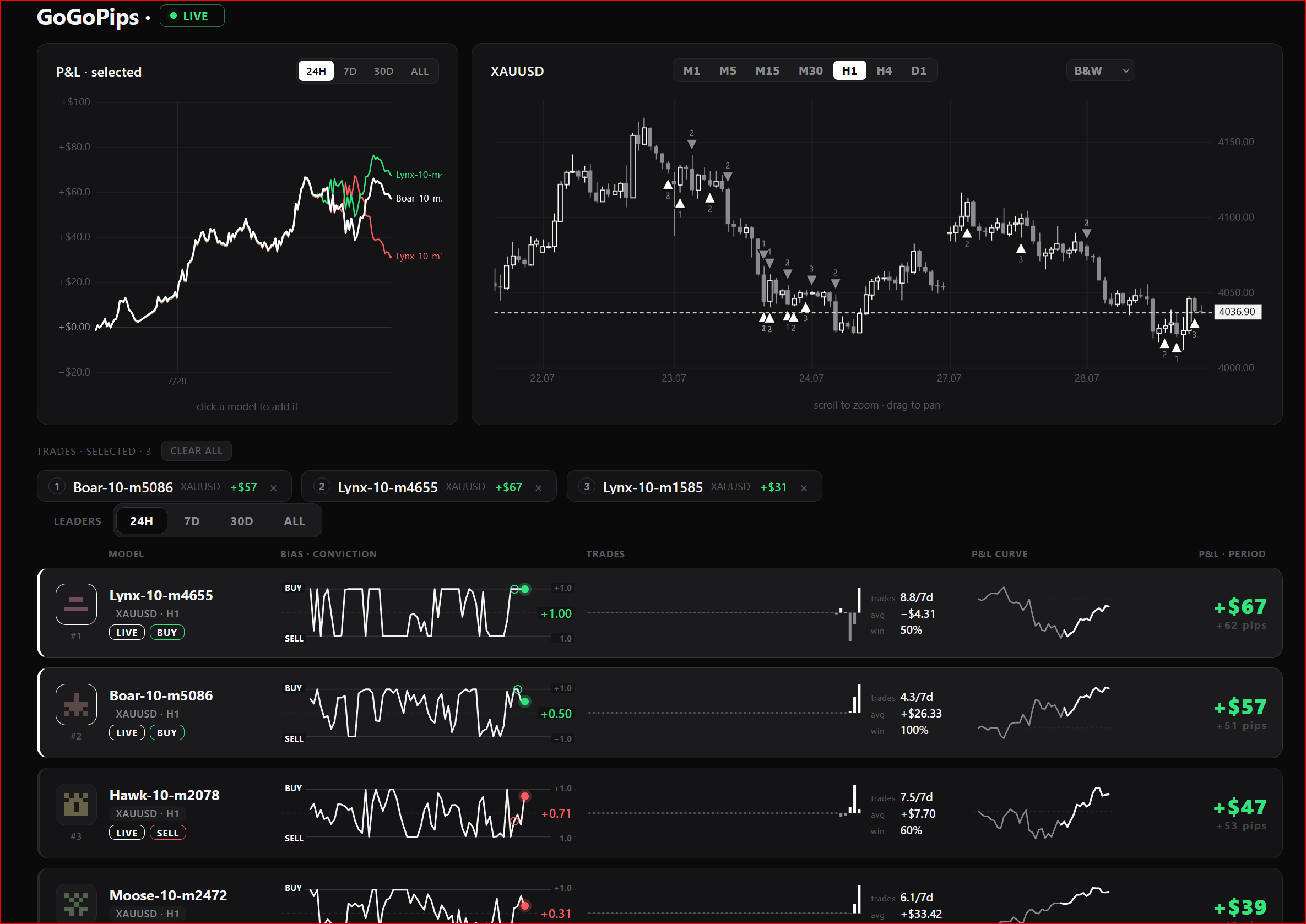
▫️100 models trading XAUUSD on a real account;
▫️ every trade visible live: entries, exits, P&L in dollars;
▫️model signals mirrored to the chat — free to follow;
▫️Hundreds of models by the end of the year;
Come watch How Machine Learning Is Trying to Beat the Market⚡️
🟢 Idea The idea is — it seems to me that exactly at 10:00 EURUSD always goes up. How can this be verified? This indicator analyzes historical data at the same hour of the day over the past N days and shows: ProbUp — the probability that after a given number of bars ( HorizonBars ) the price will be higher; ZEdge — the “strength” of the signal = average move / dispersion. This allows you to understand: “In 70% of cases, after 3 bars during this hour the market
심볼 XAUUSD (골드/미국 달러) 기간 (타임프레임) H1-M15 (임의) 단일 거래 지원 예 최소 입금액 500 USD (또는 다른 통화로 환산된 금액) 모든 브로커와 호환 가능 예 (2자리 또는 3자리 시세, 모든 계좌 통화, 심볼 이름, GMT 시간 지원) 사전 설정 없이 작동 가능 예 기계 학습에 관심이 있다면 채널을 구독하세요: 구독하기! Mad Turtle 프로젝트 주요 특징: 진정한 기계 학습 이 전문가 자문(Expert Advisor, EA)은 GPT 웹사이트나 유사한 서비스에 연결되지 않습니다. 모델은 MT5에 내장된 ONNX 라이브러리를 통해 실행됩니다. 처음 실행 시, 위조할 수 없는 시스템 메시지가 표시됩니다. CLICK 참조: ONNX (Open Neural Network Exchange). 자금 보호 사전 롤오버, 마이크로 스캘핑, 작은 표본의 좁은 범위 전략을 사용하지 않습니다. 그리드나 마틴게일 같은 위험한 전략을 사용하지 않습니다
The indicator is an analytical tool incorporating 37 different variations of moving averages developed by authors such as Patrick Mulloy, Mark Jurik, Chris Satchwell, Alan Hull, and others. It provides the capability for historical virtual testing. The indicator can be used on various instruments, including gold, cryptocurrencies, stock indices, currency pairs, and other assets. An integrated visual backtester allows users to simulate virtual trading positions, track results, and visually assess
-------------------------------------------------------------------------------------------------------------------
1)Add address 2)Attach the EA to the chart
3)Enable check box "Allow live trading"
4)Set lot
5)Set the maximum drawdown
6)Set the time zone
6)Change the magic number
7)Choose server1 or server2
8)Change: #close-on and #tradeban
Important: 1)if you want to change any settings, you need to remove it from the chart and re-install.
2)all settings are installed automatically from the server.