News Trade EA MT4

4.38
제가 몇 년 동안 사용하고 있는 유용한 로봇을 소개드립니다. 반자동뿐만 아니라 자동 모드로도 사용할 수 있습니다.
>>>Chat<<<
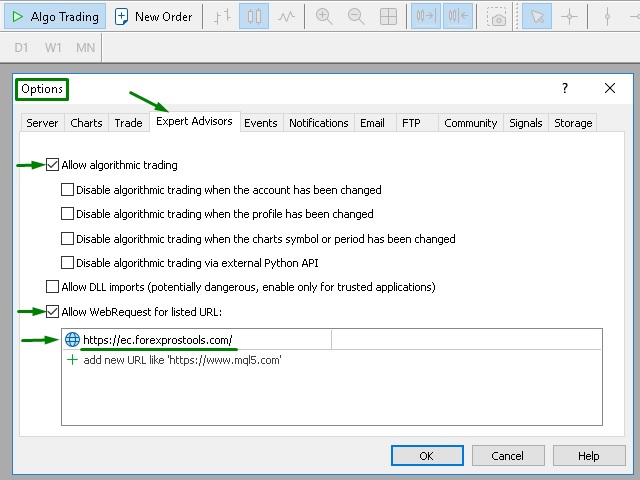
본 프로그램에는 경제 캘린더의 뉴스별로 유연한 거래 설정이 포함되어 있습니다. 전략 테스터에서 확인할 수 없습니다. 진짜 작업뿐입니다. 터미널 설정에서 허용된 URL 목록에 뉴스 사이트를 추가해야 합니다. 서비스>설정 > 조언자>를 클릭합니다. "다음 URL에 대해 WebRequest 허용:" 확인란을 선택합니다. 다음을 추가합니다 (공백 삭제): https://  nfs.faireconomy.media

최신 설정 아카이브 다운로드: https://www.mql5.com/en/blogs/post/747929

이 전문가를 위해 고유 설정 세트를 만들 때 블로그의 모든 매개변수에 대한 설명을 참조하십시오: https://www.mql5.com/en/blogs/post/748545 .


기본 설정 설명


작업은 한 차트에서 GBP(GBPUSD, EURGBP, GBPJPY, GBPCAD, GBPAUD, GBPCHF)와 쌍으로 이루어집니다. GBP는 가장 변동성이 큰 통화로서 거래 수행 시 거래를 성공적으로 종료할 수 있는 더 많은 기회를 제공합니다.
  • Use_Symbols_from_Line = true;
  • Symbols_Line = GBPUSD, EURGBP, GBPJPY, GBPCAD, GBPAUD, GBPCHF.
대기 중인 오더는 GBP 외에 통화 쌍에 대한 뉴스보다 먼저 열립니다 (여러 오더가 동시에 열리지 않도록). 따라서 GBPUSD 오더는 USD 뉴스 이전에 열리며, EURGBP 오더는 EUR 뉴스 이전에, 열리며 GBPJPY 오더는 JPY 뉴스 이전에 열립니다. 중요한 뉴스가 고려됩니다.
  • News_currency_pairs = true;
  • Excluded_currency_str = GBP;
  • IncludeHigh = true.

더 많은 거래 (더 적극적인 옵션)를 얻으려면 "Excluded_currency_str" 줄을 비워두면 GBP 뉴스에서도 오더가 열립니다. 중간 중요 뉴스 IncludeMedium = true를 추가할 수도 있습니다.

대기 중인 오더는 뉴스가 게시되기 60초 전에 열립니다. 뉴스 게시 후 20초 이내에 미처리된 대기 중인 오더가 삭제됩니다.
  • SecondBeforeHigh = 60;
  • SecondAfterHigh = 20.
다음 시간에 높은 중요 및 중간 중요 정도의 연설이 예정되어 있으면 오더가 열리지 않습니다.
  • IncludeSpeaks = false;
  • SpeaksHigh = true;
  • SpeaksMedium = true.

더 많은 거래 (더 적극적인 옵션)를 얻으려면 SpeaksHigh = false 및 SpeaksMedium = false를 설정하면 연설이 오더 개시를 차단하지 않습니다.

뉴스가 게시되기 전에 사기적인 가격 움직임을 가정하므로 가격에서 2.5포인트 떨어진 위치에서 LIMIT 오더가 사용됩니다. 대기 중인 오더는 양방향 (BUY 및 SELL)으로 열립니다. 오더 중 하나가 실행되면 다른 오더는 삭제됩니다. 지정된 시간 내에 실행된 오더가 없으면 오더가 둘 다 삭제됩니다.

  • Trade_Direction = BUY_and_SELL;
  • Type_Orders = ORDERS_LIMIT;
  • Offset_from_price = 2.5.
뉴스 게시 중 변동성은 매우 다를 수 있으므로 전자동 모드에서 모든 거래에 대해 표준 SL을 사용하는 것은 비효율적입니다. 짧은 SL은 종종 발생하고 큰 SL은 잔액의 대부분을 빼앗아 가므로 큰 의미가 없습니다. SL 세트를 선호하는 경우 각 통화 쌍에 대해 개별적으로 설정을 선택하십시오(Use_Symbols_from_Line = false). 기본 설정에서 24 시간 내에 5포인트와 동일한 TP의 포지션을 마감할 수 있습니다. 하루가 지난 후에도 포지션이 마감되지 않으면 평균 오더가 열립니다 (통화 쌍당 최대 3개 포지션).
  • TakeProfit_Safety = 5;
  • StopLoss_Safety = 0;
  • Total_open_transactions = 3;
  • Min_minuts_pause_between_positions = 1440;
  • Min_pips_between_positions = 35;
  • Multiplier_of_trade_Lot = 1.5.
각 통화 쌍당 계정 잔액의 백분율로 최대 인출액을 설정할 수 있습니다. 예: Close_positions_at_percentage_of_loss = 30).

마지막 블록 "consider other positions"의 매개 변수는 다른 전문가와의 공동 작업을 위한 것입니다 (다른 매직 번호가 있는 열린 포지션에 대한 설명). 따라서 이 전문가를 전문가의 일반 프로필에 추가할 수 있습니다.

리뷰 17
Nail Sharipov
423
Nail Sharipov 2023.06.08 14:46 
 

Отличный бот, брал мт5 сейчас для мт4 советую , 5+ от меня.

Franck Martin
177305
Franck Martin 2023.05.25 17:24 
 

The seller is very available if there is a need to solve problems. I always use it to diversify my investments in addition to my main EA.

Iurii Semenov
331
Iurii Semenov 2022.09.23 18:38 
 

Отличный советник, использую его уже почти пол года, много настроек, есть все что может понадобится. За 4 месяца на счете с моими настройками +75% от вложенного. Торгую с ним в полуавтоматическом режиме, но и в автоматическом он справляется. Рекомендую! (настройки не стандартные,свои)

추천 제품
Heaven Assistant: MT4 관리 단순화 Heaven Assistant를 통해 MetaTrader 4 (MT4) 플랫폼 관리를 단순화하세요. 이 전문가 어드바이저(EA)는 효과적이고 사용자 친화적인 방식으로 거래 환경을 제어하고 사용자 정의 할 수 있게 해주는 견고한 도구입니다. 핵심 기능: 다수의 페어 열기: 주요 및 마이너 통화 쌍뿐만 아니라 이국적인 통화 쌍에 대한 빠른 액세스. 한 번의 클릭으로 지수, 금속 및 암호화폐를 열 수 있습니다. 템플릿 변경: 모든 열린 페어에 대해 좋아하는 템플릿을 적용하여 차트 뷰를 쉽게 사용자 정의 할 수 있습니다. 시간프레임 변경: 모든 열린 차트의 시간프레임을 변경하여 거래 스타일에 적응하십시오. 이점: 쉬운 사용: 입력 패널을 통한 쉬우면서 빠른 설정. 특정 차트에만 동작을 적용하는 필터링 옵션. 시간 절약: 여러 페어와 설정을 쉽게 관리하여 소중한 시간을 절약하십시오. 사용자 정의 가능: 주요, 마이너, 이국적인 페어, 지수,

Email Drawdown Alert
Roman Starostin
5 (12)
Free informative Indicator-helper. It'll be usefull for traders who trade many symbols or using grid systems (Averaging or Martingale). Indicator counts drawdown as percent and currency separate. It has a number of settings: Count deposite drawdown according equity value and send e-mail or notifications to user if DD more than set; Sending e-mail when max open orders reached; Shows price and remaining pips amount before MarginCall on current chart and Account generally; Display summary trade lot
FREE
This Dashboard displays signals in grid view for the 28 major fx currency pairs. It is Mainly used for forex scalping in between 10 to 20 pips maximum and can be used on major trend market decisions. It Uses mainly Moving average and does not give false signal. All you need to note is the point in the grid where the signal occurs.  A beep sound is heard whenever there is a new signal and it will be displayedat the top of the chart.
H4 GBPUSD Trend Scalper is a trend signal scalper The EA trades according to the trend strategy using original built-in indicator for opening and closing orders. The external inputs for limiting trading on Fridays and Mondays are available. The purpose of the strategy is to use the current trend with the most benefit. According to the results of testing and working on demo and real accounts, the best results achieved by using the Н4 timeframe on the GBP/USD pair Works on MetaTrader 4 Build 971+
KFX Trade Manager
Joe Christopher Ramirez
Introducing the "KFX Trade Manager" expert advisor for MetaTrader 4 (MT4), a comprehensive solution for advanced trade management and risk control. This powerful tool is designed to enhance your trading experience by automating various aspects of order handling, profit optimization, and alert notifications. With the "KFX Trade Manager," you can take your trading to the next level and streamline your operations for improved efficiency and better risk management. Key Features: Trade Management Set
Rainbow MT4
Jamal El Alama
Rainbow MT4 is a technical indicator based on Moving average with period 34 and very easy to use. When price crosses above MA and MA changes color to green, it’s a signal to buy. When price crosses below MA and MA changes color to red, it’s a signal to sell. The Expert advisor ( Rainbow EA MT4) based on Rainbow MT4 indicator, as you can see in the short video below is now available here .
FREE
Binary Option Signal
Yaroslav Varankin
Indicator for binary options arrow is easy to use and does not require configuration works on all currency pairs, cryptocurrencies buy signal blue up arrow sell signal red down arrow tips do not trade during news and 15-30 minutes before their release, as the market is too volatile and there is a lot of noise it is worth entering trades one or two candles from the current period (recommended for 1 candle) timeframe up to m 15 recommended money management fixed lot or fixed percentage of the depo
Reverse copier is a tool that will open opposite buy/sell orders from your master account. It will help you with low profit EA's that lose consistenly and turn it to wins. Feel free to ask for new functions/features and I will add it. Now it's a simple MT5 to MT4 bridge with straightforward logic of one position open/close.  How to install: https://www.mql5.com/en/market/product/141604
FREE
혁신적인 Trades Time Manager로 손쉽게 거래 루틴을 관리하세요. 이 강력한 도구는 지정된 시간에 주문 실행을 자동화하여 거래 방식을 변화시킵니다. 수동 개입 없이 구매에서 주문 설정에 이르기까지 다양한 거래 작업을 위한 개인화된 작업 목록을 만드십시오. 거래 시간 관리자 설치 및 입력 가이드 EA에 대한 알림을 받으려면 MT4/MT5 터미널에 URL을 추가하십시오(스크린샷 참조). MT4 버전       https://www.mql5.com/en/market/product/103716 MT5 버전       https://www.mql5.com/en/market/product/103715 수동 모니터링에 작별을 고하고 간소화된 효율성을 수용하십시오. 직관적인 인터페이스를 통해 기호, 실행 시간, 가격, 손절매(SL), 이익실현(TP) 포인트 및 로트 크기를 포함한 정확한 매개변수를 설정할 수 있습니다. 도구의 유연성은 시장 행동과 일치하는 적응형 반복 옵션으로 강조됩니

VR Cub
Vladimir Pastushak
VR Cub 은 고품질 진입점을 얻는 지표입니다. 이 지표는 수학적 계산을 용이하게 하고 포지션 진입점 검색을 단순화하기 위해 개발되었습니다. 지표가 작성된 거래 전략은 수년 동안 그 효율성을 입증해 왔습니다. 거래 전략의 단순성은 초보 거래자라도 성공적으로 거래할 수 있다는 큰 장점입니다. VR Cub은 포지션 개시 지점과 이익 실현 및 손절매 목표 수준을 계산하여 효율성과 사용 편의성을 크게 높입니다. 간단한 거래 규칙을 이해하려면 아래 전략을 사용한 거래 스크린샷을 살펴보세요. 설정, 세트 파일, 데모 버전, 지침, 문제 해결 등은 다음에서 얻을 수 있습니다. [블로그] 다음에서 리뷰를 읽거나 작성할 수 있습니다. [링크] 버전 [MetaTrader 5] 진입점 계산 규칙 포지션 개설 진입점을 계산하려면 VR Cub 도구를 마지막 최고점에서 마지막 최저점까지 늘려야 합니다. 첫 번째 지점이 두 번째 지점보다 빠른 경우, 거래자는 막대가 중간선 위에서 마감될 때까지 기다립니다

GeoWprPro
Georgij Komarov
WPR by Profile, or WPR for Professionals Geo_WprPro is one of the well-known currency profile indicators. It simultaneously displays two WPR indicators with different parameters in the matrix form on all timeframes of multiple currency pairs forming the currency profile . As follows from the description, " WPR is a leading indicator that often goes ahead of the price chart. The oscillator frequently reaches extreme values before the price reversal as if anticipating that event: it almost always
Forex 4up MT4
Volodymyr Hrybachov
전보 채널에서 신호를 거래하고 게시하시겠습니까? 그렇다면 이 유틸리티는 당신을 위한 것입니다. - 터미널에서 거래 - 전보 채널에 거래 게시 고객은 다음과 같이 기뻐할 것입니다. - 매일 5개의 신호에서 - 아름다운 신호 디자인 커스터마이징 서비스 -> 설정 -> 전문가 자문 -> 다음 URL에 대한 WebRequest 허용: https://api.telegram.org 텔레그램에서 @BotFather로 이동하여 봇을 만듭니다. 봇의 토큰을 복사하여 어드바이저의 매개변수에 입력합니다. 채널을 만들고 공개하세요. 생성한 봇을 채널에 추가하고 관리자로 지정 링크를 따라가세요: https://api.telegram.org/bot [TOKEN_BOTA ]/sendMessage?chat_id=@ [USERNAME_KANALA ]&text=TEST. 대괄호 []를 자신의 값으로 바꿉니다. 제 경우에는 https://api.telegram.org/bot1285429093:AAER
HMA Trend
Pavel Zamoshnikov
4.59 (69)
A trend indicator based on the Hull Moving Average (HMA) with two periods. The Hull Moving Average is an improved variant of the moving average, which shows the moment of trend reversal quite accurately. It is often used as a signal filter. Combination of two types of Hull Moving Averages makes a better use of these advantages: HMA with a slow period identifies the trend, while HMA with a fast period determines the short-term movements and signals in the trend direction. Features The movement d
FREE
EARLY REMINDER: The Starting price is 65 price will rise soon up to 365$ and then 750$ after first 10 copies of sales. Grab this offer now! Introduction Hello, traders! Welcome to the demonstration of the Forex Beast Indicator , a comprehensive tool designed to assist aspiring traders in navigating the complexities of the forex market. This indicator incorporates seven essential components to provide a well-rounded trading experience: Moving Averages Colored Zones Support and Resistance Levels
Three 3TP Easy Trade Pad Expert for MT4 – Download The 3TP Easy Trade Pad Expert is an advanced tool designed for capital management, risk control, and streamlined trading within the MetaTrader 4 (MT4) platform. With its functional and specialized interface, this expert advisor allows traders to effortlessly set and manage Stop Loss (SL) and Take Profit (TP) levels. In addition to simplifying trade execution, the tool provides features for defining acceptable risk, expected profit (R/R), and adv
PZ Trade Pad EA
PZ TRADING SLU
4.27 (30)
This simple visual expert advisor allows you to trade easily from the chart. It handles risk management for you and can perform several useful tasks with your existing trades, saving time and making risk-management for each individual trade easier.  [ Installation Guide | Update Guide | Troubleshooting | FAQ | All Products ] Trade easily from the chart Trade with precise risk management, hassle free Trade pending order with drag and drop price selection Set SL and TP levels with drag and drop pr
FREE
Set TP & SL by Price – Auto Order Modifier for MT4 모든 주문에 정확한 TP 및 SL 가격 자동 설정 ️ 모든 심볼 및 EA와 호환되며, 심볼 또는 매직 넘버로 필터링 가능 이 EA는 EURUSD에서 1.12345 와 같은 정확한 가격값을 사용하여 TP 및 SL을 설정할 수 있게 해줍니다. 핍이나 포인트가 아닌 정확한 가격 기준으로 주문을 관리하며, 모든 주문 또는 필터링된 주문(차트 또는 매직 넘버)을 대상으로 적용할 수 있습니다. 주요 기능: 정확한 가격으로 TP 및 SL 즉시 설정 모든 주문, 현재 심볼 또는 특정 매직 넘버에 적용 가능 ️ TP 또는 SL을 제거하려면 0 사용 차트에 붙이기만 하면 자동으로 작동 모든 거래 상품과 호환 가능 이런 트레이더에게 추천: TP/SL을 빠르게 제어하고 싶은 수동 트레이더 출구 전략을 바꾸고 싶은 EA 사용자 다수의 주문을 동시에 관리하는 트

PZ Mean Reversion MT4
PZ TRADING SLU
3 (4)
평균 회귀 거래에 대한 전문적이고 정량적인 접근 방식을 구현하는 고유한 지표입니다. 이는 가격이 예측 가능하고 측정 가능한 방식으로 평균으로 전환되고 반환된다는 사실을 이용하여 비정량적 거래 전략을 훨씬 능가하는 명확한 진입 및 퇴장 규칙을 허용합니다. [ Installation Guide | Update Guide | Troubleshooting | FAQ | All Products ] 명확한 거래 신호 놀랍도록 쉬운 거래 사용자 정의 가능한 색상 및 크기 성능 통계 구현 대부분의 거래 전략을 능가합니다. 적절한 SL 및 TP 레벨을 표시합니다. 이메일/음향/시각 알림을 구현합니다. 작동 원리 이 지표는 더 높은 기간에서 완전히 사용자 정의 가능한 이동 평균 주변의 표준 편차를 측정하고 추세 추종 접근 방식을 사용하여 정확하게 거래를 찾습니다. 거래는 현재 차트의 가격 동작을 살펴보고 선택한 더 높은 기간에서 계산된 평균 가격대로 가격이 돌아오면 닫힙니다. 코딩 방식 때문에 지


Pro Minimalist Trade Assistant : Focusing on Risk Management and Strict Trade Discipline for Each Trading Style The benefits of EA: 1.Intuitive Graphical Interface:  Take control with an excellent graphical dashboard featuring outstanding parameters for swift order execution. Enjoy a sleek and customizable interface with the option to switch between dark and light themes 2.Support for Cultivating Trading Discipline Habits Adhering to your trading style is essential. Each Trading style is tailor
Auto Fibo Pro m
DMITRII GRIDASOV
"Auto FIBO Pro" Crypto_Forex 지표 - 거래에 유용한 보조 도구입니다! - 지표는 자동으로 Fibo 수준과 로컬 추세선(빨간색)을 계산하여 차트에 배치합니다. - Fibonacci 수준은 가격이 반전될 수 있는 주요 영역을 나타냅니다. - 가장 중요한 수준은 23.6%, 38.2%, 50%, 61.8%입니다. - 역전 스캘핑이나 존 그리드 거래에 사용할 수 있습니다. - Auto FIBO Pro 지표를 사용하여 현재 시스템을 개선할 수 있는 기회도 많습니다. - Info Spread Swap Display가 있습니다. 현재 Spread와 Swap이 부착된 외환 쌍을 표시합니다. - 디스플레이에는 계정 잔액, 자본 및 마진도 표시됩니다. - 차트의 어느 모서리에서나 Info Spread Swap Display를 찾을 수 있습니다. 0 - 왼쪽 상단 모서리, 1 - 오른쪽 상단, 2 - 왼쪽 하단, 3 - 오른쪽 하단. 여기를 클릭하여 고품질 트레이딩 로봇과




Harvest GOLD
Sayan Vandenhout
Harvest GOLD USES THE TREND WAVE INDICATOR AND IT CAN IDENTIFY THE BEGINNING AND THE END OF A NEW WAVE TREND MOVEMENT. AS AN OSCILLATOR, THE INDICATOR IDENTIFIES THE OVERBOUGHT AND OVERSOLD ZONES. IT WORKS GREAT TO CATCH THE SHORT TERM PRICE REVERSALS AND USES A MARTINGALE STRATEGY TO CLOSE ALL TRADES IN PROFIT. USE DEFAULT SETTINGS ON H1 OR HIGHER TIME FRAME ON ANY PAIR FOR MORE ACCURATE TRADES WHY THIS EA : Smart entries calculated by 3 great strategies The EA can be run on even a $30000
Click Trade Manager
Hispraise Chinedum Abraham
5 (1)
클릭 무역 관리자는 지금까지 최고의 제품입니다! 초보 및 전문 소품 회사 거래자 모두를 위한 최고의 솔루션! 인출 한도를 위반하지 않도록 FTMO/MFF 소품 회사 또는 개인 계정을 보호하십시오. EA는 자동으로 모든 거래를 종료하므로 인출 한도에 도달하지 않습니다. 거래가 인출 한도를 초과할 수 있는 경우 경고합니다. 수익 목표에 도달하면 자동으로 거래를 종료합니다. 브로커에서 매직 넘버를 숨기도록 설정할 수 있습니다. 단 한 번의 클릭으로 위험을 계산하고 SL 및 TP로 거래하십시오. 한 번의 클릭으로 정지 및 제한 주문을 넣으십시오. 한 번의 클릭으로 각 거래에 대해 서로 다른 SL 및 TP로 여러 fib 수준 거래를 설정하십시오. 키보드의 키를 한 번만 눌러 부분 가져오기, SL을 BE로 이동, 열려 있는 모든 거래 청산, 보류 중인 모든 주문 삭제 하루 중 사전 설정된 시간에 모든 거래를 마감하십시오. 모든 거래에 대한 알림을 Telegram으로 보냅니다. 고도로 사용자 정

"다이내믹 파워 오실레이터"는 MT4를 위한 고급 맞춤형 암호화폐/외환 지표이자 효율적인 거래 도구입니다! - 차세대 오실레이터 - 사용 방법은 그림을 참조하세요. - 매우 유용한 기술적 모멘텀 지표입니다. - 다이내믹 파워 오실레이터는 적응형 과매도/과매수 영역을 제공합니다. - 오실레이터는 동적인 과매도/과매수 영역에서 정확한 진입 시점을 찾는 보조 도구입니다. - 과매도 값: 녹색선 아래, 과매수 값: 노란색선 위. - 이 지표는 가격 변동 패턴과도 결합하기 좋습니다. - 표준 오실레이터보다 훨씬 정확합니다. 적합한 시간대: M30, H1, H4, D1, W1. - PC 및 모바일 알림 기능 제공. // 훌륭한 트레이딩 로봇과 지표는 여기에서 확인하실 수 있습니다: https://www.mql5.com/en/users/def1380/seller MQL5 웹사이트에서만 제공되는 정품 제품입니다.
Smart FVG 인디케이터 MT4 – MetaTrader 4를 위한 고급 Fair Value Gap 탐지 Smart FVG 인디케이터 MT4는 MetaTrader 4 차트에서 Fair Value Gap(FVG)을 전문적으로 탐지하고, 모니터링하며, 알림까지 제공하는 도구입니다. ATR 기반 필터링과 시장 구조를 인식하는 로직을 결합하여 노이즈를 줄이고, 유동성 환경에 맞게 자동으로 적응하며, 매매 의사결정에 중요한 불균형 구간만 남겨 줍니다. 주요 장점 정확한 FVG 탐지: 단순한 캔들 갭이 아닌 실제 시장 비효율 구간을 식별합니다. ATR 기반 정밀도: 다양한 상품과 시간 프레임에서 저품질 신호를 걸러내는 적응형 민감도. 실시간 유효성 추적: 가격이 해당 구간을 메우거나 돌파하면 존이 자동으로 연장·조정·삭제됩니다. 사용자 정의 가능한 시각화: 색상, 선 스타일, 채우기 옵션을 템플릿에 맞게 자유롭게 설정 가능. 실질적인 알림: 새로 생성된 FVG, 메워진 FVG, 무효화된
FREE
Copy MT4
Denis Vasyutin
Утилита предназначена для копирования ордеров с одного счета на другой. Поддерживается копирование с множителем, копирование с реверсом позиции, копирование с префиксами и суффиксами. Отложенные ордера, TakeProfit и StopLoss не копируются. Поддерживается копирование на несколько счетов. Входные параметры: Mode - Режим копирования, master, slave NumMaster - Номер файла обмена данных в общей папке timer1 - Частота обмена данных между master и slave счетом, в секундах Настройки для режима копирован
Forex Gump
Andrey Kozak
2.4 (5)
Forex Gump is a fully finished semi-automatic trading system. In the form of arrows, signals are displayed on the screen for opening and closing deals. All you need is to follow the instructions of the indicator. When the indicator shows a blue arrow, you need to open a buy order. When the indicator shows a red arrow, you need to open a sell order. Close orders when the indicator draws a yellow cross. In order to get the most effective result, we recommend using the timeframes H1, H4, D1. There
实盘交易盈利,回测年化125%,回撤25%,交易量少,不是经常下单,挂起后要有耐心。没有多牛的技术,只是一套简单的交易策略,贵在长期坚持,长期执行。我们有时候就是把自己高复杂,想想我们交易的历程,你就会发现,小白好赚钱,当你懂得越多的时候也是亏损的开始,总是今天用这个技术,明天用那个指标,到头来发现,没有一个指标适合你。其实每个技术指标都是概率性的,没有100%的胜率。很多技术指标你要融合一套交易策略,资金仓位控制,止损止盈比例,一套策略下来下一步你做的就是执行力了,必须要坚决执行你的交易策略,如果不能坚持的话最终还是在亏损。说实话不是每个人都有好的心态和执行力,所以我们做出来这款ea自己来用,发现时间久了扭亏为盈了,那现在就拿出来给大家分享,让更多的人来达到自己的盈利目标。购买后留下邮箱或添加软件里的qq,我们会根据你的资金来调整软件参数。 经测试过的柱数 14794 用于复盘的即时价数量 51321985 复盘模型的质量 n/a 输入图表错误 213935 起始资金 10000.00 点差 当前 (54) 总净盈利 12583.42 总获利 37630.02 总亏损 -25046.
Risk Commander
Adisorn Soodkanueng
Product Name: Risk Commander: Trade Assistant & Strategy Simulator Risk Commander is more than just a trade panel—it is a complete Manual Trading Ecosystem . It serves two powerful purposes: Live Assistant: Helps you execute trades with speed, precision, and perfect risk management in real-time markets. Training Simulator: Fully compatible with the Strategy Tester (Visual Mode) , allowing you to practice manual trading on historical data without risking a cent. NEW! Built-in Simulator Mode S
Discover the Power of Trend Strength Pro Unlock a new level of clarity in your trading with Trend Strength Pro , the ultimate tool for visualizing market momentum. Stop guessing and start seeing the true strength of a trend with a single glance. Our elegant and intuitive indicator helps you make smarter, more confident trading decisions. Key Advantages & Features Instantly See Trend Strength : Our color-coded histogram tells you whether the trend is getting stronger or weaker. Green means moment
FREE
Angry bull Option Binary
Fabio Oliveira Magalhaes
1 (1)
Angry Bull Option Binary   This is a Binary Options robot, which contains 7 strategies, you can backtest it to check what the best strategies are Settings Initial Batch Value Dynamic Investment = If activated it will use an automatic lot according to its capital Balance ($) w/ backtest = Starting balance to backtest PorcRiscoInvestment = It will be the value of % for the automatic lot if it is activated Expiration (in minutes) = It will be the expiration time of orders in Binary Options Magic
이 제품의 구매자들이 또한 구매함
Unlimited Trade Copier Pro is a tool to copy trade remotely to multiple MT4, MT5 and cTrader accounts at different computers/locations over internet. This is an ideal solution for you if you are a signal provider and want to copy your trades to other receivers globally on your own rules. One provider can copy trades to multiple receivers and one receiver can get trade from multiple providers as well. The provider can even set the subscription expiry for each receiver, so that receiver will not b
With this Expert Advisor, you can seamlessly integrate various channel, arrow, and reversal indicators. It offers the flexibility to use all popular channel trading strategies, while also providing powerful tools to customize your trading conditions and risk management system.   The Expert Advisor opens orders when the price crosses the channel boundaries. Multiple crossing conditions are available for customization: Price touches boundary on re-entry into the channel Price touches boundary on
LIMITED OFFER - JUST FOR 2 DAYS | 50% BLACK FRIDAY DISCOUNT $640 -> $320 Your Smart Trading Assistant for the Forex Market Introducing a powerful MetaTrader tool designed to revolutionize the way you trade. This intelligent assistant goes beyond traditional indicators to provide a comprehensive, AI-driven market analysis — so you can trade with clarity and confidence. What It Does This advanced tool continuously monitors and analyzes a wide range of market data to deliver high-quality trading
The advantage of using this EA This EA directly updates takeprofit and stop losses that are still empty in a manual order Parameters Multiplier: Multiplier value of the previous transaction Distance: Distance hedging from the previous order Takeprofit: take profit taken from the last price + the value of this column We recommend that you do not add more than one manual transaction in the same pair martingale hedging | manual hedging | hedging manual | hedging lot | best robot | best ea
The FFx Hidden Manager panel will help you to manage easily your orders directly on the chart. Below all features described: TP, SL and TrailingStop are hidden Each order has its own lines on chart Drag & Drop any line to change the TP/SL as per your need Option to move automatically the SL line at breakeven when TP #1 is reached Option to choose the TP/SL type (by pips or price) Option to choose the TrailingStop type (by pips, MA, Fractals, PSAR or ATR) Define which order(s) you want to manage
FFx Risk Calculator panel will help you to calculate very easily your trades size, SL or the risk directly on the chart. All features are described below: Option to select which parameter to calculate: Risk, Stop Loss or Lot Size The panel will show if the lot size is allowed according to the current account free margin Button to maximize/minimize the panel Drag and Drop the panel anywhere on the chart How to use it? Select the parameter you want to be calculated. It will be based on the 2 other
News Trader Pro
Vu Trung Kien
4.38 (16)
News Trader Pro is a unique robot that allows you to trade the news by your predefined strategy. It loads every piece of news from several popular Forex websites. You can choose any news and preset the strategy to trade it, and then News Trader Pro will trade that news by selected strategy automatically when the news comes. News release gives opportunity to have pips since the price usually has big move at that time. Now, with this tool, trading news becomes easier, more flexible and more exciti
FFx Watcher PRO
Eric Venturi-Bloxs
The FFx Watcher PRO is a dashboard displaying on a single chart the current direction of up to 15 standard indicators and up to 9 timeframes. It has 2 different modes: 1. Watcher mode: Multi Indicators User is able to select up to 15 indicators to be displayed User is able to select up to 9 timeframes to be displayed 2. Watcher mode: Multi Pairs User is able to select any number of pairs/symbols User is able to select up to 9 timeframes to be displayed This mode uses one of the standard indicat
Transaction Repeater Full
Alexandr Bryzgalov
5 (4)
Copies transactions between MT4 terminals. Possibilities: quick copy start minimum processor load direct and reverse (reverse) copying. copying Take Profit and Stop Loss levels copying deferred and their changes copy transactions one to many copy trades many to one local copy only Attention: The product is designed for copying trades only within a single computer or VPS with access to the desktop. The product will not work on the built-in Virtual Hosting of the terminal. We will help you set up
If you wish to draw Support and Resistance lines, view: daily market opening, classical pivot levels, Fibonacci pivot levels, trend lines, Fibonacci levels, the remaining time to candle closing, and current spread. If you seek to place your orders with the exact lot that meets your desired stop loss risk. If you wish to do all this and more with just one click, then this is the perfect tool to use. This tool will allow you to feel more relaxed when deciding to open orders, as well as predicting
Unlimited Binary Options Copier Remote is a powerful tool to copy binary options trades remotely between multiple accounts at different locations over internet. This is an ideal solution for signal provider, who want to share his binary options trades with the others globally on his own rules. One provider can copy trades to unlimited receivers and one receiver can get trade from unlimited providers as well. The provider can set the subscription expiry for each receiver, so that receiver will no
Pairs Trade
Oleg Pechenezhskiy
The Pairs Trade indicator is a utility for semi-automatic pair trading. It allows combining the charts of two arbitrary instruments, even if the schedules of their trading sessions are different. It displays a spread chart in the form of a histogram with an overlaying moving average. It calculates the swap that will be charged for the synthetic position (in the deposit currency). It is possible to set a level for automatic opening of a synthetic position on the spread chart (analogous to the 'se
This Stacker EA will: Automatically set Stop loss on a new order Automatically set Take profit on a new order Stack (or open up to 4 additional orders at the same time) when a new order is placed, the SL/TP can be preset individually for each order. Provides a transparent replacement for the standard 1-click trading buttons in MetaTrader 4 (1 click still works and SL/TP will automatically be set as well as Stacking). Automatically calculate lot order size according to preset risk management perc
FXFledgling Exit Tool is a complete risk management tool that analyzes both the open trades and the direction of the pair of open trades. As long as the suggested entry and lotsizing management presented here is followed strictly, you will have a high chance (but no guarantee) of surviving the trade. What It Does It is used as an exit tool. It helps the trader to manage any manual trade that he transacted. It does the following: Trail Stop Dynamic Stop Loss - a calculated stop-loss that changes
Crypto Market Pro
Daniil Kurmyshev
5 (1)
New opportunities for analyzing cryptocurrency in the usual MetaTrader 4. For example : We select the symbol of the cryptocurrency and attach any indicators, Expert Advisors or scripts. Startup Mode View cryptocurrency; Data collection. Capabilities Work as with a standard currency chart; Automatic update of open charts; Selection of individual cryptocurrency for updating; Selection of individual timeframes for updating; Work on the desired timeframes; Open charts do not affect the work of Cry
The  Easy Strategy Builder (ESB)  is a " Do It Yourself " solution that allows you to create a wide range of the automated trading strategies without any line of codes. This is the world’s easiest method to automate your strategies that can be used in STP, ECN and FIFO brokers. No drag and drop is needed. Just by set conditions of your trading strategy and change settings on desired values and let it work in your account. ESB has hundreds of modules to define unlimited possibilities of strategi
Fibonacci Expansion and Retracement Analysis Fibonacci retracing and extended line tools for the MT4 platform, ideal for traders who use the DiNapoli point trading method and the Golden Section trading The main function: 1. You can draw multiple sets of Fibonacci retracements directly, and the relationship between important return points is clear at a glance. 2. Can draw Fibonacci extensions 3. The Fibonacci foldback and extension of the line can be moved left and right for easy observation
Советник риск-менеджер с огромным арсеналом возможностей защиты вашего депозита. Для инвесторов, которые решили передать капитал в доверительное управление. Когда у трейдера нет доступа к настройкам - нивелирует торговые риски. А также для трейдеров, которые осознали необходимость стороннего контроля за их торговлей для улучшения торговых результатов.  Для максимальных результатов - должен стоять на отдельном VPS сервере и у трейдера не должно быть возможности менять настройки в торговый период.
Virtual Grid
Volodymyr Hrybachov
반자동 거래를 위한 유틸리티. 브로커에게 보이지 않는 스탑 오더, 손절매, 이익 실현 및 트레일링 스탑 설정을 위한 동적 수준을 적용합니다. FIFO 요구 사항이 있는 미국 중개인을 포함하여 모든 중개인과 작업하는 데 적합합니다. 어드바이저 링크의 MT5 버전 버튼이나 라인을 사용하여 거래를 열 수 있습니다. 어드바이저가 선을 따라 포지션을 열려면: 차트에 선을 그리고 이름을 바꿉니다. 가격이 이를 초과하면 EA가 해당 명령을 실행합니다. OPEN_SELL - 판매 주문 열기 CLOSE_SELL - 모든 판매 주문 마감 OPEN_BUY - 구매 주문 열기 CLOSE_BUY - 모든 구매 주문 마감 명령이 실행된 후 "OK"라는 주석이 작성되고 행은 명령을 한 번만 실행합니다. 차트는 수신된 이익, 현재 오픈 포지션(주문 수, 로트 수 및 이익), 오픈 주문 버튼, 실행 속도 및 슬리피지에 대한 정보를 표시합니다. "i" 버튼을 클릭하면 거래 내역이 시각적으로 표시됩니다.

Grid Hero War Pad
Chock Hwee Ng
3.4 (5)
Grid Hero War Pad is a  GRAPHICAL MANUAL TRADER version of the original Grid Hero EA, designed and created for ADVANCED TRADERS who are experienced in plotting their own market entries. It is coded using ADVANCED GRAPHICAL INTERFACE programming, that combines the power of discretionary trading with Grid Hero algorithm in the form of a graphical console with button-click easy execution. It allows you to execute trades manually using Market Orders and Pending Orders, and then automatically uses th
MirrorEA
Eugenio Bravetti
The new version of  MirrorSoftware 2021  has been completely rewriten and optimized.  This version requires to be loaded only on a single chart because  it can detect all actions on every symbol and not only the actions of symbol where it is loaded. Even the  graphics and the configuration mode  have been completely redesigned. The MirrorSoftware is composed of two components (all components are required to work):  MirrorController  (free indicator): This component must be loaded into the MASTER
Open charts
Maksim Slovakov
Скрипт открывает графики по всем инструментам находящимся в окне "Обзор рынка" и по желанию может задать для всех графиков один шаблон. Так-же можно удалить все графике открытые в терминале Мт4. В скрипте имеются следующие настройки: "Таймфрейм" по умолчанию M30;             (Можно поставить свой: M1, M5, M15, M30, H1, H4, D1, W1, MN.) "Задержка" по умолчанию "0";                  (Задержка перед открытием следующего графика в миллисекундах.) "Шаблон" по умолчанию "True";                (True=пр
Quantized Trend
Oleg Pechenezhskiy
This utility automatically draws the trend channel on the price chart. For the time interval from the specified date to the current bar, the drawn channel is almost optimal. Placing the beginning of the channel at a more distant historical price extremum, you get a visualization of a longer-term trend. Channel slope is not a continuous value, but takes one of discrete values (in AxB format, where A is the number of price points (points), and B is the number of timeframes). This program works ONL
Forex copier
Alexandr Bryzgalov
4.5 (2)
We offer simple and reliable software that can  copy trades  between any MT4 accounts. Easy to use MetaTrader copier which saves valuable time Reliable, so you are protected from technical issues Powerful, with a lot of features available Who can use this MT4 copier? Forex Copier is a solution for individual traders or account managers who need to execute trade signals from external sources or who need to  manage several MetaTrader 4 accounts  at the same time. We do not offer you “yet another
Forex Market View Dashboard and CSM
Opengates Success International
5 (1)
FFXMV Dashboard + CSM is a custom indicator combined with Currency Strength Meter . It is created to give the Traders a full view of what is going on in the market. It uses a real time data to access the market and display every bit of information needed to make a successful trading. Before attaching this Indicator to your window chart, go to your MT4's Market Watch panel and HIDE all the Currency pairs you don't need or trade and leave the rest there. The reason is that FFMV Dashboard will DISP
Trendline Scalper Robot
Vijay Vikram Singh Kushwah
Trading  Robot which automates your scalping and take your profitability  and forex trading experience to the next level ,Computer cannot analyse market as humans do, at same time we cannot compete with them in terms of speed of execution, hft  & emotionlessness  .  ​In this scalp-trading robot we have integrated human analysis with quick algorithmic execution  to enter and exit trades at fraction of seconds Get More details at :  https://www.noemotionfx.com/tl-scalper-ea To test , use it in dem
NewsReady
Joel Protusada
NewsReady is a semi-automated Expert Advisor that uses a smart straddle methods It needs to be set in charts 2 to 10 minutes before Economic Data release with a red-flag impact on currencies related to the news. Then it run pending orders in specified number of minutes indicated in the time-period parameter. After the specified time, it will stop trading and will remove all pending orders. Important You can not backtest this tool because it is semi-automated and can only be set and run a few min
Automatic enumeration of input parameters of the TrendImprovement Pro indicator to find the optimal combination. Description. A powerful tool for testing the input parameters for the TrendImprovement Pro indicator will allow you to quickly find the most profitable options for the input parameters. Settings DateOrBars – switch for using time or number of bars;  MaxBars - the maximum number of bars for calculation; StartHistory - indicator start time; BEGINNING - the initial historical data (In-S
Advanced Smart Renko and Heiken Ashi Candle Trader is ONE STOP SOLUTION based semi/fully - automated multi-currency EA carefully engineered for traders to enter the trade based on their Analysis or in fully automated mode for scalping, trend trading, candle breakout trades and also automated news trading with inbuilt trade management solution.    Advantages    No grid / Martingale Works on Classic Renko, Renko Heiken Ashi charts and classic Heiken Ashi charts    Features Multi-Currency Ma
GRID for MT4
Volodymyr Hrybachov
GRID for MT4 트레이딩 패널은 오픈, 클로즈, 오더 추적 기능을 갖추고 있습니다. 주문은 바스켓으로 마감되며, 단방향 - BUY 또는 SELL만 가능하거나 양방향 BUY 및 SELL을 함께 사용합니다. 포지션을 청산하기 위해 손절매, 이익실현, 손익분기점 및 추적 정지 기능을 사용할 수 있습니다. 손절매 및 이익실현은 잔액의 %로 설정할 수 있습니다. 그것은 최소 위치 유지 시간과 새로운 주문의 개시 사이의 최소 간격(초)의 기능을 가지고 있습니다. 옵션: MULTIDIRECTIONAL_MODE - 양방향 주문의 동시 마감(참일 경우) - 주문 바구니 마감(거짓일 경우) - 매수 및 매도 주문이 별도로 마감됩니다. MIN_HOLDING_SEC - 최소 위치 유지 시간(밀리초). SL_PERCENT - 참이면 손절매가 잔액의 %로 설정됩니다. STOPLOSS - 손절매; TP_PERCENT - true인 경우 이익 실현은 잔액의 %로 설정됩니다. TAKEPROFIT -
제작자의 제품 더 보기
Trust EA
Konstantin Kulikov
3 (2)
Trust EA is a real trader's tool, working on a clear principle, with its advantages and disadvantages, so it will not suit everyone, but for some users it can become the best trading robot. Discuss the complexities of Forex trading here:  chat "Age of Expert Advisors" . Logic I have been working with algorithmic trading systems since 2015, and in my experience, systems with a small StopLoss size are capable of working stably for a long time only in the "Scalping" mode. The best time for scalpin
Buy by Trend MT4
Konstantin Kulikov
Sometimes the markets are in such a trending phase that it is impossible not to notice and it is enough to simply buy with the trend. 1) So, we scroll through the charts of different instruments, and see a good entry point, so let's specify the desired price for the first order in the Price_for_First_Order parameter and the direction in the Trend_Direction parameter, this is already enough for a good deal. (If Price_for_First_Order=0, the position will open immediately at the market price.) 2) T
Good Monday
Konstantin Kulikov
5 (8)
The expert trades at the opening of the market after the weekend, focusing on the price gap (GAP). Various sets of settings are ready (trading against or towards the GAP). At the same time, various options are available in the expert settings, allowing you to create your own unique sets yourself.    >>> Chat <<< Currency pairs for which the sets have been developed: GBPUSD, AUDUSD, NZDUSD, USDCAD, EURGBP, EURCHF, GBPCAD, GBPAUD, AUDCHF, AUDJPY, AUDNZD, CHFJPY, CADJPY, NZDJPY, NZDCHF, EURUSD, G
Hello friends. I wrote this utility specifically for use in my profile with a large number of Expert Advisors and sets ("Joint_profiles_from_grid_sets" https://www.mql5.com/en/blogs/post/747929 ). Now, in order to limit losses on the account, there is no need to change the "Close_positions_at_percentage_of_loss" parameter on each chart. Just open one additional chart, attach this utility and set the desired percentage for closing all trades on the account. The utility has the following function
GridMartin Conqueror MT5
Konstantin Kulikov
4 (6)
An automated trading system with smart entry/exit algorithms that uses grid and martingale techniques to maximize profits. You can search for current signals on this page, or write me a personal message: https://www.mql5.com/en/signals/author/test-standart The default settings ( M1 timeframe ) are suitable for currency pairs, especially for pairs with GBP. All new sets appear here:  https://www.mql5.com/en/blogs/post/747929 A description of the Expert's parameters can be found in the comment th
GoldenScalp MT5
Konstantin Kulikov
4.2 (5)
Hello algo traders.  The Expert Advisor trades on gold (XAUUSD), any timeframe (the same on any TF), the initial account balance is from $100. The following presets are available "GS SL dynamic 001for100" . Each position has several closing logics, including a hidden StopLoss, which is calculated individually for each position, based on the volatility of the last hours. (If you have special stop requirements, then you can set your SL and TP in points via the parameters: "TakeProfit_Safety" and
Hello friends. I wrote this utility specifically for use in my profile with a large number of Expert Advisors and sets ("Joint_profiles_from_grid_sets"   https://www.mql5.com/en/blogs/post/747929 ). Now, in order to limit losses on the account, there is no need to change the "Close_positions_at_percentage_of_loss" parameter on each chart. Just open   one   additional chart, attach this utility and set the desired percentage for closing all trades on the account. The utility has the following fu
This utility trails not each position separately, but the entire profit on the account (by money or by percentage). Activate_Trailing - activation of trailing by money or by percentage of profit.  Start_Trailing - the required profit value to start the trailing.  Size_Trailing - the size of the trailing stop. Min_Value_for_Close - the minimum profit value after the start of trailing to close positions (in case of a large negative gap to stay in the game).  Select_trades - selecting positions t
Total Trailing
Konstantin Kulikov
This utility trails not each position separately, but the entire profit on the account (by money or by percentage). Activate_Trailing - activation of trailing by money or by percentage of profit.  Start_Trailing - the required profit value to start the trailing.  Size_Trailing - the size of the trailing stop. Min_Value_for_Close - the minimum profit value after the start of trailing to close positions (in case of a large negative gap to stay in the game).  Select_trades - selecting positions t
Spread Record
Konstantin Kulikov
This utility allows to record the spread value to the file, which is equal to or greater than the value specified in the settings, at the specified time. The utility also displays useful information on the symbol's chart: current spread value in points, name of account holder, name of trading server, leverage, the size of the swap for buy orders, the size of the swap for sell orders, day of the week for accruing triple swap, the size of a point in the quote currency, the minimum allowed level of
FrankoScalp
Konstantin Kulikov
3.79 (116)
포렉스 외환시장의 제일 지속적으로 근무하는 시장 전문가의 홈페이지에 와 주셔서 환영합니다. 본 전문가는 세간의 주목을 받으며 사람의 관심을 이끌어온 지 5년이상이나 된다. 외환시장의 어느 포럼이든지 FrankoScalp이란 전문가에 대한 많은 토론을 찾을 수 있다. 하지만 mql5에서만 업데이트 받은 특별 나 아까 도와 주겠습니까의 최신판을 받고 그 제작자에게 연락하고, 친절한 FrankoScalp EA 사용자 커뮤니티 참석자가 될 수 있다. >>> Chat <<< ​구매 세부 내용 엑스퍼트 전문가 서비스는 한번 구매하면 업데이트가 다 공짜이어서 영원히 사용할 수 있고 황설은 10번까지 할 수 있다. 황설은 10번으로 할 수 있다는 것이란 10개의 컴퓨터나 VPS에서 따로 이용할 수 있는 뜻이다. 매매계좌 및 터미널 수는 제한이 없다. 우리 역사 2012년에 우리가 외환시장 세계에 처음으로 들어가고 2015년에 자동 매매 시스템을 중심으로 했고 2016년에는 FrankoScal
Virtual Trailing SL TP
Konstantin Kulikov
5 (3)
The utility places virtual (hidden from your broker) trailing stop, breakeven, stop loss and take profit.‌ It is necessary to allow automated trading in the terminal settings. In testing mode, the utility opens Buy or Sell positions on the first ticks, which allows you to visually observe the given logic, changing the utility parameters. In real mode, the utility does not open positions. Discuss the complexities of Forex trading here:  chat "Age of Expert Advisors" . Parameters magic   - magic
Breakthrough Strategy
Konstantin Kulikov
4.46 (35)
This system was developed to work with a large number of sets and after a certain time it showed itself well when working at the close of trading on Friday. As a result, this direction of trading became the main one for working with this Expert Advisor. However, you can create your own trading settings and choose any day of the week for trading. The collection of settings sets can be expanded. Currency pairs for which sets are developed: EURUSD, EURCAD, EURAUD, EURNZD, GBPCAD, GBPAUD, AUDNZD, GB
The utility places stop loss and take profit for opened orders. It is necessary to allow automated trading in the terminal settings. Discuss the complexities of Forex trading here:  chat "Age of Expert Advisors" . Parameters magic - magic number. If less than 0, orders with any magic number are processed. Select_Symbol  - selection of symbols. Positions with selected symbols will be accompanied by. Take_Profit - take profit (TP). If the value is less than 0, then TP does not change. If the value
GridMartin Conqueror
Konstantin Kulikov
4.69 (13)
An automated trading system with smart entry/exit algorithms that uses grid and martingale techniques to maximize profits. You can search for current signals on this page, or write me a personal message:  https://www.mql5.com/en/signals/author/test-standart The default settings ( M1 timeframe ) are suitable for currency pairs, especially for pairs with GBP All new sets appear here:  https://www.mql5.com/en/blogs/post/747929 A description of the Expert's parameters can be found in the comment th
Trailing and SL TP
Konstantin Kulikov
5 (1)
The utility places trailing stop, breakeven, stop loss and take profit.‌ It is necessary to allow automated trading in the terminal settings. In testing mode, the utility opens Buy or Sell positions on the first ticks, which allows you to visually observe the given logic, changing the utility parameters. In real mode, the utility does not open positions. Discuss the complexities of Forex trading here:  chat "Age of Expert Advisors" . Parameters magic  - magic number. If less than 0, positions wi
Trailing by SAR
Konstantin Kulikov
Tracking positions using trailing on the Parabolic SAR indicator. It is necessary to allow automated trading in the terminal settings. In testing mode, the utility opens Buy or Sell positions on the first ticks, which allows you to visually observe the given logic, changing the utility parameters. In real mode, the utility does not open positions. Discuss the complexities of Forex trading here:  chat "Age of Expert Advisors" . Parameters Select_Magic - selection of magic numbers. Positions with
Friday Monday
Konstantin Kulikov
5 (2)
This EA trades a weekly GAP, opening trades on the Friday before the market close and closing trades on Monday morning. The expert works from one chart for all currency pairs:   EURUSD, GBPUSD, USDCHF, AUDUSD, USDCAD, EURJPY, EURCHF, EURAUD, EURCAD, EURNZD, GBPJPY, GBPCHF, GBPAUD, GBPCAD, CHFJPY, AUDJPY, CADJPY, AUDCHF, AUDCAD, AUDNZD. If the symbols in the "Market Watch" have a suffix, then specify it in the expert parameter "Symbol_suffix". Version for MT5 >>> Chat <<< Expert setup Download t
GoldenScalp MT4
Konstantin Kulikov
4 (3)
Hello algo traders.  The Expert Advisor trades on gold (XAUUSD), any timeframe (the same on any TF), the initial account balance is from $100. The following presets are available "GS SL dynamic 001for100" . Each position has several closing logics, including a hidden StopLoss, which is calculated individually for each position, based on the volatility of the last hours. (If you have special stop requirements, then you can set your SL and TP in points via the parameters: "TakeProfit_Safety" and
Hello everyone, this is another utility that I wrote specifically for users using my profile with a large number of experts and sets ( https://www.mql5.com/en/blogs/post/750723 ) . This utility is useful for working with a profile using grid strategies (averaging and martingale). As we know, such strategies periodically fall into a large drawdown and you need to be careful when opening averaging positions (do not open too many). In my profile, I use a limit of 3 positions for each EA, if this w
FrankoScalp MT5
Konstantin Kulikov
4.25 (28)
포렉스 외환시장의 제일 지속적으로 근무하는 시장 전문가의 홈페이지에 와 주셔서 환영합니다. 본 전문가는 세간의 주목을 받으며 사람의 관심을 이끌어온 지 5년이상이나 된다. 외환시장의 어느 포럼이든지 FrankoScalp이란 전문가에 대한 많은 토론을 찾을 수 있다. 하지만 mql5에서만 업데이트 받은 특별 나 아까 도와 주겠습니까의 최신판을 받고 그 제작자에게 연락하고, 친절한 FrankoScalp EA 사용자 커뮤니티 참석자가 될 수 있다. >>> Chat <<< ​구매 세부 내용 엑스퍼트 전문가 서비스는 한번 구매하면 업데이트가 다 공짜이어서 영원히 사용할 수 있고 황설은 10번까지 할 수 있다. 황설은 10번으로 할 수 있다는 것이란 10개의 컴퓨터나 VPS에서 따로 이용할 수 있는 뜻이다. 매매계좌 및 터미널 수는 제한이 없다. 우리 역사 2012년에 우리가 외환시장 세계에 처음으로 들어가고 2015년에 자동 매매 시스템을 중심으로 했고 2016년에는 FrankoScal
The utility places virtual (hidden from your broker) trailing stop, breakeven, stop loss and take profit.‌ It is necessary to allow automated trading in the terminal settings. In testing mode, the utility opens Buy or Sell positions on the first ticks, which allows you to visually observe the given logic, changing the utility parameters. In real mode, the utility does not open positions. Discuss the complexities of Forex trading here:  chat "Age of Expert Advisors" . Parameters magic   - magic n
The utility places trailing stop, breakeven, stop loss and take profit.‌ It is necessary to allow automated trading in the terminal settings. In testing mode, the utility opens Buy or Sell positions on the first ticks, which allows you to visually observe the given logic, changing the utility parameters. In real mode, the utility does not open positions. Discuss the complexities of Forex trading here:  chat "Age of Expert Advisors" . Parameters magic   - magic number. If less than 0, positions w
Good Monday MT5
Konstantin Kulikov
4.5 (2)
The expert trades at the opening of the market after the weekend, focusing on the price gap (GAP). Various sets of settings are ready (trading against or towards the GAP). At the same time, various options are available in the expert settings, allowing you to create your own unique sets yourself.    >>> Chat <<< Currency pairs for which the sets have been developed: GBPUSD, AUDUSD, NZDUSD, USDCAD, EURGBP, EURCHF, GBPCAD, GBPAUD, AUDCHF, AUDJPY, AUDNZD, CHFJPY, CADJPY, NZDJPY, NZDCHF, EURUSD, G
Tracking positions using trailing on the Parabolic SAR indicator. It is necessary to allow automated trading in the terminal settings. In testing mode, the utility opens Buy or Sell positions on the first ticks, which allows you to visually observe the given logic, changing the utility parameters. In real mode, the utility does not open positions. Discuss the complexities of Forex trading here:  chat "Age of Expert Advisors" . Parameters Select_Magic - selection of magic numbers. Positions with
Breakthrough Strategy MT5
Konstantin Kulikov
4.2 (10)
This system was developed to work with a large number of sets and after a certain time it showed itself well when working at the close of trading on Friday. As a result, this direction of trading became the main one for working with this Expert Advisor. However, you can create your own trading settings and choose any day of the week for trading. The collection of settings sets can be expanded. Currency pairs for which sets are developed: EURUSD, EURCAD, EURAUD, EURNZD, GBPCAD, GBPAUD, AUDNZD, GB
Friday Monday MT5
Konstantin Kulikov
3.71 (7)
This EA trades a weekly GAP, opening trades on the Friday before the market close and closing trades on Monday morning. The expert works from one chart for all currency pairs: EURUSD, GBPUSD, USDCHF, AUDUSD, USDCAD, EURJPY, EURCHF, EURAUD, EURCAD, EURNZD, GBPJPY, GBPCHF, GBPAUD, GBPCAD, CHFJPY, AUDJPY, CADJPY, AUDCHF, AUDCAD, AUDNZD. If the symbols in the "Market Watch" have a suffix, then specify it in the expert parameter "Symbol_suffix". Version for MT4 >>> Chat <<< Expert setup Download the
News Trade EA MT5
Konstantin Kulikov
4.55 (11)
제가 몇 년 동안 사용하고 있는 유용한 로봇을 소개드립니다. 반자동뿐만 아니라 자동 모드로도 사용할 수 있습니다. >>> Chat <<< 본 프로그램에는 경제 캘린더의 뉴스별로 유연한 거래 설정이 포함되어 있습니다. 전략 테스터에서 확인할 수 없습니다. 진짜 작업뿐입니다. 터미널 설정에서 허용된 URL 목록에 뉴스 사이트를 추가해야 합니다. 서비스>설정 > 조언자>를 클릭합니다. "다음 URL에 대해 WebRequest 허용:" 확인란을 선택합니다. 다음을 추가합니다 (공백 삭제): https://  nfs.faireconomy.media 최신 설정 아카이브 다운로드: https://www.mql5.com/en/blogs/post/747929 신호 모니터링: https://www.mql5.com/en/signals/author/test-standart 이 전문가를 위해 고유 설정 세트를 만들 때 블로그의 모든 매개변수에 대한 설명을 참조하십시오: https://www.mql5.
Hello everyone, this is another utility that I wrote specifically for users using my profile with a large number of experts and sets ( https://www.mql5.com/en/blogs/post/750723 ) . This utility is useful for working with a profile using grid strategies (averaging and martingale). As we know, such strategies periodically fall into a large drawdown and you need to be careful when opening averaging positions (do not open too many). In my profile, I use a limit of 3 positions for each EA, if this w
Buy by Trend
Konstantin Kulikov
Sometimes the markets are in such a trending phase that it is impossible not to notice and it is enough to simply buy with the trend. 1) So, we scroll through the charts of different instruments, and see a good entry point, so let's specify the desired price for the first order in the Price_for_First_Order parameter and the direction in the Trend_Direction parameter, this is already enough for a good deal. (If Price_for_First_Order=0, the position will open immediately at the market price.) 2) T
필터:
Olivier
153
Olivier 2024.02.16 17:05 
 

beautiful tech. wonderful contact & support. did not deliver. Hopeful about the author's future work.

Konstantin Kulikov
25740
개발자의 답변 Konstantin Kulikov 2024.02.17 20:55
thank you
Jesus Torres Parraga
1079
Jesus Torres Parraga 2023.09.07 21:08 
 

The EA leaves a lot to be desired for many reasons that I am going to highlight. It is complex to optimize and the sets that Konstantine provides are too generic and risky, you can easily lower the risk but you cannot backtest a news EA. Don't even think about entering his telegram, as soon as you register in it, you will be contacted by a fake konstantine who by chance is also Russian, and he will ask you for money in crypto for some improved sets, it is a trap This would not happen if Konstantine responded to everything publicly in the EA forum in MQL5, but he prefers to divert you to Telegram, where as soon as you register, the scammers enter you privately, seconds apart, with their name, logo, etc... The EA sets are very poor, they are hardly optimized. He has a lot of options that he doesn't use in his sets, and he uses too high risk. It seems that by not answering publicly in the product forum in MQL5 he wants to take you to Telegram, and it does not offer anything of interest there and it is a trap of Russian scammers. The EA may be good, but being a news EA it makes it almost impossible to optimize in backtesting and the sets, as I said, are extremely poor, with hardly any deep configuration on their part. The EA is old, it is not capable of getting the GMT time right, something that modern EAs do, they do not bother to update this aspect. He does not use the product forum to inform correctly, he always prefers to respond with a link from his blog or privately in internal messaging, it does not seem like fair play to me. You should answer publicly in the product forum. Because the doubt that a person solves is read later by other people. It makes no sense to sign up for your telegram, it's a scammer's trap. Being able to provide all the support in the product forum here in Mql5, it seems to be of special interest. Summarizing. Bad old GMT configuration that causes many doubts. Sets offered too generic. It does not offer public help in the product forum in MQL5, it redirects you to Telegram, what it does makes no sense. It makes no sense to provide support on Telegram knowing that the scammers are there, and that does not happen through MQL5. If you know that they scam there, why do you offer Telegram? I would like to see much more information in the forum when you are asked something about a topic and you answer it in the forum and not privately, and I would like to see much more elaborate sets, since the risk and DD I lower myself, but the configuration should give it better quality. And an EA with a bad Set is a bad EA. When I improve the sets, I improve the GMT programming (I wouldn't even have to ask for it) and when I really respond to everything on the product forum, then I will give it more than 1 star. I beg people to stay away from this product due to its poor support and poorly designed sets. Do not enter your telegram.

Konstantin Kulikov
25740
개발자의 답변 Konstantin Kulikov 2023.09.08 12:37
My main communication takes place here and I respond to all messages in personal correspondence and in the product thread. There are answers to all the questions, but not a single question from you in the comments, so it’s strange to accuse me of ignoring it. However, despite this, many users ask for communication in a telegram, so a group has been created, but I am not encouraging anyone to join there. In your first message you asked to be added immediately, here is your first message to me on MQL5 to me:
"
Hello I have purchased your EA News Trade. I have other news EAs but I need a better one.
I want you to give me access to the News trade users telegram.
"
I added you and you immediately received a warning message when joining the group:
"
SCAMMERS ACT IN CHAT!
⛔️Do not send me and admins your money. We do not write such offers in private.
🤝Selling Expert Advisors only through the MQL5 service.
"
I can't imagine how anyone could ignore this. On my pages on MQL5, it is also indicated that all sales are only through MQL5 service. I'm very sorry that you became a victim of fraud, I understand that you are upset, but writing a bad review on this basis is wrong.
Nail Sharipov
423
Nail Sharipov 2023.06.08 14:46 
 

Отличный бот, брал мт5 сейчас для мт4 советую , 5+ от меня.

Konstantin Kulikov
25740
개발자의 답변 Konstantin Kulikov 2023.11.09 14:47
Спасибо:)
Franck Martin
177305
Franck Martin 2023.05.25 17:24 
 

The seller is very available if there is a need to solve problems. I always use it to diversify my investments in addition to my main EA.

Konstantin Kulikov
25740
개발자의 답변 Konstantin Kulikov 2023.05.25 20:57
Thank you
Bluetradissimo
922
Bluetradissimo 2023.02.16 21:07 
 

Just my 2 cents worth. In principle this is probably an excellent EA, but very dependent on which broker you use and even within Broker performance seems to vary quite significantly. I am running this on 2 FP real accounts - note Konstantin also uses FP Markets for monitoring. One FP account with GBP base currency experienced a horrendous drawdown of nearly 60% (!!) luckily the account did not go bust! while the other FP account with CHF currency had - so far - drawdown of only less than 10 % but has not been running that long. both accounts run on FPMarkets-Live2. I have now limited the number of open trades under the Grid mode to 2 (the 60% drawdown happened after the EA opened 3 trades with increasing lot sizes against the trend! )

I have also had good experiences running it on Axi real accounts.. (in that context I also ran it initially on a FP Demo account but that only worked for a few months then stopped)

Again, puzzling to see that with the same broker performance in different accounts with different base currencies can be so different. Also much lower drawdown there with Axi, maximum 11% so far for both accounts. I initially had the standard risk settings of 0.01 lot per 100 balance, but obviously after the horrendous drawdown reduced this to 0.01 lot per 150; AND (as mentioned before) reduced number of open positions to maximum 2. I am still concerned about the grid mode used. I subscribed to a previous version of the "joint work of 5 EAs" that Konstantin offered. That account went bust after opening 3 positions with increasing lot sizes against the trend even though I had "moderate risk" settings and allegedly such a drawdown of >99% should not happen.

I am only running Newstrade EA (and I would avoid "Grid Martin" as this was probably the culprit for the 99% drawdown of the "joint work of 5 EAs")

So I think Newstrade EA on its own probably good EA but risky.

Konstantin Kulikov
25740
개발자의 답변 Konstantin Kulikov 2023.02.23 19:17
Thanks for the feedback. I did not just publish this program in the utilities, and not in the experts. This is not some kind of "black box" with a secret algorithm, it's just opening pending orders before the news.
The utility works according to the ticks of the chart it is attached to, so there may be differences if the Expert Advisor is attached to different currency pairs on different accounts.
As for the fact that it is possible to blow up an account using a grid set, then of course it is possible, especially with a lot of 0.01 for $100-200 of the balance. But I like this set and use it on my accounts so I provided it.
In general, this utility has many parameters for creating your own sets, for sure, many people have an idea about trading on the news, so use at least StopLoss, at least Trailing. Ok, I understand, I would like to immediately get a good set with StopLoss along with the utility, here it is (in the "News_Trade.zip" archive): https://www.mql5.com/en/blogs/post/747929 You can use this set as a base for your sets, just modify this one if you have thoughts on how to improve it (you can write to me in PM).
Iurii Semenov
331
Iurii Semenov 2022.09.23 18:38 
 

Отличный советник, использую его уже почти пол года, много настроек, есть все что может понадобится. За 4 месяца на счете с моими настройками +75% от вложенного. Торгую с ним в полуавтоматическом режиме, но и в автоматическом он справляется. Рекомендую! (настройки не стандартные,свои)

Konstantin Kulikov
25740
개발자의 답변 Konstantin Kulikov 2022.10.20 16:42
Спасибо за отзыв:)
Shumini8 请添加微信
1619
Shumini8 请添加微信 2022.09.21 09:50 
 

我购买了作者好几个EA,非常好,在新闻前打开订单并很快获得利润!I bought several EA from the author, very good, signal time is long enough to be trustworthy。

Tim Sustar
835
Tim Sustar 2022.09.10 22:09 
 

Grid. No SL.

Konstantin Kulikov
25740
개발자의 답변 Konstantin Kulikov 2022.09.10 22:11
In the default settings - yes, but you can customize the set to your liking, the expert is full of parameters.
Maya Rivera
168
Maya Rivera 2022.09.09 07:06 
 

This was my second EA from Konstantin. It's very precise on entries and exits so the grid positions are rarely activated. If you manage your risks well, you will be very successful with this EA. Konstantin's support is outstanding. Thank you.

Konstantin Kulikov
25740
개발자의 답변 Konstantin Kulikov 2022.09.10 22:11
Thanks for your feedback!
Perez0289
305
Perez0289 2022.07.29 00:35 
 

very good ea

Konstantin Kulikov
25740
개발자의 답변 Konstantin Kulikov 2022.07.29 11:24
Thank you:)
Childerich
1499
Childerich 2022.07.18 13:38 
 

been using this EA for almost a month. I'm using this as a complementary Expert, and very satisfied with the result. not so many trades, but stable.

Konstantin Kulikov
25740
개발자의 답변 Konstantin Kulikov 2022.07.18 15:56
Thank you very much)
Georgios Baizanis
2272
Georgios Baizanis 2022.07.03 08:20 
 

Excellent product. Be aware may not work well with some brokers that restrict the placing of T/L and S/L to a certain distance from current price. For 99% of the brokers you will not be having that problem. however for those brokers you can still change the default settings to real trailing to false and will work as that turns the trailing to virtual trailing.

Konstantin Kulikov
25740
개발자의 답변 Konstantin Kulikov 2022.07.03 22:00
Thanks for your feedback!
Moreno Dainese
1559
Moreno Dainese 2022.06.23 12:53 
 

top super Kostantin

Konstantin Kulikov
25740
개발자의 답변 Konstantin Kulikov 2022.06.23 13:14
Thank you)
Mikhail Rozhkov
884
Mikhail Rozhkov 2022.06.22 06:51 
 

사용자가 평가에 대한 코멘트를 남기지 않았습니다

Konstantin Kulikov
25740
개발자의 답변 Konstantin Kulikov 2022.06.22 12:39
Спасибо за отзыв!
Dannieyo
958
Dannieyo 2022.04.29 20:49 
 

seldom but accurate, like published signal. I love this kind of EA. So far 100% accuracy. Thanks Konstantin

Konstantin Kulikov
25740
개발자의 답변 Konstantin Kulikov 2022.04.29 20:51
Thank you very much:)
Andrio Suroyo
336
Andrio Suroyo 2022.04.13 02:21 
 

I have used all four of Konstantin's EAs for awhile now, with solid results on both MT4 and MT5. I expect News Trade will compliment the current set very well :) Thank you for your hard work, Konstantin.

Konstantin Kulikov
25740
개발자의 답변 Konstantin Kulikov 2022.04.19 15:31
Thank you very much for your feedback :) I really appreciate it.
Morteza Hosseini
372
Morteza Hosseini 2022.04.09 22:06 
 

Regardless of whether the work is good or not, the author is very attentive, So I believe I am willing to pay for the products he made.

Konstantin Kulikov
25740
개발자의 답변 Konstantin Kulikov 2022.04.19 15:34
Thank you for your trust. I really try not to let you down.
리뷰 답변