Orderflow EA
- Experts
- 버전: 4.1
- 활성화: 5

RETAILBERG ORDERFLOW STANDALONE EA — Two-Engine Gold Expert Advisor for MetaTrader 5, Light and Fully Automatic
Version 4.01 · XAUUSD (Gold) · M5 chart · H1 + M5 engines · 83-page user manual included
PLEASE READ THIS PAGE AND THE MANUAL IN FULL BEFORE YOU BUY, RENT OR RUN THE EA ON A LIVE ACCOUNT
━━━━━━━━━━━━━━━━━━━━━━━━━━━━━━━━━━━━━━━━
𝗧𝗛𝗘 𝗘𝗦𝗦𝗘𝗡𝗧𝗜𝗔𝗟𝗦
✔ 𝗙𝗨𝗟𝗟𝗬 𝗔𝗨𝗧𝗢𝗠𝗔𝗧𝗜𝗖 · 𝗧𝗛𝗘 𝗦𝗔𝗠𝗘 𝗧𝗪𝗢 𝗘𝗡𝗚𝗜𝗡𝗘𝗦 𝗔𝗦 𝗢𝗨𝗥 𝗛𝗬𝗕𝗥𝗜𝗗 𝗘𝗔, 𝗪𝗜𝗧𝗛𝗢𝗨𝗧 𝗧𝗛𝗘 𝗖𝗛𝗔𝗥𝗧 𝗪𝗢𝗥𝗞𝗦𝗣𝗔𝗖𝗘
✔ 𝗡𝗢 𝗠𝗔𝗥𝗧𝗜𝗡𝗚𝗔𝗟𝗘 · 𝗡𝗢 𝗚𝗥𝗜𝗗 · 𝗡𝗢 𝗔𝗩𝗘𝗥𝗔𝗚𝗜𝗡𝗚 𝗗𝗢𝗪𝗡
✔ 𝗔 𝗦𝗧𝗢𝗣 𝗢𝗡 𝗘𝗩𝗘𝗥𝗬 𝗧𝗥𝗔𝗗𝗘 · 𝗣𝗔𝗥𝗧𝗜𝗔𝗟 𝗣𝗥𝗢𝗙𝗜𝗧𝗦 𝗔𝗧 𝗧𝗣𝟭 / 𝗧𝗣𝟮 · 𝗧𝗥𝗔𝗜𝗟𝗜𝗡𝗚 𝗦𝗧𝗢𝗣
✔ 𝗗𝗔𝗜𝗟𝗬 𝗟𝗢𝗦𝗦 𝗟𝗜𝗠𝗜𝗧 𝗙𝗢𝗥 𝗣𝗥𝗢𝗣 𝗙𝗜𝗥𝗠𝗦 · 𝗙𝗥𝗘𝗘-𝗠𝗔𝗥𝗚𝗜𝗡 𝗖𝗛𝗘𝗖𝗞
✔ 𝗧𝗘𝗦𝗧𝗘𝗗 𝗢𝗡 𝗥𝗘𝗔𝗟 𝗗𝗨𝗞𝗔𝗦𝗖𝗢𝗣𝗬 𝗧𝗜𝗖𝗞𝗦, 𝟮𝟬𝟮𝟬 – 𝟮𝟬𝟮𝟲
✔ 𝗫𝗔𝗨𝗨𝗦𝗗 · 𝗠𝟱 𝗖𝗛𝗔𝗥𝗧 · 𝗛𝗘𝗗𝗚𝗜𝗡𝗚 𝗔𝗖𝗖𝗢𝗨𝗡𝗧 · $𝟯,𝟬𝟬𝟬+ 𝗥𝗘𝗖𝗢𝗠𝗠𝗘𝗡𝗗𝗘𝗗
▶ 𝗪𝗮𝘁𝗰𝗵 𝘁𝗵𝗲 𝘀𝗲𝘁𝘂𝗽 𝗮𝗻𝗱 𝗱𝗲𝗺𝗼𝗻𝘀𝘁𝗿𝗮𝘁𝗶𝗼𝗻 𝘃𝗶𝗱𝗲𝗼 𝗼𝗻 𝘁𝗵𝗶𝘀 𝗽𝗮𝗴𝗲 𝗯𝗲𝗳𝗼𝗿𝗲 𝘆𝗼𝘂 𝘀𝘁𝗮𝗿𝘁.
𝗟𝗔𝗨𝗡𝗖𝗛 𝗣𝗥𝗜𝗖𝗘 $𝟭𝟵𝟵 — 𝘁𝗵𝗲 𝗽𝗿𝗶𝗰𝗲 𝗿𝗶𝘀𝗲𝘀 𝘁𝗼 $𝟮𝟰𝟵 𝗮𝗳𝘁𝗲𝗿 𝘁𝗵𝗲 𝗳𝗶𝗿𝘀𝘁 𝟮𝟬 𝗰𝗼𝗽𝗶𝗲𝘀.
━━━━━━━━━━━━━━━━━━━━━━━━━━━━━━━━━━━━━━━━
FREE DEMO / STRATEGY TESTER — READ FIRST
• Symbol: XAUUSD (your broker's name for gold: XAUUSD, XAUUSD.i, GOLD ...)
• Timeframe: M5 (both engines, H1 and M5, run from the one M5 chart)
• Modelling: "Every tick based on real ticks" (the other modes are not reliable for this EA)
• Deposit $10,000 or your size · leverage 1:100+ · hedging account
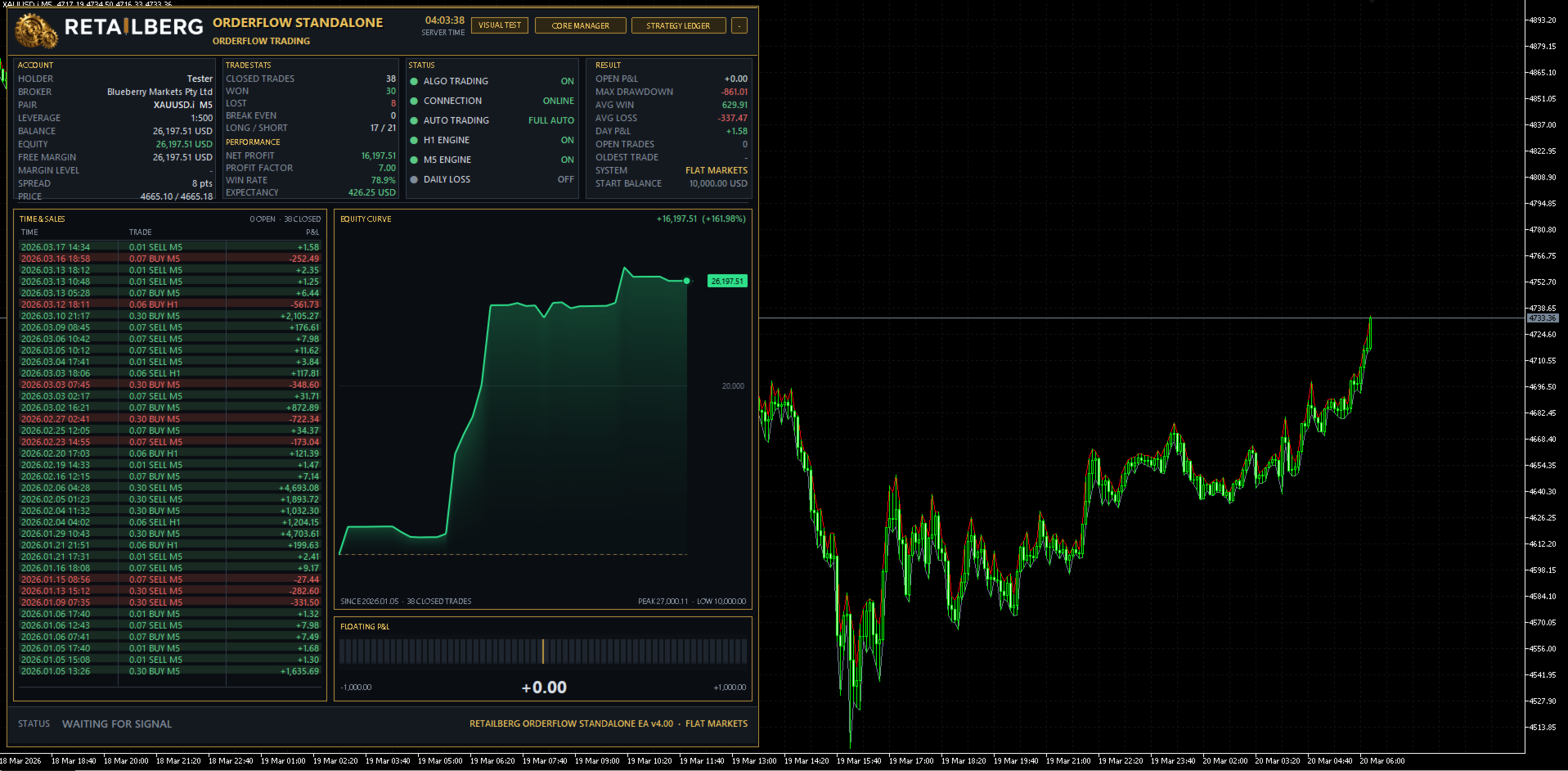
• Visual mode on, to watch the DASHBOARD fill with the trades and the equity curve
• Lots: set them for your account size (section 6), or load a preset
In the tester the engines trade on their own: the CORE MANAGER switches and the alerts do not run.
━━━━━━━━━━━━━━━━━━━━━━━━━━━━━━━━━━━━━━━━
OVERVIEW
An Expert Advisor that trades gold with two engines side by side:
• The H1 ENGINE follows the bigger moves that last hours or days: fewer trades, held longer.
• The M5 ENGINE follows the intraday moves: more trades, usually closed within the day.
Each engine finds its own setups, waits for confirmation, enters with a stop and two targets, takes part of the profit at each target and trails the rest. Each has its own lots and on / off switch.
THE STANDALONE EDITION
This is the trading core of RETAILBERG ORDERFLOW HYBRID EA on its own: the same engines, systems, trade management, risk controls and daily loss limit, and its backtest matched the HYBRID EA deal for deal. It leaves out the order-flow chart workspace (overlay, zones, profiles, studies, drawing tools, analyst, mini chart) and the semi-automatic and manual trading. Made for a light, clean chart: on a VPS, beside other EAs or on a slower computer. A DASHBOARD at the top left shows the account, the results, the EA's status, its trades and a live equity curve, with buttons for the CORE MANAGER and the STRATEGY LEDGER.
━━━━━━━━━━━━━━━━━━━━━━━━━━━━━━━━━━━━━━━━
1. WHAT YOU NEED
• MetaTrader 5 for Windows (MT4 not supported)
• A HEDGING account (netting not supported: each engine can hold a trade at once)
• Gold on an M5 chart · leverage 1:100+ · minimum lot 0.01
• $3,000 or more recommended (section 6)
• A Windows VPS or MetaTrader's virtual hosting for 24-hour trading
• Algo trading allowed (Tools → Options → Expert Advisors) and the Algo Trading button on
• No DLLs, no web requests, no third-party services
━━━━━━━━━━━━━━━━━━━━━━━━━━━━━━━━━━━━━━━━
2. CHOOSING A BROKER
The broker's costs come off every trade, win or lose. Look for:
• HEDGING account, ideally raw-spread / ECN for gold
• A tight, steady gold spread, also at the daily open and around news
• Low commission (compare spread + commission together)
• Gold's swap (H1 trades can be held for days)
• Stop level at or near zero, fast execution, no requotes
• 100 oz contract (0.01 lot ≈ $1 per $1 move), lot step 0.01
• Regulation and real tick history for the Strategy Tester
Tip: run the demo on your broker's own real ticks to see its real costs. The backtests below had no commission.
━━━━━━━━━━━━━━━━━━━━━━━━━━━━━━━━━━━━━━━━
3. HOW TO START
1) Watch the video on this page.
2) Buy or rent; MetaTrader installs it under Expert Advisors → Market.
3) Test it in the Strategy Tester, then on a DEMO account for 4 to 8 weeks.
4) Open an XAUUSD M5 chart and drag the EA onto it; tick Allow Algo Trading.
5) Inputs: load the preset for your account and risk (or set the M5 / H1 lots), system AUTO SWITCH recommended.
6) Click OK: the DASHBOARD appears and the CORE MANAGER opens the first time.
7) In the CORE MANAGER switch AUTO TRADING on, then H1 and / or M5. Nothing trades until you do — on purpose.
8) VPS: set "AUTO TRADING when the EA starts" to "on: H1 and M5".
9) Prop firm: set the DAILY LOSS LIMIT inputs first.
One copy per account and symbol. To stop: switch AUTO TRADING off (open trades are still managed), remove the EA once both engines are FLAT. Never run the STANDALONE and the HYBRID EA on the same account and symbol: they share magic numbers.
━━━━━━━━━━━━━━━━━━━━━━━━━━━━━━━━━━━━━━━━
4. THE THREE SYSTEMS
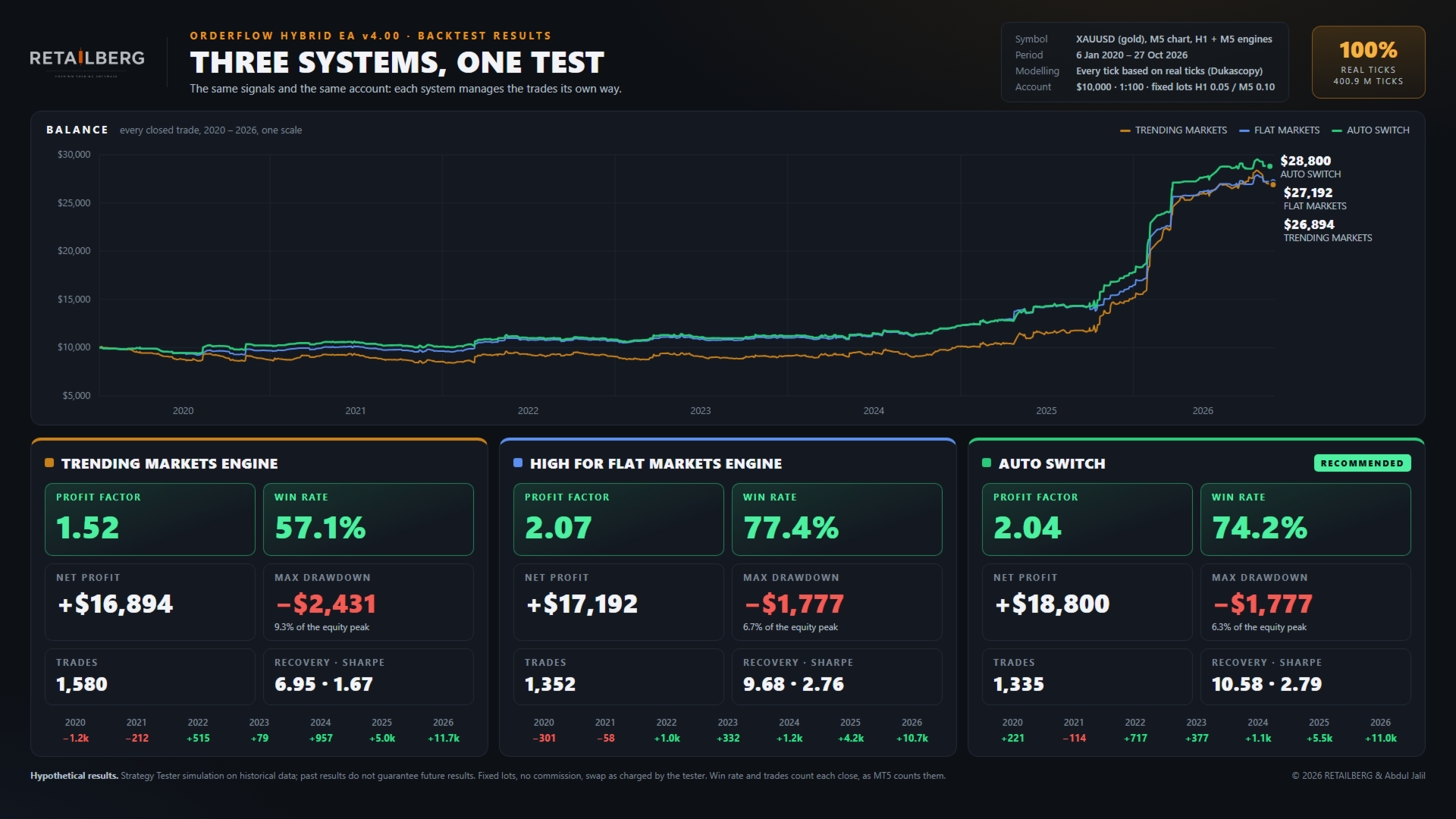
Choose ONE in the inputs, and change it only while no trades are open. All three take the same signals; they differ in how each trade is managed. Every engine setting is built in and tested.
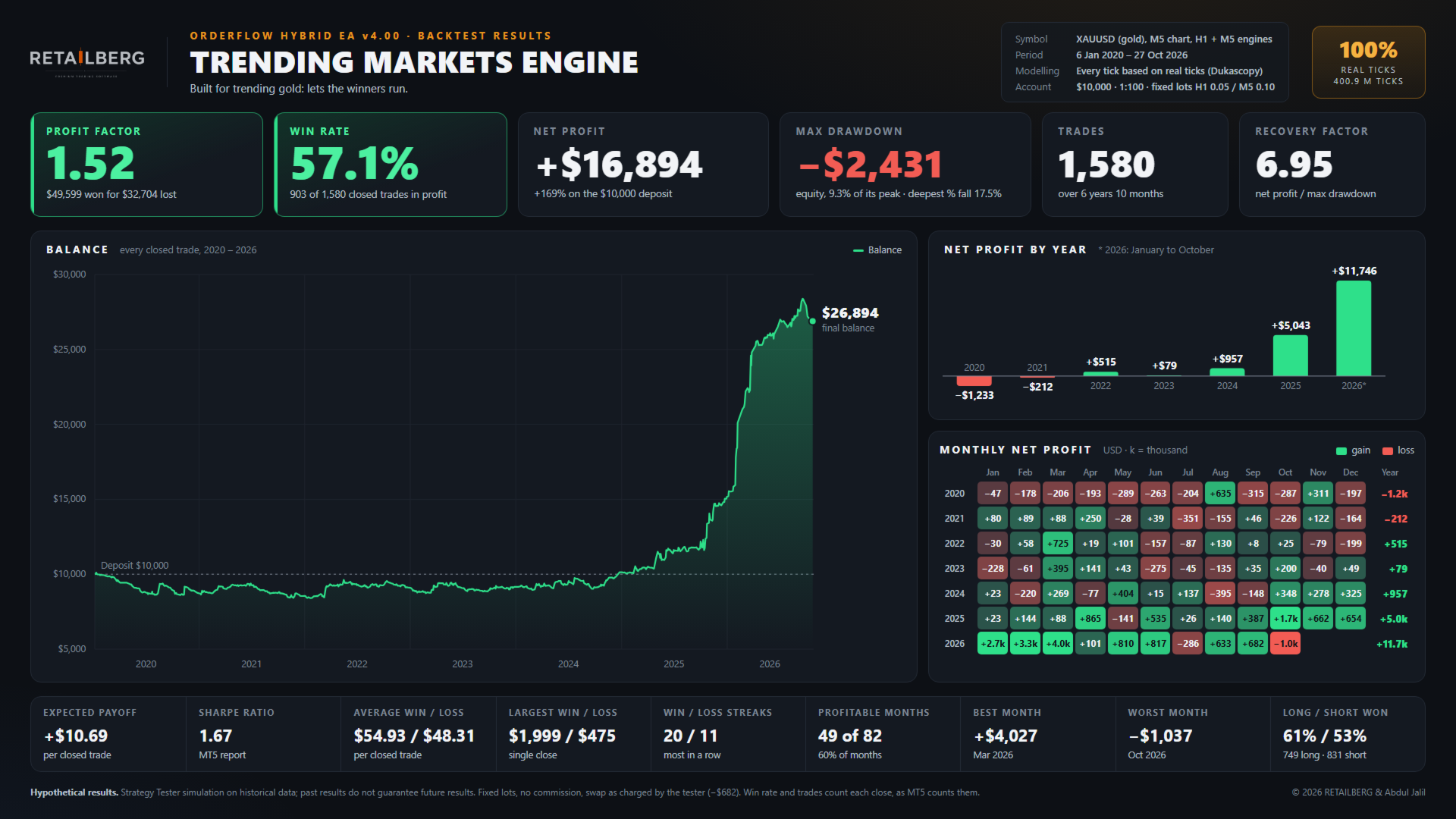
• TRENDING MARKETS — lets winners run with the trend: fewer, larger wins; deeper drawdowns in quiet years.
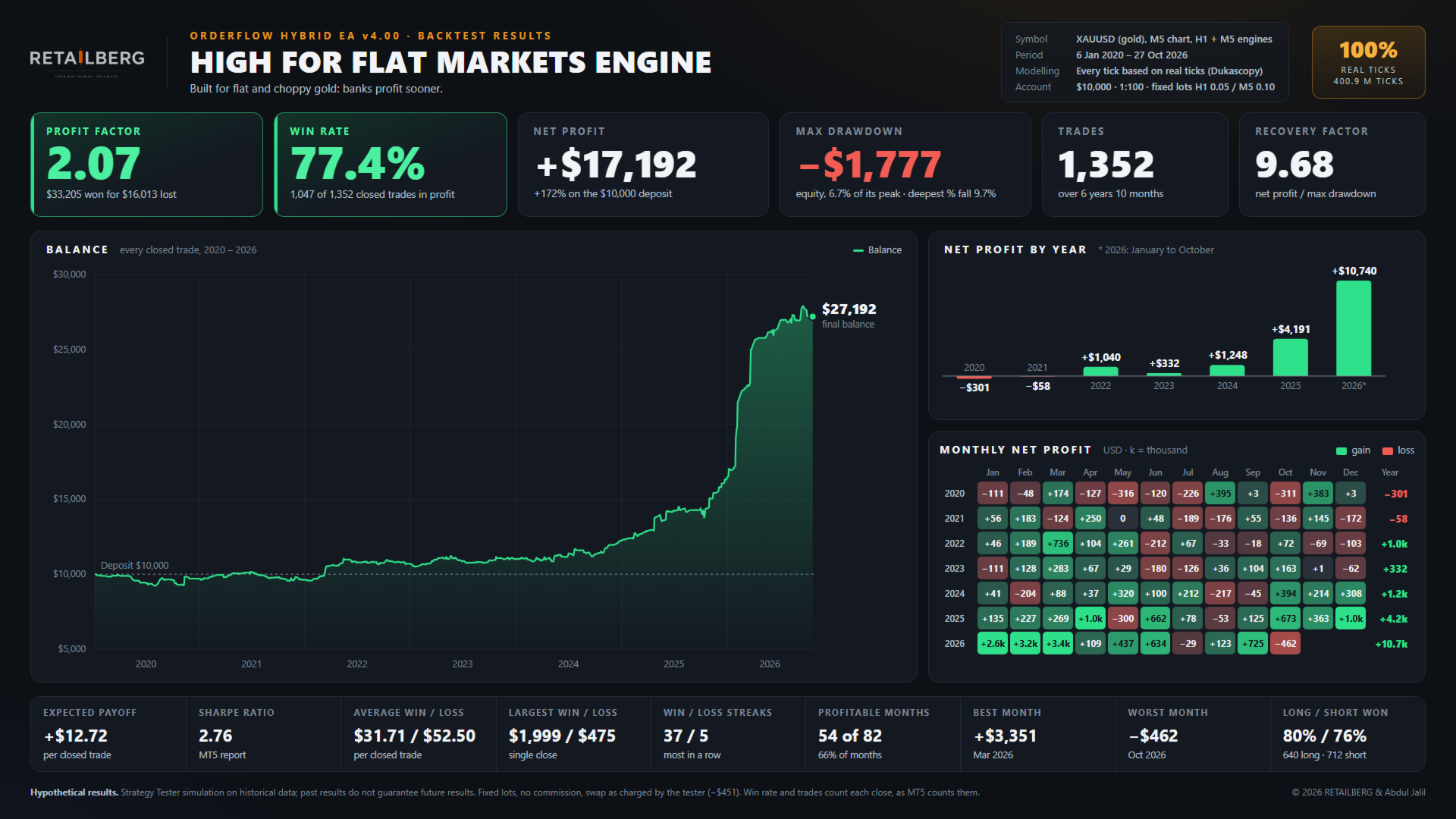
• HIGH FOR FLAT MARKETS — protects profit sooner: a much higher share of winners and smaller drawdowns.
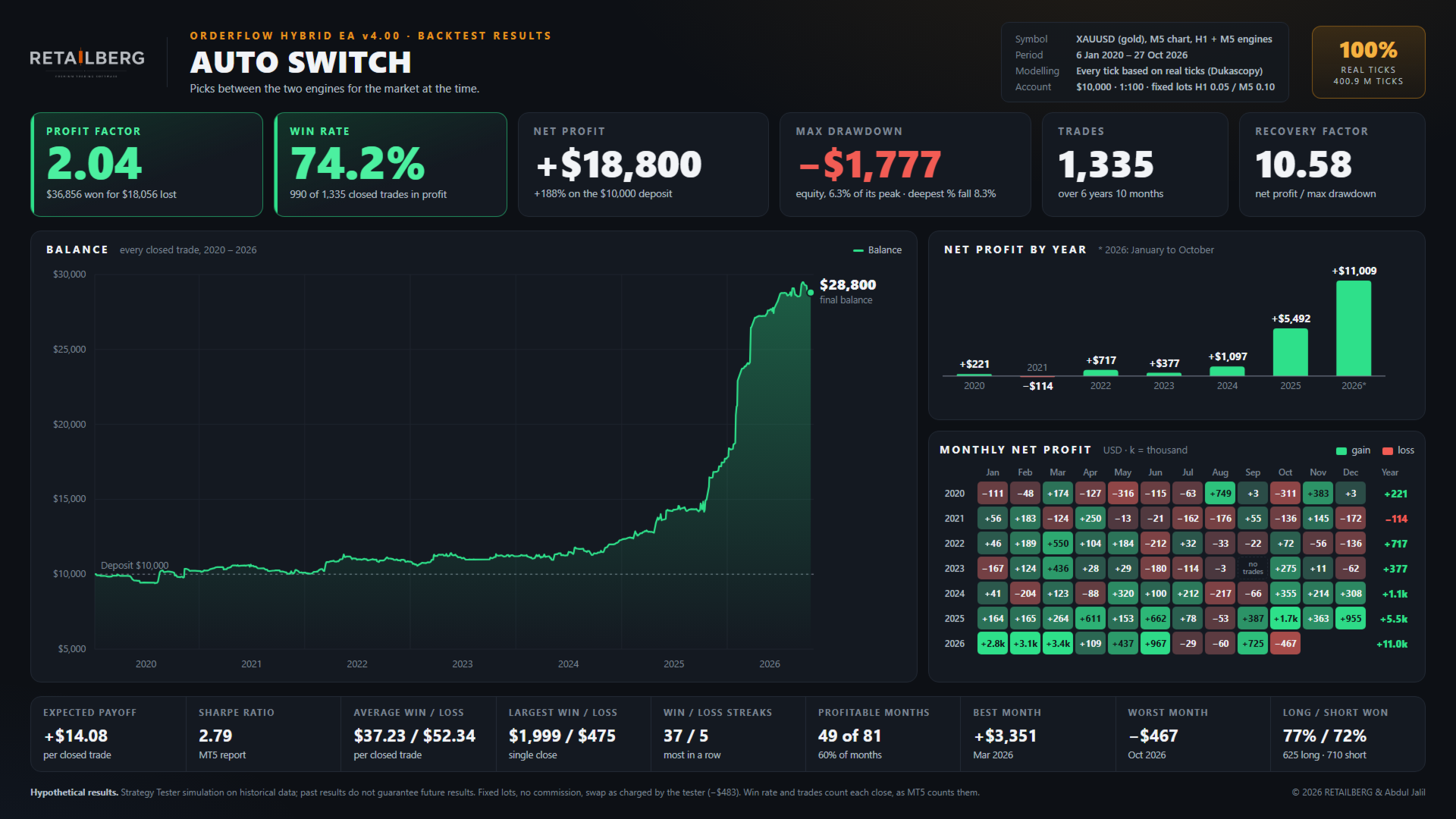
• AUTO SWITCH (recommended) — decides signal by signal how each trade is managed and leaves very quiet markets alone: the best result of the three over the full test.
━━━━━━━━━━━━━━━━━━━━━━━━━━━━━━━━━━━━━━━━
5. HOW A TRADE IS MANAGED
• Every trade has a stop at the broker from the moment it opens.
• Part is closed at TP1, part at TP2; the runner follows a trailing stop that only moves in its favour.
• M5 enters with a limit at the signal's price (it expires unfilled rather than chase); H1 enters at market once confirmed.
• A trade ends at its stop, its targets and trail, when the trend turns, or after a set time without progress.
• One trade per engine. Size is never above your lot input.
• Free margin and the broker's volume limit are checked before every order.
━━━━━━━━━━━━━━━━━━━━━━━━━━━━━━━━━━━━━━━━
6. RISK MANAGEMENT
Your lot size IS your risk: the two lot inputs (M5 and H1) decide how hard the account swings.
ACCOUNT AGGRESSIVE (M5 / H1) LOW RISK (M5 / H1)
$3,000 0.03 / 0.01 0.01 / 0.01
$5,000 0.04 / 0.01 0.01 / 0.01
$7,500 — 0.03 / 0.01
$10,000 0.08 / 0.02 0.04 / 0.01
$25,000 0.20 / 0.05 0.10 / 0.02
$50,000 0.40 / 0.10 0.20 / 0.05
$100,000 0.80 / 0.20 0.40 / 0.10
M5 0.03 is the smallest size that splits into TP1 / TP2 / runner. Estimated worst drawdown in the 2020–2026 tests, scaled to these lots: aggressive ~17% (Trending) / ~12% (Flat Markets, Auto Switch); low risk ~9% / ~6%. Estimates from the past, not limits: a future drawdown can be deeper and longer. $500 and $1,000 accounts can only trade 0.01 / 0.01 and are NOT recommended (tested lows −30% and −15%).
• Between two sizes, take the smaller one.
• Keep H1 on, also on small accounts.
• Other EAs on the account: trade smaller.
• Demo first, then the smallest size, then your full size.
━━━━━━━━━━━━━━━━━━━━━━━━━━━━━━━━━━━━━━━━
7. DAILY LOSS LIMIT (PROP FIRMS)
Set it in the inputs or the CORE MANAGER: Off (default) / % of the day's starting balance / money; when reached stop new trades, close this EA's trades, or close every trade on the account; count the whole account or this EA only; the new day's hour. Once reached the EA takes no new trade that day, cancels its orders, closes trades by your choice, shows STOPPED and alerts you.
Advice: low-risk lots, the limit at 80–90% of the firm's rule, CLOSE ALL, whole account. The EA does NOT cap a prop firm's overall or trailing drawdown, does not pause for news and can hold trades over the weekend.
━━━━━━━━━━━━━━━━━━━━━━━━━━━━━━━━━━━━━━━━
8. DASHBOARD, CORE MANAGER & STRATEGY LEDGER
DASHBOARD (display only)
• Account: balance, equity, margin, spread, price
• Trade stats: trades, wins / losses, net, profit factor, win rate, expectancy
• Status lights: algo trading, connection, AUTO TRADING, H1, M5, daily loss
• Result: open P&L, drawdown, today, open trades
• Time & sales of the EA's trades, a live equity curve and a floating P&L meter
CORE MANAGER
• AUTO TRADING, H1 and M5 switches; POTENTIAL trades OFF / ABOVE BAND / ALL (OFF recommended)
• Account details, 16 performance tiles, the trades tape, results by engine, the DAILY LOSS LIMIT section
STRATEGY LEDGER
• The account's whole history by every EA: a P/L calendar, the equity curve, the full ledger and results by EA
ALERTS: trade and daily-loss alerts by popup, phone push or email.
━━━━━━━━━━━━━━━━━━━━━━━━━━━━━━━━━━━━━━━━
9. INPUTS
System · per engine: enable, lots, magic (M5 also potential trades) · slippage · AUTO TRADING when the EA starts · DAILY LOSS LIMIT · alerts · screen resolution. Default magics: 20261101 / 02 (Trending), 20261111 / 12 (Flat Markets), 20261121 / 22 (Auto Switch); keep them unique on the account. Appendix A of the manual explains every input.
━━━━━━━━━━━━━━━━━━━━━━━━━━━━━━━━━━━━━━━━
10. BACKTEST RESULTS (HYPOTHETICAL)
MT5 Strategy Tester, every tick based on real ticks, Dukascopy, 6 Jan 2020 – 27 Oct 2026. XAUUSD, $10,000, 1:100, H1 0.05 / M5 0.10, no commission.
SYSTEM PF WIN RATE* NET MAX EQUITY DD
Trending Markets 1.52 57.1% +$16,894 $2,431 (9.3%)
High for Flat Mkts 2.07 77.4% +$17,192 $1,777 (6.7%)
Auto Switch 2.04 74.2% +$18,800 $1,777 (6.3%)
Auto Switch by year: 2020 +$221 · 2021 −$114 · 2022 +$717 · 2023 +$377 · 2024 +$1,097 · 2025 +$5,492 · 2026 (to Oct) +$11,009
* As MT5 counts them: each partial close is a trade.
2020–2023 were flat to slightly positive; most of the profit came in the strong gold trend of 2025–2026. A period like 2020–2023 can return at any time, and a losing period can be longer and deeper than any in the test.
━━━━━━━━━━━━━━━━━━━━━━━━━━━━━━━━━━━━━━━━
11. WHAT YOU GET, UPDATES & SUPPORT
• The EA (one .ex5), the 83-page user manual (PDF) and 15 account-size presets ($500 to $100,000, sent on request)
• Free updates through the MQL5 Market (attach the EA again after an update)
• Support by MQL5 private message: send the EA version, a chart screenshot, the Experts log lines, your broker / account type and your .set file. Never send passwords.
Best practice: tester, then demo, then the smallest live size · a VPS · AUTO SWITCH with a low-risk preset · both engines on · judge it over months, not days.
━━━━━━━━━━━━━━━━━━━━━━━━━━━━━━━━━━━━━━━━
12. RISK DISCLAIMER
Trading gold, forex and CFDs on margin carries a HIGH risk and is not suitable for every investor; you can lose all the money in your account. Only trade money you can afford to lose.
RETAILBERG ORDERFLOW STANDALONE EA is a software tool. Nothing in the EA, its presets, manual or this description is investment, financial, tax or legal advice. RETAILBERG is not a licensed financial adviser; every decision to trade and every setting is yours.
PAST PERFORMANCE DOES NOT GUARANTEE FUTURE RESULTS. All results shown are hypothetical Strategy Tester simulations on historical data, with no money at risk. A backtest cannot show your broker's spread at news and the opens, commission, swap, slippage, refused orders, delays or outages, and settings chosen on past data look better on that data than later. The largest drawdown is still to come. Every trade can lose; price can gap past a stop at news, at the opens and over weekends.
By buying, renting or running the EA you accept these risks. Test it in the Strategy Tester and on a demo account before trading real money.
━━━━━━━━━━━━━━━━━━━━━━━━━━━━━━━━━━━━━━━━
Download the free demo and run it on real ticks in the Strategy Tester.
© 2026 RETAILBERG & Abdul Jalil. All rights reserved.