MS Trade Assistant

MSL Trade Assistant

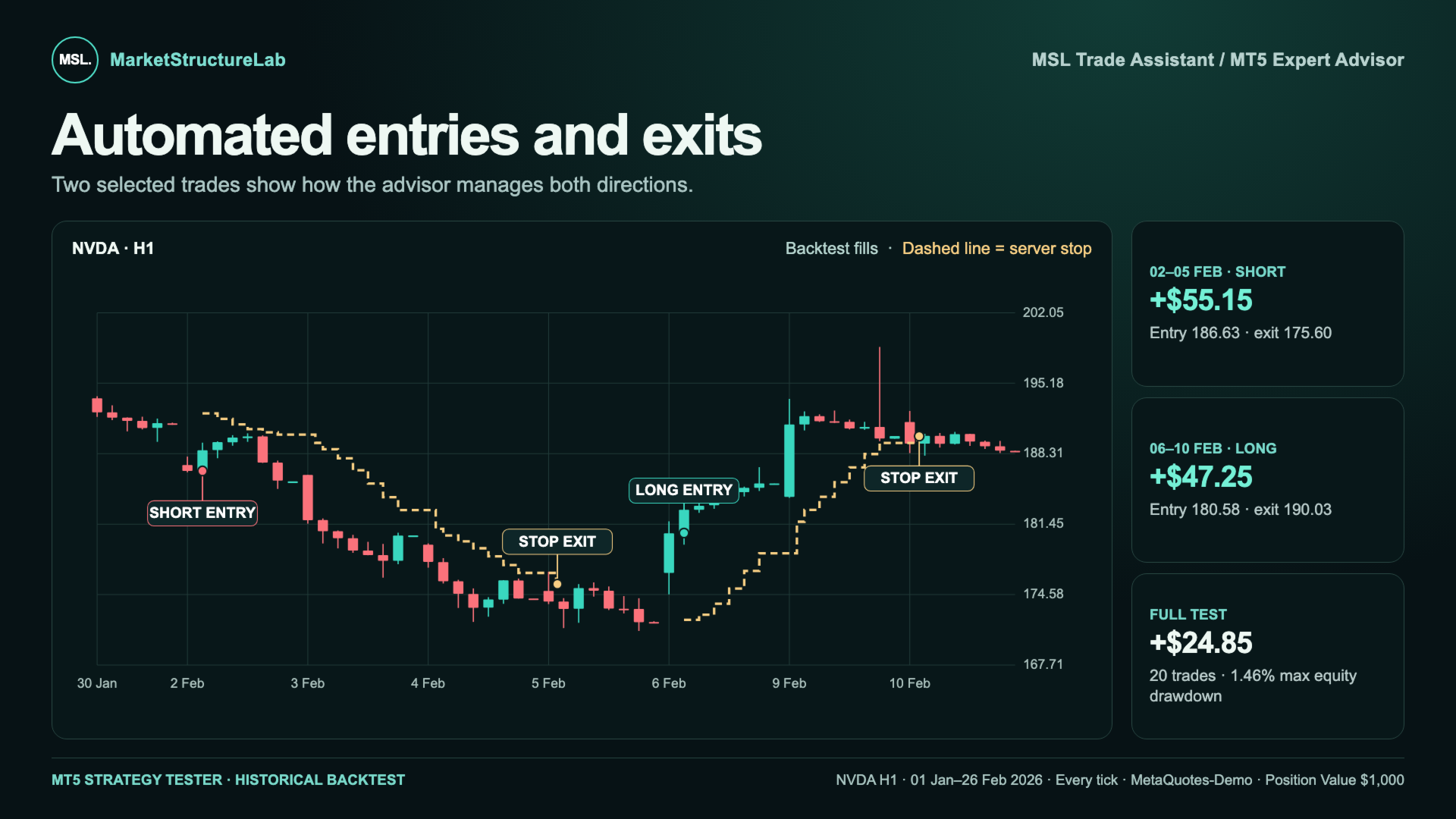
Automated entries, server-side stop management, and trade statistics on a single MetaTrader 5 chart. MSL Trade Assistant checks entry conditions after a candle closes, opens a position when the signal is confirmed, and manages it according to your settings. The dashboard breaks down long and short results so you can evaluate each direction on your chosen instrument.

How It Works

  • Confirmed entries. The Expert Advisor evaluates the closed candle against a smoothed price channel and an ATR buffer. An optional higher-timeframe filter aligns entries with the broader trend.
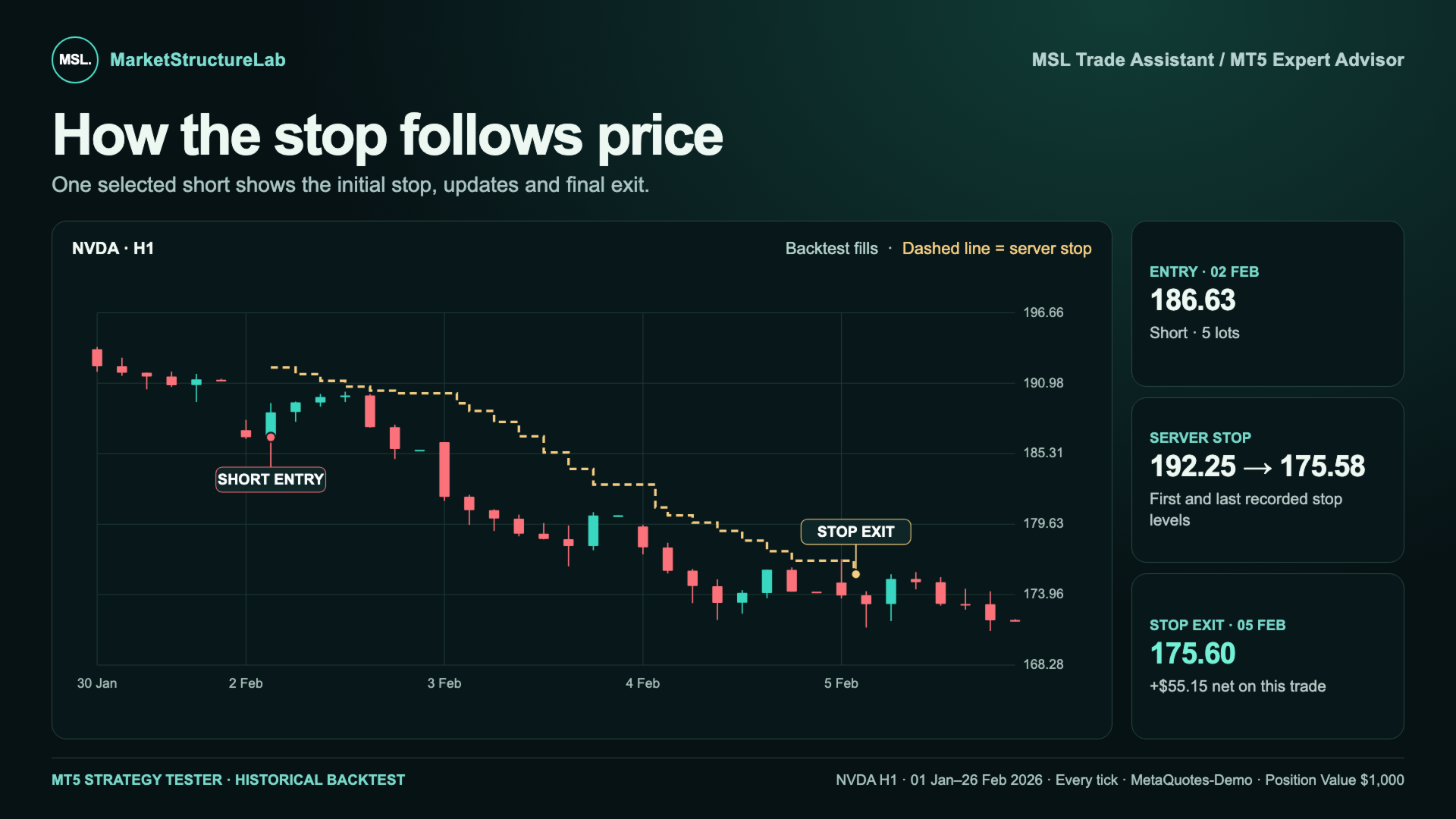
  • Protection from entry. A server-side Stop Loss is submitted with the entry order. As price moves in favor of the position, the advisor can tighten the stop while preserving any more protective level already in place.
  • Flexible position sizing. Choose the broker’s minimum lot, a fixed lot size, a target position value, or an estimated risk percentage of account equity. The advisor checks order volume and available margin before submitting the order.
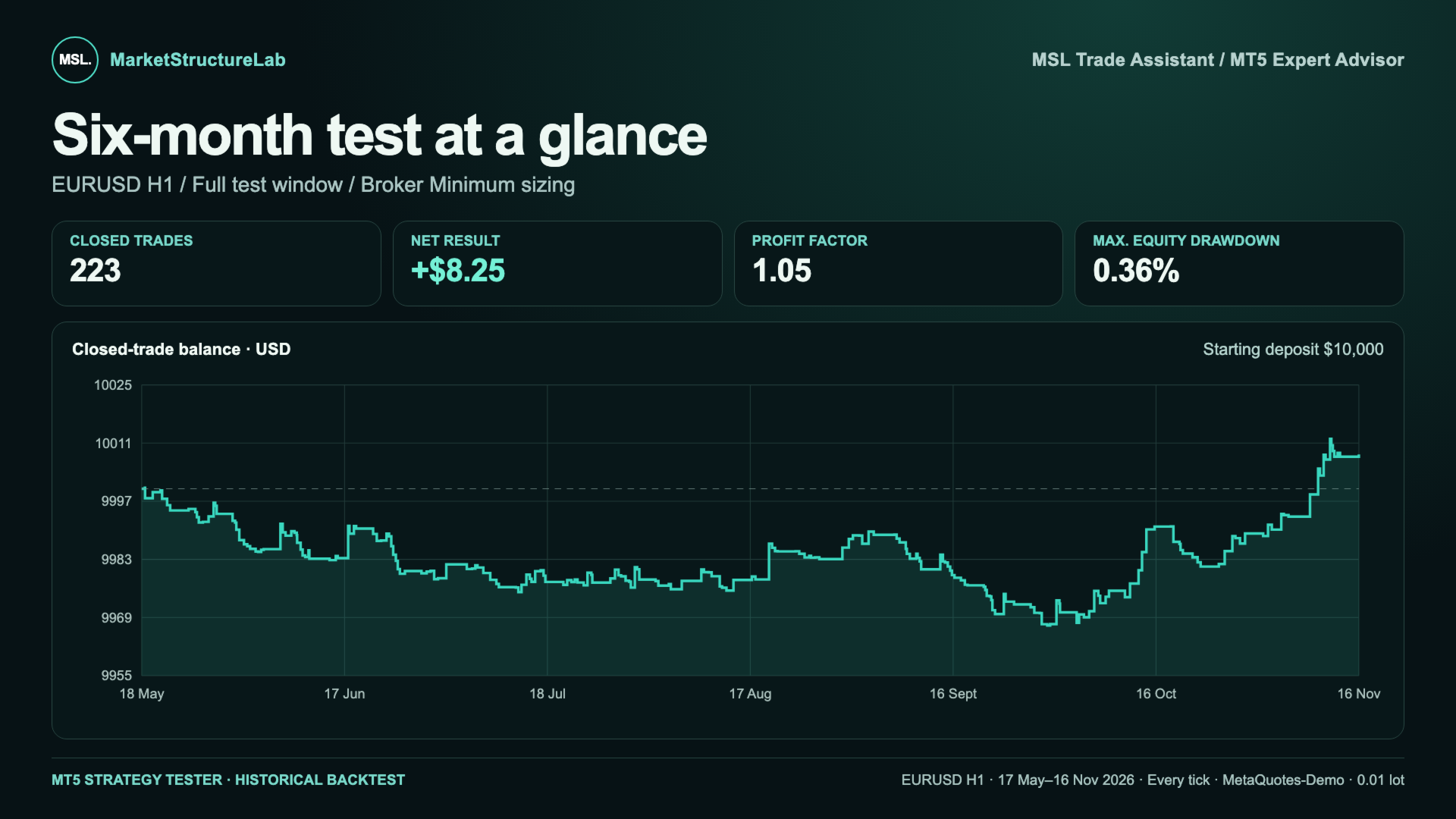
  • Results by direction. The dashboard shows net P&L, Profit Factor, closed positions, and closed-trade drawdown. Chart labels mark executed entries and exits.

Settings for Your Instrument and Timeframe

The default settings are a starting point for your first backtest. Volatility, spreads, and trading sessions vary by instrument. Even on the same market, switching from H1 to H4 changes how often signals occur and how far away the stop is placed. A setup that works well on one chart can produce very different results on another.

Start with a baseline run in the MT5 Strategy Tester. Compare settings on your chosen instrument and timeframe, then check the selected setup on a separate historical period. Evaluate net results after costs, drawdown, and trade count together to see whether the setup fits your risk tolerance.

Main Input Parameters

  • Channel and entry — smoothing method and length, ATR signal buffer, and re-entry conditions after a stop.
  • Direction and filter — long only, short only, or both directions, with an optional higher-timeframe filter.
  • Protective stop — ATR period, stop buffer, initial stop distance limit, and additional trailing stop.
  • Position size — sizing mode and its associated lot, position value, or risk settings.
  • Chart display — dashboard visibility, position and size, plus entry and exit labels.

Need help with setup? You can always contact the MarketStructureLab developers through the product comments or private messages on MQL5. Tell us your instrument and timeframe, and we’ll help you choose settings for your first test and interpret the results.

제작자의 제품 더 보기
Liquidation Radar
Andrei Lukoianov
Crypto Liquidation Radar First, a LIQ event. Then, the price reaction. Direction confirmation is a separate step. After a sharp rise or fall, the main question is: will the move continue, or is the market preparing to reverse? Crypto Liquidation Radar helps you assess this situation on your MetaTrader 5 chart. It highlights unusual price movements with increased volume, shows the strength of each detected event, and marks the confirmed LONG or SHORT direction. Circles draw attention to events. T
MSL Liquidity Zones
Andrei Lukoianov
Liquidity Zones is a free MetaTrader 5 indicator by MarketStructureLab. It automatically highlights support and resistance zones, counts separate price returns and marks broken zones. The indicator helps you keep important price areas in view and assess how the market reacts to them. Colored zones, compact labels and historical levels make it useful for both beginners and experienced traders with their own analysis methods. Main features Zones based on confirmed price swings. Support zones come
FREE
PSAR Strategy
Andrei Lukoianov
PSAR Strategy See the trend direction and spot changes on one chart. PSAR Strategy is a trend indicator for MetaTrader 5 that combines Parabolic SAR, an EMA direction filter, and an ADX trend strength filter . Colored dots show the current PSAR state, large circles highlight direction changes, and transparent shading makes the chart easier to read. Alerts can notify you when a direction change meets your selected filter conditions. Clear Chart Display Turquoise dots below price — bullish PSAR st
FREE
MSL Friendly Trend
Andrei Lukoianov
Friendly Trend is a MetaTrader 5 indicator by MarketStructureLab. It helps you see the trend direction, notice changes in its state and compare conditions across several timeframes. The indicator displays a smooth adaptive line, a colored ribbon and BULLISH / BEARISH labels. A compact dashboard shows the states of four selected timeframes and their combined result. Beginners can use it as a visual guide. Experienced traders can use it as an additional filter within their own analysis process. Wh
FREE
Trend State Signals
Andrei Lukoianov
Trend State Signals is a free indicator for MetaTrader 5 by MarketStructureLab. It helps you see the current trend state and notice changes in direction through an adaptive line and BULLISH / BEARISH labels. Use it to assess the market visually or as an additional confirmation tool in your trading strategy. Beginners get a clear guide on the chart. Experienced traders get an adjustable filter for market direction. What you see on the chart Colored line: turquoise shows a bullish filter state, wh
FREE
MSL Trade Master
Andrei Lukoianov
Trade Master Check the direction before entering. Get an alert when it changes. You have found a level, a pattern, or another area of interest. The next question is: does your idea follow the current market direction or go against it? Trade Master provides a clear visual reference directly on your MetaTrader 5 chart. A green ribbon shows a bullish state, while a red-pink ribbon shows a bearish state. A contrasting marker highlights direction changes, and terminal alerts help you notice them. The
Pr0fit Engine
Andrei Lukoianov
Profit Engine — Signal, Entry, Stop and Three Targets on One Chart A signal appears. Where is the entry? Where should risk be limited? Which targets should you monitor? How does the protective level change as price moves? Profit Engine brings these reference points together in a clear visual trading plan. The indicator shows direction, plots Entry and Stop Loss levels, calculates three Take Profit targets, marks target touches and displays how the setup develops. You do not need to draw every s
Pr0fit Navigator
Andrei Lukoianov
Profit Navigator — from confirmed signals to targets and setup tracking on one chart. A LONG or SHORT signal appears. What happens next? Which targets have been reached? Where is the active stop? Are the conditions for reentry in place after an exit? Profit Navigator brings signals, three targets, a dynamic stop and statistics into one clear workflow. You can follow both the signal and the setup’s subsequent development — directly on your MetaTrader 5 chart. Less manual drawing. Less searching f
MSL Smart Trade
Andrei Lukoianov
Smart Trade — confirmed signals, two targets and an active stop on your MT5 chart When a candle closes beyond a confirmed swing level, Smart Trade marks the LONG or SHORT signal and displays Entry, TP1, TP2 and Trail on the right side of the chart. You can see which levels to watch and where the stop currently sits without redrawing the setup after each signal. From signal to exit Signals are confirmed at candle close. Smart Trade checks for a break of the latest confirmed swing high or low. If
Buy Sell Signals — confirmed signals, entry, stop and three targets on one MT5 chart When a candle closes and a BUY or SELL signal is confirmed, Entry, SL and TP1–TP3 appear on the right side of the chart. Buy Sell Signals calculates the levels, marks target touches and shows when the modeled stop has moved to entry. You can follow the setup without drawing the levels by hand after every signal. How it works on the chart Wait for confirmation. The indicator checks where the candle closes relati
필터:
리뷰 없음
리뷰 답변