Maple Grid
- Experts
-
Mr Adisorn Mayang
 Hello, my name is bangzeed
I am an professional analysis algorithms trading and developer.
You can see my products here: https://www.mql5.com/en/users/bangzeed/seller - 버전: 1.0
- 활성화: 5
Maple Grid - an automated basket grid for the CAD crosses AUDCAD, GBPCAD and NZDCAD, run from one chart, with a built-in news pause and a full results dashboard.
Free demo: download it and run it in the Strategy Tester with the default settings before you buy.
Risk note: Maple Grid is a grid system with increasing lot sizes (martingale style). A long one-way trend can keep a basket open for days with a deep floating drawdown. Use money you can afford to lose, start with the Medium or Low risk level, and test on a demo account first.
Why Maple Grid
- Three related pairs from a single chart, with a cap on how much CAD exposure can build up in one direction.
- Stays out of the market around rate decisions, CPI and jobs reports - no news file to download, it works out of the box.
- Every basket is managed and closed automatically; you only choose the risk level.
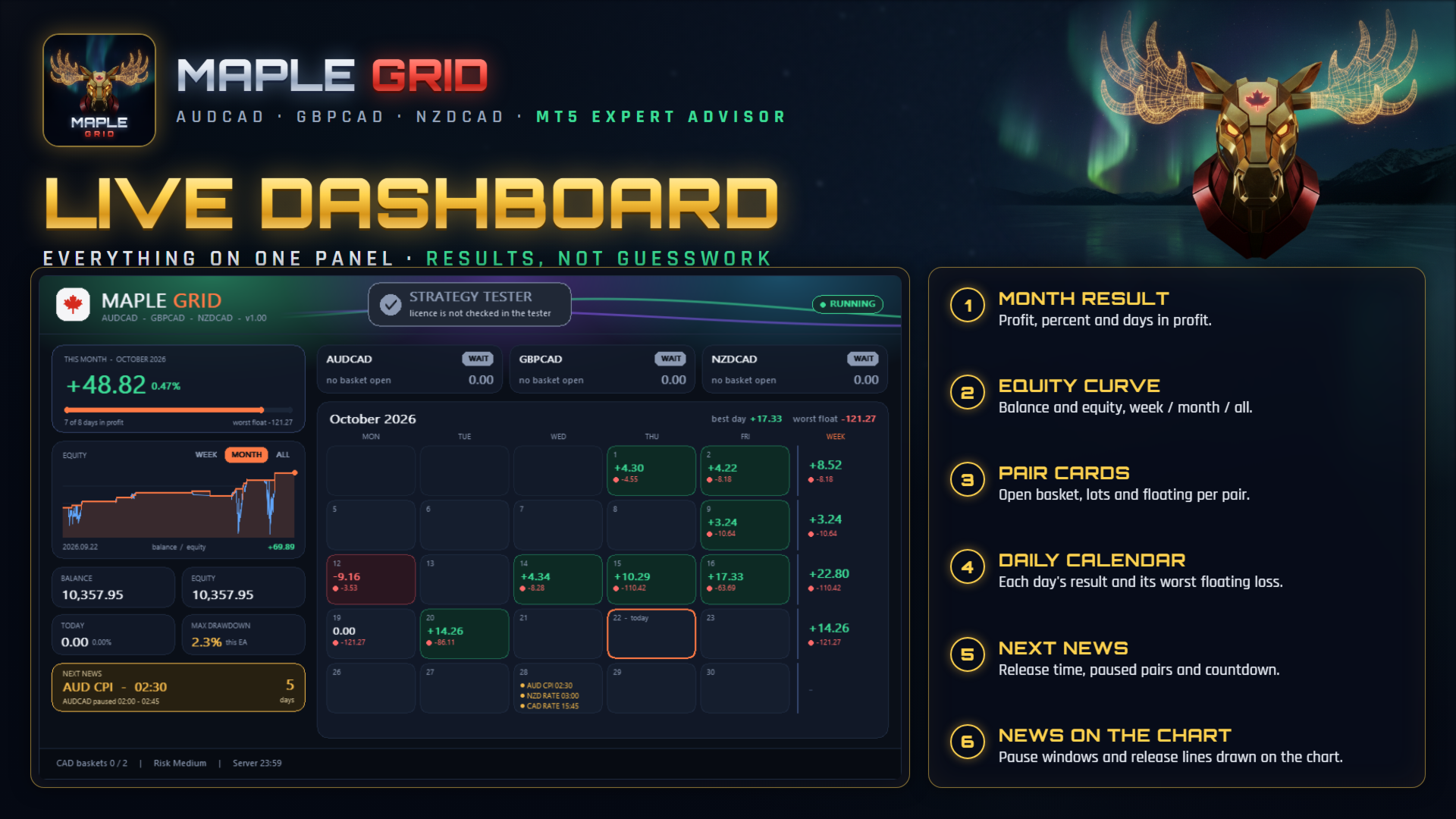
- A dashboard that shows what matters: daily results, the worst floating loss of each day, the equity curve and the next news release.
How it works
Maple Grid waits for stretched moves on the CAD crosses and opens a basket in the direction of the expected return. If price keeps going, the basket is built up step by step and actively reduced when parts of it can be closed together; the whole basket is closed once it reaches its profit target. Spread, news and a first-Friday filter decide when new trades are allowed - closing is never blocked.
Key features
- AUDCAD, GBPCAD and NZDCAD from one chart; the broker's symbol suffix is detected automatically (e.g. AUDCAD.m).
- CAD exposure limit: maximum number of baskets holding CAD in the same direction.
- News pause for AUD, GBP, NZD and CAD rate decisions, CPI and employment releases; times built in and updated from the MT5 economic calendar; broker server time and daylight saving detected automatically.
- Risk levels High / Medium / Low, Custom, or a Fixed start lot.
- Spread filter and a pause on the US jobs-report Friday.
- Dashboard: month result, equity curve (week / month / all), balance, equity, max drawdown, open baskets per pair, calendar with day results and worst floating loss, next news countdown.
- Safe restart: open baskets are picked up again after a terminal restart.
- No DLL, no external web requests.
Requirements and recommendations
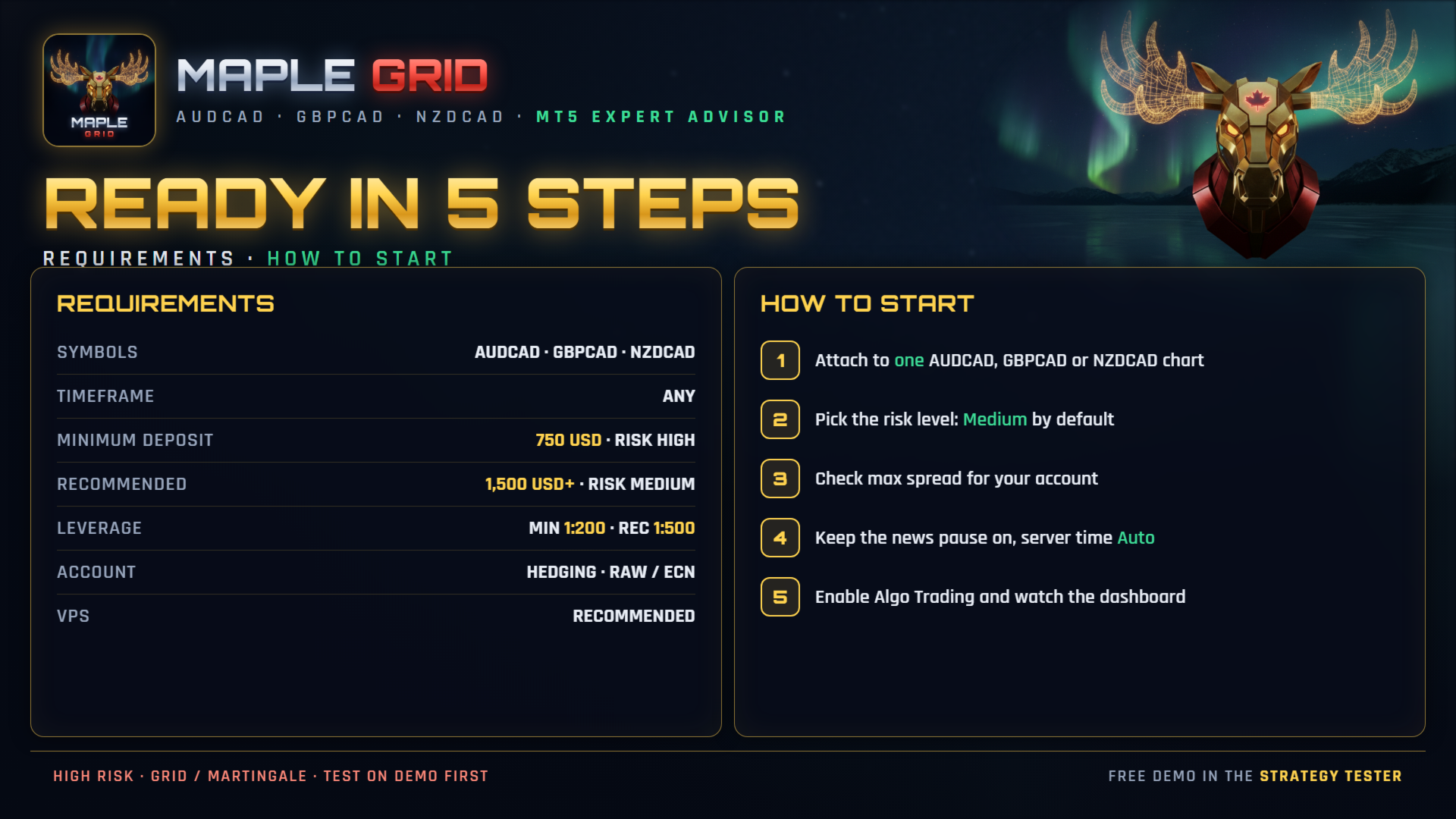
- Symbols: AUDCAD, GBPCAD, NZDCAD (attach to one of these charts).
- Timeframe: any - the EA uses its own timeframes internally.
- Minimum deposit: 750 USD (start lot 0.01 with Risk = High).
- Recommended deposit: 1,500 USD or more (start lot 0.01 with Risk = Medium).
- Leverage: minimum 1:200, recommended 1:500.
- Account type: hedging recommended. On a netting account the EA keeps one position per pair.
- Broker: Raw / ECN / low-spread account. Default maximum spread is 30 points; raise it on accounts with wider spreads, otherwise the EA rarely trades.
- VPS: recommended, so baskets are always managed.
How to start
- Open one AUDCAD, GBPCAD or NZDCAD chart and attach Maple Grid.
- Choose the Risk level (Medium is the default) or a Fixed start lot.
- Check Max spread for your account type.
- Leave the news pause on and set "Broker server time" to Auto.
- Enable Algo Trading and check the dashboard: the licence box shows your account and the pair cards show WAIT or the open baskets.
Inputs
- Pairs: Trade AUDCAD / GBPCAD / NZDCAD.
- Money: Risk level, Custom balance per 0.01 lot, Fixed start lot.
- Filters: Max CAD baskets in the same direction, Max spread (points), No new trades on the first Friday.
- News pause: Rate decisions, CPI, Employment, minutes before / after, broker server time, show pauses on the chart.
- Dashboard: show, size.
- General: Magic number.
Backtest
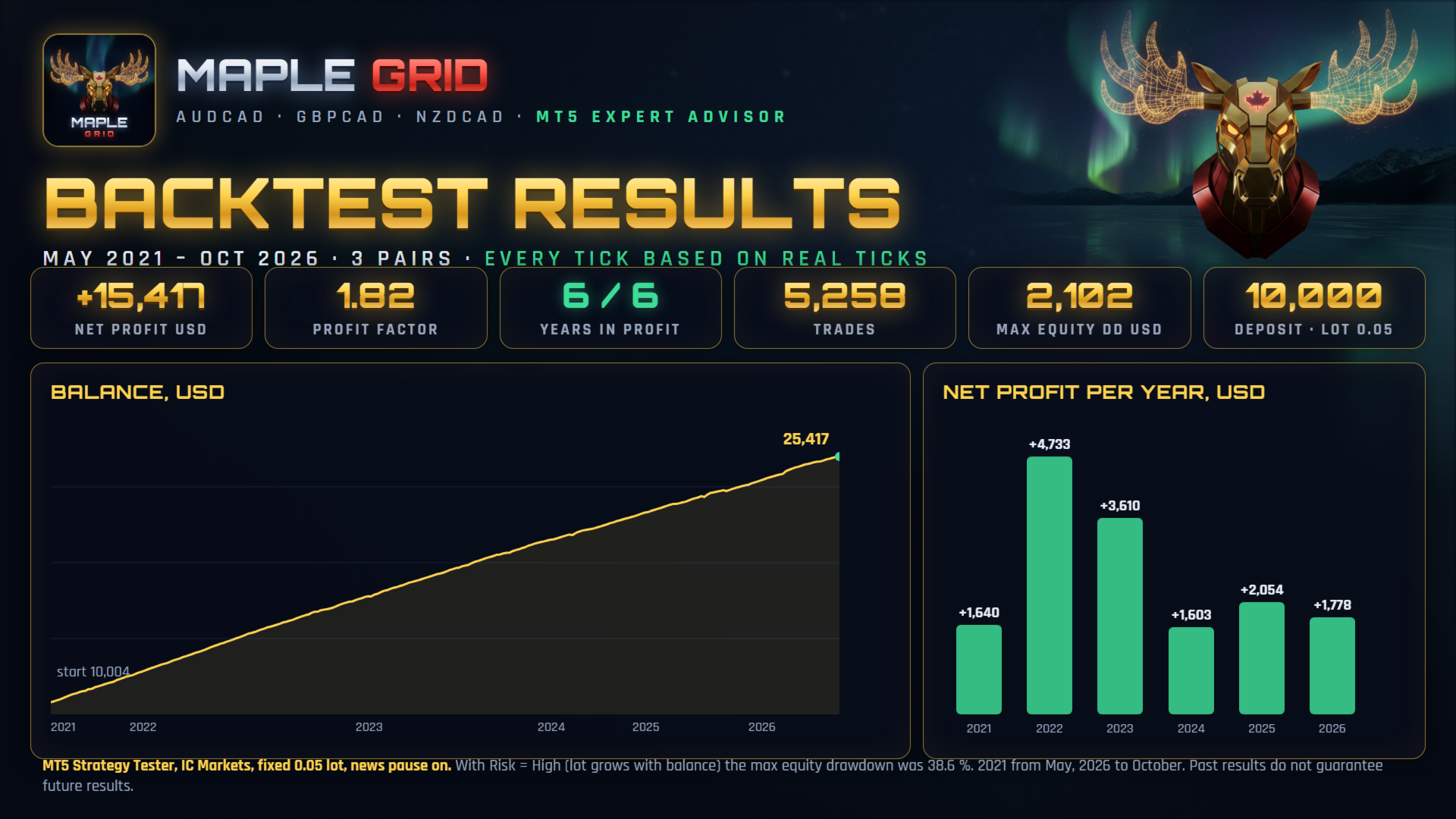
Use "Every tick based on real ticks" on AUDCAD (the other two pairs are loaded automatically). Our test: IC Markets, May 2021 to October 2026, fixed 0.05 lot, deposit 10,000 USD, news pause on - net profit 15,417 USD, maximum equity drawdown 2,102 USD, profit factor 1.82, 5,258 trades. With Risk = High the maximum equity drawdown in the same period was 38.6 %. Results differ between brokers (spread, swap) and past results do not guarantee future results.
FAQ
How much do I need? 750 USD minimum, 1,500 USD or more recommended, leverage 1:200 or higher.
Can I attach it to other symbols? It is built and tested for the three CAD crosses. On another chart it trades only that symbol, which is not recommended.
Can I run it on several charts? Attach it once per account. If you run two copies, give each its own magic number.
Is it suitable for prop firms? Check your firm's rules first - many do not allow grid or averaging systems.
What happens if my terminal restarts? Open baskets are recognised again and managed as before.
Support
Send me an MQL5 private message with your broker, account type, settings screenshot and the Experts journal.
Trading involves risk. This EA does not guarantee profits; use it at your own responsibility.