Zenith Trend EA
- Experts
- 버전: 1.6
- 활성화: 10

Zenith Trend EA — The Ultimate Hybrid Trendline & ATR Trading Assistant
Zenith Trend EA is a premium Hybrid Trading System that perfectly bridges the gap between human market intuition and robotic execution discipline. Designed for traders who want to maintain strategic control over their technical analysis while leaving the flawless, emotionless execution to an advanced algorithm.
Unlike fully automated robots that struggle during changing market conditions, Zenith Trend EA utilizes an interactive dual-mode system . You draw the core trendlines based on your analysis, and the EA instantly takes over the precise candle-by-candle monitoring, risk calculation, and trade execution.
🌟 Key Features & Mechanics
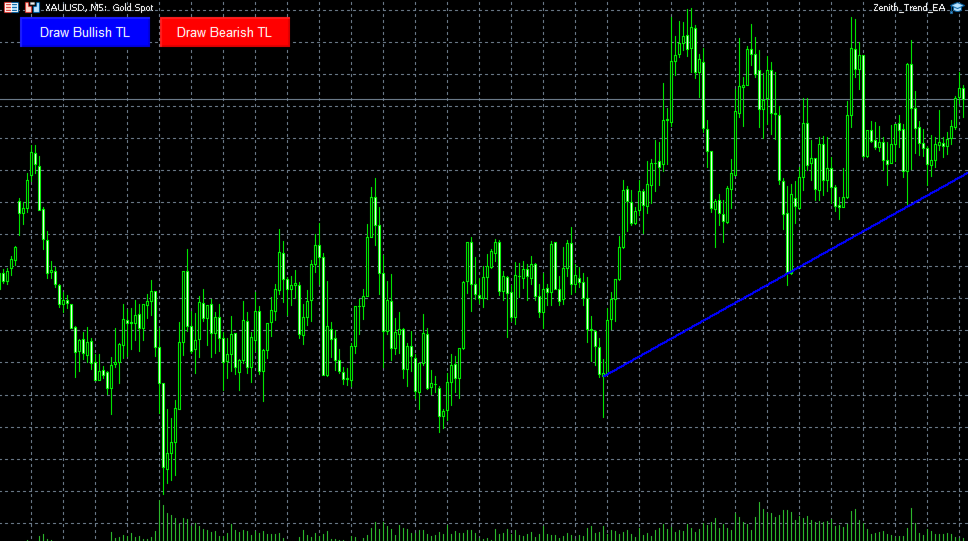
- Interactive Hybrid Execution: Simply click the on-screen buttons to generate dynamic trendlines (LineBullish & LineBearish ). Drag and adjust them with your mouse to connect any structural peaks or troughs.
- Smart Candle-Body vs. Pinbar Logic:
- Reversal (Breakout): If a candle Body Closes breaking past the trendline, the EA flags a structural shift and instantly executes a Reversal Trade (Sells a broken bullish line / Buys a broken bearish line).
- Continuation (Bounce): If the candle only tests the line with its wick (Pinbar) and closes safely behind it, the EA confirms a valid bounce and triggers a Trend Continuation Trade .
- Dynamic ATR Risk Management: Stop Loss (SL) and Take Profit (TP) are calculated automatically for every single trade using the Average True Range (ATR) indicator to adjust according to real-time market volatility.
- Professional Money Management: Includes an advanced Auto-Lot feature that calculates exact lot sizes based on your desired account risk percentage per trade.
- Daily Drawdown Protection: Built-in Max Daily Loss shield that automatically halts all trading operations for the day if your target loss limit is reached, protecting your capital from market anomalies.
- MQL5 Market Tester Compliant: Features an internal automated mode specifically engineered to pass the MQL5 automatic validation process seamlessly.
⚙️ Input Parameters
- --- Lot & Risk Settings ---
- InpAutoLot (true/false): Enable automatic lot calculation based on risk.
- InpRiskPercent : Account balance percentage risked per trade (e.g., 1.0%).
- InpFixedLotSize : Fixed lot size utilized if Auto-Lot is disabled.
- --- ATR Settings ---
- InpATRPeriod : The lookback period for the ATR volatility calculation.
- InpATRMultiplierSL : ATR multiplier to determine the Stop Loss distance.
- InpATRMultiplierTP : ATR multiplier to determine the Take Profit distance.
- --- Account Protection ---
- InpMaxDailyLossUSD : Maximum equity loss allowed per day in USD (0 = Disabled).
- InpMagicNumber : Unique ID for the EA's order tracking.
📖 How to Use (Live Trading)
- Attach Zenith Trend EA to your preferred chart and timeframe (Recommended: H1 or H4 for reliable price action).
- Click the [Draw Bullish TL] or [Draw Bearish TL] button on the top-left corner of your chart.
- Double-click the generated line and drag its anchor points to match your market analysis.
- Let the EA sit in the background; it will auto-extend the line to the right ( Ray Right ) and handle the entries flawlessly on the 3rd, 4th, or subsequent touches!