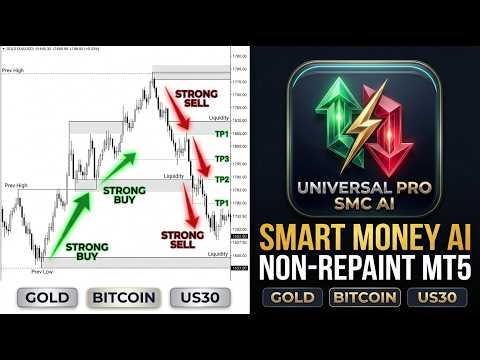
Universal Pro SMC AI Trading System MT5
- 유틸리티
- 버전: 1.0
- 활성화: 5

Institutional Smart Money Liquidity Engine • 100% Non-Repainting • Multi-Asset • External AI Integration
Universal Pro SMC AI is a next-generation institutional trading utility engineered for intraday and swing traders across Gold (XAUUSD), Bitcoin (BTCUSD), US30 (Dow Jones 30), and Major Forex pairs.
Unlike conventional retail indicators that rely on lagging moving averages and generate false breakout signals, this system tracks institutional liquidity pools, waits for retail stop-loss sweeps at swing extremes, and confirms high-probability reversal moves using a proprietary 6-factor confluence scoring engine.
Every signal is accompanied by dynamic, color-coded ATR Stop Loss and 3 Take Profit targets plotted directly on your chart, alongside real-time audio, popup, and mobile push notifications.
🌟 KEY FEATURES
- 100% Non-Repainting & Deterministic: Evaluates closed bars only (shift 1 or older). Plotted arrows, levels, and historical signals NEVER recalculate, shift, or disappear.
- Institutional Liquidity Sweep Hunter: Pinpoints false breakout traps where institutional market makers absorb retail orders at swing highs and swing lows.
- Dynamic ATR Risk/Reward Engine: Automatically calculates and draws Stop Loss (Red zone) and 3 Take Profit targets (Green zones: TP1, TP2, TP3) upon signal confirmation.
- 6-Factor Confluence Scoring HUD: On-chart glassmorphic dashboard tracking Multi-Timeframe Trend (H4), Daily Bias (D1), RSI Extremes, Bollinger Volatility Bands, DXY Correlation, and AI alignment.
- Built-in Economic News Shield: Reads the MT5 internal calendar and flashes a prominent warning banner 50 minutes before and after high-impact events (CPI, NFP, FOMC) to protect capital from news spikes.
- Auto White Background & Grid Removal: Automatically removes chart grid lines and configures a clean, high-contrast white chart aesthetic with bold typography upon attachment.
- Multi-Provider AI Agent Connectivity: Seamlessly connect your choice of external AI reasoning endpoints (NVIDIA NIM, OpenAI, Anthropic Claude, Google Gemini, DeepSeek, or local LLMs) via WebRequest.
- Multi-Channel Alerts: Instant audible sound alerts, MT5 popup dialogs, and real-time push notifications sent directly to your iOS or Android MT5 mobile app.
📈 SUPPORTED MARKETS & RECOMMENDED TIMEFRAMES
- Precious Metals: GOLD (XAUUSD), Silver (XAGUSD) — M15, M30, H1 (Optimal during London & New York sessions)
- Cryptocurrencies: BTCUSD, ETHUSD, SOLUSD — M30, H1, H4
- Stock Indices: US30 (Dow Jones), NAS100, GER40 — M15, M30
- Forex Majors: EURUSD, GBPUSD, USDJPY, AUDUSD — M30, H1
🛠️ STEP-BY-STEP INSTALLATION GUIDE ON MT5
- In your MetaTrader 5 terminal, click File > Open Data Folder.
- Navigate to MQL5 > Experts and copy the file Universal Pro Smart Trading System & Indicator MT5.ex5 into this folder.
- In MT5, open the Navigator window ( Ctrl + N ), right-click on Expert Advisors, and click Refresh.
- Drag and drop the utility onto any chart (e.g., Gold H1 or BTCUSD M30).
- In the settings window under the Common tab, ensure you check "Allow Algo Trading".
- Click OK. The chart will automatically switch to a clean white background, remove grid lines, and initialize the dashboard.
🤖 HOW TO CONNECT EXTERNAL AI AGENTS (OPTIONAL)
The utility can query external Large Language Models (LLMs) to display an independent AI bias signal ( STRONG BUY , BUY , HOLD , SELL , STRONG SELL ) on your dashboard:
Step 1: Whitelist AI Endpoints in MT5 (Mandatory)
- In MT5, go to Tools > Options ( Ctrl + O ) and click the Expert Advisors tab.
- Check the box "Allow WebRequest for listed URL".
- Add the URL corresponding to your AI provider:
- NVIDIA AI (NIM): https://integrate.api.nvidia.com
- OpenAI (ChatGPT): https://api.openai.com
- Anthropic Claude: https://api.anthropic.com
- Google Gemini: https://generativelanguage.googleapis.com
- DeepSeek: https://api.deepseek.com
- Local Custom LLM (Ollama / vLLM): http://localhost:11434
- Click OK.
Step 2: Configure Inputs in the EA
- Set UseAI = true
- Select your AI_Provider (e.g., PROV_NVIDIA , PROV_OPENAI , etc.)
- Paste your API Key in AI_ApiKey
- Enter the desired model name in AI_Model (e.g., meta/llama-3.2-11b-vision-instruct or gpt-4o-mini )
(Note: If you do not wish to use external AI, leave UseAI = false . The core SMC indicator logic functions 100% autonomously without any API key).
🎯 TRADING RULES & EXECUTION STRATEGY
1. Long Entry Setup (STRONG BUY):
- Signal Confirmation: A green glowing arrow appears below the candle with a bold STRONG BUY label and top confirmation banner.
- Criteria Met: Price swept a prior swing low, pierced the lower Bollinger band, formed a bullish displacement candle, and RSI is oversold.
- Entry: Enter BUY at the close of the signal bar.
- Stop Loss: Pre-calculated and drawn below the swept low in the red zone.
- Take Profit Targets: Scale out at TP1 (1x ATR), TP2 (2x ATR), and TP3 (3x ATR). Move Stop Loss to breakeven once TP1 is hit.
2. Short Entry Setup (STRONG SELL):
- Signal Confirmation: A red glowing arrow appears above the candle with a bold STRONG SELL label and top confirmation banner.
- Criteria Met: Price swept a prior swing high, pierced the upper Bollinger band, formed a bearish rejection candle, and RSI is overbought.
- Entry: Enter SELL at the close of the signal bar.
- Stop Loss: Pre-calculated and drawn above the swept high in the red zone.
- Take Profit Targets: Target the green zones at TP1, TP2, and TP3 below entry.
3. Understanding the 6-Factor Confluence Score:
Signals displaying 4/6, 5/6, or 6/6 Confluence on the dashboard represent the highest probability setups:
- SMC Liquidity Sweep verified
- Higher Timeframe (H4) EMA Trend aligned
- Daily (D1) Bias aligned
- DXY Inverse Dollar Index confirmed (for Gold)
- RSI Volatility Extreme confirmed
- AI Directional agreement confirmed
🛡️ ECONOMIC NEWS PROTECTION PROTOCOL
High-impact macro events (CPI, NFP, FOMC) cause violent spread widening and slippage.
- The utility monitors MT5's internal economic calendar.
- Exactly 50 minutes BEFORE and 50 minutes AFTER scheduled high-impact events, a prominent warning flashes across your chart:
NEWS: USD HIGH: CPI Inflation Data (in 15m) - Rule: When the news banner is active, avoid opening new trades and protect open positions with breakeven stops.
⚙️ MAIN INPUT PARAMETERS GLOSSARY
- AutoWhiteBackground : Auto-sets clean white chart background (Default: true ).
- AutoRemoveGrid : Auto-removes chart grid lines (Default: true ).
- SignalTF : Primary execution timeframe (Default: PERIOD_M30 ).
- HigherTF : Higher timeframe for trend and ZigZag structure (Default: PERIOD_H4 ).
- BiasTF : Long-term daily bias timeframe (Default: PERIOD_D1 ).
- UseNewsFilter : Inbuilt MT5 calendar news reader (Default: true ).
- NewsBeforeMin / NewsAfterMin : Blackout window in minutes (Default: 50 ).
- AlertPopup / AlertPush : Audible MT5 popups and mobile app push alerts (Default: true ).
- UseAI : Enable external LLM API reasoning (Default: false ).
⚠️ RISK & REGULATORY DISCLAIMER
Past performance of any trading system or indicator is not indicative of future results. Trading foreign exchange, cryptocurrencies, indices, and commodities on margin carries a high level of risk and may not be suitable for all investors. Test thoroughly on a DEMO account before deploying live capital.