 MetaTrader 5
 Experts
 지표
지표
 라이브러리
라이브러리
 유틸리티
유틸리티
 위젯
위젯
 규칙
규칙
MetaTrader 5용 새 Expert Advisor 및 지표 - 491
 트레이딩 로봇과 지표를 사용하여 외환 거래를 더 수익성 있게 만들 수 있습니다. 트레이딩용 로봇을 사용하면 개점 및 폐점 거래를 자동화할 수 있으며, 지표는 시장 행동을 보다 정확하게 예측할 수 있습니다.
이 페이지에는 MetaTrader 5 응용 프로그램의 카탈로그가 나와 있습니다.
트레이딩 로봇과 지표를 사용하여 외환 거래를 더 수익성 있게 만들 수 있습니다. 트레이딩용 로봇을 사용하면 개점 및 폐점 거래를 자동화할 수 있으며, 지표는 시장 행동을 보다 정확하게 예측할 수 있습니다.
이 페이지에는 MetaTrader 5 응용 프로그램의 카탈로그가 나와 있습니다. 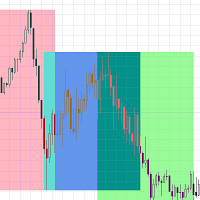
거래 세션 표시기는 각 거래 세션의 시작과 끝을 강조 표시합니다. 제품의 유료 버전은 세션의 시작/끝을 사용자 정의 할 수있는 가능성 무료 입니다 >>>
[옵션:] Time shift - 세션의 시간 오프셋이있는 경우 사용하십시오
[매개 변수 설정:] Asian session Open=0; Asian session Close=9; Asian session OpenSummertime=1; Asian session CloseSummertime=10; European session Open=8; European session Close=17; European session Open=13; European session Close=22;
시장에 나의 다른 제품 https://www.mql5.com/en/users/sky-angel/seller
FREE

전문가용 사용자 설명서: Master Calendar OSW 본 설명서는 Master Calendar OSW의 작동 방식을 완벽하게 이해할 수 있도록 제작되었습니다. Master Calendar OSW는 경제 캘린더를 MetaTrader 플랫폼에 직접 통합한 고성능 펀더멘털 분석 콘솔입니다. 이 시스템은 데이터 표시뿐 아니라 통화 건전성 및 기관 유동성 주기 분석까지 제공합니다.
1. 소개 및 시스템 목적 Master Calendar OSW는 시장 상황 분석 도구입니다. 거시 경제 이벤트에 대한 맹목적인 거래를 방지하고 주요 금융 시장 개장 시 발생하는 확장 움직임을 활용할 수 있도록 지원합니다.
다른 지표와 달리, 이 시스템은 고급 차트 엔진을 사용하여 기술적 가격 분석을 방해하지 않고 정보를 이동, 축소 및 관리할 수 있습니다.
2. 매개변수 안내 (입력 메뉴) 지표를 로드하면 거래 환경을 사용자 지정할 수 있는 다음과 같은 옵션이 표시됩니다.
표시 및 이벤트 설정 Ini

This indicator finds and displays the Double Bottom and Double Top technical analysis patterns. Signals (displays a message on the screen) if the shape was formed recently. Often after the appearance of these patterns, the trend reverses or a correction occurs. In order not to search for them yourself, or not to miss their appearance, it is enough to add an indicator to the chart. The indicator can be used on different timeframes and currency pairs, there are settings for a better search on a c
FREE

In finance, Z Scores are measures of the variability of an observation and can be used by traders to help determine market volatility. Z scores tell Traders whether a score is typical for a specified dataset or is atypical. Z scores also enable analysts to adapt scores from multiple datasets to make scores that can be more accurately compared to each other. # In practice, we have the ZScore with zero point and oscillations between 2 and 3 for ultra high high points and oscillations between -2 an

This EA Utility allows you to manage (with advanced filtering) unlimited open orders (manual or EA) with 16 trailing stop methods: fixed, percent, ATR Exit, Chandelier Exit, Moving Average, Candle High Low Exit, Bollinger Bands, Parabolic, Envelope, Fractal, Ichimoku Kijun-Sen, Alligator, Exit After X Minutes or Bars, RSI and Stochastic. The trailing stop can be either real or virtual, and you can exit fully or with a partial close percent on touch or bar close.
Moreover, you can add (override

Automatic marking of the chart with Pentagram models. This model is based on the Expansion Model from Adversa Tactics. Designed to determine the trend and predict possible levels and targets of price correction in the future. The model describes a developing trend. The trend is relevant until the price crosses the trend line of the model in the opposite direction. Levels of rays of the pentagram, level of HP, distances of 100% and 200% of the distance between points 1-4, levels of HP are possibl

Trading panel for manual trading. Has a fairly wide functionality. Allows you to automatically calculate the order size, open both market and pending orders. It has a wide range of options for closing orders, it is possible to partially close orders, close orders after reaching a certain profit or loss, separately close profitable and unprofitable, buy and sell, as well as pending orders. The panel also contains a simple implementation of a grid of pending orders, reverse and lock functions, tr

Robot Manual Order Manager is a tool that allows you to automatically include Stop Loss, Breakeven, Take Profit and partials in open trades. Be it a market order or a limit order. Besides, it automatically conducts your trade, moving your stop or ending trades, according to the parameters you choose. To make your operations more effective, the Manual Orders Manager Robot has several indicators that can be configured to work on your trade. Among the options you can count on the features: Conducti
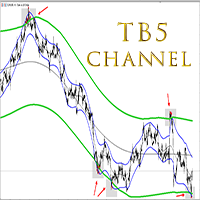
TB5 Channel is a multi- timeframe channel indicator. It generates input points on different timeframes. There are 2 methods for constructing an indicator. The first method is to install the indicator on the current timeframe. In this case you will have a channel on that timeframe that you have at MT5. The second method to install an indicator is to multiply it by the timeframe index. The point of the second method is to construct a higher timeframe channel on the current chart. For example, i

Fully automatic trading based on HEDGING and CORRELATION of instruments. By buying one currency, we sell another, thereby compensating for the drawdown! We earn correlations of tools on us! The Expert Advisor takes care of all the basic calculations and decision-making on trading. Your task is just to select the necessary trading tools and specify them the lot as a percentage of the deposit (lot_percent). The approximate percentage for the minimum lot is 0.005% for a 500 usd deposit. Be sure to
The first wave - it is a Secure Automated Software for trade Forex market and indices.
This system detects the ranges between the end of the American session and the beginning of the Asian session, detecting the first moves before the market starts and positioning yourself in favor of strong hands to take advantage of your breakout.
To adapt to the different schedules of the different brokers, you have to set the closing time of the American session of your broker in the configuration, from thi

Splash EA is a long-awaited implementation of my trading system in a fully automated form. The algorithm is based on the analysis of the symbiosis of the trading volume and the movement of the price of the instrument, as a result of which we get points with a high probability of a reversal. My trading system will always work as long as the market exists. Honest advisor with honest tests. Join your team, you won't regret it! Timeframes: M5- H 1
Basic pairs: GBPUSD , EURUSD , AUDUSD .
EA
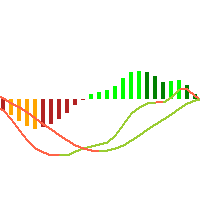
This is just a MACD with multi symbols, multi timeframes, and multi colors. features. different symbols and timeframes from the main chart. draw main line, signal line, and histogram. each line can be erased. the ascent and descent can be distinguished. Due to the above features, this MACD is suitable for multiple lineups in a single chart. This can be used in the same way as MiniCandles.
FREE

Autumn-Harvest EA
Features Multiple strategies for entry and exit Open buy and sell positions and set applicable amounts for each Smart stop-loss and trailing stops levels EA can be set to only maintain own deals or any open deal eMail and telegram alerts on buy/sell signals ( * Configure the email tab under options for trade opportunity email alerts to work ) Monitoring using heartbeat checks
About This EA is capable of opening trades using various strategies. Once the trades are open it als
FREE
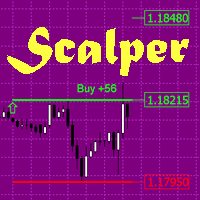
The indicator is a trading system for short-term trading.
Scalper Assistant helps to determine the direction of the transaction, and also shows the entry and exit points.
The indicator draws two lines (possible points for opening positions).
At the moment of the breakdown of the upper line up (and when all trading conditions are met), an up arrow appears (a buy signal), as well as 2 goals.
At the moment of the breakdown of the lower line down (and when all trading conditions are met), a down ar

Hello, Every one
A script to close all market positions and/or pending orders.
-----------------------------------------------------------------------------------
This is Close All market positions and/or pending orders button
You can close all orders in 1 second by one click
For advanced version: Advanced: https://www.mql5.com/en/market/product/77763
https://www.mql5.com/en/market/product/89311 Key:
1 Close all button: The script will close All orders market + pending
FREE

Pending Orders Grid Complete System opens any combination of Buy Stop, Sell Stop, Buy Limit and Sell Limit pending orders and closes all existing pending orders. Only one time of the pending order at the same time!!! You will have a possibility to put a legitimate Open Price for the first position in the grid. Usually it should in the area of Support/Resistance lines. You just need to drop this script on the chart of a desired currency pair.
Input Parameters Before placing all pending ord

O Alpha B3 Renko Trader é um robô especialista para negociação no Bovespa B3 (miniíndice e minidólar) que une a análise de candlesticks do gráfico Renko (calculado internamente, sem imagens gráficas) com a estratégia Alpha B3 . O robô permite configurar, para os sinais de entrada, o tamanho do brick do gráfico Renko, bem como um número de candlesticks para análise. Além disso, você deve configurar os stops fixos, em pontos. O robô permite também a configuração de funções, tais como número de c
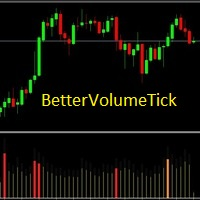
BetterVolumeTick it is a volume indicator. It marks the volume regions where there was a great aggression, also shows the volume intensity. Yellow means low volume, normal activity. Orange means activity with a pretty amount of volume. Red means ultra high volume. This indicator combined with the price chart will give you another view of the market context.
Have you ever been in a situation when you could not control the chart conveniently or had to make additional clicks to be able to scroll the history or set the scale fix numbers manually to be able to stretch the chart? Features: Chart centering. Automatic scale fix. Automatic scroll control. This tool is one of many features included in "Trading Essentials" utility application, which can be found on mql5.com
FREE
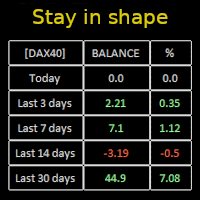
Constantly monitor the progress of your trading at daily intervals of your choice. For positive readings - maintain discipline and stick to your strategy. In case of gradually worsening results - react as soon as possible.
Be aware of the quality of your work!
The panel calculates the account balance You can track your progress for both the current instrument and the entire account The number of days back (5 items) - you set freely Learning to count days: if today is October 3 (day number

What Exactly Is A Smart Trading Tool? Smart Trading Tool was developed for fast and comfortable trading of the financial markets especially for ORDER BLOCKS TRADERS . It provides traders functionalities, such as: A Drawing Tool One-Click Trading Panel Automated Lot Sizes Calculation based on your risk appetite & Money Management ( Watch this video , how this tool can help manage your risk per trade better!) Built in PRICE LEVELS (Fibonacci, Round Numbers, Daily hi-low, etc) Shows Trading

MANAGING YOUR FOREX TRADING LIKE A PROFESSIONAL WITH POSITION SIZE CALCULATOR Position Size Calculator – an MT5 indicator, is a user-friendly tool that allows you to determine your required forex trading size for each trade based on how much you want to risk and available capital in your forex trading account. Load the calculator onto your chart and simply draglines to show your stop loss and take profit level. The calculator will automatically calculate the trade size instantly. This indica

이 인디케이터는 극한에서 3주기 세마포어 및 반전 패턴(123)을 형성합니다. 신호는 두 번째 캔들이 개장할 때 나타납니다. 이 패턴은 다양한 방법으로 거래할 수 있습니다(테스트 포인트 3, 브레이크아웃 등). 채널에서 이탈하거나 추세선을 돌파하는 것이 진입점을 찾는 주요 트리거입니다. 아이콘은 피보나치 레벨에 따라 색상이 지정됩니다. 노란색 아이콘은 신호가 증폭되는 레벨의 테스트를 나타냅니다. 다중 통화 대시보드를 사용하면 123 패턴이 발견된 통화쌍과 해당 패턴을 따르는 바의 수를 추적할 수 있습니다. 프랙탈 지그재그를 기반으로 합니다. 다시 그릴 수 있습니다. 따라서 링크의 블로그에서 전략을 연구하십시오 - 123 Fractal Trading With UPD1 .
입력 매개 변수.
Bars Count – 표시할 기록입니다. Tooltip – 개체 위로 마우스를 가져갈 때 도구 설명을 표시할지 여부입니다. Show Semaphore – 세마포어를 활성화, 비활

이 표시기의 아이디어는 모든 시간 프레임에서 Murray 레벨을 찾아 강력한 Murray 레벨(+2, +1, 8, 4, 0, -1, -2)을 기반으로 하는 신호 레벨을 포함하는 콤보 레벨로 결합하는 것입니다. 기간이 짧을수록 콤보 레벨을 즉시 볼 수 있는 기회가 많아집니다. 색상으로 강조 표시됩니다. 숫자 위에 커서를 올리면 레벨이 속한 기간에 대한 힌트가 나타납니다. 그러나 항상 현재 시간대가 가장 왼쪽으로 표시됩니다. 스마트 경고는 신호 콤보 레벨과 관련된 가격을 전달하는 데 도움이 됩니다.
비디오의 대시보드는 선언된 기능이 아니며 여기에 포함되지 않습니다! 아직 개발 중입니다.
트레이딩 추천. 추가 기술적 분석 없이 콤보 레벨에서 반등을 거래하는 것은 권장하지 않습니다. 파란색과 빨간색 레벨에서 반등할 확률이 더 높습니다. 가격은 아직 가격에 의해 테스트되지 않은 (128 캔들 전) 콤보 레벨에 자화됩니다. 이 경우 레벨 테이킹(한 레벨 상승/하락)이 있는 추세 전략을 사용
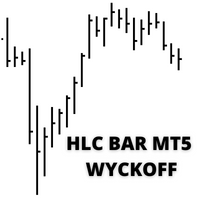
MT5에 대한 표시기 "HLC_bar_MT5 Wyckoff"는 거래 시 분석을 용이하게 하기 위해 생성되었습니다. HLC Bar는 Richard Wyckoff가 사용했으며 현재 "VSA" 작업에서 널리 사용됩니다. Wyckoff는 High, Low 및 Close를 사용하면 그래프가 훨씬 더 명확하고 분석하기 쉽다는 것을 발견했습니다. 표시기 "HLC_bar_MT5 Wyckoff"는 다음을 허용합니다. # 막대 너비를 변경합니다. # 막대를 같은 색으로 둡니다. # 그리고 같은 가격으로 열리고 닫힌 바를 강조 표시합니다. 색상과 너비는 설정에서 쉽게 수정할 수 있습니다. 지표를 사용하려면 차트로 끌어다 놓기만 하면 됩니다. Wyckoff는 볼륨과 함께 사용할 때 HLC 차트를 막대 그래프라고 불렀습니다.

MT5 세그먼트 거래량 표시기는 가격 및 거래량 분석, VSA, VPA, Wyckoff Method 및 Smart Money System을 사용하여 거래하는 사람들을 용이하게 하기 위해 만들어졌습니다. 분할된 거래량은 모든 시장(Crypto, CFD, Forex, Futures, Stock...)에서 작동하며 모든 차트 시간에서 작동합니다. 당신의 해석이 얼마나 쉬운지 보십시오: #녹색: 시장 평균보다 훨씬 높은 거래량 #다크핑크 : 평균보다 큰 볼륨 #파란색: 양의 정상 볼륨 #빨간색: 음의 정상 볼륨 #핑크: 낮은 볼륨 #노란색: 초저용량 MT5 분할 볼륨 표시기는 틱 볼륨 또는 실제 볼륨에서 사용할 수 있습니다. 스마트 머니의 움직임을 읽는 데 도움이 되어 의사 결정을 용이하게 합니다.
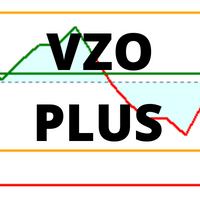
VZO Plus is an indicator that shows overbought and oversold regions based on traded volume. #When the indicator line is between -40 and -60 it is oversold #When the indicator line is between 40 and 60 it is overbought.
Outside these regions, the market is following its natural path by inertia. Above the green line, it means that the market is positive, Another way to analyze the indicator is through divergence regions. When we have the bottom higher than the other in a downtrend or One bottom

The VSA Smart Money indicator tracks the movement of professional traders, institutional trades and all compound man movements. The VSA Smart money Indicator reads bar by bar, being an excellent tool for those who use VSA, Wyckoff, PVA and Any other analysis that uses price and volume. There are 10 indications that you will find in your Chart: *On Demand *Climax *UT Thrust *Top Reversal bar *Stop Volume *No Supply *Spring *Reversal Bottom *Shakeout *Bag Holding Using this indicator you will be o

이 지표를 사용하면 일중 범위의 지역 추세의 강도에 상대적인 가격 변화의 역 동성을 추적 할 수 있습니다 추천 기간:M5-H1 가격 채널 프로 표시기는 다시 그리지 않고 레벨을 변경하지 않습니다 표시기를 사용하여 거래하는 것은 매우 간단합니다
판매 거래를 여는 방법:
1. 새로운 현지 가격 최대를 기다립니다 2. 가격은 채널의 중간(녹색 선)으로 롤백해야합니다 3. 새 촛불에 판매 표시를여십시오 4. 정지 손실을 채널의 상한(파란색 선)이상으로 설정하십시오 5. 가격이 역전되고 로컬 최소값이 업데이트되면 수익성 영역에서 주문을 닫습니다
구매 거래를 여는 방법:
1. 새로운 지역 최소 가격을 기다리십시오 2. 가격은 채널의 중간(녹색 선)으로 롤백해야합니다 3. 새로운 촛불에 구매 트랙을 엽니 다 4. 채널의 하단 테두리(빨간색 선)아래 정지 손실을 설정합니다 5. 가격이 역전되고 로컬 최대 값이 업데이트되면 수익성 영역에서 주문을 닫습니다
가격 채널 프로 표시기를
FREE

인디케이터는 차트의 라운드 레벨을 보여줍니다. 심리적, 뱅킹 또는 주요 플레이어 레벨이라고도 합니다. 이 수준에서 황소와 곰 사이에 실제 싸움이 있고 많은 주문이 누적되어 변동성이 증가합니다. 표시기는 모든 악기와 기간에 따라 자동으로 조정됩니다. 80레벨을 돌파하고 테스트를 하면 구매합니다. 20레벨 돌파 후 테스트 하면 판매합니다. 목표는 00입니다. 주목. 강력한 지원 및 저항 수준으로 인해 가격이 00 수준을 약간 놓칠 수 있습니다.
입력 매개변수.
Bars Count - 라인 길이. Show 00 Levels - 00 레벨을 표시하거나 표시하지 않음. Show 10, 90 Levels. Show 20, 80 Levels. Show 30, 70 Levels. Show 40, 60 Levels. Show 50 Levels. N Lines - 차트의 레벨 수를 제한하는 매개변수. Distance 00 Levels - 레벨 사이의 거리(자동 또는 수동). Line Positi
FREE

실시간 바이낸스 선물 틱 데이터 및 실시간 바이낸스 현물 틱 데이터 작업을 위한 유틸리티입니다. 데이터를 더 빠르게 가져오고 Binance Future의 경계 내에 머물도록 설계되었습니다.
작동 로직: 글로벌 변수는 바이낸스 체크 서버 시간에서 수신한 시간 정보를 기록합니다.
다른 프로그램에서는 이 시간 정보를 사용하여 작업을 더 빠르고 효율적으로 수행합니다.
도구 메뉴 >> 옵션 >> Expert Advisors에서 WebRequest를 허용하고 URL을 추가해야 합니다. https://api.binance.com 설치 중 또는 판매 후 발생할 수 있는 문제가 있을 경우 주저하지 마시고 당사로 연락주시기 바랍니다. 설치 중 또는 판매 후 발생할 수 있는 문제가 있을 경우 주저하지 마시고 당사로 연락주시기 바랍니다.
FREE

유키무라 - 정밀함과 간결함의 만남 YUKIMURA는 정교한 내부 로직을 갖추고 있음에도 불구하고 사용자 친화적인 단순함을 염두에 두고 설계되었습니다. 손쉬운 관리에 필요한 모든 필수 제어 기능을 제공하여 수동 거래를 선호하는 트레이더도 쉽게 사용할 수 있습니다. 기본적으로 YUKIMURA는 H1 시간 프레임의 EURUSD 에 최적화되어 있으며, 이는 지난 6개월간의 광범위한 테스트를 통해 가장 안정적이고 효과적인 설정으로 입증되었습니다. 로봇은 다른 통화쌍 거래도 지원하지만, 최적의 성능을 위해서는 EURUSD H1 시간 프레임을 권장하며 가장 간편하게 사용할 수 있습니다. 이 전략은 여러 ATR 기반 지표를 활용하여 동적으로 청산 규칙을 계산합니다. 손절매(Stop Loss) 및 익절(Take Profit) 수준은 사용자 지정 가능한 계수를 사용하여 시장 변동성에 맞춰 지능적으로 설정됩니다. 모든 진입 조건과 거래 규칙은 일관성을 위해 신중하게 사

The FX 2021 release | Eadvisors The Expert Advisor FXScalper works trading the 5min forex main timeframe looking for small market variations in the pairs, it uses new trading technology, intraday results are amazing. This is the last release version we brought to you at the mql Market, you can active the expert in 5(five) personal accounts.
Initial informations about the strategy
Strategy used: Grid x Distancing. Initial Lot: From 0.01 (Micro Lots). StopLoss and Take Profit Adjustable.

The Grid Builder MT5 utility is designed for placing a grid of pending orders of any complexity and will be an excellent tool in the hands of a trader who trades grid trading strategies. The tool has numerous settings that allow you to quickly and easily build a grid of orders with the specified parameters. All types of pending orders are supported:
Buy Stop; Buy Limit; Sell Stop; Sell Limit. The script also allows you to delete a previously placed grid of orders in one click. If the "Delete

MQL4 has also been converted to MQL5 exposure info for friends using iexposure. It shows the total number of positions that have been opened, how many buy or sell positions there are, the net amount of position numbers and their order prices, the profit and loss status of all total positions. I didn't write their code, it's open source, but I wanted to share it with everyone because it's an indicator I like!
https://www.mql5.com/en/charts/14801856/usdjpy-fix-d1-idealfx-llc

NFP Master its an scalper EA that trade the NFP monhtly news,here we locate an extraordinary oportunity to make flash money, even if the price rise down or pump up we will get profit anyway, the best part of this Expert Advisor is that we dont need any VPS, just run the EA 10 minutes before the Non Farming Payrolls new gonna be released and let the money comes, just test it on any NFP new that has been released in the past and you will see it works, the performance say it all. Preferly use ECN b

An Expert Advisor that works from one to six currency pairs simultaneously for major currencies (EUR, GBP, USD, CAD). For trading, the price movement and the combination of opening signals for several strategies are analyzed.
For position opening signals, indicators based on moving averages with various parameters that change during the work on the market situation are used. The preferred periods of the adviser's work are when there is no strong trend, but the volatility is high enough. The in

Amiguinho's Bar Counter is a price action indicator to display the bar count (candles) with some interesting options.
About the "Period of analysis" parameter: if the current timeframe is in minutes, then the analysis period will be considered in days; if the current timeframe is in days, then the analysis period will be considered in months; or if the period of analysis will be considered in years.
FREE

DynamicalReflector - a bot with dynamic parameters of stop loss, take profit, steps for buying and trend for trading. For each of the four above-mentioned directions of automation, there is a separate regression indicator. I will consider in more detail the algorithm of work.
To begin with, the trend is determined, that is, the direction for trading. For this, the indicators are taken from the first regression, which are responsible for the trend. And according to the direction of the regressi

This algorithm thrives on extreme conditions of volatility. It will evaluate the condition prior to market close, enter a position and exit when market swings to extreme levels in your favour. The algorithm does not deploy any technical indicators, just simple mathematical calculations. This works very well on non directional markets especially FOREX in the short term which are very choppy. You can test out on other asset classes as well. 20 year backtest done to validate the rule.

I have been trading and designing indicators and EAs for the last 5 years, and with great pride and excitement, I am honored to present FMC Alert(Forex Market Conditions Alert) to you all!
If you are a fan of the traditional indicators like the stochastic indicator, macd and moving averages, but if you would like a complete indicator that can utilize all these indicators, and some others, then the F.M.C Alert is the indicator for you. F.M.C Alert is an indicator that allows traders to customize
Seconds time frame
In MT5 there are no second charts by default. Many of the presented options for creating such do not work fully - errors with extrema, inability to use indicators, etc. I present you a fully working variant. The script works as an Expert Advisor by creating a custom symbol. To work, the script is placed on the M1 chart of the instrument of interest, after which the window of the custom symbol will open automatically. The settings are minimal and intuitive - the timeframe inter
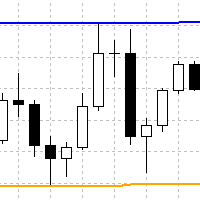
Indicator finds swing highs and lows, which are located between x bars to the left and y bars to the right. It plots such high and lows in form of continuous lines. Here is description of inputs. High Left Length - count of bars to the left for finding of swing high High Right Length - count of bars to the right for finding of swing high Low Left Length - count of bars to the left for finding of swing low Low Right Length - count of bars to the right for finding of swing low

It may be true that “Time waits for no one [human],” but at least now you can control the marching time of all your robots. EA Schedule Launcher (ESL) can launch and close any number of your EAs and/or indicators at custom beginning and ending times. You save your EA and/or indicator to a template and input when to open and close them. The power to control your EAs trading time window can improve both strategy performance and terminal/computer performance.
Note: EA cannot be run with the visual

It is a trainable trading advisor that you can adapt to trade on any symbol. The robot is suitable for trading any currency pairs, metals, oil or cryptocurrencies. To learn, just run the robot in the tester. At the first pass of the tester, the neural network is trained performing random transactions. During the second pass, you can see the trading results using your trained neural network. Before using the advisor, you can watch the tutorial video.
Parameters Lots size - size for orders; L
I find the lot calculation tedious so I just use this script and tell it the dollar amount to use. It then does the rest. This works for any currency.
How-To: Creates a buy limit order at chosen MA price using the desired dollar amount instead of lots. To use, just drop it onto a chart and set inputs as needed. The script will then do the necessary lot calculation and create a buy limit order.
Inputs: FIXED_DEAL_AMOUNT: Fixed amount to use for the trade e.g 100 to open a R100 deal MA_PRICE: MA
FREE
I find the lot calculation tedious so I just use this script and tell it the dollar amount to use. It then does the rest. This works for any currency.
How-To: Creates a sell limit order at chosen MA price using the desired dollar amount instead of lots. To use, just drop it onto a chart and set inputs as needed. The script will then do the necessary lot calculation and create a sell limit order.
Inputs: FIXED_DEAL_AMOUNT: Fixed amount to use for the trade e.g 100 to open a R100 deal MA_PRICE:
FREE

Best Tested Pairs :- Step Index (Also can use on other pairs which spread is lowest)
How does the Magic Storm work
The Magic Storm will commence only if the Initial Trade becomes a losing trade. In case the initial trade is a
profitable one, or has been closed by the trader there is no need for the Magic Stormto be initiated.
Let’s assume that the initial trade was a 1 lot buy trade with Recovery Zone Range Pips is 50 and Recovery Zone Exit
Pips is 150 pips. The take profit for this tr

Tested Pairs
-EURUSD, -GBPUSD
-STEP INDEX (M1)
How Magic Hedge works
control the support/resistance indicator. It's best to leave them in default EnableFilter_SR StopSell_SR Martingale: So when the market goes against the trade by MartingaleInitiateThresh points, the martingale is initiated. Every MartingaleDistance against the trade will cause a martingale position to be posted, and if the martingale group enters a profit of MartingaleProfit points, the group
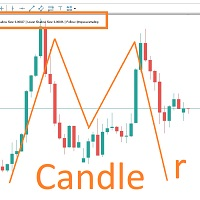
MARUBOZU IS THE KEY.
Imagine finding a fantastic marubozu candle pattern in the 1H timeframe automatically and bips an alarm for your awareness?
The 1H Marubozu means trend and momentum in the 5M timeframe.
Find a momentum candlestick pattern with this great algorithm, it always considers the last closed candle.
it is simple to use, but if you want some support just get in touch via mql5.

· Asmani Magical Profits Expert Advisor for Boom and Crash · Index trading in Boom and Crash (BC) is High Risk and High Rewards Trading. It can give Huge Magical Profits. But it can also have higher DD. · Please check the backtest table attached in this document. Use ONLY with capital which you can afford to lose. · Asmani Magic EA uses “Closing of Candles” for booking Profit. Hence there is no problem of slippage on spikes in Backtests or in Real Trading ·

Trend Phoenix EA is the new state of art of Stochastic Oscillator indicator. In this trading strategy, stochastic can be configured as trend filter and trigger . The trend stochastic is configured with bull and bear limits and it´s possible to use different timeframes. The trigger stochastic works together with trend, sending orders according to it. The trigger stochastic can be configured with limits to buy under long trade in limit and sell above short trade in limit. It´s also possible to con

This is an indicator for MT5 providing accurate signals to enter a trade without repainting.
It can be applied to any financial assets: Forex Cryptocurrencies Metals Stocks Indices It will provide pretty accurate trading signals and tell you when it's best to open a trade and close it. How do I trade with the Entry Points Pro indicator? Buy and install the indicator in your terminal Start trading by receiving signals from the indicator telling you about the ideal moment to enter a trade. E

GM Dawn is only sold on MQL5. If you are purchasing it somewhere else, it is fake , it won't work like the real thing, and you won't get any support as well.
SPECIAL LAUNCH PROMO If you rent GM Dawn for $250 you will get 1 free EA (Unlimited) ONLY 10 COPIES OUT OF 10 LEFT AT $ 250! After that, the price will be raised to $499.
Hi my friends,
GM Dawn: is a fully optimized EA easy to use for everyone. GM Dawn is very reliable: - No Grid, - No Martingale, - Smart: stop loss and take profit - W

Bitcoin Trading My Expert Advisor trade Bitcoin on H1 time frame, Base on ADX indicator, Bollinger Bands indicator, and follow the trend. stop loss 31 usd/0.01 bitcoin take profit 19 usd/0.01 bitcoin (0.01 lot) Min deposit: from 300 usd Profit: 100%/year. Draw Down: < 35% Input Setting to test my EA: - Lots: 0.01 - Stoploss: 31 usd/0.01 bitcoin or 3100 usd/bitcoin depend on your broker and your account (adjust to the correct ratio and do not change) - Takeprofit: 19 usd/0.01 bitcoin or 1900 u

SL Sniper I coded. to trade with the trap system of the main market with vsa for more information and you want vsa system please pm me
Suggested timeframes to trading : M1- M2- M3- M5 - M15-M30 -H1 Wait london and newyork markert open after wait best then select the best strong index and weakest index by sniper Histogram is indicated by one arrow at a time. The signal in the end direction of weak and strong All red and green mean trending index,natural market is displayed only in white SL

MingTrader AUDCAD has been designed to trade with precision the AUDCAD forex pair in the 30 minute timeframe. It has been developed using Machine Learning technology. Install it onto a AUDCAD chart in the 30 minute timeframe and adjust the trade sizing parameters.. the default is that it will risk 1% per trade but you can select fixed lot size also This trading robot is optimised for the AUDCAD pair. High accuracy and good number of trades!

NOVIDADE!!! STOPS FIXOS , dando mais estabilidade ao robô e do jeito que você gosta!
CANGACEIRO B3 TRADER é um robô especializado para negociação na Bolsa Brasileira B3 , em minicontratos de miniíndice ( WIN ) e minidólar ( WDO ).
O robô tem como característica a entrada em operações na tendência do mercado (alta ou baixa), de acordo com pontos de entrada (trigger) consistentes e que podem ser configurados para cada ativo e gerenciamento de riscos. O robô Cangaceiro B3 Trader utiliza o indicad

一 運作方式(如下圖)
在一個單邊向上的行情中, 自動交易工具做以下動作: 當價格來到高點,等待突破訊號在進場。
當價格回調,等待回調結束要往上時在進場。 當進場下單後,
如果一直漲就持續持單,等待價格漲不上去準備下來時,在獲利離場。
但如果一直跌,就等待要上漲時在進場,進場時加倍下單,
一個做底單,動作同上等待獲利離場,
另一個單用做倉位修正,此單和第一張單在盈虧為0時會各自平倉,不造成損失。 Ps:
在一個單邊向下的行情中,動作則相反
二 設定方法(如下圖)
Step1 一開始要自己指定工具的方向.
如果認為會往上走,設定i_tradeup=true, i_tradedown=false,
如果認為會往下走,設定i_tradeup=false, i_tradedown=true,
Step2 指定目標位置和止損位置
如果認為會往上走,i_top輸入目標位置,i_bottom輸入止損位置
如果認為會往下走,i_top輸入止損位置,i_bottom輸入止盈位置
當價格到達目標位置會強制平倉獲利並暫停工具運作
當價格到達止損位置會反向開單鎖倉
FREE

L'expert Advisor clôture les positions selon l'une des conditions suivantes: fermeture de toutes les positions fermeture uniquement des positions bénéficiaires fermeture uniquement des positions de perte Positions de clôture : toutes , uniquement des positions rentables ou uniquement des positions perdantes Ce expert ferme tous les ordres de la paire.
Expert pour MetaTrader 5
Live Signal : https://www.mql5.com/en/signals/author/usd180307 Peculiarities The EA just need attached to ONLY one chart to trading 6 sybolms. The EA can open three different trading strategies on different charts, but note that different magic numbers must be used. Multicurrency transactions to share the risk of loss. Does not require optimization and configuration. Uses ready-made strategies. Flexible risk management system. Advanced algorithm for entering and exiting the market

Expert Advisor for in-trend buying and selling.
This EA identifies the trend and makes entries when criteria are met. The user sets how many price points moving in the same direction count as trend; the user sets the percentage between price points going in the same direction that counts as increase or decrease in price; the user sets close profit and stop loss limits, lot value and time interval.
This algorithm gives the user the opportunity to try many different strategies. Backtesting data
안녕
누구나 하루 동안 외환 또는 장기 투자로 거래 할 수 있습니다
당신이 필요로하는 것은"Pro intraday EA MQL5"입니다
프로 장중 EA,감지하면"안전 구매/판매"포인트에 의 처리"가장 낮은 값이고에서 가장 높은 값의 날"이 기기에는 시간 간격을 지정하면"목표는 채널 범위를 즉시"에 실시간 차트
1-그것은 구매 영역을 제공합니다;구매 1,구매 2,구매 3 안전 구매 포인트 2-그것은 판매 영역을 제공합니다;판매 1,판매 2,판매 3 안전 판매 포인트 3-그것은 대기 영역을 제공합니다;이 영역에서 첫 번째 빨간색 선과 첫 번째 녹색 선 사이
프로 장중 EA MQL5 기능 및 기능 ;
1-귀하의 추세 분석에 따라 중장기 포지션을 취함 2-일중 거래 만,일종의 스캘핑 3-EA 는 하루 중반과 장기간에 동시에 거래 할 수 있습니다 4-자동 헤지 시스템(기존 수익 포지션 보호) 5-자동 헤지로 마진 관리 6-이동 위치.. 위치에 따라 SL 이있는 지점 아래

The indicator draws potential levels that may become significant support and resistance levels in the future.
The longer the line, the higher the probability of a price reversal or an increase in price movement after the breakdown of this level. With a decrease in the probability of the formation of a level, the length of the line is reduced.
The indicator does not require adjustment.
In the settings, you can change the design of the indicator.
The "L ine_Length " button is placed on the ch
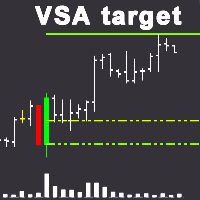
VSA 목표 지표를 식별한 전문적인 구매자 또는 전문 판매자에 차트를 사용하 VSA(볼륨 확산 분석)시스템을 구축 트렌드 지원 영역에 상대적인 이러한 막대기(촛대),뿐만 아니라 대상으로 수준입니다. 특징: 1. 에서 이 표시기는,당신이 선택할 수 있습니다 이 모드에서는 전문 구매자 또는 전문 판매자 결정될 것이고,모두 전문적인 참여자에 결정됩니다. 2. 기호에 임의의 시간대를 설정하여 지원 영역과 목표 수준을 결정할 수 있습니다. 거래할 때,큰 기간은 설정을 결정하는 지역 및 목표 수준이고,자체 트랜잭션 수행할 수 있습에 작은 기간에 대한 더 정확한 항목으로 트랜잭션이 있습니다. 3. 에 표시 설정을 선택할 수 있습니다 틱는 경우 볼륨 틱 볼륨을 사용하고,실제 볼륨을 경우 실제 볼륨을 사용합니다. 4. 대형 판매자 또는 구매자를 결정할 때 볼륨 크기와이 볼륨의 검색 기간을 수동으로 선택할 수 있습니다. 5. 전문가를 만드는 데 사용될 수있다. 설명: 녹색 점선은 구매자의 지원

TOP WAVE BOT 2.0: It is an automated trading algorithm based on trend reversal followed by high volatility. Use short and long moving averages to identify a trend High volatility serves as an operational filter for trading entries The take profit and stop loss are stipulated according to the specific volatility of each asset Risk / Return of at least 1 / 1.5. It is a customizable tool that works the way you prefer, however, we advise the following currency pairs: "EURUSD; GBPUSD; USDCAD; EURCAD
This EA finds technical analysis patterns that often appear before a trend reversal: Double Bottom, Triple Bottom, Head and Shoulders and their opposite counterparts. The Expert Advisor is able to identify them on the chart of a currency pair and trade when the pattern has been formed and it has been broken through. Also, in order to trade excluding unnecessary signals (for example, with weak volatility), you can adjust and optimize the readings of some indicators (Stochastic, ADX) and the filte

*** Note that this EA will no longer be updated as I have lost the source file - for that reason the EA is sold at a very low price ***
PAM SCALPER (Price action momentum scalper) analyses historical price data to identify supply and demand zones where liquidity is high and enters with momentum of the institutional money flow. The EA extrapolates areas to either buy or sell from historical price action and volume data. If you want to backtest this EA or any other scalper EA, you must use high
A huge number of traders use the VolumeProfile/MarketProfile analysis method. And I think there is no need to explain such concepts as POC and VAH/VAL. However, the standard VolumeProfile representation has a drawback - we only see the current picture of the market. We see the "convexity" of the volume distribution within the period. But we don't see the main thing - the "migration" of the POC level during the price movement. Our indicator is unique. It is dynamic. The first feature is that the
MetaTrader 마켓은 거래로봇과 기술지표를 판매하기에 최적의 장소입니다.
오직 어플리케이션만 개발하면 됩니다. 수백만 명의 MetaTrader 사용자에게 제품을 제공하기 위해 마켓에 제품을 게시하는 방법에 대해 설명해 드리겠습니다.
