 MetaTrader 5
 Experts
 지표
지표
 라이브러리
라이브러리
 유틸리티
유틸리티
 위젯
위젯
 규칙
규칙
MetaTrader 4용 새 Expert Advisor 및 지표 - 266
 트레이딩 로봇은 자동으로 시장거래를 수행하는 반면 지표는 가격을 더 잘 분석하고 가격 행동을 예측할 수 있게 해줍니다.
이러한 어플리케이션을 사용하면 MetaTrader 4에서 더 많은 기회를 포착하는 동시에 보다 정보에 입각한 방식으로 거래를 수행할 수 있습니다.
트레이딩 로봇은 자동으로 시장거래를 수행하는 반면 지표는 가격을 더 잘 분석하고 가격 행동을 예측할 수 있게 해줍니다.
이러한 어플리케이션을 사용하면 MetaTrader 4에서 더 많은 기회를 포착하는 동시에 보다 정보에 입각한 방식으로 거래를 수행할 수 있습니다. 
Money Eruption
A real money maker! No hassle... Easy to configure... Based on your defined risk %... Designed and tested on 3 currency pairs EURCAD, CHFSGD, EURSGD
Some useful features: Easy configuration Just set your risk in percentage of your account balance (that's the all setting you need to go for) Short term results based on 5 minute chart Try your DEMO now. It is all FREE! Enjoy!

本EA采用两个MACD指标在两个时间周期里面同一时间达到开单条件来做多或者做空,EA不设置止损止盈参数没有过多的繁琐设置, 固定手数,对本金要求也不是很高,0.01手50USD-100USD都可以做!!! 由于本EA采用的是两个周期MACD符合条件才开单平仓,所以在自动交易前一定要进行交易品种的数据优化,从中找到最佳的数据设置, 由于优化这个过程很费时,所以现在只公布了一个参数设置,这个设置不是最好的设置但回测的数据看着还可以,如果你有时间可以自己优 化更好的设置参数!!! 希望大家在使用过程中有更好的建议,可以提出来大家共同讨论,让这款EA更好!最后,如果你有更好的设置参数可以的话记得 评论区留言!!!

Forex Trading Profit Panel allow you to place trades with easy peasy way with a maximum profit, it has many many features.
Advantages
You can choose any time period and it'll display all detail.
You can see your whole accounts details, the profit and loss with exact $figure and ratio as well.
Each pair shows the profit they've earned or lose,
The winning and losing trades
Winning VS losing %
and many more
Parameters
HTextColor- Heading Text color for the Account details
DTextColor - Details p

Работает на основе скользящей средней с подтверждением RSI. Уровни берет от 1 свечи старшего таймфрейма. Высчитывает зоны перекупленности и перепроданости с помощью скользящей средней и длины 1 свечи старшего таймфрейма и на минимуме покупает, на максимуме продает, закрытие происходит при противоположных сигналах. Настройки по умолчанию для EURUSD 5min. Входные параметры: Per- старший таймфрейм. mnoj-делитель старшего таймфрейма для более точной подгонки(не может быть 0). minlot-лот по которому
Buy and Sell stop-limit orders are available in MT5 but not on the Metatrader 4 platform. Now you can place a Buy/Sell limit order or both on your chart with multiple user defined parameters. Save your PIPS and get your orders placed where you want them. Once placed on chart it will place up to 1 order long and short depending upon the choice made by user. Once a Buy or Sell limit order is placed it will not repeat another unless reinstalled on chart. See screenshot below for possible settings.

EA finds the largest volume in the market and determines the level for entry. After crossing the level towards the breakdown, a market order is opened. The EA builds a two-sided grid of orders, adapting to the market. Each direction of orders works separately and has its own take-profit. Thus, the adviser covers the whole trend, starting from its start, while the adviser perfectly passes the flat market condition, trading both directions. Please see all my products: https://www.mql5.com/en/user
FREE
Scalp and Swing Signals (MT4 Indicator)
A powerful non‑repainting signal system designed to capture precise reversal points and trend‑following entries across any market and any timeframe. The Scalp and Swing Signals indicator combines a robust dual‑line algorithm with real‑time alerting to help traders identify high‑probability setups at both trend cycle tops/bottoms and during strong trend continuations. With permanent, non‑repainting signals and an intuitive visual structure, traders can en

The 'DartFX by WPR' is an easy-to-set Expert Advisor. Williams Percentage Range Williams %R, also known as the Williams Percent Range, is a type of momentum indicator that moves between 0 and -100 and measures overbought and oversold levels. The Williams %R may be used to find entry and exit points in the market. The indicator is very similar to the Stochastic oscillator and is used in the same way. It was developed by Larry Williams and it compares a stock’s closing price to the high-low r
The principle of this indicator is very simple: detecting the trend with Moving Average, then monitoring the return point of graph by using the crossing of Stochastic Oscillator and finally predicting BUY and SELL signal with arrows, alerts and notifications. The parameters are fixed and automatically calculated on each time frame. Example: If you install indicator on EURUSD, timeframe M5: the indicator will detect the main trend with the Moving Average on this timeframe (for example the Moving
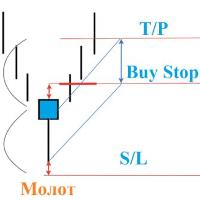
If a candle with a small body and a big shadow is formed, a reversal candle "hammer or shooting star"
The EA detects turning points and starts working!
S / L sets for the shadow + you can specify another number of points
T / P is equal to the size of a long shadow + you can increase it
Additionally set a trailing stop
delete order by time
Transfer to breakeven.
Also in the parameters you can set the settings yourself, such as the shadow, the body, so that the adviser can only consider th
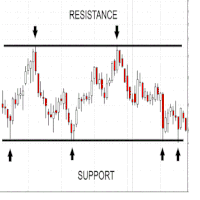
This indicators automatically draws the Support and resistances levels for you once you've dropped it on a chart. It reduces the hustle of drawing and redrawing these levels every time you analysis prices on a chart. With it, all you have to do is dropped it on a chart, adjust the settings to your liking and let the indicator do the rest. But wait, it gets better; the indicator is absolutely free! Get the new and improved version here: https://youtu.be/rTxbPOBu3nY Parameters Time-frame -> T
FREE
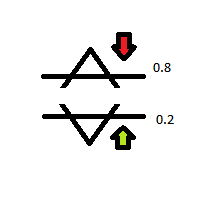
Curve is Basicly from DeMarker Condition Comparing Value of DeMarker Level Current and Before Default DeMarker Setting Periode : 14 Level Below or Equal 0.20 For Buy Area Level Above or Equal 0.80 For Sell Area This Version is using Daily Value of DeMarker, so this EA is recomended for Mid to Long Term, Swing Trader recomended ( Not For Scalp ), because the Signal is rarely. Recomended in MultiPair ( If user want to single Pair, can be attached to one Chart Only ) Stop Loss/Take Profit :Manually

With this indicator, you can easily make price regions in all time zones. In addition, with the automatic supply demand finder, you can ensure that the new regions are found automatically. You can increase your transaction quality by reaching more accurate operations with this auxiliary Tool and indicator.
I share your trial version of EURUSD for free with you. If you want to buy the working version in all parities, you can contact me. +New version Gap Bar Add ( Press G keyboard ) Default con
FREE
IntradayMagic predicts the nature of ATR and tick volumes for 1 day ahead. The indicator does not redraw and does not lag behind. Using Intraday Magic, you can significantly improve the quality of trading and avoid unnecessary risks. According to its indications, you can detect the crisis state of the market and the moments of trend reversal, specify the moments and directions of entries. How the indicator works Periodic events, exchange schedules, Bank schedules, expirations, and other similar
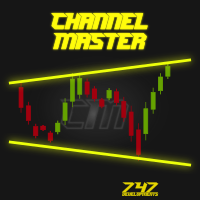
Channel Master is unique indicator for automatic channel finding. This indicator is fully adjustable by user. User can also put more instances of Channel Master to one chart with different channel size for better trend filtering. To find more information visit the 747Developments website. Features
Easy to use (just drag & drop to the chart) Fully adjustable Accessible via iCustom function Possible to use with any trading instrument Possible to use on any time-frame
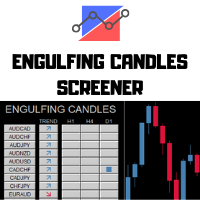
---> Check all the other products <---
The Engulfing Candles Screener is a deeply customizable dashboard.
You can chose a trend filter, using 2 EMAs, with custom periods applied on a custom TimeFrames Then you can choose 3 timeframes to search, any TimeFrame is suitable and the screener will find the engulfing candles in the selected timeframe. 3 Timeframes to scan All the major forex pairs and crosses - up to 28 symbols Deeply Customizable
How to setup the screener:
Let the crosses visib
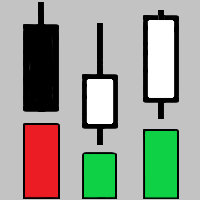
The indicator shows key volumes confirmed by the price movement.
The indicator allows you to analyze volumes in the direction, frequency of occurrence, and their value.
There are 2 modes of operation: taking into account the trend and not taking into account the trend (if the parameter Period_Trend = 0, then the trend is not taken into account; if the parameter Period_Trend is greater than zero, then the trend is taken into account in volumes).
The indicator does not redraw .
Settings History_S

With this indicator, you can easily make price regions in all time zones. In addition, with the automatic supply demand finder, you can ensure that the new regions are found automatically. You can increase your transaction quality by reaching more accurate operations with this auxiliary Tool and indicator.
I share your trial version of EURUSD for free with you. If you want to buy the working version in all parities, you can contact me. +New version Gap Bar Add ( Press G keyboard ) +Redsword P
The indicator is designed for Forex Markets. The algorithm is based on Moving average and a few filters. When to enter into transactions The blue arrow is a buy signal. The red arrow is a sell signal Recommended options are set by default. -------------------------------------------------------- You can use Moving average to filter signals. Period 30 Method linear Weighted Apply high You can also use Alligator, Bollinger bands, RSI.
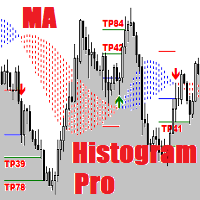
MA Histogram Pro is an expensive version of the indicator. It is equipped with the second Take Profit (TP) and is more equipped ( has a positive optimization method) than its cheaper brother. Simple and effective system with automatic optimization. See my forecasts .
MA Histogram are used primarily as trend indicators and also identify support and resistance levels.
Equipment:
Take Profit 1 Take Profit 2
Stop Loss Automatic optimization Result R/R Consecutive losses

User Manual For more information pm me SL Currency28 Pair Dashboard is even used by the Banks to make profits. They take a strong currency and pitch against a weak currency This strategy i am made my other indicator SL Currency Strength Meter 28 Pair more improvement We can easily study the financial strength of multi-faceted trading SL Currency28 Pair Dashboard strength meter which creates multiple charts in a single window based on the price action of each currency in relation to

The Trend Venom EA is a fully automated Expert Advisor that trades based on Moving Average and RSI signals. The EA trades using market orders and uses averaging to safely turn otherwise negative trades positive. This EA works best on EURUSD using the M5 timeframe. A VPS is advisable when trading this system. Check the comments for back test results and optimized settings. Please note: I have made the decision to give this EA away and many more for free with limited support so that I can concentr
FREE

This EA does not place pending orders, but forms a virtual grid according to the settings. The EA showed maximum efficiency on a pair of EURJPY. The work of the adviser can be seen on the information panel. For stable work on a cent account you need at least $ 600. With such a deposit, the EA withstands recoilless movement of the price of 4000 pips and does not lose the starting depositю
FREE
The Bollinger Fading EA is a fully automated Expert Advisor that trades based on Bollinger Band and RSI entry signals. The EA trades using market orders and uses averaging to safely turn otherwise negative trades positive. This EA works best on EURUSD using the H1 timeframe. A VPS is advisable when trading this system. Check the comments for back test results and optimized settings. Please note: I have made the decision to give this EA away and many more for free with limited support so that I c
FREE
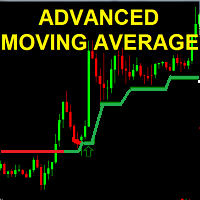
the Advanced MOVING AVERAGE indicator This is a formula of moving average based on support and resistance levels Two Colors indicator : UP trend --> Green Down trend -->Red Arrows UP/Down are shown for trend reversal indication ALERTS and mobile Push NOTIFICATIONS Simple Strategy : BUY on price over new green line Sell on price under new red line
Works on any TIMEFRAME MAin Input for calculation : index = 20.. 50..100..500 ... 1000 (Lower time frame -> Hig

Tool sends trades when open and close with chart to telegram channel. Tool can send multiple charts and magic numbers and pairs from a single chart. Send information of all type of orders: Opened (including Pending Orders), closed tiggered, and modified orders.
Telegram Setup instruction Open your Telegram APP and search for "BotFather". Type /start and click/type /newbot to create a new bot. Give your bot a nickname and username (e.g., nickname: Bestnavisignal and username: Bestnavisignal

TWO PAIRS SQUARE HEDGE METER INDICATOR Try this brilliant 2 pairs square indicator It draws a square wave of the relation between your two inputs symbols when square wave indicates -1 then it is very great opportunity to SELL pair1 and BUY Pair2 when square wave indicates +1 then it is very great opportunity to BUY pair1 and SELL Pair2 the inputs are : 2 pairs of symbols then index value : i use 20 for M30 charts ( you can try other values : 40/50 for M15 , : 30 for M30 , : 10 for H1 ,

The strategy is based on tick analysis with exponential Moving Average indicator, confirmed by Exponential Moving Average of Higher time Frame. The default settings are just place holders and not necessarily the best. Use the settings that best suites you or your strategy.I recommend using VPS and a Account with a low spread(spread <= 2 is recommended) and fast order execution for better trading results.
Advantages low draw down; easy to set up. you can start trading With $50 in default set

Kalman Filter Velocity Oscillator Kalman filter is an algorithm that uses a series of measurements observed over time, containing statistical noise and other inaccuracies. The filter was originally designed to work with noisy data. Also, it is able to work with incomplete data. Another advantage is that it is designed for and applied in dynamic systems; our price chart belongs to such systems. This Oscillator works all pairs, all timeframes, on separete windows and zero based oscillator.

Omrc OMRC EA
======================================
The Robot is based on 4 Indicators to catch profitable trades. ==========================================
This Robot is fully automated and has been created for everyone. The Robot works also on cent accounts. =============================================================================================== => works on all Time Frames from 1Minute to 1Day i recommend and prefer 4H and Day => On the lower Frames there are too many small trades

OscillatorMotion - индикатор выполнен в виде осциллятора и показывает направление движения цены. Для удобства пользования и более точной настройки индикатора можно изменять период, количество предыдущих свечей или баров, которое индикатор берет для анализа. Так же есть функции alert и push-уведомлений. Индикатор работает на любой валютной паре и на любом таймфрейме. Входные параметры: period - количество предыдущих баров для анализа AlertSignal - включить функцию да/нет PushSignal - включить фун

MostTransactions - индикатор анализирует какие транзакции преобладают на рынке в данный момент покупки или продажи. Как правило если большинство трейдеров продает, то цена идет вверх, если преобладают покупки, то цена идет вниз. Таким образом крупные игроки заставляют обычных трейдеров терпеть убытки. Этот индикатор призван решить данную проблему. Если количество сделок на покупку превышает определенное среднее значение, то на графике появляется зеленая точка и следует ожидать движения вниз, есл

ANDREW’S PITCHFORK TRADING STRATEGY Essentially, Andrew’s Pitchfork is a tool for drawing price channels. While two lines surrounding price are usually enough to draw a channel, the Pitchfork has an extra line. It is the median line or the handle of the Pitchfork. The median line is central to this trading method. This is why Andrew’s Pitchfork is also known as the Median Line Method. TRADING RULES There are many ways to trade using Andrew’s Pitchfork but the basic idea is that pr

The Alexis EA Expert Advisor is a professional tool for trading grids of orders on financial instruments. The algorithm of the program is arranged in such a way that the EA uses price action base signals not on the current price. A special algorithm calculates the channel and the price range and uses it to generate signals. And if trade went into loss, EA manage it by martingale /grid. Advantages Automatic trading mode, no need manual interference Minimum Balance requirement; 100k cent / 100k

Cmrc
Watch here how to set the bot https://www.youtube.com/watch?v=2wCzTFIGNp4&feature=youtu.be CMRC EA
======================================
The Robot is based on 4 Indicators to catch profitable trades. ==========================================
This Robot is fully automated and has been created for everyone. The Robot works also on cent accounts. =============================================================================================== => works on all Time Frames from 1Minute

Cmrc pro v1 Cmrc pro v1 EA
======================================
The Robot is based on 4 Indicators to catch profitable trades. ==========================================
This Robot is fully automated and has been created for everyone. The Robot works also on cent accounts. =============================================================================================== => works on all Time Frames from 1Minute to 1Day => On the lower Frames there are too many small trades but its up to yours
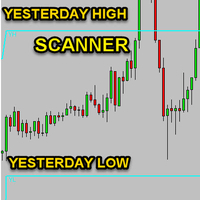
No idea why demo is not working. you can check the GIF to see how it works.
Features With this scanner you can detect Candles which are below/above yesterday high/low lines. A pair's rectangle turns RED in dashboard if it is above the yesterday high, and rectangle turns GREEN in dashboard if it is below the yesterday low. It gives alerts in every 15m candle close. Contains a Dashboard which will help you to see all market pair's. It is possible to disable this sorting through to make it easier

Gooinsta Hedge Plus
Gooinsta Hege Plus is expert advisor major trend calculation EA Fitur : Auto lots and fix lot Auto tp and cut profit Trend follow order position Cover mode when order position loss Send info notification to smartphone button close buy , close sell and close all EA Inputs : Start_Setting = " ------------ Gooinsta Hedge+ ------------ "; EA_Name = "Gooinsta Hedge+"; Logic = 1; Lots = 0.0 --- If Lots=0 Auto Lots aktive Risk = 15.0; mLots = 15.0; Step = 20; Takeprof
FREE

Handle orders for different magic -1 for all magic, 0 for manual orders, 1-XXXXXX for EAs For example, if you want to control orders from EA with magic 3333, your manual orders, type 0;3333 Close on exact time, example. close order every XX:15 --> Close all on 00:15, Close all on 11:15, Close all on 12:15... Close on Loss, close the loss for single order, close the loss for the whole magic number.
Parameters Description (-1 for all magic)(0 for manual orders)
List of the magic to check - 0;1;2
FREE

EA Trade Manager CloudS simplifies trade management. This EA handles trades with ease. Traders use it to control open positions fast. Key features stand out. Close All ends every trade in one click. Break Even moves stops to entry level for zero risk. Close Profit secures gains from winning trades. Close Loss stops losses on bad ones. Delete Pending Order clears orders that wait to trigger. Forget scripts that run one at a time. This tool skips that hassle. It executes actions right away. The EA

Авторский советник Salary Trend EA с широкой диверсификацией до 7 валютных пар. Эксперт размещает на выбранном расстоянии отложенные ордера (стоповые или лимитные). Присутствует уникальный алгоритм фиксации прибыли по всей корзине ордеров - данная функция значительно снижает риски, которые присутствуют у классических роботов. В советнике предусмотрен манименеджмент, можно торговать как фиксированным лотом, так и процентом от депозита. Имеется адаптивная система перекрытия просадок , трейлинг ст

Strategy quick description :
- Forex trading on H1 time unit
- The daily pivot point (DPP) defines the trend
- Buy or Sell when SMA15 cut with DPP regarding SMMA5 and RSI10 and the last candle values
- Close positions when SMA15 cut-reversed DDP
- Do not take position before the 02:00 AM
- Multiple positions are allowed, default = 5 positions
- Risk management, default Exposure = 1% for each order
- Use of a Stop Loss
- Positions can stay opened several days
- Do not take position if there

GOLD GO GOAL ( GGG SYSTEM )
NEW RELEASES..!! Updated June 2020 Pure Indicator Technical Not Martingale Not Hedging Not Grid Less risk / More reward
Lots Size : 200 $ / 0.01 standard lots
Currency : best on GOLD (XAUUSD) & SILVER (XAGUSD) ********** : ( not recommended ) NZD , JPY , CHF
Time Frame : H1 ( recommended ) or higher
Survive on Sideway / Strong gain on Trend / Lower Drawdown ( less than 30% )
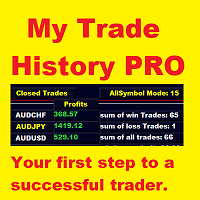
My Trade History PRO 자신의 거래를 되돌아보는 것이 성공하는 트레이더가 되는 첫걸음입니다. 성공한 트레이더는 거래만 하는 것이 아니라 모든 포지션을 검토하고 분석하며 배웁니다. My Trade History PRO는 그 검토를 쉽고 시각적으로 만들어 줍니다. 직접 거래하든, 시그널을 따라가든, EA를 운용하든 이 지표는 차트 위에서 완전한 거래 이력과 실용적인 분석을 보여 줍니다. MetaTrader 4와 MetaTrader 5에서 동일한 기능을 제공합니다. MT4 버전: https://www.mql5.com/ko/market/product/50206
MT5 버전: https://www.mql5.com/ko/market/product/199179 주요 기능 1. 세 가지 보기 모드 청산 거래 - 청산된 포지션의 이력 진행 중 거래 - 현재 열려 있는 포지션 청산 + 진행 중 거래 - 두 가지를 한눈에 모드 버튼을 한 번 클릭하면 모드가 전환됩니다. 2. 세 가지 분
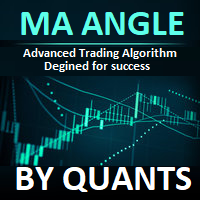
Quants 이동 평균 기울기는 방향 표시와 모멘텀을 제공하는 매우 강력한 지표입니다. 표시기가 다시 칠해지지 않습니다. 마각을 효율적으로 계산하고 추세를 찾을 수 있습니다.
신호 촛불이 닫히면 이익 계산이 시작됩니다. 따라서 라이브에서 정확한 결과를 얻을 수 있습니다.
제안된 TimeFrame은 H1에서 그것을 사용하고 있습니다. 표시기의 모든 옵션을 편집할 수 있습니다.
팁 : 거래 스윙 및 추세 브레이크 아웃 방향. 프랙탈, renko 막대 및 볼린저 밴드는 정확도와 수익성을 향상시킬 수 있습니다.
각도 선의 발산 접근법을 사용하여 높고 낮음을 찾을 수 있습니다. 이 지표는 지지 저항, 공급 수요 지표에 대한 추가 확인으로 사용할 수 있습니다.
Ma 기울기 정보는 추세 방향으로 입력하고 종료점을 갖는 데 매우 유용합니다. 외환, 주식, 지수에서 작동합니다.
PushNotifications / Email / SoundAlerts / PopUpAlerts로 알림을 받을 수

KonokaSystem is a day trade targeting (0:00 ~13:00) Japan time. The currency pair is USDJPY and trades at the closing price of M5. No grid or martingale logic is used. Both TP and SL are 100Pips, which are slightly larger. (To avoid stop loss hunting) There are other exit methods using time and technical indicators. With those internal logic, profit and loss are repeated and grow. KonokaSystem is not aimed at increasing the winning rate.
forward test: https://www.mql5.com/ja/signals/573517 <Pa

Features This EA is good at v olatility market. This EA specializes in GBPJPY, so we recommend you apply it to that chart. Please apply this EA to the 15 minute chart. This EA uses CANDLE technical. This EA is easy to manage because it has a maximum of 1 position. The maximum profit is set at 0 pips(Unlimited). The maximum loss cut is set at 80pips.
Parameters -----Basic parameter----- magic - Please set a magic number which is not the same as other EA. NormalBuy - Please set the number of lot
FREE
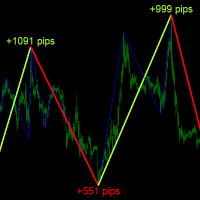
Description
ABC Trend Detector is an indicator that identifies impulses and trends in the market and displays their presence on the price chart. Found patterns are drawn as colored connecting lines between their highs and lows. Above / below each extreme, the value of the range (the number of pips) of the trend is displayed.
Recommendations
You can use this indicator to determine the trend and, accordingly, to determine the direction of opening a position or closing an opposite position.
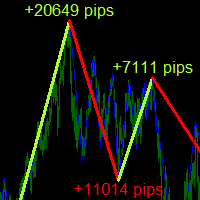
Description
ABC Trend Detector Pro is an indicator that identifies impulses and trends in the market and displays their presence on the price chart. Found patterns are drawn as colored connecting lines between their highs and lows. Above / below each extreme, the value of the range (the number of pips) of the trend is displayed.
Recommendations
You can use this indicator to determine the trend and, accordingly, to determine the direction of opening a position or closing an opposite position

TrendLinesEA "is a tool designed to trade according to the trend lines drawn by the internal indicator or drawn by the trader manually. The expert relies on two trading signal extraction systems (SPIKE & ROLL). SPIKE MODE : - The signal is generated when the price breaks through the trend line and then rebounds to break it again. ROLL MODE :- A signal and a bounce is created when the price touches the trend line. You can activate one or both of the signaling systems by placing a check mark on t

Henry - An indicator by which you can determine the levels and trend. The indicator calculates the saturation levels of the price chart. A signal to exit the resale area is a buy signal. A signal to exit the overbought area is a sell signal. Usually, you need to set relative values for the overbought and oversold levels of Bottom and Top - for this indicator.
Most often, a good trend is visible on the price chart visually. But an experienced trader must clearly understand the current balance

Scalper Little is a Forex trading strategy, carried out at short intervals and with very small profit / loss goals. A trader makes a deal from a few seconds to several minutes and at the same time tries to take a small profit / loss from a few points to tens of points. In other words, the bot is trying to work on the smallest market fluctuations, as if cutting profit / loss from the market into thin slices.
The bot is designed to trade major currency pairs, it has protection against failures -

Halley´s comet it is a Secure Automated Software for trade Forex market and indices.
The architecture is a Fully Automatic Autonomous Robot Expert capable of
Independently analyzing the market and making trading decisions Halley´s comet It is an advanced trading system. This is a fully automatic Expert Advisor. Halley´s comet . It is a 100% automatic system, The system is self-sufficient, performing all the work. Is a revolution in the customization of the trading. You

FBO Trend Admiral is a professional yet simple to use trend following system. It detects the prevailing trend and gives entry points as arrows. To determine the trend it uses a unique filtering algorithm. Suitable for defining entry points for scalping as well as for intra-day trading. Features Works with the prevailing market trend. Suitable for all markets (currency pairs, metals and indices). Ideal for short time trading on the M1, M5 and M15 time frames. Does not redraw/repaint the arrows

Are you tired of the constant ups and downs? It is not worth becoming a victim of unstable market movements, it is time to somehow get rid of it! Already now, you can use Business Trend solutions to balance the analysis of price movements and get a clearer picture of price behavior.
Business Trend is a trend indicator for the MetaTrader 4 trading platform. This indicator allows you to find the most likely trend reversal points. You will no longer find a copyright indicator like this. A simple

The trader uses the Trend for Neuro indicator to determine the market situation. This is a trending algorithm that is convenient to download, install and use. The algorithm with acceptable accuracy generates input signals and output levels. Strategy for trend trading, filtering and all the necessary functions built into one tool! By launching the indicator, the user will see only two types of arrows that can change color to blue during an uptrend, to red during a downtrend there is no uncertaint

Cherokee - is a professional adviser based on a trend tracking system with an adaptive algorithm. New sets are in the "Comments" section comments #2-3. Signal: 6 currency pairs Main Advantages 6 currency pairs; The EA does not use Martingale; The minimum starting deposit is $300; No need to close the robot during news releases; It works with 4 and 5-digit quotes; A multi-level model of a quantum set.
Working parameters Currency pairs : EUR/USD, GBP/USD, EUR/CHF, USD/CHF, USD/CAD, USD/JPY ,

Bot Atilla LT. In this work, the classical and generally accepted methods for managing scalping Expert Advisor orders are discarded. You will not find in Atilla LT a thoughtless martingale that will average transactions to unconsciousness until it loses your deposit (it’s familiar, really?). It uses hard (fixed!) Stop orders and you can clearly see their work on the test chart, there is no increase in the lot after a losing deal - it always remains unchanged. And most importantly - a unique ins

The Perspective Trend indicator tracks the market trend with very high reliability. All intersection points will be ideal points at which the direction of the trend changes. Sharp price fluctuations, as well as noise around averaged prices, are ignored. Signal points, places where color changes, can be used as points of potential market reversal. The indiuctor algorithm implements a kind of technical analysis based on the idea that the market is cyclical in nature. This development can be used b

Всем привет! Советник "Calipso" за много лет перетерпел очень много изменений и модификаций. Данная версия собрала в себе лучшие апгрейды и идеи. Эксперт поддерживает много режимов торговли и его можно адаптировать под разные нужды, такие как ночной скальпинг, торговля сеткой, позиционная торговля на отбой от уровней поддержки/сопротивления и многое многое другое. Благодаря глубоким настройкам, этот советник становиться незаменимым помощником в торговле. На базе этого EA можно реализовать десят
FREE

Ultimate pattern builder indicator
Allows you to build any pattern with up to 3 candlesticks (+ special fourth). This indicator is special because you can create any pattern you want, by modifying body and both wicks separately to your needs. If you ever wanted to create your own patterns , or just adjust any known popular pattern, then this is perfect for you. With this indicator you can learn how to build candles, testing it in strategy tester and get marked new candles on realtime charts, ho
FREE

Closing partial open orders is very tricky strategy and users usually want to make this after few intervals of time. This Script does the exact opposite with entry point partial opennig in the beginning. It help us when we need to open three market positions with selected order type and favorite lot size if you choose to trade with percentage lot size exposure like 40% for 1st, 30% for second, 30%. for the 3rd. You can customize it with Take Profit, Stop Loss and more parameters.

The Fiery expert system works with ticks on all types of accounts. For an internal algorithm, the elementary unit of analysis is a tick.
The expert system does not use the history stored in the database to work. For his own needs, he uploads historical data online, creating his own database. To achieve good results in real tick mode on the tester, it is necessary to carry out optimization.
The internal optimizer, having carried out optimization according to the indicated principle, selects th
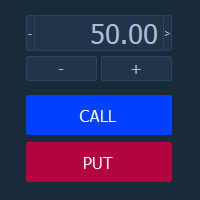
Торговая панель "BinaryOptionsPanel" предназначена для торговли бинарными опционами на платформе mt4.
Содержит в себе 4 блока:
Время экспирации Размер ставки Установка ордера Таблица ставок Так же на панели отображается торгуемый символ и таймер экспирации.
Ставка, как и таблица ставок, имеет два режима ручной и автоматический. Расчёт ставок производится по 4-м формулам.
The Bollinger Scalper EA is a fully automated Expert Advisor that trades based on Bollinger Band and RSI entry signals. The EA trades using market orders and uses averaging to safely turn otherwise negative trades positive. This EA works best on EURUSD using the M5 timeframe. A VPS is advisable when trading this system. Check the comments for back test results and optimized settings. Please note: I have made the decision to give this EA away and many more for free with limited support so that I
FREE
The ADX Indicator is known to be used to determine the trend direction. Not only that, but it also has deviation (+DI and -DI) that determine the direction of the trend as well. The role of the indicator is to spot the trend and its direction and generate signals accordingly.
Indicator Settings: - ADX period : default is 14 periods (it works best with the timeframe H1). - Signal Width : the size of signals arrows. - Signal Distance : the distance of the signal arrow from the candle. - Signal co
FREE

Stochastic BR allows you to recognize reversals professionally. The "Stochastic BR" is designed to recognize profitable counter trend patterns from your chart. Stochastic Indicator: This technical indicator was developed by George Lane more than 50 years ago. The reason why this indicator survived for so many years is because it continues to show consistent signals even in these current times. The Stochastic indicator is a momentum indicator that shows you how strong or weak the current trend i
Multi MA Distance Signal Indicator is a no-nonsense, no delay, no repaint indicator ! Moving Average distance together with a trend filter is a 'simple', but very powerful and reliable signal. The current moving average distance for both a slow and a fast moving average is compared with the past MAD values. For two moving averages, all the distances between the Close price and the moving average (MAD) over a selected period of time are compared with the current MAD "Moving Average Distance". If

Forex MakeMyDay is a fully automated and customizable Expert Advisor. Automatic identify the trend and adjust buy/sell trades ratio to lock in profits. Recommendations EA Settings: Use default settings for best results
Symbol: EURUSD
Time Frame: H1
Brokers: ECN brokers, low spread/commission, 1:200-500+ leverage
Minimum Deposit required: $1, Risk computed on account free margin balance-equity Fully automated and customizablee EA on H1 Time frame. The EA self-adjust to the current mar

NeuralBot Pro
Hi :) Before asking yourself if NeuralBot Pro is the expert advisor to suit your needs, buy it if you find yourself among the following: - you are in the Forex market for the medium and long term (at least 1 year) - you are looking for balance growth on a yearly basis - expect on demand customer support (and for that, don't hesitate write me for more details about the EA, or if you need sets file, I will respond asap) - you are looking for an honest EA with honest backtesting re
MetaTrader 마켓은 거래로봇과 기술지표를 판매하기에 최적의 장소입니다.
오직 어플리케이션만 개발하면 됩니다. 수백만 명의 MetaTrader 사용자에게 제품을 제공하기 위해 마켓에 제품을 게시하는 방법에 대해 설명해 드리겠습니다.
