거래 로봇을 무료로 다운로드 하는 법을 시청해보세요
당사를 Telegram에서 찾아주십시오!
당사 팬 페이지에 가입하십시오
스크립트가 흥미로우신가요?
그렇다면 링크 to it -
하셔서 다른 이들이 평가할 수 있도록 해보세요
스크립트가 마음에 드시나요? MetaTrader 5 터미널에서 시도해보십시오
지표

Gold Spread ATR Trend Panel MT5 - MetaTrader 5용 지표

Brijesh Jaiswal
Brijesh Jaiswal
  • Founder & Lead Algorithmic Developer 에  I-Tech Zone
  • 인도
  • 2205
5 (5)
15년 이상의 금융 시장 경력을 보유한 저는 외환 시장 분석가, 포트폴리오 매니저, MQL 개발자로서 고정밀 기술 분석 및 자동 거래 시스템을 전문으로 합니다. 시장 메커니즘, 가격 움직임, 위험 관리에 대한 깊은 이해를 바탕으로 변동성이 큰 외환 시장에서도 명확하고 체계적인 분석을 제공합니다.
인도 고아에 거주하며, 고아 지역 주요 신문에 기고한 금융 분석 및 시장 분석 글을 통해 지역적으로 인정받고 있습니다.
제가 제공하는 서비스 및 지원 방법:
조회수:
565
평가:
(1)
게시됨:
MQL5 프리랜스 이 코드를 기반으로 한 로봇이나 지표가 필요하신가요? 프리랜스로 주문하세요 프리랜스로 이동
The panel is designed for learning, observation and quick market context. It does not open trades, close trades, manage positions or send trading signals. The values shown on the panel should be interpreted as informational market data only.
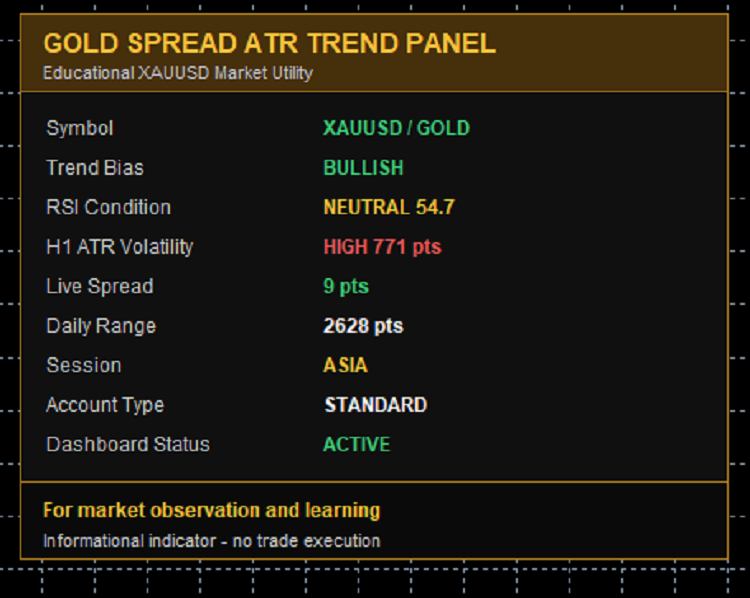
The indicator reads data from standard MetaTrader 5 indicators and symbol information. It combines live spread, H1 ATR volatility, H1 EMA trend bias, H4 EMA trend filter, H1 RSI condition, daily range, session name and account type into one compact dashboard.
Main Features:
- On-chart XAUUSD information panel
- Live spread display in points
- H1 ATR volatility reading
- H1 EMA trend bias
- H4 EMA major trend filter
- H1 RSI condition
- Daily range display
- Basic session label
- Standard / cent account text detection
- Three visual themes

- No trade execution

Gold Spread ATR Trend Panel MT5

How To Use:
Attach the indicator to an XAUUSD or Gold chart in MetaTrader 5. It can be viewed on any chart timeframe because the panel internally reads H1 and H4 data for trend, RSI and volatility context.
Panel Interpretation:
- Symbol shows whether the current chart appears to be XAUUSD or Gold.
- Trend Bias compares H1 EMA values with the H4 trend EMA.
- RSI Condition shows whether the H1 RSI is above 60, below 40 or neutral.
- H1 ATR Volatility compares current ATR against the low and high ATR thresholds.
- Live Spread shows current spread in points.
- Daily Range shows the current D1 high-low range in points.
- Session gives a simple time-based market session label.
Input Parameters:
- Dashboard title: text shown in the dashboard header.
- Dashboard corner: chart corner where the panel is displayed.
- X and Y position: pixel offset for panel placement.
- Theme: visual color theme.
- Refresh seconds: timer refresh interval.
- ATR period: period used for H1 ATR reading.
- Fast EMA period: fast H1 EMA used for trend bias.
- Slow EMA period: slow H1 EMA used for trend bias.
- Trend EMA period: H4 EMA used as a major trend filter.
- RSI period: H1 RSI period.
- Low ATR points: threshold for quiet volatility.
- High ATR points: threshold for high volatility.
- Spread warning points: spread level shown as a warning.
- Show account info: show or hide account type text.
Notes:
This indicator is intended as a free educational chart utility. It is not financial advice, it does not predict future price movement and it does not execute trades.

SetSLByLoss — set Stop Loss on all open positions by target loss amount SetSLByLoss — set Stop Loss on all open positions by target loss amount

Script to set Stop Loss on every open position based on a target loss in the account's currency (e.g. $50 per position). Works on any deposit currency and any forex symbol. Validates broker stops/freeze levels. Currency conversion handled automatically.

TickValue_Compare — diagnose differences between TICK_VALUE, LOSS and PROFIT TickValue_Compare — diagnose differences between TICK_VALUE, LOSS and PROFIT

Diagnostic script that compares SYMBOL_TRADE_TICK_VALUE, SYMBOL_TRADE_TICK_VALUE_LOSS and SYMBOL_TRADE_TICK_VALUE_PROFIT for every symbol in Market Watch. Classifies each symbol into one of four categories (ALL_EQUAL, TV_MATCHES_PROFIT, TV_MATCHES_LOSS, ALL_DIFFER) and provides an aggregated summary plus interpretation tip. Useful for verifying which tick-value property to rely on when implementing risk-based lot sizing in EAs. Exports full per-symbol report to CSV in MQL5/Files.

XAUUSD Spread Alert Utility MT5 XAUUSD Spread Alert Utility MT5

Educational MT5 chart utility that monitors XAUUSD spread on the chart and alerts when spread rises above user-defined warning or danger levels.

Real-Time Spread Monitor with Session Statistics Real-Time Spread Monitor with Session Statistics

Displays the current bid-ask spread in points and pips directly on the chart, with live tracking of session minimum, maximum and average spread since the indicator was attached. Color changes to alert when spread exceeds a user-defined threshold.