 MetaTrader 5
 Experts
 지표
지표
 스크립트
스크립트
 라이브러리
라이브러리
 보관함
보관함
거래 로봇을 무료로 다운로드 하는 법을 시청해보세요
당사를 Telegram에서 찾아주십시오!
당사 팬 페이지에 가입하십시오
당사 팬 페이지에 가입하십시오
스크립트가 마음에 드시나요? MetaTrader 5 터미널에서 시도해보십시오

XAUUSD Spread Alert Utility MT5 - MetaTrader 5용 지표

- 조회수:
- 30
- 평가:
- 게시됨:
- 업데이트됨:
-
 이 코드를 기반으로 한 로봇이나 지표가 필요하신가요? 프리랜스로 주문하세요
프리랜스로 이동
이 코드를 기반으로 한 로봇이나 지표가 필요하신가요? 프리랜스로 주문하세요
프리랜스로 이동


XAUUSD 스프레드 알림 유틸리티 MT5는 MetaTrader 5용의 간단한 교육용 지표입니다. 이 지표는 현재 브로커의 스프레드를 차트에 직접 표시하며, 스프레드가 설정된 경고 또는 위험 임계값을 초과할 때 트레이더에게 알림을 보낼 수 있습니다.
이 도구의 개발 취지는 스프레드가 중요한 거래 비용이라는 점에 있습니다. 특히 XAUUSD와 같은 상품의 경우, 세션 개장, 롤오버, 뉴스 발표 시기, 유동성이 낮은 시점 등에서 시장 상황이 급격히 변할 수 있기 때문입니다. 차트에서 직접 스프레드를 확인함으로써 트레이더는 거래일 중 다양한 시간대에 따라 체결 조건이 어떻게 변화하는지 파악할 수 있습니다.
이 유틸리티는 정보 제공만을 목적으로 합니다. 포지션 개설, 청산, 관리 또는 진입 신호를 제공하지 않습니다.
주요 기능:
- 차트 내 XAUUSD 스프레드 모니터
- 포인트 단위의 실시간 스프레드 표시
- 스프레드 가격 표시
- 정상, 경고, 위험 상태 표시
- 사용자 정의 경고 스프레드 임계값
- 사용자 정의 위험 스프레드 임계값
- 팝업 알림 옵션
- 소리 알림 옵션
- 푸시 알림 옵션
- 이메일 알림 옵션
- 반복 알림을 줄이기 위한 알림 대기 시간
- 전략 테스터 검증을 위한 수동 스프레드 테스트 모드
- 세 가지 시각적 테마
- 차트에 개발자 이름 표시
- 거래 실행 기능 없음
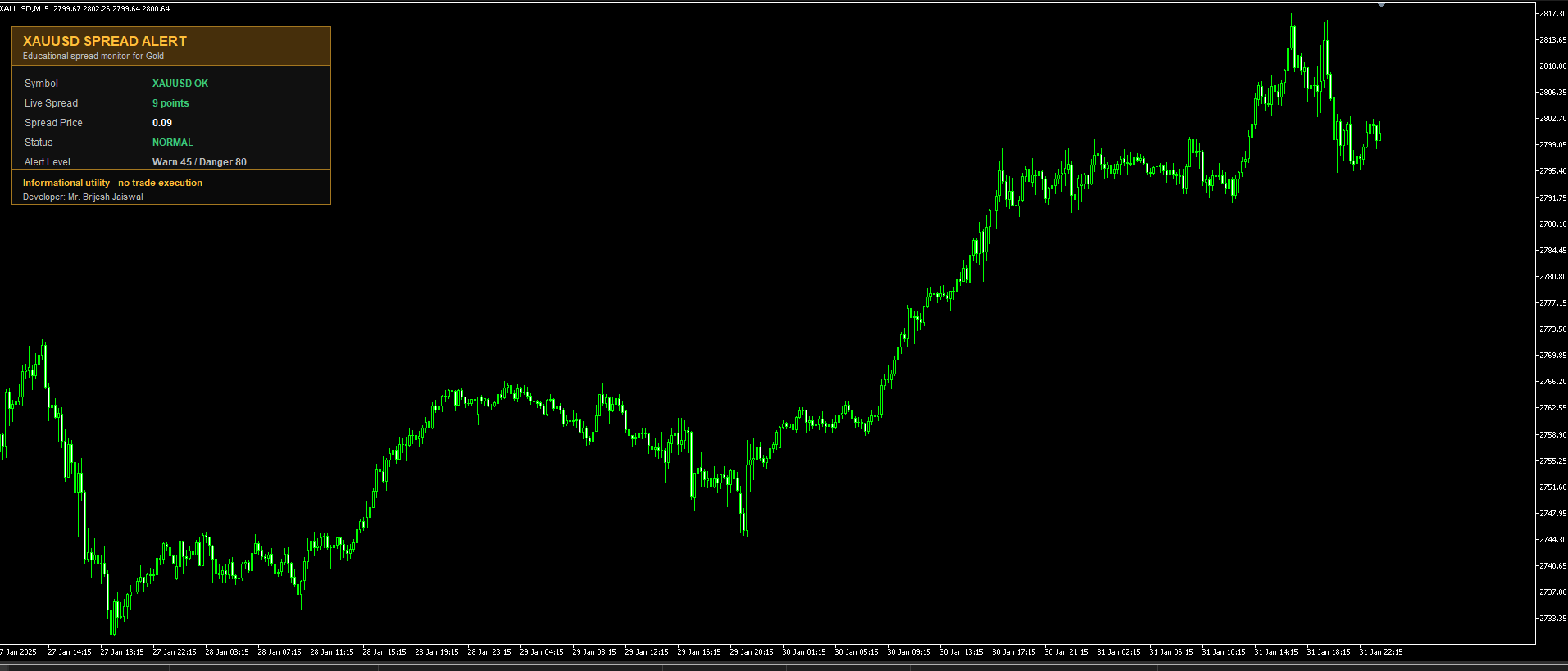
사용 방법:
MetaTrader 5의 XAUUSD 또는 금 차트에 이 지표를 적용하십시오. 패널에는 브로커가 보고한 현재 스프레드가 표시됩니다. 스프레드가 경고 수준 미만이면 패널은 정상 상태를 표시합니다. 스프레드가 경고 수준에 도달하거나 초과하면 패널이 경고 상태로 변경됩니다. 스프레드가 위험 수준에 도달하거나 초과하면 패널이 위험 상태로 변경됩니다.
패널 해석:
- 심볼은 현재 차트가 XAUUSD인지 금(Gold)인지 표시합니다.
- 실시간 스프레드는 브로커가 보고한 스프레드를 포인트 단위로 표시합니다.
- '스프레드 가격'은 스프레드 포인트를 가격 차이로 변환한 값입니다.
- 상태는 설정된 임계값에 따라 ‘정상(NORMAL)’, ‘경고(WARNING)’, ‘위험(DANGER)’으로 표시됩니다.
- '임계값'은 지표에서 현재 사용 중인 경고 및 위험 수준을 표시합니다.
- '마지막 알림'은 지표가 감지한 가장 최근의 알림 조건을 표시합니다. 터미널의 알림 창과 알림 채널이 실전 차트에서와 다르게 작동할 수 있으므로, 전략 테스터에서 이 정보를 활용하면 유용합니다.
입력 매개변수:
- 패널 제목: 패널 헤더에 표시되는 텍스트입니다.
- 패널 위치: 패널이 표시될 차트의 모서리.
- X 및 Y 위치: 패널 배치를 위한 픽셀 오프셋입니다.
- 테마: 시각적 색상 테마.
- 새로고침 간격(초): 타이머 새로고침 간격.
- 경고 스프레드 포인트: 경고 상태가 시작되는 스프레드 수준.
- 위험 스프레드 포인트: 위험 상태가 시작되는 스프레드 수준.
- 경보 재발생 대기 시간(초): 경보가 반복되어 표시되기까지의 최소 시간.
- 팝업 알림: 터미널 팝업 알림을 활성화하거나 비활성화합니다.
- 소리 알림: 터미널 소리 알림을 활성화하거나 비활성화합니다.
- 사운드 파일: MetaTrader 터미널의 'Sounds' 폴더에 있는 사운드 파일.
- 푸시 알림: 터미널에서 설정된 경우 모바일 푸시 알림을 활성화하거나 비활성화합니다.
- 이메일 알림: 터미널에서 설정된 경우 이메일 알림을 활성화하거나 비활성화합니다.
- 개발자 이름 표시: 차트 패널에 개발자 이름을 표시하거나 숨깁니다.
- 테스터 수동 모드: 전략 테스터에서 브로커가 보고한 스프레드 대신 수동 스프레드 값을 사용합니다.
- 테스터 스프레드 포인트: 테스터 수동 모드가 활성화되었을 때 사용되는 수동 스프레드 값입니다.
참고:
이 지표는 무료 교육용 스프레드 모니터링 도구로 제공됩니다. 이는 금융 자문이 아니며, 향후 가격 변동을 예측하지도 않고, 거래를 실행하지도 않습니다.
지원이 필요하시면 문의해 주십시오:
https://www.mql5.com/ko/users/2rockworld/seller
MetaQuotes Ltd에서 영어로 번역함.
원본 코드: https://www.mql5.com/en/code/73293
 Quantora Position Size Calculator MT5
Professional open-source Position Size Calculator for MetaTrader 5. Calculates broker-compatible lot size using account value, risk percentage, fixed risk amount and Stop Loss distance.
Professional Automatic Trailing Stop Utility for MetaTrader 5
Professional open-source Trailing Stop manager for MetaTrader 5 with adjustable start, distance, step, profit filter, Magic Number filtering and a modern Quantora dashboard.
Gold Spread ATR Trend Panel MT5
XAUUSD에 대한 교육용 MT5 차트 패널로, 실시간 스프레드, ATR 변동성, EMA 추세 방향, RSI 상태, 일일 변동폭 및 활발한 거래 세션을 보여줍니다.
Quantora Candle Countdown MT5 - Professional Candle Timer and Countdown Tool
Professional open-source Candle Countdown for MetaTrader 5. Displays a live digital candle timer, progress bar, elapsed and remaining time, market status and configurable countdown alerts with a modern Quantora dashboard.