 MetaTrader 5
 Experts
 지표
지표
 스크립트
스크립트
 라이브러리
라이브러리
 보관함
보관함
거래 로봇을 무료로 다운로드 하는 법을 시청해보세요
당사를 Telegram에서 찾아주십시오!
당사 팬 페이지에 가입하십시오
당사 팬 페이지에 가입하십시오
스크립트가 마음에 드시나요? MetaTrader 5 터미널에서 시도해보십시오

Daily Risk Monitor Lite - MetaTrader 5용 지표

- 조회수:
- 110
- 평가:
- 게시됨:
- 업데이트됨:
-
 이 코드를 기반으로 한 로봇이나 지표가 필요하신가요? 프리랜스로 주문하세요
프리랜스로 이동
이 코드를 기반으로 한 로봇이나 지표가 필요하신가요? 프리랜스로 주문하세요
프리랜스로 이동

Daily Risk Monitor Lite는 차트상에서 당일 계좌 리스크를 명확하게 모니터링하고자 하는 트레이더를 위한 무료 오픈소스 MetaTrader 5 지표입니다.
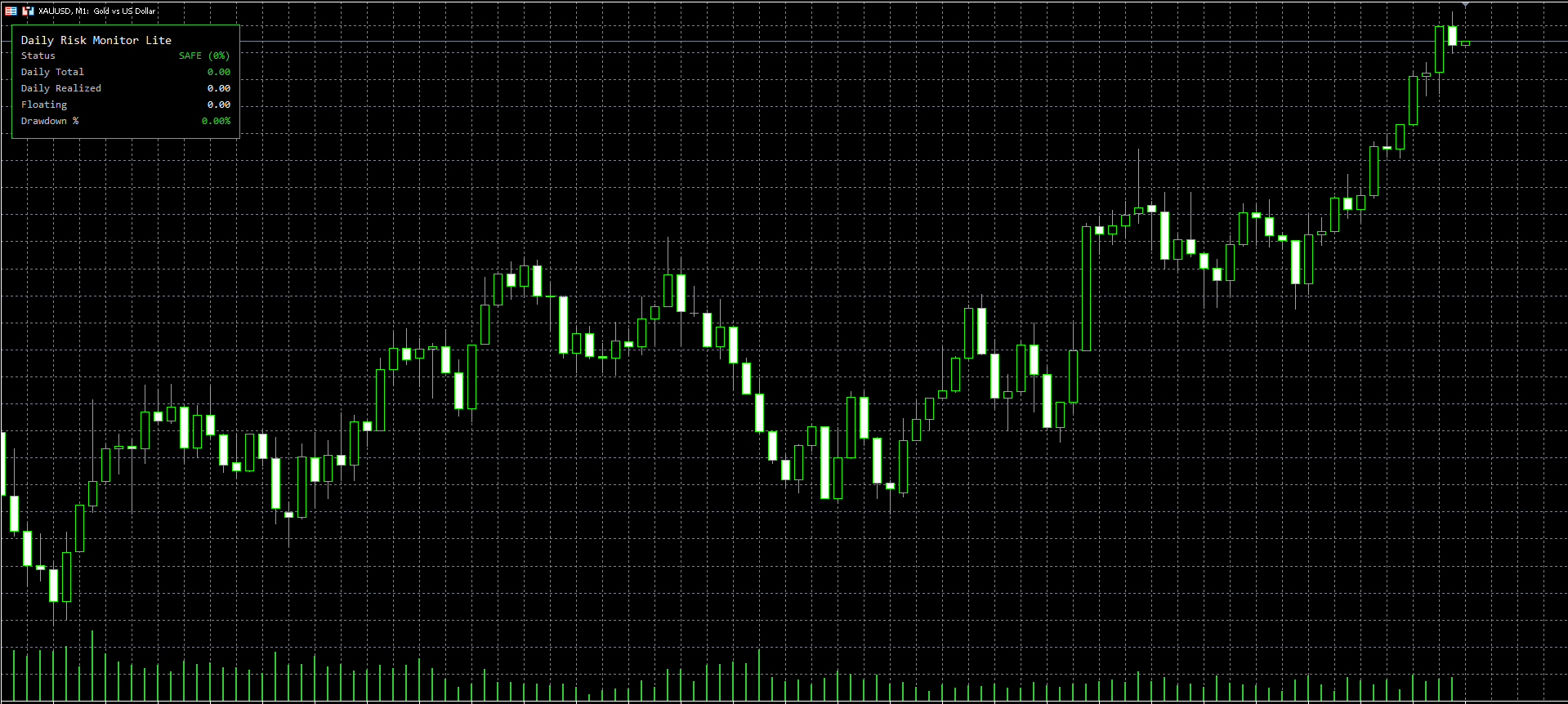
이 지표는 소규모이면서도 이해하기 쉽고 실용적인 기능 세트에 중점을 둡니다:
- 일일 실현 손익
- 미실현 손익
- 일일 총액
- 현재 드로우다운(% )
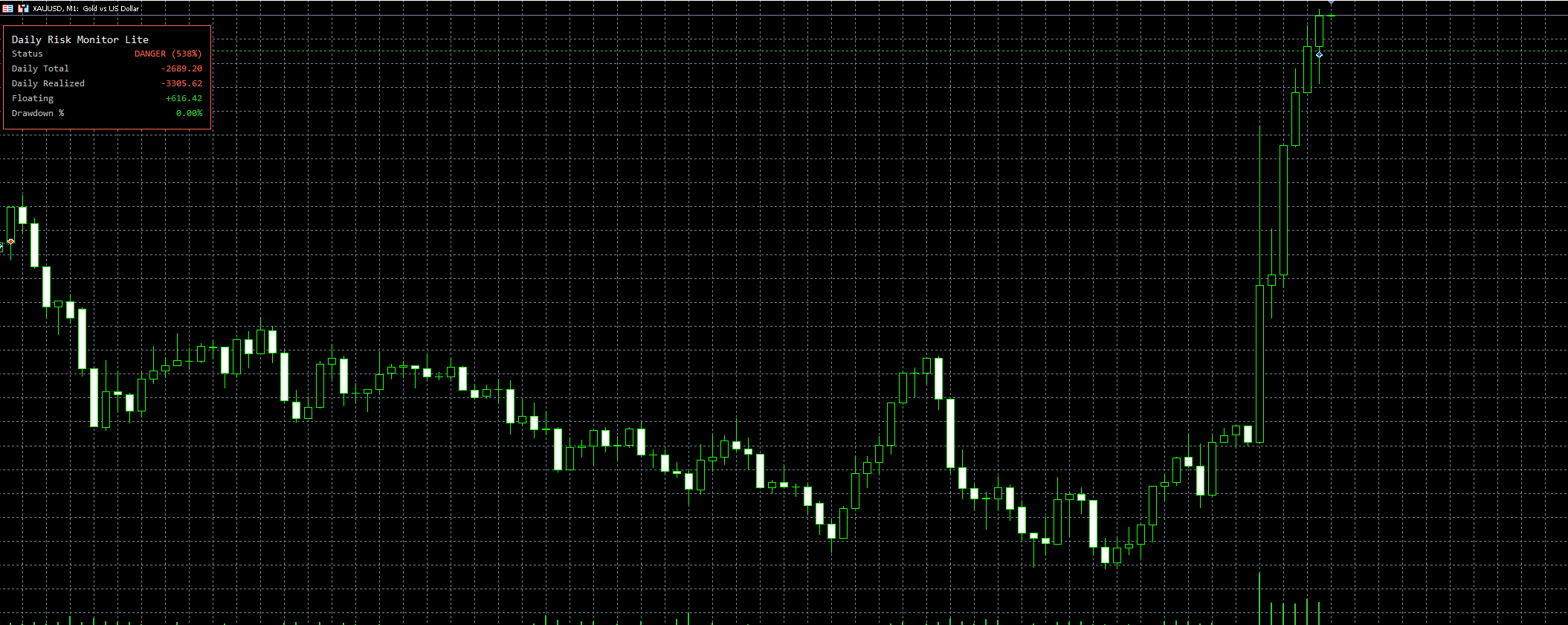
- 색상 강조 표시가 적용된 SAFE / WARNING / DANGER 상태
이 프로젝트의 목표는 간단합니다. 트레이더들이 일일 계좌 리스크를 실시간으로 파악할 수 있도록 돕는 것입니다.
이 도구는 읽기 전용 모니터링 도구입니다. 포지션을 청산하거나, 거래를 차단하거나, 완전한 보호 엔진 역할을 하지는 않습니다. 모니터링, 학습 및 향후 맞춤형 개발을 위한 경량 CodeBase 샘플로 의도적으로 설계되었습니다.
### 주요 기능
- 차트 상의 간결한 패널
- 계좌 단위의 일일 리스크 통계
- 청산된 거래의 일일 실현 손익
- 미결제 포지션의 변동 손익
- 일일 총계 산출
- 현재 드로다운 비율
- 색상 기반 리스크 상태
- 수수료 반영 여부 선택
- 스왑 포함 여부 선택
- 브로커 기준 일 또는 수동 일 시작 로직
- 활성 세션 중 차트 상에서 드래그 가능한 사용자 정의 패널
### 데이터 범위
- 계좌 수준만 지원
- 종목별 분할 없음
- 다중 계좌 통합 불가
### 계산 규칙
#### 일일 실현 손익
- 해당 일의 거래 가능 시간 내에 청산된 거래만 집계
- 청산된 거래만 포함됩니다
- 수수료는 포함하거나 제외할 수 있습니다
- 스왑은 포함하거나 제외할 수 있습니다
#### 미실현 손익
- 계좌 내 모든 미결제 포지션의 현재 미실현 손익을 사용합니다
- 스왑을 포함하거나 제외할 수 있습니다
#### 일일 합계
- `일일 실현 손익 + 미실현 손익`
#### 현재 드로우다운 %
- `max((잔고 - 순자산) / 잔고 * 100, 0)`
- `잔고 <= 0`인 경우, 드로다운은 `N/A`로 표시됩니다
#### 리스크 사용률 %
- `일일 총액 < 0`일 때만 계산됩니다
- 계산식:
`abs(일일 총액) / 일일 손실 한도 * 100`
- 경고 기준치: `50%`
- 위험 임계값: `80%`
### 거래일 정의
- `InpUseBrokerDay = true`인 경우, 하루는 브로커 서버 기준 `00:00`에 시작됩니다
- `InpUseBrokerDay = false`인 경우, 거래일 시작 시각은 브로커 서버 시간 기준 `InpManualDayStartHour`입니다
### 이 지표가 수행하지 않는 기능
- 자동 청산 기능 없음
- 거래 차단 기능 없음
- 원클릭 청산 기능 없음
- 보호 모드 ON/OFF 기능 없음
- 전체 계정 보호 상태 기계 없음
- 푸시 알림 없음
- 보고서 내보내기 기능 없음
- 프로프 펌용 전체 규칙 엔진 미지원
- 복잡한 다중 페이지 UI 미지원
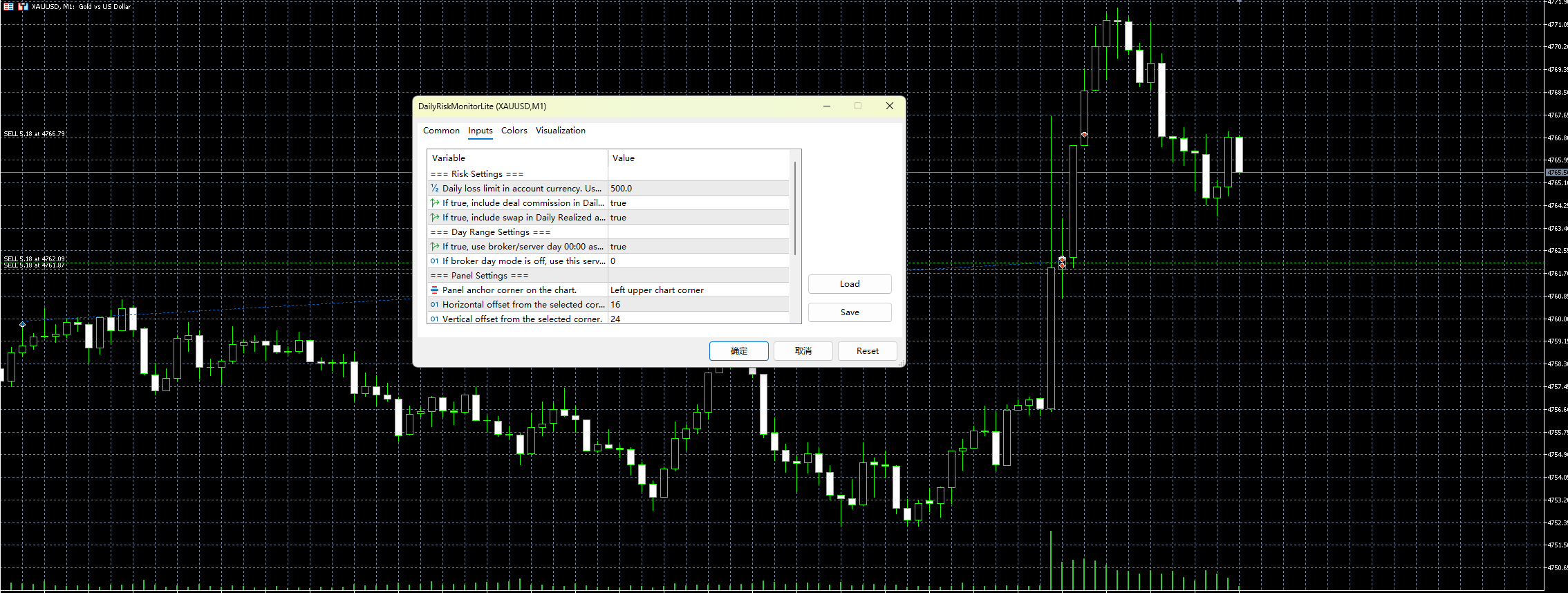
- `InpDailyLossLimitMoney`
- `InpIncludeCommission`
- `InpIncludeSwap`
- `InpUseBrokerDay`
- `InpManualDayStartHour`
- `InpCorner`
- `InpXOffset`
- `InpYOffset`
- `InpFontSize`
- `InpPanelBgColor`
- `InpSafeColor`
- `InpWarnColor`
- `InpDangerColor`
### 설치
1. 프로젝트 폴더를 `MQL5/Indicators/` 아래에 배치합니다.
2. MetaEditor에서 `DailyRiskMonitorLite.mq5` 파일을 엽니다.
3. 지표를 컴파일하십시오
4. 차트에 적용하십시오
### 사용 방법
1. 차트에 지표를 적용하세요
2. 일일 손실 한도를 설정하세요
3. 브로커 일일 모드 또는 수동 일일 시작 모드 선택
4. 일일 실현 손실, 미실현 손실, 일일 총 손실, 드로다운을 실시간으로 확인하세요
5. 패널 색상을 통해 위험을 빠르게 파악하세요
6. 필요한 경우 사용자 지정 패널을 원하는 차트 위치로 드래그하세요
### 적합한 대상
- 수동 트레이더
- 장중 리스크를 신속하게 파악하고자 하는 트레이더
- 가벼운 계정 수준 모니터링 도구를 원하는 트레이더
- 일일 리스크 계산을 위한 깔끔한 MT5 샘플을 원하는 개발자
### 다음 대상에게는 적합하지 않음
- 자동 거래 시스템을 찾는 사용자
- 강제적인 계좌 보호 기능을 기대하는 사용자
- 거래 제한이나 모든 포지션 청산 조치를 기대하는 사용자
- 완전한 프로프 펌(prop firm) 규정 준수 엔진을 찾는 사용자
### 참고 사항
- 본 도구는 모니터링 전용입니다
- 보호 조치를 직접 실행하지는 않습니다
- 패널을 드래그하여 이동한 위치는 현재 활성화된 세션에 적용됩니다
- 수수료 또는 스왑이 0인 계좌의 경우, 관련 매개변수 토글을 설정해도 눈에 띄는 차이가 나타나지 않을 수 있습니다
MetaQuotes Ltd에서 영어로 번역함.
원본 코드: https://www.mql5.com/en/code/72204
 Easy Range Breakout EA - MT5
이 EA는 범위 돌파 거래 전략을 구현합니다. 사용자가 지정한 시작 시간과 종료 시간 사이의 가격 범위를 계산하고, 차트에 직사각형 모양의 선을 그려 해당 범위의 고점과 저점을 표시한 다음, 범위가 닫힌 후의 가격 움직임을 모니터링합니다. 시세가 범위 상단을 상향 돌파하면 매수 포지션을 개설하고, 범위 하단을 하향 돌파하면 매도 포지션을 개설합니다.
Machine Learning Supertrend
트렌드 국면에 대한 기계 학습 기반의 접근 방식. 정확한 신호와 내장된 백테스트 신뢰도를 제공합니다.
Super Trend
슈퍼트렌드(Supertrend) 지표는 메타트레이더 5(MetaTrader 5) 차트에 ATR을 기반으로 한 동적 추세선을 표시하며, 상승 추세 시에는 녹색 선, 하락 추세 시에는 빨간색 선으로 표시되고, 추세 반전 시마다 선택 사항인 매수/매도 화살표 신호를 제공합니다.
Institutional Fourier Transform (DFT) Dominant Cycle Language: MQL5
시장 데이터에 이산 푸리에 변환(DFT)을 적용하여 주요 주기적 주파수를 분리함으로써 전환점을 예측하고 위상 지연을 제거하는 디지털 신호 처리(DSP) 엔진입니다.