Truong Nguyen / プロファイル
- 情報
|
11+ 年
経験
|
3
製品
|
36
デモバージョン
|
|
0
ジョブ
|
0
シグナル
|
0
購読者
|
I am a certified Elliott Wave technician with a deep knowledge and understanding of market structure.
My development philosophy is simple: entries matter, but trade management is the real edge. I design automated strategies around disciplined exposure, adaptive protection, dynamic trailing and intelligent exit management rather than grid trading, martingale recovery or uncontrolled risk.
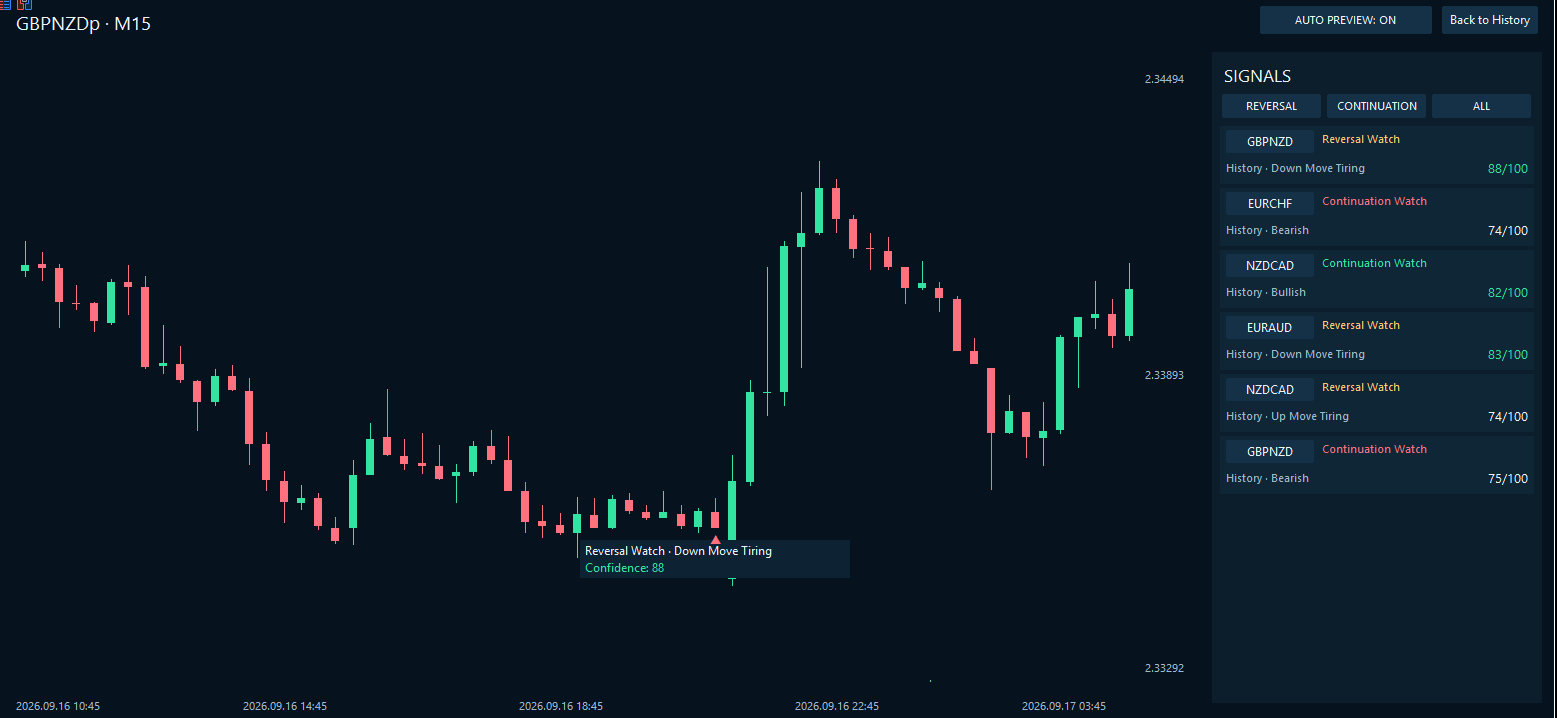
Reversal Watch identified the decline as “Down Move Tiring” with 88/100 confidence near the low—before price reversed strongly higher.
MyFxDesk cannot predict every market turn, but it can help traders identify developing reversal conditions before they become obvious
https://www.mql5.com/en/market/product/195248?source=Site+Market+My+Products+Page
実際の市場環境におけるEAの運用実績をご確認ください。 CrownForgeに関するご質問やサポートのご依頼は、私までお問い合わせください。 CROWNFORGEとは? CrownForgeは、精度の低いエントリーを広いストップロスで補うEAではありません。より精度の高いエントリーポイントを見つけるために設計されています。 CrownForgeは、MetaTrader 5向けに開発された、XAUUSD(ゴールド)を対象とする完全自動の高精度スナイパー型EA(エキスパートアドバイザ)です。独自のマルチタイムフレーム市場構造分析を用いて、短期的な取引機会が形成される可能性のある価格水準を選別します。 所定の条件がそろうと、EAはサポートやレジスタンスの付近でエントリーを試み、ポジションの開始時点から明確に設定されたストップロスで保護します。目指すのは、管理されたエクスポージャーと規律あるリスク管理です。極端に広いストップロスによって、取引の前提が崩れたポジションを持ち続けることではありません。 CrownForgeが保有するのは、 同時に1つのポジションのみ です。
My FX Desk is built for traders who want more than a simple currency-strength meter.
Its Reversal Watch technology analyses changing currency strength, momentum deterioration, multi-timeframe structure and divergence to highlight markets where an established move may be losing support before the reversal becomes obvious.
But identifying exhaustion is only half the picture.
Continuation Watch looks for situations where underlying strength remains aligned and a move may still have further room to develop — helping traders distinguish between a market that is genuinely tiring and one that is simply pausing before continuing.
Across the 8 major currencies and all 28 Forex pairs, My FX Desk continuously evaluates the market to help answer two of the most important questions a discretionary trader faces:
Is this move beginning to break down?
Or is the trend still supported?
REVERSAL WATCH
Identify developing exhaustion, weakening momentum and potential turning points.
CONTINUATION WATCH
Find markets where strength, momentum and structure continue to support the existing move.
Built for fast decision-making
No need to manually compare dozens of charts just to understand the broader FX picture.
My FX Desk brings currency strength, changing momentum, divergence and pair relationships together into one workspace designed to help you understand the market within seconds.
Find the currencies gaining strength.
See which moves are losing momentum.
Focus on the pairs that deserve your attention.
Know when it may be better to stay out.
My FX Desk — Next-Generation FX Reversal & Continuation Intelligence.
MyFxDesk は、明確になる前の市場方向の変化を捉えることを目的とした、強力な反転・継続分析インジケーターです。 MyFxDesk は、次世代の AI 駆動型クオンツリサーチとマーケットインテリジェンスに、長年の実際のトレード経験から培われた分析手法を組み合わせて開発されました。 チャート構造。複数時間足。エントリータイミング。リスク。裁量トレーダーは、すでにトレード計画に多くの集中力を使っています。通貨強弱ダッシュボードを読むことまで、さらに複雑な分析作業にする必要はありません。 MyFxDesk は、主要8通貨とそれらから構成される28のForex通貨ペアを1つのワークスペースにまとめます。どの通貨が強い・弱いのか、その強弱が拡大しているのか弱まっているのか、どの通貨ペアを詳しく見るべきか、そしてどの動きが支持を失い始めている可能性があるのかを確認できます。 現在の強さだけではありません。強さがどのように変化しているかを、より明確に把握します。 10秒で市場を把握するための設計 設計目標はシンプルです。 最初の10秒で市場全体の主要な状況を把握し
The Must-Have Monitoring Tool for Every Automated Trader
You would not drive a high-performance car with its warning lights disabled. Yet that is effectively what happens when many traders move an EA from a backtest onto a live account.
The strategy begins trading, capital is placed at risk—and the account balance becomes the main warning system.
By the time a serious drawdown makes the problem obvious, the strategy may have been behaving differently for weeks.
Strategy Drift Pro gives your automated strategies the warning system they have been missing.
Instead of only asking, “Is my EA currently making money?”, Strategy Drift Pro helps answer the more important question:
“Is my EA still behaving like the strategy I originally tested?”
Turn Demo Testing into Genuine Due Diligence
Most traders place a new EA on a demo account and simply watch whether the balance rises or falls. That tells only part of the story.
Strategy Drift Pro turns the demo account into a proper strategy-testing environment.
Load the EA’s tested performance profile, let it trade under current market conditions and monitor whether its behaviour remains consistent with the backtest that earned your confidence.
If the terminal already contains completed trades, Strategy Drift Pro can analyse eligible existing history instead of forcing you to begin from zero. It then continues monitoring new trades as they close.
This gives you a far more disciplined way to evaluate a new EA before allocating serious capital.
You are no longer relying on hope, a handful of winning trades or an impressive-looking equity curve. You are gathering evidence about whether the strategy is behaving as intended.
Create a Live-and-Demo Safety Net
Strategy Drift Pro becomes even more valuable when you already run an EA with real money.
Run the same EA on both your live and demo terminals, matching the settings as closely as possible, and use Strategy Drift Pro to monitor both environments.
The live terminal shows how the strategy is behaving under real execution conditions. The demo terminal becomes your lower-risk observation environment.
If Strategy Drift Pro identifies developing WATCH or DRIFT behaviour on the live account, you can investigate and decide whether to:
Maintain the current risk
Reduce the EA’s exposure
Temporarily pause live trading
Continue collecting trades on demo
The important advantage is that the strategy does not disappear from your radar simply because you stop risking live capital.
You can leave it running on demo and allow Strategy Drift Pro to monitor whether its behaviour remains outside the expected profile or begins moving back toward ALIGNED.
Reader Tip: Use the Last 50 Trades as a Comeback Test
A practical way to use this live-and-demo workflow is to monitor the strategy’s last 50 eligible completed trades.
When drift appears:
Record the date and current trade count.
Reduce or pause live exposure if appropriate.
Keep the same strategy running on demo with matching settings.
Allow new demo trades to replace the older results inside the rolling 50-trade window.
Watch whether the overall condition improves from DRIFT to WATCH and eventually moves back toward ALIGNED.
If the strategy returns to ALIGNED and remains there as further trades close, you may consider cautiously reintroducing it to the live account at reduced risk.
If the strategy remains in DRIFT after a prolonged demo sample—and you have ruled out incorrect settings, execution problems and other identifiable causes—consider keeping the EA disabled or removing it from your active portfolio altogether.
Persistent drift is just as valuable to identify as renewed alignment. It may indicate that the EA no longer behaves like the strategy you originally tested and that continuing to allocate capital is no longer justified by the available evidence.
Sometimes the best decision is not knowing when to restart an EA—it is recognising when it may be time to retire it.
For a cleaner assessment, try to collect up to 50 new demo trades after the drift decision. This allows the earlier drift period to rotate out of the monitoring window, leaving a result based more heavily on the strategy’s newer behaviour.
Do not restart at full risk simply because the dashboard briefly returns to ALIGNED. Look for the improved condition to remain as additional trades close.
If the demo strategy continues behaving closer to its tested profile, you may then consider cautiously restarting it on the live account at reduced risk. Fresh live trades can provide the next layer of confirmation under real execution conditions.
This does not guarantee that the strategy will be profitable again. It gives you something far more useful than guesswork: a structured process for deciding when a strategy may deserve another opportunity.
One Dashboard for Your Entire EA Portfolio
The benefits become even greater for traders running multiple automated systems.
Without a dedicated monitoring tool, one strongly performing EA can hide the deterioration of another. Reviewing every report manually is slow, and account-level profit does not reveal which individual strategy may be changing.
Strategy Drift Pro allows you to separate and monitor your strategies individually, making it easier to see:
Which EAs remain aligned with their expected behaviour
Which strategies require closer attention
Where risk may need to be reduced
Which paused strategies may be moving back toward alignment
Instead of treating every EA equally, you can direct your attention and capital toward the strategies currently providing the strongest supporting evidence.
A Potentially One-of-a-Kind Utility on MQL5
With its combination of tested baseline comparison, automatic terminal-history analysis, rolling multi-metric monitoring, clear ALIGNED, WATCH and DRIFT conditions, multi-strategy portfolio support and matched live-and-demo workflows, Strategy Drift Pro may be a one-of-a-kind utility on the MQL5 Market.
It is not simply another profit dashboard or account-statistics panel.
It is designed to monitor the health of the strategy behind the results.
For anyone running an EA, copied strategy or signal, Strategy Drift Pro could become one of the most important tools in the trading setup—not because it predicts the next trade, but because it helps reveal when the evidence supporting a strategy may be changing.
Your EA automates the trading. Strategy Drift Pro helps you monitor the strategy behind it.
Do not wait for a major drawdown to discover that something may have changed.
Test before you allocate. Monitor after deployment. Reduce risk when the evidence changes—and look for renewed alignment before putting your capital back to work.
Strategy Drift Pro is a monitoring tool and does not guarantee future performance, provide financial advice or manage risk automatically. Trading decisions always remain with the user.
https://www.mql5.com/en/market/product/192883?source=Site+Profile+Seller
Strategy Drift Pro は、稼働中のEA、コピートレード、またはシグナルの挙動が、想定される基準と引き続き一致しているかを監視します。EAの場合、基準は MT5 Strategy Tester レポートからインポートされます。MQL5 Signals およびコピートレードの場合は、公開されているシグナル統計を基に基準を設定します。 信頼していたバックテストどおりにEAが本当に動いているか、どうすれば分かるでしょうか? バックテストは、過去の条件下でストラテジーがどのように動作したかを示します。しかし、同じパフォーマンス特性が現在も続いていることを確認するものではありません。ボラティリティ、スプレッド、手数料、ブローカーの約定、ポジションサイズ、コピー条件、ストラテジーの更新は、いずれもライブ結果を変化させる可能性があります。 Strategy Drift Proは、Expert
Gold market behaviour can change significantly over time, and most XAUUSD scalping strategies are sensitive to those changes. For that reason, Sniper Xenith now includes Custom Settings, giving the strategy much more flexibility to adapt its entry buffer, Stop Loss, Take Profit and trailing behaviour to different market environments.
When I believe market conditions have changed enough to justify a different configuration, I will post updated SET files here in the comments section for users to test and use.
The goal is to keep Sniper Xenith adaptable rather than relying on one fixed configuration forever. Standard Mode will remain available, while updated SET files will give users an easy way to apply settings better suited to the current market environment.
Please check the comments and update notes regularly, especially during periods when gold volatility or price behaviour changes significantly.
This update brings a cleaner, more professional setup experience while strengthening the default trading behaviour.
Highlights include:
Simplified, more user-friendly Inputs menu
Clearer risk, news, weekend and profit-target settings
New Advanced Custom Settings section for experienced users
Optional custom Entry Buffer, Stop Loss, Take Profit and trailing controls
Standard Sniper Xenith mode remains the recommended default
New Execution Monitor
Sniper Xenith now includes a built-in Execution Monitor designed to show how well your broker is actually executing the EA’s trades. It tracks key execution conditions including slippage, spread and spread spikes, giving you a clearer picture of whether trades are being filled under good or poor market conditions.
This is especially useful for a precision gold sniper, as two users running the same strategy can experience different results because of broker spreads, slippage, execution speed or VPS conditions. The monitor helps identify whether execution quality may be affecting your results rather than leaving you guessing.
It is purely informational and does not interfere with Sniper Xenith’s trading strategy.
Existing users can update and continue using the standard strategy as normal, while advanced users now have more flexibility to experiment with their own trade-management preferences.
If you haven’t tried Sniper Xenith yet, v2.01 makes it easier than ever to get started while still offering deeper control when you want it.
Any EA can enter a breakout. What happens after entry is where Breaksmith’s real edge begins.
✅ Every trade receives a defined Stop Loss.
✅ Adaptive stop protection responds to changing XAUUSD market conditions.
✅ Dynamic trailing protection progressively secures open profit while allowing stronger breakouts room to continue.
✅ The integrated Gold Breakout Exit Manager monitors adaptive institutional reference levels to seek more favourable exit areas. It can help profitable breakouts capture more of the move while also reducing exposure when a breakout begins to fail.
✅ No martingale, grid, averaging or recovery lot multiplication.
💡 Breaksmith combines structured breakout entries with a three-layer management system designed to control risk, protect gains and manage the complete trade lifecycle.
🛒 Breaksmith on MQL5 Market:
https://www.mql5.com/en/market/product/185254
Gold Breakout Exit Manager is also available separately:
https://www.mql5.com/en/market/product/184807
Trading involves risk. No EA or exit-management method can guarantee profits or eliminate losses.