Damyan Malinov / プロファイル
- 情報
|
6+ 年
経験
|
2
製品
|
115
デモバージョン
|
|
0
ジョブ
|
0
シグナル
|
0
購読者
|
Damyan Malinov
Latest PSI updates include the following:
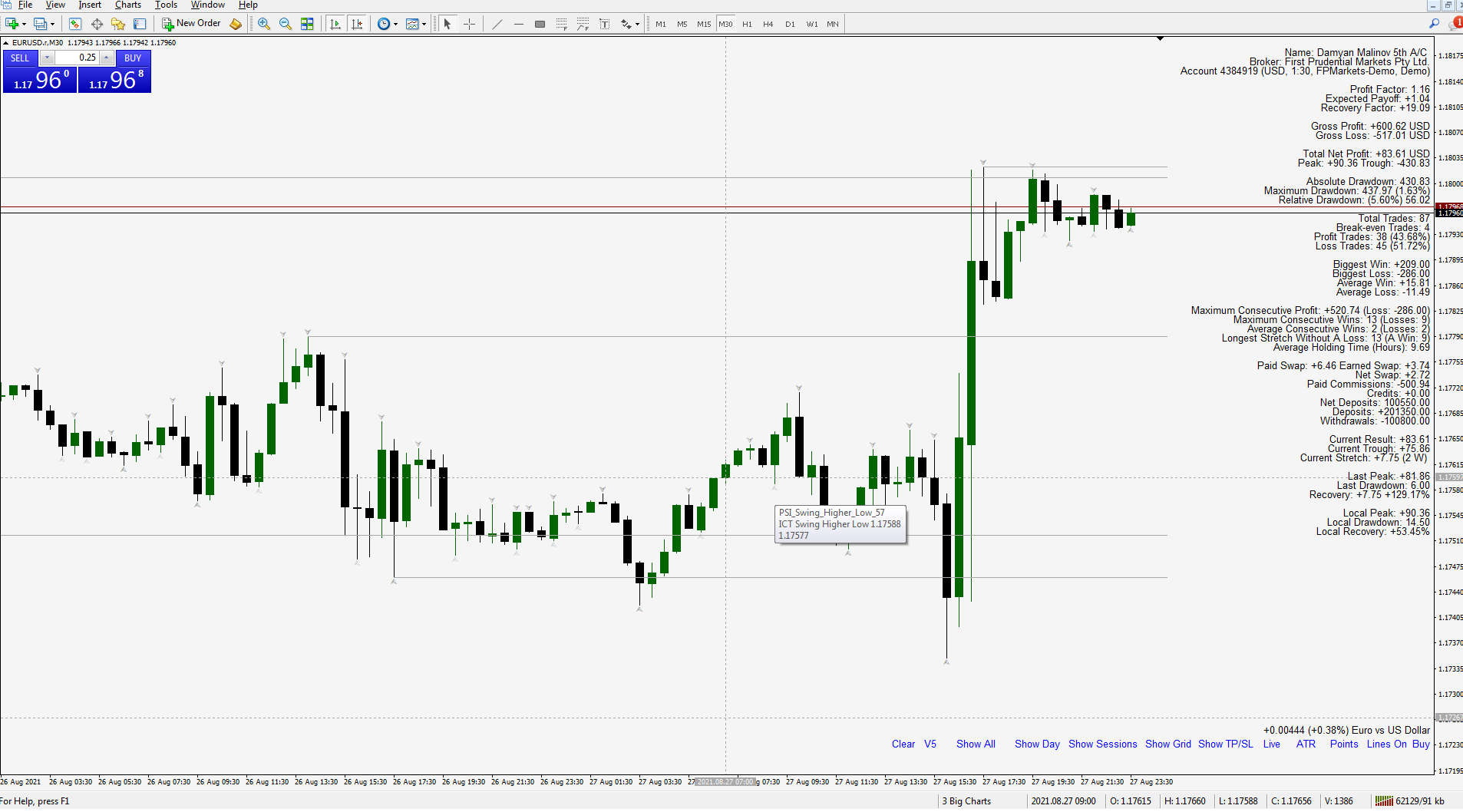
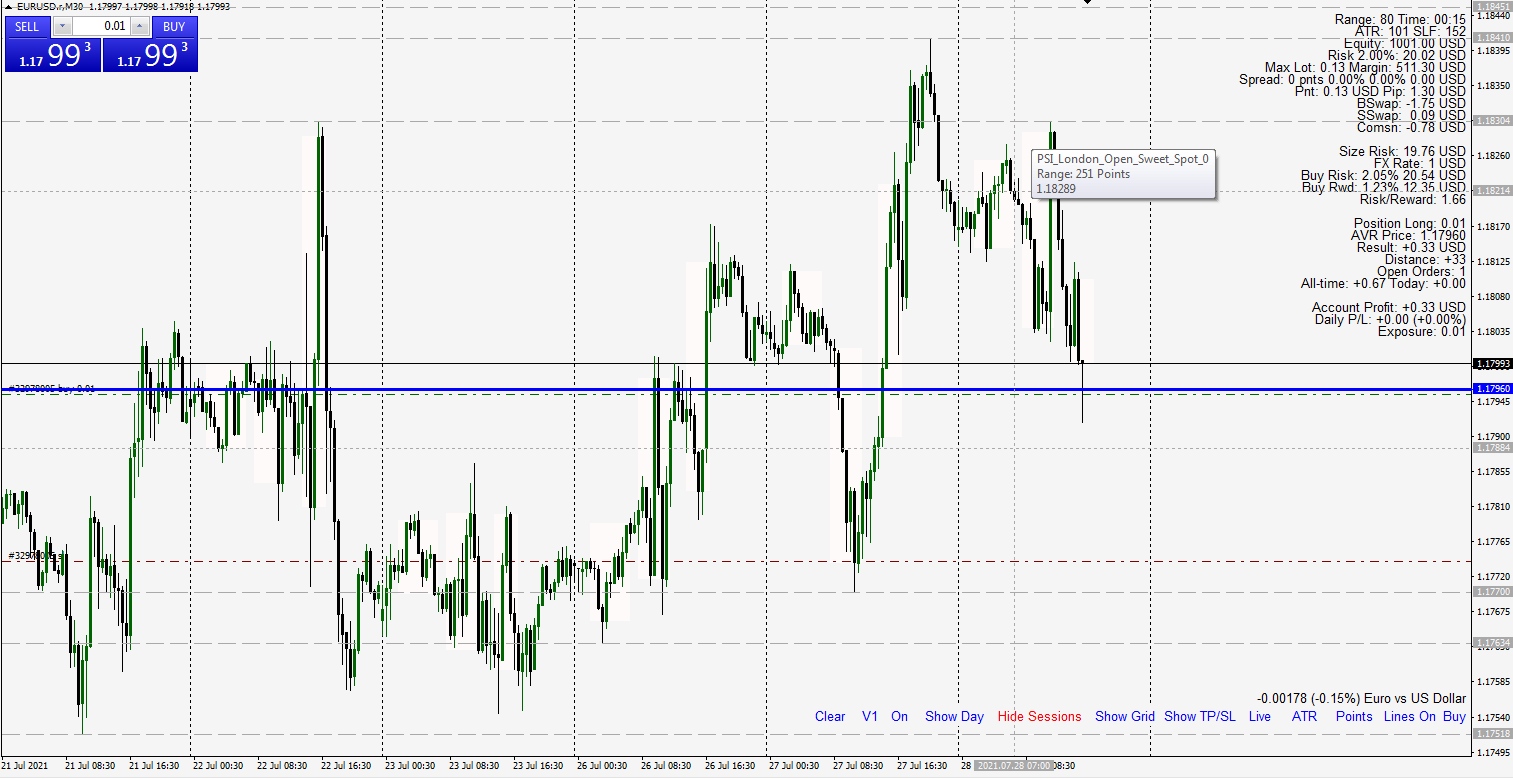
• Lots of improvements on the Forex Sessions and the Day on Focus ranges. Also added ICT Killzones with ability to focus the range on the majority of the volume (candle bodies) instead of the candle wicks.
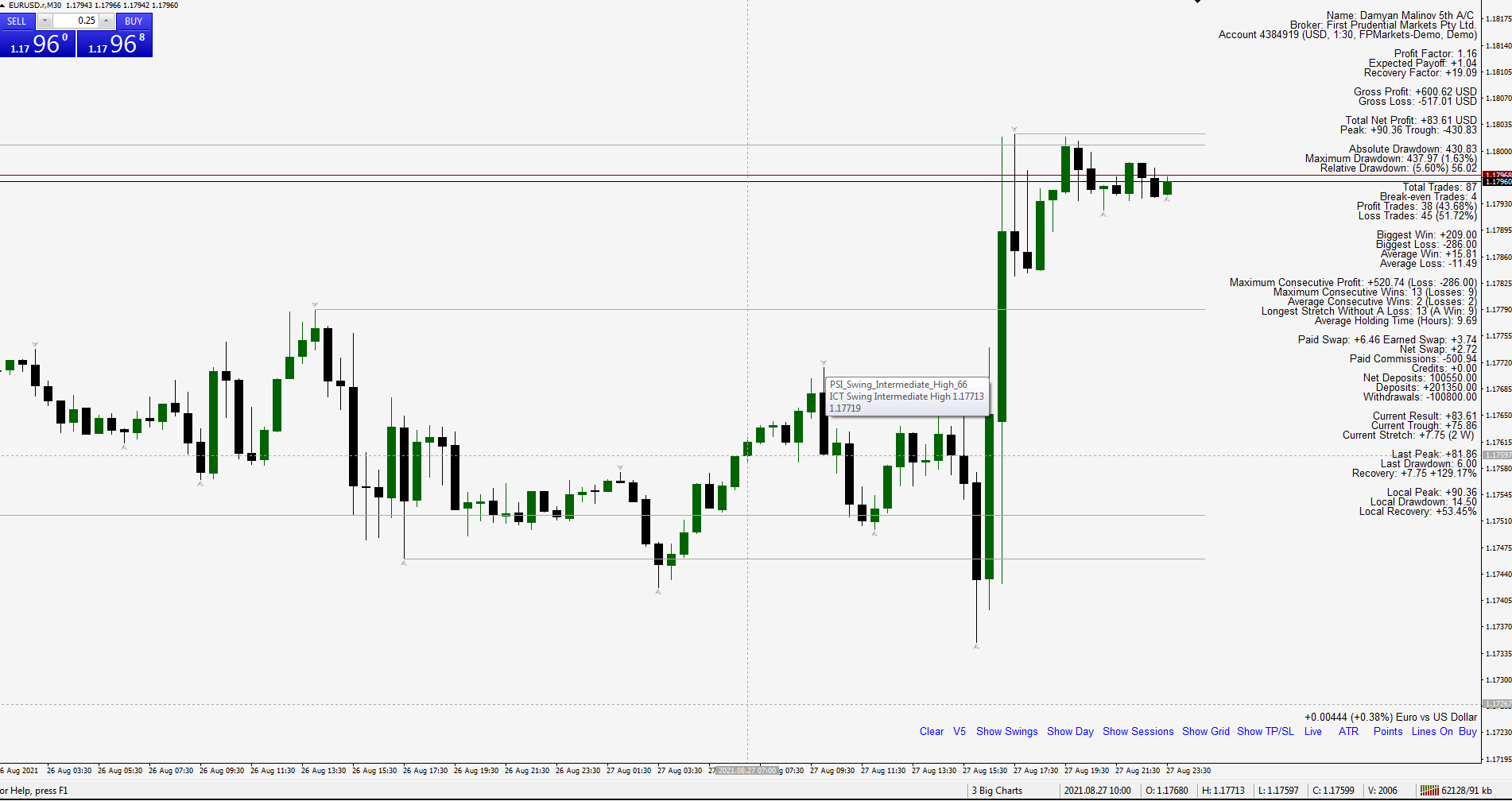
• Added range labels for all sessions as well as other tool-tip descriptions for each plotted line or tool.
• Added special button layout with minimum names and space taken.
• Divided the tool different options in categories with most frequently changed options on top for better use and customization.
• Each category has basic explanation and credits the popular and original source for its inspiration. Research on these is recommended.
• New button for easy switch between primary and secondary favorite display options.
• New On/Off button to hide and to display the selected options. Useful if for a moment the user wants to hide the labels for more chart area.
• Added Vertical Line for the NY Midnight Open or any custom period.
• Also the AVR Price and Past Results have new abilities like:
- add dividends for past performance results;
- new other options for Allowed Margin tolerance on new trades;
- display spread as percentage from the current candle range;
• Lots of improvements on the Forex Sessions and the Day on Focus ranges. Also added ICT Killzones with ability to focus the range on the majority of the volume (candle bodies) instead of the candle wicks.
• Added range labels for all sessions as well as other tool-tip descriptions for each plotted line or tool.
• Added special button layout with minimum names and space taken.
• Divided the tool different options in categories with most frequently changed options on top for better use and customization.
• Each category has basic explanation and credits the popular and original source for its inspiration. Research on these is recommended.
• New button for easy switch between primary and secondary favorite display options.
• New On/Off button to hide and to display the selected options. Useful if for a moment the user wants to hide the labels for more chart area.
• Added Vertical Line for the NY Midnight Open or any custom period.
• Also the AVR Price and Past Results have new abilities like:
- add dividends for past performance results;
- new other options for Allowed Margin tolerance on new trades;
- display spread as percentage from the current candle range;
Damyan Malinov
Enjoy Free some of the features of PSI Indicator with the PSI AVR Price
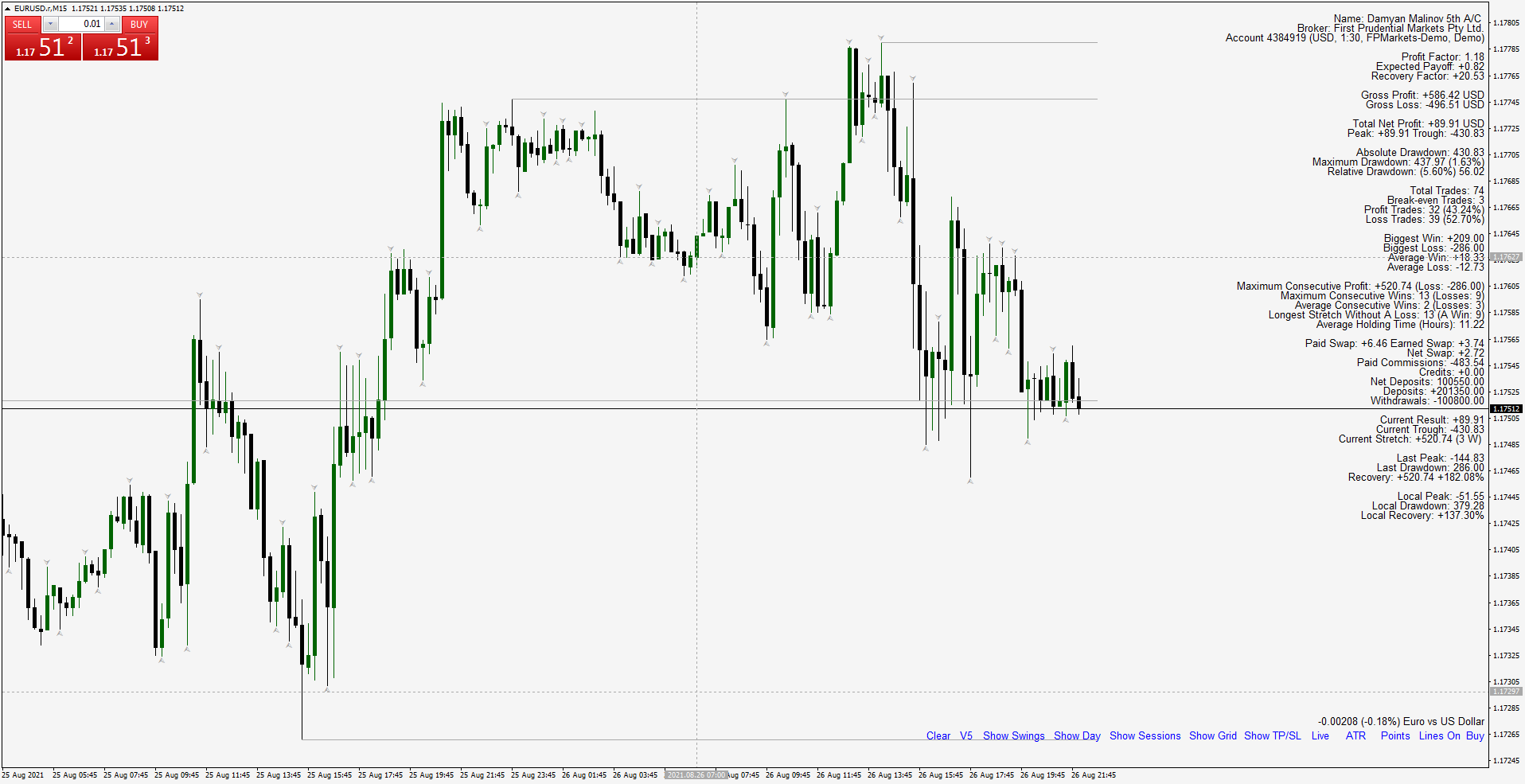
PSI AVR Price plots the Average Price, the Stop-Out level, Result, Account Information, Exposure Limits and much more like:
- You can add daily result to the Average Price or All-time results and even manual profit or loss from other account to reflect the Break Even Level you are interested in;
- Manual commentaries or Symbol description with the daily change;
- Buttons, labels, full and light version, ATR in the Data Window and so on;
PSI AVR Price plots the Average Price, the Stop-Out level, Result, Account Information, Exposure Limits and much more like:
- You can add daily result to the Average Price or All-time results and even manual profit or loss from other account to reflect the Break Even Level you are interested in;
- Manual commentaries or Symbol description with the daily change;
- Buttons, labels, full and light version, ATR in the Data Window and so on;
Damyan Malinov
Added new functionalities to PSI.
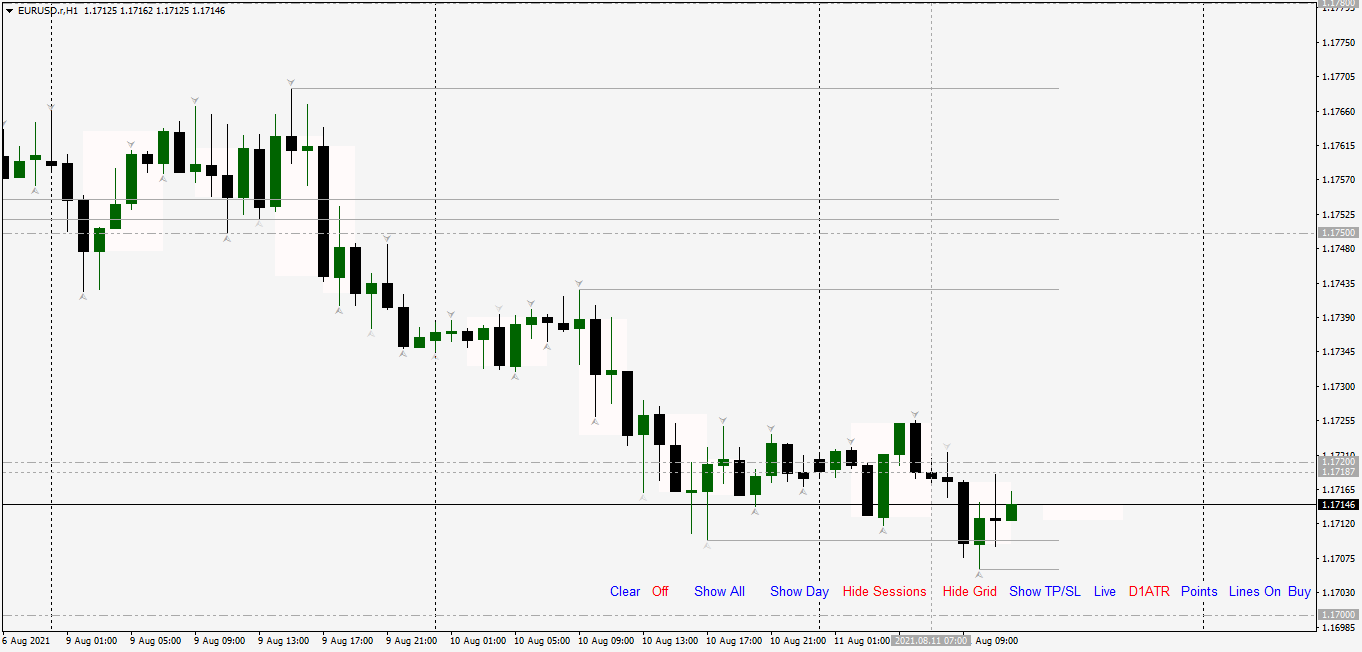
New buttons for the highlighting of the sessions and ability to highlight specific day of week. Example last few Friday sessions.
Damyan Malinov
Added new functionalities to PSI.
Among them auto map major Highs and Lows for the past and current month and week. Grid line on common institutional levels Zero, 50 plus 20 and 80 level. New York Open Price (price during Midnight hour of NY Time) and Potential 33 pip target for a London High on Bearish Bias Day or vice versa.
As well as Manual Stop Loss, Take Profit targets and Manual Entry price for Money Management simulation on the outcome.
Added Clear Button to clear the Chart from manually drawn objects (or by changing the time frame). In order to keep your objects rename them (maybe just add some prefix).
Among them auto map major Highs and Lows for the past and current month and week. Grid line on common institutional levels Zero, 50 plus 20 and 80 level. New York Open Price (price during Midnight hour of NY Time) and Potential 33 pip target for a London High on Bearish Bias Day or vice versa.
As well as Manual Stop Loss, Take Profit targets and Manual Entry price for Money Management simulation on the outcome.
Added Clear Button to clear the Chart from manually drawn objects (or by changing the time frame). In order to keep your objects rename them (maybe just add some prefix).
Damyan Malinov
Added new functionalities to PSI.
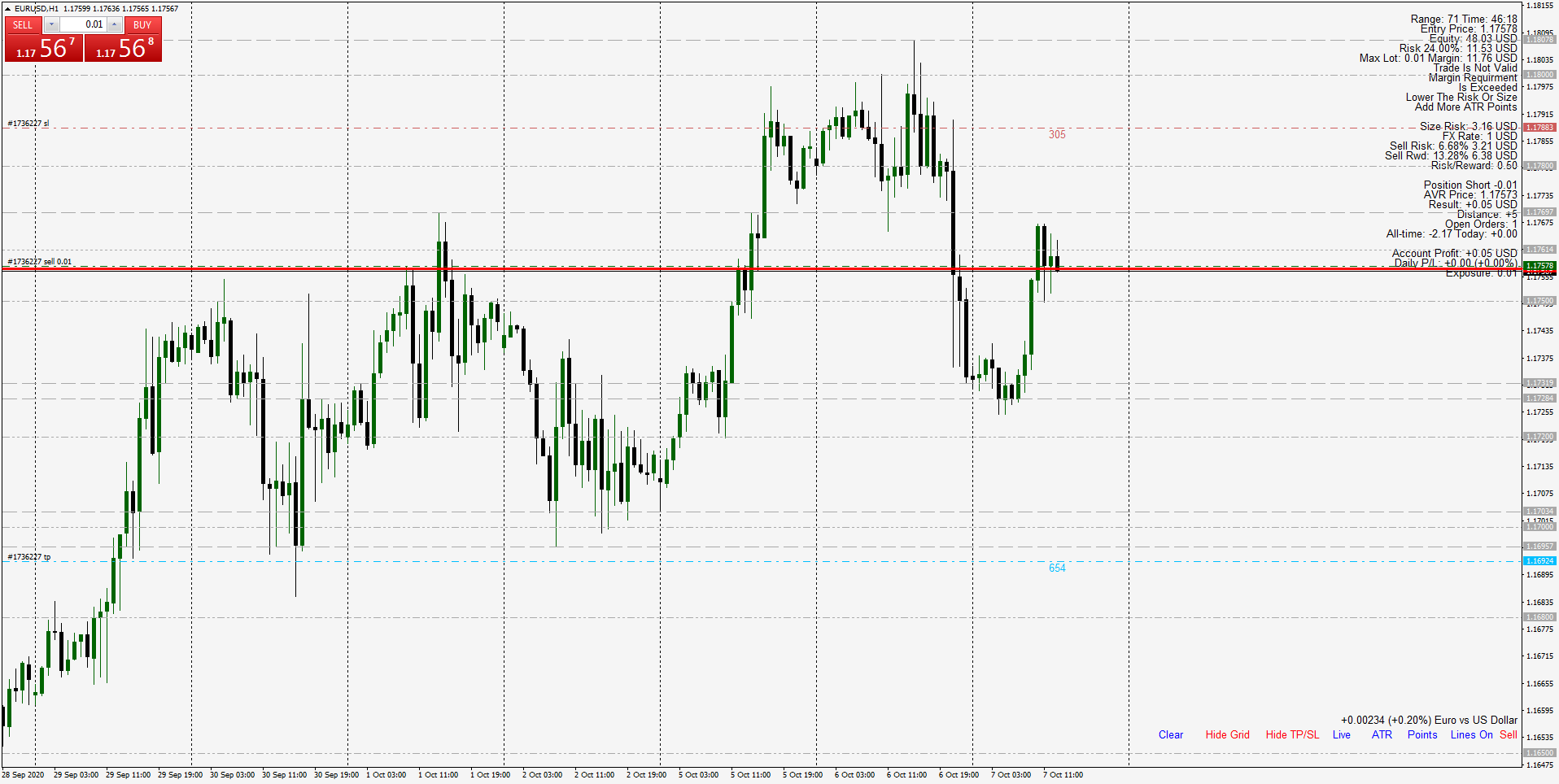
Among them warnings if Margin Requirements are exceeded or when preset Margin Level is Reach for new position. This means the Risk should be lower to lower the Position Size. Either by lowering the Risk or manually prefer lower ATR.
Also there is a warning if a traded based on the last closed price already hit stop loss or take profit is not valid.
Added new button for ATR Stop Loss and Take Profits calculated based on the Live Prices or much better on the last candle Closed price.
Close means that the referential price for entry is the last candle close. This gives advantage to enter in much better risk to reward ratios (if you delay your entry for some reason) and the targets are calculated on the time of the signal. This is due to the fact the majority of indicator signals or price action patterns are confirmed only after the candle is closed not during its shaping.
If you are much closer to the candle's closing (something you can also check in the indicator under in the candle remaining time) you may switch to Live prices as they will be much more closer to the next referential price as the previous one could be already way off.
Among them warnings if Margin Requirements are exceeded or when preset Margin Level is Reach for new position. This means the Risk should be lower to lower the Position Size. Either by lowering the Risk or manually prefer lower ATR.
Also there is a warning if a traded based on the last closed price already hit stop loss or take profit is not valid.
Added new button for ATR Stop Loss and Take Profits calculated based on the Live Prices or much better on the last candle Closed price.
Close means that the referential price for entry is the last candle close. This gives advantage to enter in much better risk to reward ratios (if you delay your entry for some reason) and the targets are calculated on the time of the signal. This is due to the fact the majority of indicator signals or price action patterns are confirmed only after the candle is closed not during its shaping.
If you are much closer to the candle's closing (something you can also check in the indicator under in the candle remaining time) you may switch to Live prices as they will be much more closer to the next referential price as the previous one could be already way off.
Damyan Malinov
Check out two Gold ratio indicators. Compare DJI30 and Silver to Gold with Gold vs Silver and Gold vs DJI30 indicators.
Damyan Malinov
Use the PSI Indicator's new feature - Stop-out Level to calculate your safe distance on your open positions.
Damyan Malinov
PSI Algo
This is a simple but effective Forex trading algorithm.
Strong points of this algorithm:
- Ability to take stronger or earlier signals;
- Ability to quickly exit losing trades;
- 2 confirmation filters to reduce weak signals;
- Identifies take profit or compounding opportunities;
- Excellent for trailing stop and break even stop management;
- Excellent to test your Money Management skills;
- Excellent to test your charting abilities to identify trend and avoid consolidation;
- Excellent to test your ability to utilize volume confirmation indicators;
- Excellent to learn how to behave and take full advantage during strong trends;
- Pairs with Flexible ATR indicator;
- Free and very flexible with lots of extras for best user experience;
- Right out the bat Take Profit and Stop Loss suggestions;
- Current Market Bias before the candle close and signal status is updated;
Weak points of this algorithm:
- Comes without volume confirmation;
- If not properly used can produce consecutive scrap trades during periods of low volume and range price action;
So, what you can do with it and what you should be using it for?
You should be using this algorithm for learning purposes only. PSI Algo is heavy on visualization so it will help you better understand the market and your psychology and how you react to it. Use it to test how you stand in avoiding consolidation and taking full advantage of strong and lasting trends. Test your Money Management skills. If you don’t have all those skills, you will not be able to take advantage of this algorithm (and anything else) and you should aim to improve yourself. If you already possess these skills chances are that you have acquired a successful strategy and you don’t need this. However, you can still use this to test new ideas – like new volume or exit indicators, etc.
Disclaimer:
PSI Algo is profitable if you have what it takes to be a successful trader and apply it in a system. If you don’t, even though you will get an adequate entry and exit signals, you will screw it up. So don’t rush it. Just test on Demo account to see how close you are to master those skills. Use higher time frames for better results. Your goal should be to learn and develop your system by aiming to:
- avoid consolidations;
- identify trends;
- avoid weak low volume markets especially during Asian session;
- set proper risk (MM);
- learn managing your trades – trailing stop, exit, scale out and take profit, even compounding;
With all these in mind aim at least to be break-even (on Demo) and if you can you are going into the right direction where you can try to develop your own style and a complete system. Naturally by adding more pieces to the puzzle – like applying confirmation patterns, indicators, etc.
So DO NOT TRADE ON REAL, especially if you don’t have any successful trading experience with PROPER Money Management. If you don’t understand what is said here, DO NOT TRADE ON REAL BUT TRY TO LEAR ON DEMO! This is not a magical indicator that will replace a good trader, but will help you getting closer to be one.
Despite all of that’s been said here, if you still arrogantly of foolishly ignore the warnings and prerequisites to be successful and loose real money on Forex – it is not my fault. It is not because of me, or your broker, or the weather. It is because you are EXTREMELY stupid.
Read the Manual for better understanding of how to use PSI Algo in MT4 and read the signals.
Have fruitful learning experience.
Enjoy!
This is a simple but effective Forex trading algorithm.
Strong points of this algorithm:
- Ability to take stronger or earlier signals;
- Ability to quickly exit losing trades;
- 2 confirmation filters to reduce weak signals;
- Identifies take profit or compounding opportunities;
- Excellent for trailing stop and break even stop management;
- Excellent to test your Money Management skills;
- Excellent to test your charting abilities to identify trend and avoid consolidation;
- Excellent to test your ability to utilize volume confirmation indicators;
- Excellent to learn how to behave and take full advantage during strong trends;
- Pairs with Flexible ATR indicator;
- Free and very flexible with lots of extras for best user experience;
- Right out the bat Take Profit and Stop Loss suggestions;
- Current Market Bias before the candle close and signal status is updated;
Weak points of this algorithm:
- Comes without volume confirmation;
- If not properly used can produce consecutive scrap trades during periods of low volume and range price action;
So, what you can do with it and what you should be using it for?
You should be using this algorithm for learning purposes only. PSI Algo is heavy on visualization so it will help you better understand the market and your psychology and how you react to it. Use it to test how you stand in avoiding consolidation and taking full advantage of strong and lasting trends. Test your Money Management skills. If you don’t have all those skills, you will not be able to take advantage of this algorithm (and anything else) and you should aim to improve yourself. If you already possess these skills chances are that you have acquired a successful strategy and you don’t need this. However, you can still use this to test new ideas – like new volume or exit indicators, etc.
Disclaimer:
PSI Algo is profitable if you have what it takes to be a successful trader and apply it in a system. If you don’t, even though you will get an adequate entry and exit signals, you will screw it up. So don’t rush it. Just test on Demo account to see how close you are to master those skills. Use higher time frames for better results. Your goal should be to learn and develop your system by aiming to:
- avoid consolidations;
- identify trends;
- avoid weak low volume markets especially during Asian session;
- set proper risk (MM);
- learn managing your trades – trailing stop, exit, scale out and take profit, even compounding;
With all these in mind aim at least to be break-even (on Demo) and if you can you are going into the right direction where you can try to develop your own style and a complete system. Naturally by adding more pieces to the puzzle – like applying confirmation patterns, indicators, etc.
So DO NOT TRADE ON REAL, especially if you don’t have any successful trading experience with PROPER Money Management. If you don’t understand what is said here, DO NOT TRADE ON REAL BUT TRY TO LEAR ON DEMO! This is not a magical indicator that will replace a good trader, but will help you getting closer to be one.
Despite all of that’s been said here, if you still arrogantly of foolishly ignore the warnings and prerequisites to be successful and loose real money on Forex – it is not my fault. It is not because of me, or your broker, or the weather. It is because you are EXTREMELY stupid.
Read the Manual for better understanding of how to use PSI Algo in MT4 and read the signals.
Have fruitful learning experience.
Enjoy!
Damyan Malinov
Manual for PSI Algo
Main objects
- Chart symbols indicating different signals generated from the algorithm as well as the current information on the side with real time recommendations and commentaries;
- Buttons to switch between Sell and Buy preview and switching on and off Filters;
- Arrow Up symbol indicates a Buy signal;
- Arrow Down symbol indicates a Sell signal;
- The bigger the arrow the stronger the signal is as it can have Tier 1, Tier 2 or both Filters support;
- Tick means that the current signal is still valid but showing weakness (Tier 1 Filter disagrees with the entry). So, at this point taking profit or reducing the size of the trade and move the stop loss to break even for the remaining part is recommended;
- Pointing triangle means that on the last candle one or two of the filters previously in disagreement with the signal now confirm it. This could be used for compounding or as a continuation trade if you already closed your position on this signal. Shows on chart for non-selected filters.
- Cross means an opposite signal is activated. This should be used as an Exit signal for the current trade. Depending on the activated Filters not always and Exit will mean a valid opposite entry.
- By adding the Filters, you reduce the number of signals to only those which have more strength by multiple confirmations.
- By ignoring the Filters you can still use them for early exit or adding more to your position you even enter earlier (more aggressive style) in the market at better price.
- By examine the current Bias you can manage your position before the close. Note that the signals are generated only after the candle is closed. The current Bias is the picture in this moment as if the candle closes like this, but until it does it can change and reverse. That is why valid signals are only when a period of examination is ended.
- Filter 1 is excellent for avoiding trading against the trend or if there is not momentum. It also signals early take profit opportunities and even continuation trades on the active signal.
- Filter 2 gives more validity and overall strength to the signal. Very aggressively it can even be used to stay in a position even if a counter signal is activated. Given in mind if the Stop Loss, Money Management and your analysis allows it of course. Trading against this Filter is not wise decision especially in higher frames so if the algorithm already told you to close your position and Filter 2 is also not in your favor probably you should.
Main objects
- Chart symbols indicating different signals generated from the algorithm as well as the current information on the side with real time recommendations and commentaries;
- Buttons to switch between Sell and Buy preview and switching on and off Filters;
- Arrow Up symbol indicates a Buy signal;
- Arrow Down symbol indicates a Sell signal;
- The bigger the arrow the stronger the signal is as it can have Tier 1, Tier 2 or both Filters support;
- Tick means that the current signal is still valid but showing weakness (Tier 1 Filter disagrees with the entry). So, at this point taking profit or reducing the size of the trade and move the stop loss to break even for the remaining part is recommended;
- Pointing triangle means that on the last candle one or two of the filters previously in disagreement with the signal now confirm it. This could be used for compounding or as a continuation trade if you already closed your position on this signal. Shows on chart for non-selected filters.
- Cross means an opposite signal is activated. This should be used as an Exit signal for the current trade. Depending on the activated Filters not always and Exit will mean a valid opposite entry.
- By adding the Filters, you reduce the number of signals to only those which have more strength by multiple confirmations.
- By ignoring the Filters you can still use them for early exit or adding more to your position you even enter earlier (more aggressive style) in the market at better price.
- By examine the current Bias you can manage your position before the close. Note that the signals are generated only after the candle is closed. The current Bias is the picture in this moment as if the candle closes like this, but until it does it can change and reverse. That is why valid signals are only when a period of examination is ended.
- Filter 1 is excellent for avoiding trading against the trend or if there is not momentum. It also signals early take profit opportunities and even continuation trades on the active signal.
- Filter 2 gives more validity and overall strength to the signal. Very aggressively it can even be used to stay in a position even if a counter signal is activated. Given in mind if the Stop Loss, Money Management and your analysis allows it of course. Trading against this Filter is not wise decision especially in higher frames so if the algorithm already told you to close your position and Filter 2 is also not in your favor probably you should.
Damyan Malinov
Added Chart Buttons for PSI:
- Switch directly from the chart from Buy to Sell risk calculations.
- Show or hide Stop Loss and Take Profit Lines.
- Last but not least ability to switch from points to pips and vice versa.
- Switch directly from the chart from Buy to Sell risk calculations.
- Show or hide Stop Loss and Take Profit Lines.
- Last but not least ability to switch from points to pips and vice versa.
Damyan Malinov
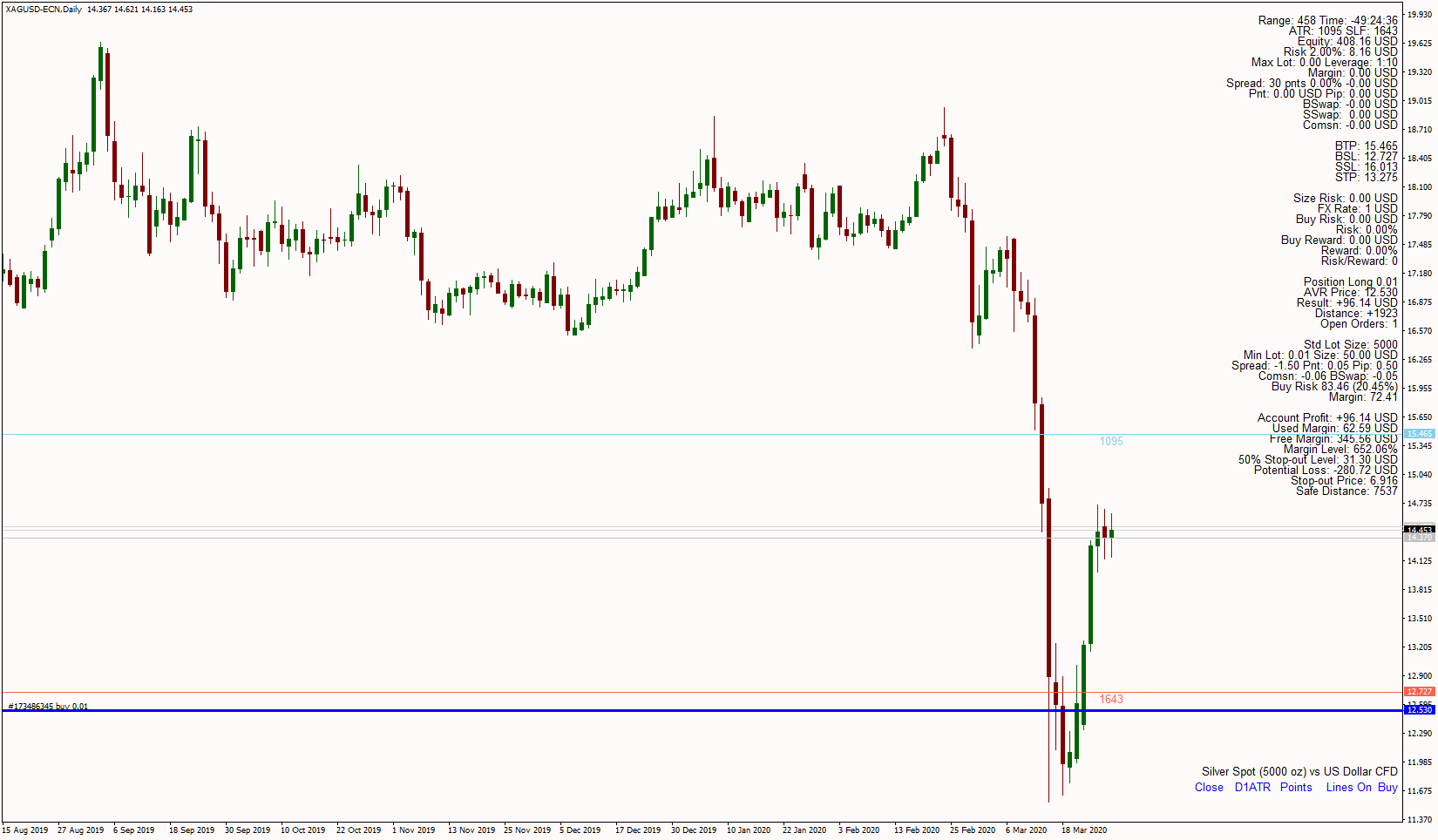
PSI example before deciding to take a buy on XAGUSD. Some panels are disabled. Lines for entry, stop loss and take profit are visible. ATR in points (pipettes). The account is in EUR. Take profit is set to 0.01 for scale out purposes as half of the recommended lots 0.03 (0.015 not possible).
Damyan Malinov
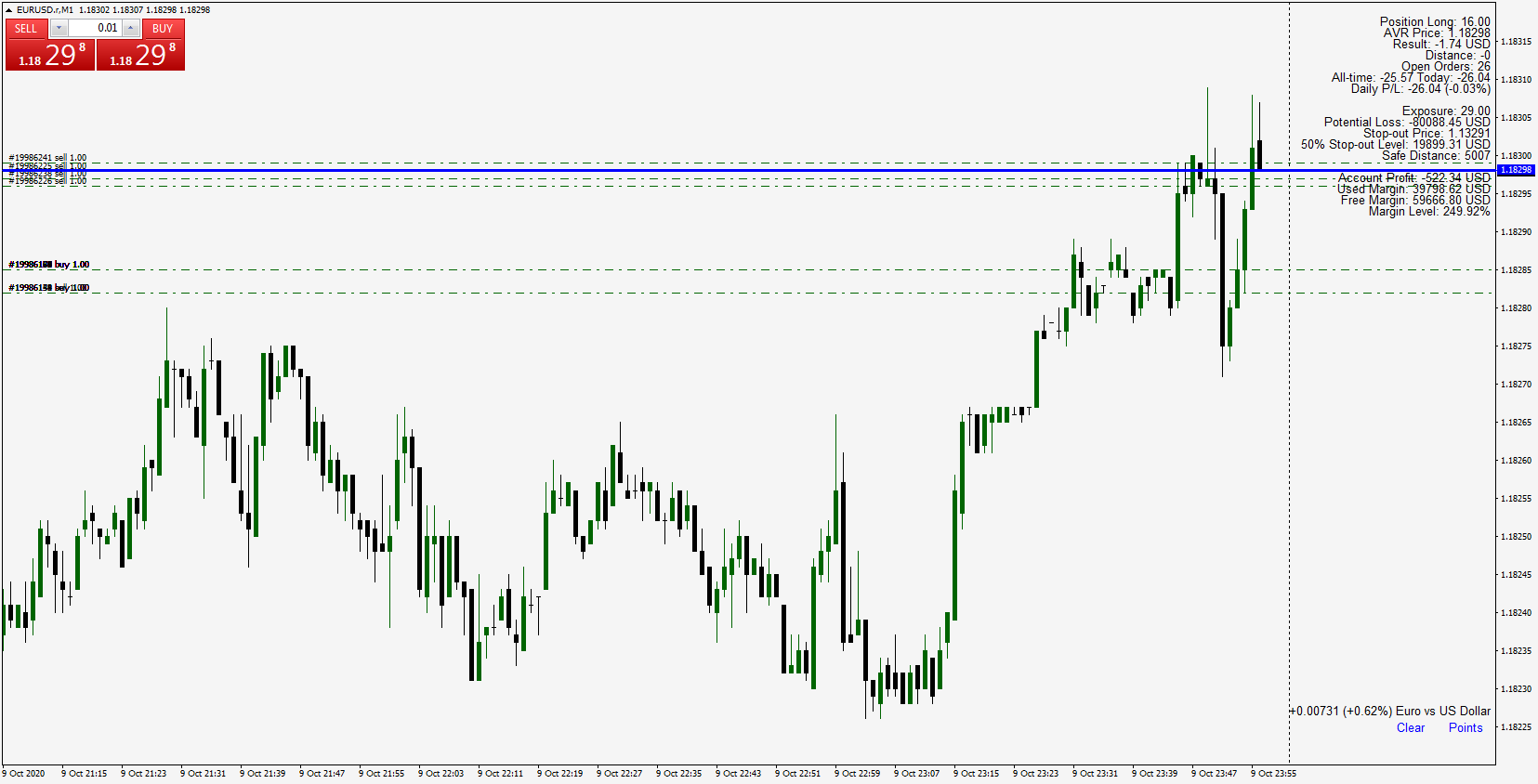
PSI example on average position and with the full information panel. The initial short position is offset with buy orders. Current position short 0.04 lots and it is still in the money. Account balance is also visible with all other open trades on different instruments. ATR and distance are in pips.
Damyan Malinov
PSI example on average position and the light version panel. The initial short position is offset with buy orders. Current position short 0.04 lots and it is still in the money. ATR and distance are in points (pipettes).
Damyan Malinov
PSI Manual
The variables are self-explanatory and most of them are to switch on and off different functions, information panels, toggle between different views, changing colors, size, etc. For example, showing or hiding commentary or replacing it with instrument description. Also, like adding or removing commission, switching to light mode, etc.
Remember always test first on Demo. The main function is to get the recommended lot size and predict your outcome and view your current state for the average position. Please know that predicted profit loss might slightly vary due to the constant change on the exchange rates of your account currency and the instruments you are trading. Let say your account is in USD and you are trading AUDCAD. This means you will profit in CAD which at the end you will have to convert to USD to know your account profit not CAD profit. At the time of the opening of your position in AUDCAD you can’t know what would be USDCAD exchange rate at its close. So, the exchange rate of the time of the open is used. If you trade EURUSD the outcome will be in USD so the calculations will be exact. If you trade USDJPY the outcome will be different for buy or sell for the same amount of stop loss and take profit in pips. However, these can be predicted as they rely on your take and stop loss level in contrast with the AUDCAD example.
Here are some more advanced concepts or troubles you may encounter:
How to see distances and ATR values in pips instead of points (pipettes)?
- Switch the value of the Display to Pips.
How to use ATR for risk management?
- Set the multipliers for stop loss and take profit accordingly.
- Set the ATR period you will take for reference.
- You can manually put some ATR value in points. Let say you want to set stop loss 10 pips away from the price. Enter 100 in the field for custom ATR.
- If ATR value is off the normal scale due to some big market moves, you can switch show ATR for previous days and set number of days back for reference. For example, if you put 1 it will take the ATR which was printed yesterday. Memorize that and use it for the custom ATR to overwrite the current abnormal ATR value. The previous ATR value is great for trailing stop adjustments when you want the ATR value from the time you opened your trade. Please note also the Range represents the last bar ATR value which not only accounts for the high and low price but if there is a gap from the previous bar.
How to use the Multiplier fix for Broker margin requirements?
- Let say your Broker gives you 1:30 leverage for your account. This number is a base for majors but some of the other instruments may require more margin and there you will have less leverage. Check this with broker and if for example for XAUUSD he gives you only 1:10 leverage divide 30 to 10. So, 30 / 10 = 3. Enter 1.5 into the multiplier fix field. If for AUDCAD the leverage is 1:20 then enter 1.5 (30 / 20 = 1.5). If you have all the information about the instruments leverage, I can fix that for you, so you don’t have to put this number each time for the instruments that are not part of the major instrument’s’ bucket of your broker.
How to use the Panel for minimum and custom lot size?
- If the panel is switched on you will see the reference data for minimum lot size. Enter different custom lot size to calculate the outcome. If you enter invalid lot size or lot step the value will be rounded to the nearest possible lot size.
How to use the Entry lines?
- You can switch on and off and change colors of the entry, stop loss and take profit lines. For buy the entry is on the ask line for sell is on the bid.
How to fix if I don’t see any information?
- If your screen is black change the font color to something else. You can also change the font face and font size. Same applies for lines width and color.
How do I use commission?
- If your trades have commission enable the commission flag to true. Enter a value for the commission based on the USD amount for 1 million contract size. For example, if the broker charges 2$ per round lot this means you must enter 20 as one lot is 100000 one tenth of a million.
What is take profit scale out option for?
- If you plan to open a trade, you might consider closing half the size once you hit take profit level and leave the rest of it to run for a bigger profits while moving the stop loss for the remainder part to break even. With this option you can see how much the profit on half the recommended size will cover if it hits take profit. You can switch it off so to see the full target profit if you plan to close the full size.
What is the Average price?
- The lines and the panel for the actual position helps to determine what is your current break-even level considering also counter trades plus swap and commissions you may have accumulated over time. Let’s say you sell 0.10 lots and after some profit you open a 0.02 buy This leaves you will 0.08 lots short with higher average price than the original 0.10 sell entry. The panel will show in pips or points (depending what you display option you select) the new distance from break-even level.
The variables are self-explanatory and most of them are to switch on and off different functions, information panels, toggle between different views, changing colors, size, etc. For example, showing or hiding commentary or replacing it with instrument description. Also, like adding or removing commission, switching to light mode, etc.
Remember always test first on Demo. The main function is to get the recommended lot size and predict your outcome and view your current state for the average position. Please know that predicted profit loss might slightly vary due to the constant change on the exchange rates of your account currency and the instruments you are trading. Let say your account is in USD and you are trading AUDCAD. This means you will profit in CAD which at the end you will have to convert to USD to know your account profit not CAD profit. At the time of the opening of your position in AUDCAD you can’t know what would be USDCAD exchange rate at its close. So, the exchange rate of the time of the open is used. If you trade EURUSD the outcome will be in USD so the calculations will be exact. If you trade USDJPY the outcome will be different for buy or sell for the same amount of stop loss and take profit in pips. However, these can be predicted as they rely on your take and stop loss level in contrast with the AUDCAD example.
Here are some more advanced concepts or troubles you may encounter:
How to see distances and ATR values in pips instead of points (pipettes)?
- Switch the value of the Display to Pips.
How to use ATR for risk management?
- Set the multipliers for stop loss and take profit accordingly.
- Set the ATR period you will take for reference.
- You can manually put some ATR value in points. Let say you want to set stop loss 10 pips away from the price. Enter 100 in the field for custom ATR.
- If ATR value is off the normal scale due to some big market moves, you can switch show ATR for previous days and set number of days back for reference. For example, if you put 1 it will take the ATR which was printed yesterday. Memorize that and use it for the custom ATR to overwrite the current abnormal ATR value. The previous ATR value is great for trailing stop adjustments when you want the ATR value from the time you opened your trade. Please note also the Range represents the last bar ATR value which not only accounts for the high and low price but if there is a gap from the previous bar.
How to use the Multiplier fix for Broker margin requirements?
- Let say your Broker gives you 1:30 leverage for your account. This number is a base for majors but some of the other instruments may require more margin and there you will have less leverage. Check this with broker and if for example for XAUUSD he gives you only 1:10 leverage divide 30 to 10. So, 30 / 10 = 3. Enter 1.5 into the multiplier fix field. If for AUDCAD the leverage is 1:20 then enter 1.5 (30 / 20 = 1.5). If you have all the information about the instruments leverage, I can fix that for you, so you don’t have to put this number each time for the instruments that are not part of the major instrument’s’ bucket of your broker.
How to use the Panel for minimum and custom lot size?
- If the panel is switched on you will see the reference data for minimum lot size. Enter different custom lot size to calculate the outcome. If you enter invalid lot size or lot step the value will be rounded to the nearest possible lot size.
How to use the Entry lines?
- You can switch on and off and change colors of the entry, stop loss and take profit lines. For buy the entry is on the ask line for sell is on the bid.
How to fix if I don’t see any information?
- If your screen is black change the font color to something else. You can also change the font face and font size. Same applies for lines width and color.
How do I use commission?
- If your trades have commission enable the commission flag to true. Enter a value for the commission based on the USD amount for 1 million contract size. For example, if the broker charges 2$ per round lot this means you must enter 20 as one lot is 100000 one tenth of a million.
What is take profit scale out option for?
- If you plan to open a trade, you might consider closing half the size once you hit take profit level and leave the rest of it to run for a bigger profits while moving the stop loss for the remainder part to break even. With this option you can see how much the profit on half the recommended size will cover if it hits take profit. You can switch it off so to see the full target profit if you plan to close the full size.
What is the Average price?
- The lines and the panel for the actual position helps to determine what is your current break-even level considering also counter trades plus swap and commissions you may have accumulated over time. Let’s say you sell 0.10 lots and after some profit you open a 0.02 buy This leaves you will 0.08 lots short with higher average price than the original 0.10 sell entry. The panel will show in pips or points (depending what you display option you select) the new distance from break-even level.
Damyan Malinov
PSI
Position Smart Indicator
Indicator type: Money Management Calculator; Forex Position Size Calculator; Fixed or ATR value for Stop Loss and Take Profit levels; Average Position Size Indicator (True Average Price); Account Information and much more.
Be Smart! Calculate your position before you apply your strategy. Know where you are standing, what you are risking, what you put on the table and what you expect to gain. Do you know all that? Well don’t make wild guesses. Just know and be relentless!
The indicator lets you chose risk parameters and calculates the maximum lot size you have to put in the trade plus many additional information panels with commission, swap, pip and point value, real risk taken, spread in points, value and % of the equity, the real average price of the position (accounts for commissions, swap and hedged trades), net result in deposit currency, pips or points and much more. Read down below for more information. You can even put motivational quotes on the chart or commentaries.
What you can get and what indicator shows is as follows:
- The range of the last candle (ATR for the last candle – accounts for gaps as well).
- Remaining time of the last candle.
- ATR(14). Standard period 14 can be changed. It can be made to take predefined value or even take the ATR(14) which was painted yesterday for example.
- Stop loss factor. Standard 1.5 times the ATR.
- Take profit factor. Standard 1.0 times the ATR.
- The current equity.
- The allowed risk. Standard and recommended is 2% per trade. Based on the risk and equity the maximum allowed loss is calculated.
- The maximum allowed lots to trade in the instrument based on the risk factors (all rates and calculations are converted to the deposit currency) and instrument’s contact specifications for standard lot size, minimum size and minimum step.
- The maximum allowed lot size is dependent on whether you buy or sell which makes this calculator better than the rest. Also on the maximum instrument’s contract size.
- The pip and point value in deposit currency for the position.
- Spread in points, percentage from the equity and real value in deposit currency.
- Buy and Sell Swap of the trading instrument.
- Commission if such applies. Smart commissions based on your broker and equity discounts.
- According to the current Bid and Ask four price levels are calculated. Each for the Buy Stop Loss, Buy Take Profit, Sell Stop Loss and Sell Take Profit. These levels are based on the profit and stop loss factor which you can chose. Recommended and standard is 1 times ATR for profit and 1.5 times ATR for stop loss.
- It also presents commission, swap, the real risk and projected gain based on all hidden costs and maximum allowed lots.
- The margin requirement for the trade.
- Same information for the minimum size (custom size) position (in most instruments it is 0.01 but you can specified all that for example you want to make calculations based on 0.10 lots) – like the spread, commission, margin, buy and sell risk.
- You can see all that information if you prefer in points or in pips.
- Before you make a move, you can see the stop loss and take profit levels of your potential buy or sell trade and calculate the outcomes in advance. Even add note about it.
- You can add comments or motivational quotes to your screen or see the instrument description.
- You can change the font face and size.
- You can see your overall account equity, free and used margin.
- You can choose which information panels to show and which to hide. It also lets you use a light version with only the most important information on the screen.
- You can even use this indicator for trailing stop strategies and scaling out as you can see the take profit in half the size of the recommended lot size. Plus, you can see ATR values for number of days back and manually overwrite the current ATR to adjust your trailing stop.
- You can request additional parameters to be added just for you or remove, rename and reposition them as per your liking.
- As per your broker the indicator will be tested and modified to meet all broker specifics so you can also see the leverage and discounts for commission.
- Support on using the calculator and get the best of it.
- Wait this is not all. The calculator shows and draws a line with the net position, the size, the net profit and the net distance to break even. So, based on all your trades you get to know where your average price and size is (works for hedging - if you have counter positions).
Money management is the first and the most important skill you must learn in trading. Especially in Forex. Don’t make the mistake anyone else does and learn it the hard way. Use your time and money wisely to acquire this skill.
With this indicator you will have anything you need to precisely position yourself and make smart decisions. If this is not very useful, detailed and pedantic then what is?
Disclaimer: Use this calculator wisely and solely at your own risk. Read the manual and guiding comments to fully utilize its benefits. First test it out on Demo with all its features with different account and lot sizes with all instruments you are interested in and confirm it works fine. This calculator is more precise than the rest as it accounts for the exit price for the outcome or the maximum lot size. Very rarely it may happen that some calculations on instruments may be depending on your current broker and not be standard as the rest of his instruments. If you find any problem or you just have a specific request, send me message so I can fine-tune the calculator to your best needs. I can help you with commission deductions, instrument leverages and other stuff which are different for every broker. The indicator can be fully customizable for your needs and your broker. You can request customized changes made just for you like to add or remove parameters, rename and reposition them on the chart as per your liking.
Position Smart Indicator
Indicator type: Money Management Calculator; Forex Position Size Calculator; Fixed or ATR value for Stop Loss and Take Profit levels; Average Position Size Indicator (True Average Price); Account Information and much more.
Be Smart! Calculate your position before you apply your strategy. Know where you are standing, what you are risking, what you put on the table and what you expect to gain. Do you know all that? Well don’t make wild guesses. Just know and be relentless!
The indicator lets you chose risk parameters and calculates the maximum lot size you have to put in the trade plus many additional information panels with commission, swap, pip and point value, real risk taken, spread in points, value and % of the equity, the real average price of the position (accounts for commissions, swap and hedged trades), net result in deposit currency, pips or points and much more. Read down below for more information. You can even put motivational quotes on the chart or commentaries.
What you can get and what indicator shows is as follows:
- The range of the last candle (ATR for the last candle – accounts for gaps as well).
- Remaining time of the last candle.
- ATR(14). Standard period 14 can be changed. It can be made to take predefined value or even take the ATR(14) which was painted yesterday for example.
- Stop loss factor. Standard 1.5 times the ATR.
- Take profit factor. Standard 1.0 times the ATR.
- The current equity.
- The allowed risk. Standard and recommended is 2% per trade. Based on the risk and equity the maximum allowed loss is calculated.
- The maximum allowed lots to trade in the instrument based on the risk factors (all rates and calculations are converted to the deposit currency) and instrument’s contact specifications for standard lot size, minimum size and minimum step.
- The maximum allowed lot size is dependent on whether you buy or sell which makes this calculator better than the rest. Also on the maximum instrument’s contract size.
- The pip and point value in deposit currency for the position.
- Spread in points, percentage from the equity and real value in deposit currency.
- Buy and Sell Swap of the trading instrument.
- Commission if such applies. Smart commissions based on your broker and equity discounts.
- According to the current Bid and Ask four price levels are calculated. Each for the Buy Stop Loss, Buy Take Profit, Sell Stop Loss and Sell Take Profit. These levels are based on the profit and stop loss factor which you can chose. Recommended and standard is 1 times ATR for profit and 1.5 times ATR for stop loss.
- It also presents commission, swap, the real risk and projected gain based on all hidden costs and maximum allowed lots.
- The margin requirement for the trade.
- Same information for the minimum size (custom size) position (in most instruments it is 0.01 but you can specified all that for example you want to make calculations based on 0.10 lots) – like the spread, commission, margin, buy and sell risk.
- You can see all that information if you prefer in points or in pips.
- Before you make a move, you can see the stop loss and take profit levels of your potential buy or sell trade and calculate the outcomes in advance. Even add note about it.
- You can add comments or motivational quotes to your screen or see the instrument description.
- You can change the font face and size.
- You can see your overall account equity, free and used margin.
- You can choose which information panels to show and which to hide. It also lets you use a light version with only the most important information on the screen.
- You can even use this indicator for trailing stop strategies and scaling out as you can see the take profit in half the size of the recommended lot size. Plus, you can see ATR values for number of days back and manually overwrite the current ATR to adjust your trailing stop.
- You can request additional parameters to be added just for you or remove, rename and reposition them as per your liking.
- As per your broker the indicator will be tested and modified to meet all broker specifics so you can also see the leverage and discounts for commission.
- Support on using the calculator and get the best of it.
- Wait this is not all. The calculator shows and draws a line with the net position, the size, the net profit and the net distance to break even. So, based on all your trades you get to know where your average price and size is (works for hedging - if you have counter positions).
Money management is the first and the most important skill you must learn in trading. Especially in Forex. Don’t make the mistake anyone else does and learn it the hard way. Use your time and money wisely to acquire this skill.
With this indicator you will have anything you need to precisely position yourself and make smart decisions. If this is not very useful, detailed and pedantic then what is?
Disclaimer: Use this calculator wisely and solely at your own risk. Read the manual and guiding comments to fully utilize its benefits. First test it out on Demo with all its features with different account and lot sizes with all instruments you are interested in and confirm it works fine. This calculator is more precise than the rest as it accounts for the exit price for the outcome or the maximum lot size. Very rarely it may happen that some calculations on instruments may be depending on your current broker and not be standard as the rest of his instruments. If you find any problem or you just have a specific request, send me message so I can fine-tune the calculator to your best needs. I can help you with commission deductions, instrument leverages and other stuff which are different for every broker. The indicator can be fully customizable for your needs and your broker. You can request customized changes made just for you like to add or remove parameters, rename and reposition them on the chart as per your liking.
: