Johnson Fairway EA
- エキスパート
- バージョン: 3.36
- アクティベーション: 5

Pretty Good Oscillator grid trading for traders who want the first grid level to wait for a real stretch away from the average price. One promise: no grid starts until a finished bar closes more than three average true ranges away from its 21-bar mean. Mechanism: Mark Johnson's Pretty Good Oscillator (PGO), computed inside the EA as close minus its 21-bar simple average, divided by a 21-bar EMA of true range, crossing +3.0 or -3.0, an EMA 200 trend filter and a Range Guard, then an ATR-spaced grid that banks small closures.
Put simply, Johnson Fairway EA is a PGO grid EA for MetaTrader 5, a volatility breakout expert advisor: when price breaks clearly above its own average in an up-trend, it joins the buyers; when it breaks clearly below in a down-trend, it joins the sellers.
Which side it takes, in one line: the PGO crossing up through +3.0 arms a BUY, crossing down through -3.0 arms a SELL, and only when the close sits on that same side of the EMA 200. The panel prints the PGO in the same units as the input, so +3.0 on screen is +3.0 in the settings.
Why it costs less: the grid engine, the safety fixes and the panel are the very same code as our full grid EAs; the difference is one focused signal and nothing stacked on top.
The price gap in plain numbers: our full grid EAs sit around $213 to $249; this one is $93. The lighter part is the signal (one indicator, 13 signal inputs, hedge cycle off by default), not the money handling.
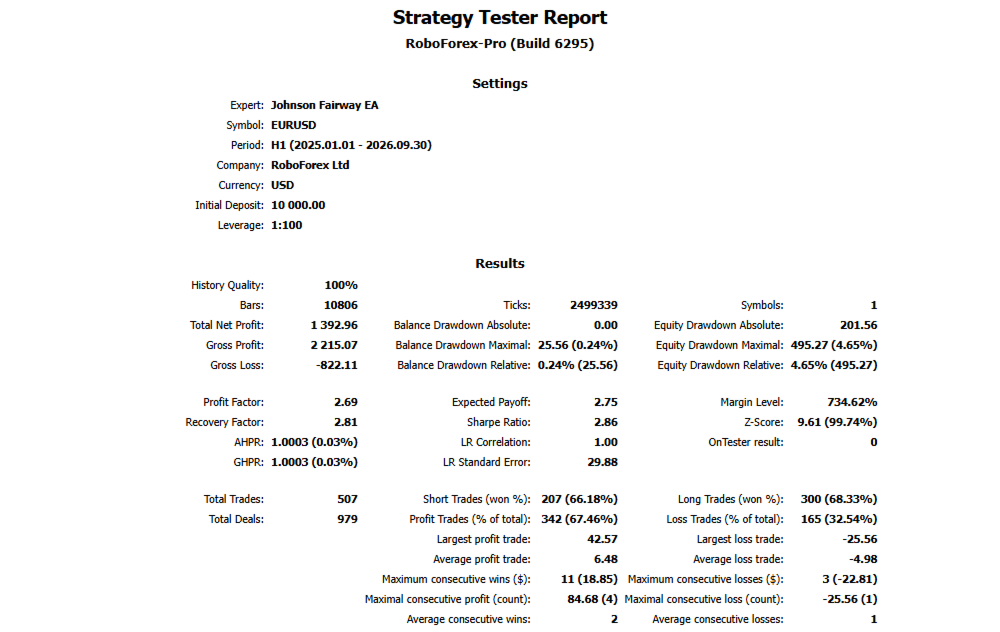
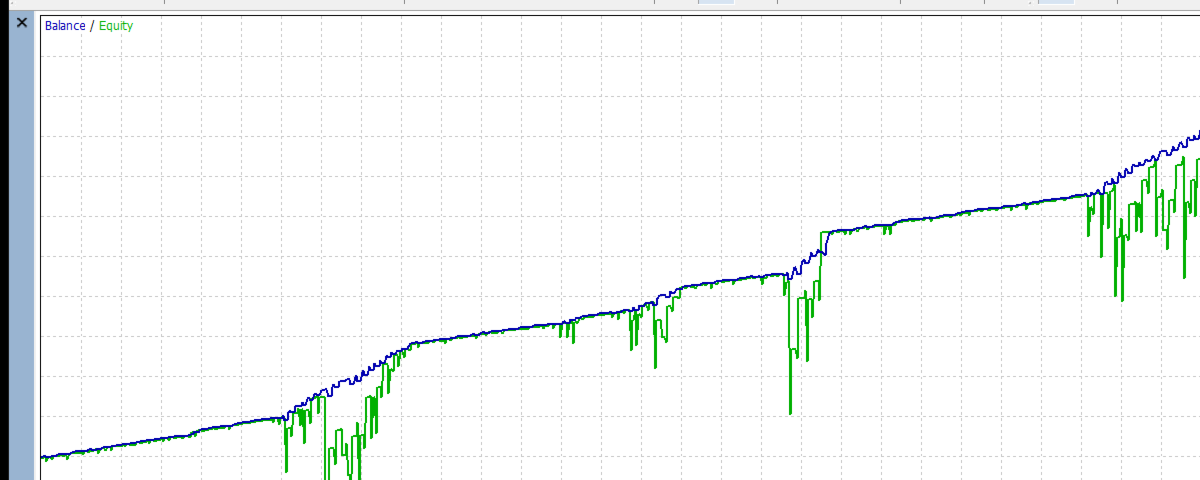
Tested on: EURUSD H1, $10,000, default inputs, 2025.01.01 to 2026.09.30: net +1,392.96, maximal equity drawdown 495.27 (4.65%), 507 trades, profit factor 2.69, no stop-out, no margin refusal. 507 trades in about 91 weeks is roughly 5 to 6 a week, with quiet days between.
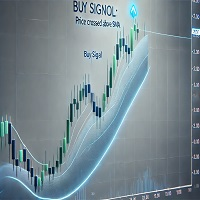
Try it free first: open Johnson Fairway EA in the MetaTrader 5 Strategy Tester, visual mode on, default inputs, EURUSD H1. Every cross it takes gets an arrow on the candle; on a live chart every cross a guard refused shows as a grey dot.
The trade lifecycle in plain verbs. It averages the last 21 closes, measures how far the newest close sits from that average, divides by the 21-bar EMA of true range, waits for that number to cross +3.0 or -3.0, checks the EMA 200 agrees, opens the first level, spaces the next ones by ATR, and banks groups of orders once their joint result clears the target.
Plain risk up front. This IS a grid. It adds to losing positions and uses no stop loss by default. Defaults: 0.01 first lot, additive steps of 0.01, ATR spacing with a 50 point floor, hedge cycle off, margin-level safety off. Limits stop new levels; they never force-close the book.
----------
WHAT THE PGO MEASURES
Most oscillators ask whether price is high or low compared with a range. The Pretty Good Oscillator asks a cleaner question: how many normal bar ranges is the close away from its average? Zero means the close sits on its mean; +3 means it sits three true ranges above it, which only happens when buyers have pushed hard.
- distance = close minus the simple average of the last 21 closes,
- scale = exponential average of the last 21 true ranges (gaps included),
- PGO = distance divided by scale, a pure number that means the same on every symbol.
A worked cross: the PGO read +2.7 on one bar and +3.2 on the next, so it crossed +3.0 and a BUY is armed if the close is above the EMA 200. Everything is computed inside the EA from finished bars: no indicator file, no DLL, no web request.
Five facts before you start
- Entry: the finished bar where the PGO crosses through +3.0 (BUY) or -3.0 (SELL). Accepted signals do not repaint.
- Side: in the default breakout mode the EA trades with the cross; a second mode fades it.
- The default trend filter only lets a cross through when the close sits on the matching side of the EMA 200.
- A Range Guard skips quiet boxes where 20 bars span less than 5 ATR, so in tight flat ranges expect fewer trades.
- New this build: a Rise Guard that can ask how many of the last 5 PGO steps moved toward the trade side, and the live count on the panel. It ships OFF.
----------
Start here (5 minutes)
1. Put it on EURUSD H1 and leave every input at its default.
2. Switch RunMode to Scan only for the first session. The panel shows each plan and sends nothing.
3. Watch the arrows and grey dots: they show which past crosses the guards took or refused.
4. When the plans make sense to you, press ARMED on the panel.
5. Repeat the tester run below on your own broker's data before real money; spread, swap and commission differ between brokers. Running more than one chart? Give each copy its own EAMagicNumber and HedgeMagicNumber.
Minimum deposit: on EURUSD H1 the worst equity drawdown was about $495 at default lots, so start with at least $3,000 at default lots and size up only with the balance. Larger lots need proportionally more, and a longer trend than our test period can dig deeper.
----------
Reproduce our numbers
Strategy Tester, default inputs, 1 minute OHLC, leverage 1:100, 2025.01.01 to 2026.09.30, one broker's demo data. Same settings and period, and you should land close to these:
- EURUSD H1, $10,000: net +1,392.96, gross profit 2,215.07, gross loss -822.11, profit factor 2.69, maximal equity drawdown 495.27 (4.65%), maximal balance drawdown 25.56 (0.24%), 507 trades (207 short, 66.18% won; 300 long, 68.33% won). No stop-out, no margin refusal.
- EURUSD H1, $1,000,000: net +1,392.96, maximal equity drawdown 495.27 (0.05%), 507 trades. No stop-out, no margin refusal.
- XAUUSD D1, $10,000: net +53.26, maximal equity drawdown 20.91 (0.21%), 17 trades (15 long, 2 short, all closed in gain). No stop-out, no margin refusal.
- XAUUSD D1, $1,000,000: the same 17 trades and net +53.26, drawdown 0.00%. No stop-out, no margin refusal.
17 gold trades is a small sample.
Treat this as one past stretch, not a forecast. The equity drawdown is far larger than the balance drawdown because the grid holds losing levels open until a closure pays them off. The money drawdown is the same at both deposits because lots do not grow with the balance. Other symbols, timeframes and deposits under $10,000 were not tested. Defaults were chosen once by judgement, not optimised. These runs used a netting demo account; hedging accounts were not tested.
----------
Why the PGO
A grid suffers most when its first level opens in a dead market that then drifts against it. The PGO waits until the close has travelled well away from its average, measured in the market's own bar size, so the first level joins a move that has already shown force, and the EMA 200 keeps that move in line with the longer trend. The honest costs: a breakout of three true ranges is already a big move, so some entries come late and the grid then works through the pullback; in news spikes the line can jump past the level and fall back, which is what the Range Guard and the gap between signals are there to calm.
----------
One cycle, step by step
1. Average. The last 21 closes are averaged.
2. Distance. The newest finished close minus that average.
3. Scale. The distance is divided by the 21-bar EMA of true range.
4. Cross. The event is the bar where that number crosses +3.0 upward (BUY) or -3.0 downward (SELL).
5. Mode. Mode 0 takes that side, mode 1 the opposite side.
6. Rise Guard. Optional: at least InpPGORiseMin of the last 5 PGO steps must move toward the trade side (0, the default, switches it off).
7. Stretch Guard. Optional: the close must have moved at least InpPGOStretchMin ATR over the momentum bars (0 switches it off).
8. Range Guard. The last 20 bars must span at least 5 ATR, so tight boxes are skipped.
9. Trend filter. By default the close must be on the matching side of the EMA 200. It can also fade that side, or be switched off.
10. Timing. Accepted signals are kept apart by a gap of bars, and a signal may wait a few bars if the level cannot be placed straight away.
11. Ladder. Levels follow ATR or fixed points, with a floor, a ceiling and an optional freeze. BUY and SELL grids can run together or alone.
12. Banking. Groups of oldest and newest orders close when their joint result, after swap and commission, clears the target. If the oldest order is too heavy, a slice of it is closed instead.
13. Safety checks. A closure that would reopen a level at once is blocked, every leg is confirmed in deal history, failed legs are retried, and a plan is dropped if the book changed before sending.
14. Hedge cycle, optional. Off by default and not exercised in our tests. When on, it holds a balanced pair on a chosen symbol and retires it in equal slices, paid by a small surcharge on closures the grid already makes.
----------
The panel
The panel sits on the left, keeping the right side and the price scale free. It shows symbol, magic number, a status pill, grid mode, lot step, spacing, banked result, the book, each side's closing plan and the order table. Two rows belong to the signal, and every short code on them is spelled out here:
- PGO PULSE: the length (21), the PGO of the last finished bar, HIGH above +3.0, LOW below -3.0 or MID between, UP or DN for rising or falling, and x 12b = 12 bars since the last cross.
- RISE GUARD: B or S for the side the PGO points to, BRK (breakout) or FADE for the mode, 3/5 = three of the last five PGO steps moved to that side, then S = Stretch Guard move in ATR, R = Range Guard width in ATR, each followed by OPEN (passes), HOLD (blocks) or off, and EMA UP or DN for the trend side.
On the live chart every cross of the last 150 bars is marked: a small arrow when accepted, a grey dot when a guard refused it. Buttons switch Armed / Scan only, Pause / Resume, chart marks and slicing. The Hedge Vault card docks under the main panel and stays hidden while the hedge is off. Nothing is drawn in a non-visual backtest.
----------
Limits you control
No setting closes the book for you; limits only stop new levels.
Every order passes a free margin check with a safety buffer before it is sent.
Caps on levels per grid, orders per side and lot per order keep the ladder finite. MinMarginLevelPercent and MaxAccountRiskPercent start at off; set them for your own account.
An optional margin-level timeframe safety moves the signal and spacing to a higher timeframe as margin falls. It is off by default and was not exercised in our tests.
Copies are kept apart by symbol and magic number.
Scan only shows every decision without sending a single order.
----------
Who this is for
Traders who like breakouts measured in the market's own volatility, who want a grid that starts only when price has clearly left its average in the trend's direction, who like many small closures, who want the core engine at an entry price, and who size lots to their balance.
Who this is NOT for
- Anyone who needs a stop loss on every order. This grid has none by design.
- Anyone expecting a fixed monthly return. The tested result above is one past period.
- Small accounts running large lots unattended. A long one-way trend can keep the book open for weeks; the tested equity drawdown reached about 5% of $10,000 and a harder market can go further.
- Traders who will not test first. If you skip the Strategy Tester on your own broker, this is not the right tool for you.
----------
Common questions
Does it repaint? Accepted signals, chart marks and both panel rows use finished bars only.
Is it the classic Pretty Good Oscillator? Yes: close minus its simple moving average, divided by the exponential average of true range, with Johnson's +3 and -3 breakout levels. The trend filter and the guards are added by this EA.
Why so few trades on some days? A cross of three true ranges is a real event. Quiet days with no new level are normal; the panel row shows how far the PGO is from the level.
Breakout mode or fade mode? Breakout trades with the cross, fade against it. Fade was not backtested here.
Which markets were tested? EURUSD H1 and XAUUSD D1. Everything else is yours to test.
What should I change first? InpPGOLevel and InpPGOLen, then InpPGORangeMinATR, then InpPGORiseMin. One change at a time, and read drawdown and trade count next to net result.
Netting accounts? Yes, all four test runs above were on a netting demo account; hedging accounts were not tested.
----------
All inputs
Grid levels
TradeMode - two grids, BUY and SELL, by default, or one direction only.
GridSpacePoints - level distance in fixed spacing mode (25).
GridSpaceMultiplier - above 1.0 widens deeper levels (1.0 = even).
MaxGridLevels - most levels in one grid (1000).
UpDirectionIsBuy - which side an up move arms.
EAMagicNumber - number on grid orders (9781650).
GridOrderComment - text on grid orders (JFWY).
OneOrderPerBar - at most one new level per bar.
Lots
InitialLotSize - volume of the first level (0.01).
LotSizingMode - additive by default, multiply as the alternative.
LotMultiplier - factor per level in multiply mode (1.25).
LotAddStep - step per level in additive mode (0.01; 0 uses the starting lot).
MaxOrderVolume - largest single order (1.0).
UseAutoLot - ties the starting lot to balance (off).
AutoLotBaseBalance - balance that matches the starting lot (1000).
AutoLotAllowDecrease - lets auto lot drop below the starting lot (off).
ATR spacing
GridSpacingMode - ATR by default, fixed points as the alternative.
ATRTimeframe - ATR timeframe (current chart).
ATRPeriod - ATR length (14).
ATRSpacingFactor - spacing as a multiple of ATR (1.0).
ATRBarShift - ATR bar; 1 is the last finished bar.
ATRMinSpacingPts - smallest spacing in points (50; 0 none).
ATRMaxSpacingPts - largest spacing in points (5000; 0 none).
ATRFreezeOnStart - keeps one spacing for the whole cycle (off).
Closure target
DesiredProfitPerClosure - base target in account currency (2.0).
ProfitMultiplier - final scale, 1.00 to 2.00.
ProfitTargetMode - scaled by default: bigger, deeper books aim higher.
ProfitVolumePower - how closing volume lifts the target (1.0; 0 off).
ProfitDepthBonus - extra target per additional open level (0.10).
ProfitMaxMultiple - scaled target ceiling in multiples of the base (50).
ProfitMaxReachFraction - keeps the target within this share of one grid step (0.50).
Fragment scanner
UseMultiLegScan - checks multi-order groups before the plain pair (on).
MaxOldestLegs - most old orders in one closure (3).
MaxNewestLegs - most new orders in one closure (6).
ScanPriority - ranking of qualifying groups; largest group first by default.
NeverBankLessThanPair - a group must also beat the pair target (on).
RequireCloseVolumeExceedsTarget - newest volume must exceed oldest volume (on).
MinCloseVolumeRatio - required ratio of those volumes (1.5).
Target slicing
EnableTargetSlicing - allows part-closing the oldest order (on).
FragProfitWeightPower - weight per closing lot (1.5).
FragMinSlicePercent - smallest slice, percent of the target order (20).
FragAllowMultiCloser - several new orders may fund one slice (on).
FragPreferFullClosure - a full closure wins when both are possible (on).
Reopen guard
ReopenGuard - blocks closures that would reopen a level at once (step based).
ReopenGuardCushion - safe distance as a share of one step (0.90).
Account protection
MinMarginLevelPercent - no new levels below this margin level (0 off).
MaxAccountRiskPercent - no new levels beyond this floating loss, percent of balance (0 off).
NetMaxMarginPercent - netting only: cap on net position margin, percent of equity (5.0).
MaxTotalOrders - absolute order cap per side (1000).
Execution and checks
RunMode - Armed or Scan only.
CloseSequence - order in which legs are sent; oldest first by default.
MaxSlippagePoints - allowed slippage (30).
MaxSpreadPoints - no trading above this spread (7500).
MinSecondsBetweenClosures - pause between closures per side (5).
CloseAttemptsPerLeg - attempts before the retry queue (3).
VerifyTimeoutSeconds - how long a stuck leg is followed (90).
DeferWhenMarketClosed - waits for the session instead of halting (on).
MarketClosedRetrySeconds - retry spacing while orders are refused (30).
AutoResumeAfterSeconds - a halt clears itself after this many seconds (300; 0 waits for you).
NoPartialRetryMinutes - partial closes tried again this many minutes after a broker refusal (15; 0 never).
AbortIfBookChanged - drops a plan if a leg changed (on).
UseFullCommission - counts commission on both sides (on).
CommissionPerLot - fallback figure (0 reads history).
CloseOrderComment - text on closing deals.
Hedge cycle
EnableHedgeCycle - main switch (off).
HedgeSymbols - comma list; repeat a symbol for more turns (XAGUSD).
HedgeSymbolRotation - how the next symbol is picked (per cycle).
HedgeMaxSymbolsInTester - rotation cap in the tester only (2; 0 none).
HedgeCycleLots - lots on each side of the pair (0.01).
HedgeSliceLots - lots retired per side each slice (0.01).
HedgeFragmentBonus - bonus over the slice cost (100).
HedgeBonusIsPercent - bonus is a percent; false means money (on).
HedgeMaxSurcharge - money cap per closure (0 none).
HedgeMaxSurchargePercent - largest rise of any closure target, percent (50).
HedgeMagicNumber - number on hedge legs, must differ from the grid (9781651).
HedgeReopenOnFinish - opens a new cycle when one ends (on).
HedgeStartRequiresTrade - first cycle waits for a grid order (on).
HedgeIntegritySeconds - leg balance check interval (5).
HedgeAutoRepair - repairs a lone leg automatically (on).
HedgeNakedAction - what to do with a lone leg; re-hedge by default.
HedgeMaxSpreadPoints - hedge spread limit (0 off).
HedgeSlippagePoints - hedge slippage allowance (30).
HedgeAttemptsPerLeg - attempts per hedge leg (3).
HedgeVerifyTimeout - follow time for a stuck hedge leg (90).
HedgeCommissionPerLot - fallback hedge commission (0 reads history).
HedgeOrderComment - text on hedge deals.
Weekly cash day
WeeklyCashDay - pauses new cycles and slices around withdrawals (off).
CashDayOfWeek - 0 Sunday, 1 Monday and so on (1).
CashCutoffHour - server hour after which no new slice fires (21).
Panel and chart
ShowPanel - panel on or off.
PanelX and PanelY - distance from the chart edge (12, 15).
PanelFontSize - base text size (9).
ShowArabic - second language line (on).
ShowChartMarks - plans and levels drawn on the chart (on).
MaxTableRows - order rows per grid (13).
PanelCorner - corner the panel is anchored to.
Entry trigger
EntryTriggerMode - the PGO strategy by default.
SignalBarShift - 1 is the last finished bar.
SignalBarsDelay - bars between accepted signals (30; 0 every).
SignalValidBars - bars a signal stays usable (3).
SignalAllowBuy and SignalAllowSell - switch each side.
SignalReverse - turns the direction around (off).
Pretty Good Oscillator
InpPGOLen - bars for the close average and the true-range EMA (21).
InpPGOLevel - crossing level in true-range units; up through +level is a BUY, down through -level a SELL (3.0).
InpPGOMode - 0 breakout, trade with the cross; 1 fade, trade against it (0).
InpPGOMomBars - bars over which the close move for the Stretch Guard is read (10).
InpPGOStretchMin - Stretch Guard: least move in ATR over the momentum bars (0 = off; OPEN/HOLD on the panel).
InpPGORiseMin - Rise Guard: least of the last 5 PGO steps moving to the trade side (0 = off, the default; up to 5; OPEN/HOLD on the panel).
InpPGORangeMinATR - Range Guard: least window width in ATR (5; 0 off).
InpPGORangeBars - Range Guard: window length in bars (20).
InpPGOATRPeriod - ATR length for the Range Guard and the Stretch Guard (14).
InpPGOTrendFilter - 1 with the EMA side, 2 against it, 0 off (1).
InpPGOTrendMAPeriod - trend EMA length (200).
InpShowSignalArrows - arrow where a cycle armed (on).
InpShowPGOOnChart - past crosses on the live chart, arrow or grey dot (on).
Debug
DebugMode - extra journal detail (off).
Margin timeframe safety
UseMarginTFSafety - main switch (off).
Level1MarginPct and Level1TF - at 6000 percent the work moves to M15.
Level2MarginPct and Level2TF - at 5000 percent the work moves to H1.
MarginTFHysteresisPct - recovery needed before stepping back (500).
----------
Risk, plainly
Grid trading is risky. It adds to losing positions, uses no stop loss, and a long trend can keep the book open for a long time or, with lots too large for the balance, end in a stop-out and a heavy loss. The PGO is built from past bars and cannot see the next one. Nothing is promised. Choose lots that survive a bad run, test on your own broker, and only risk money you can afford to lose. No DLLs or extra files are needed.
If you have run it, an honest review of how it behaved for you, good or bad, helps the next trader decide.