Trove Master The One
- エキスパート
- バージョン: 5.4
- アクティベーション: 6

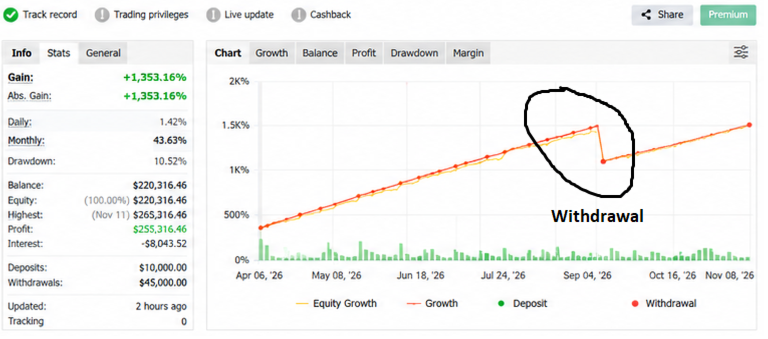
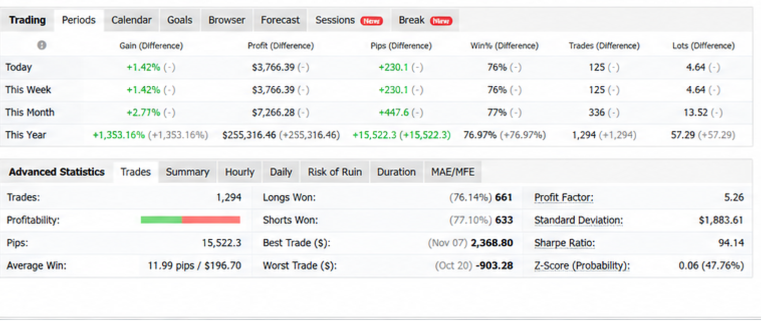
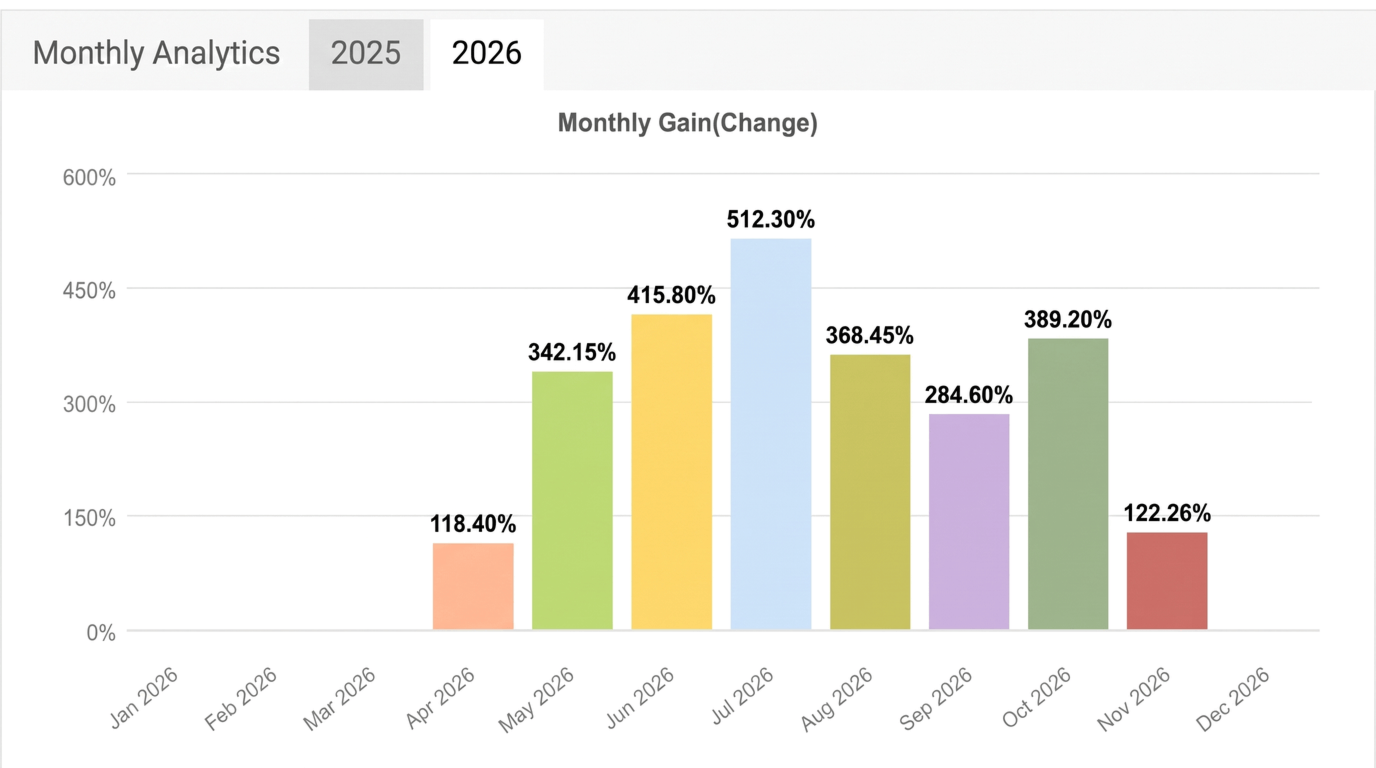
Live results attached: EA is doing wonders with all four engine together.

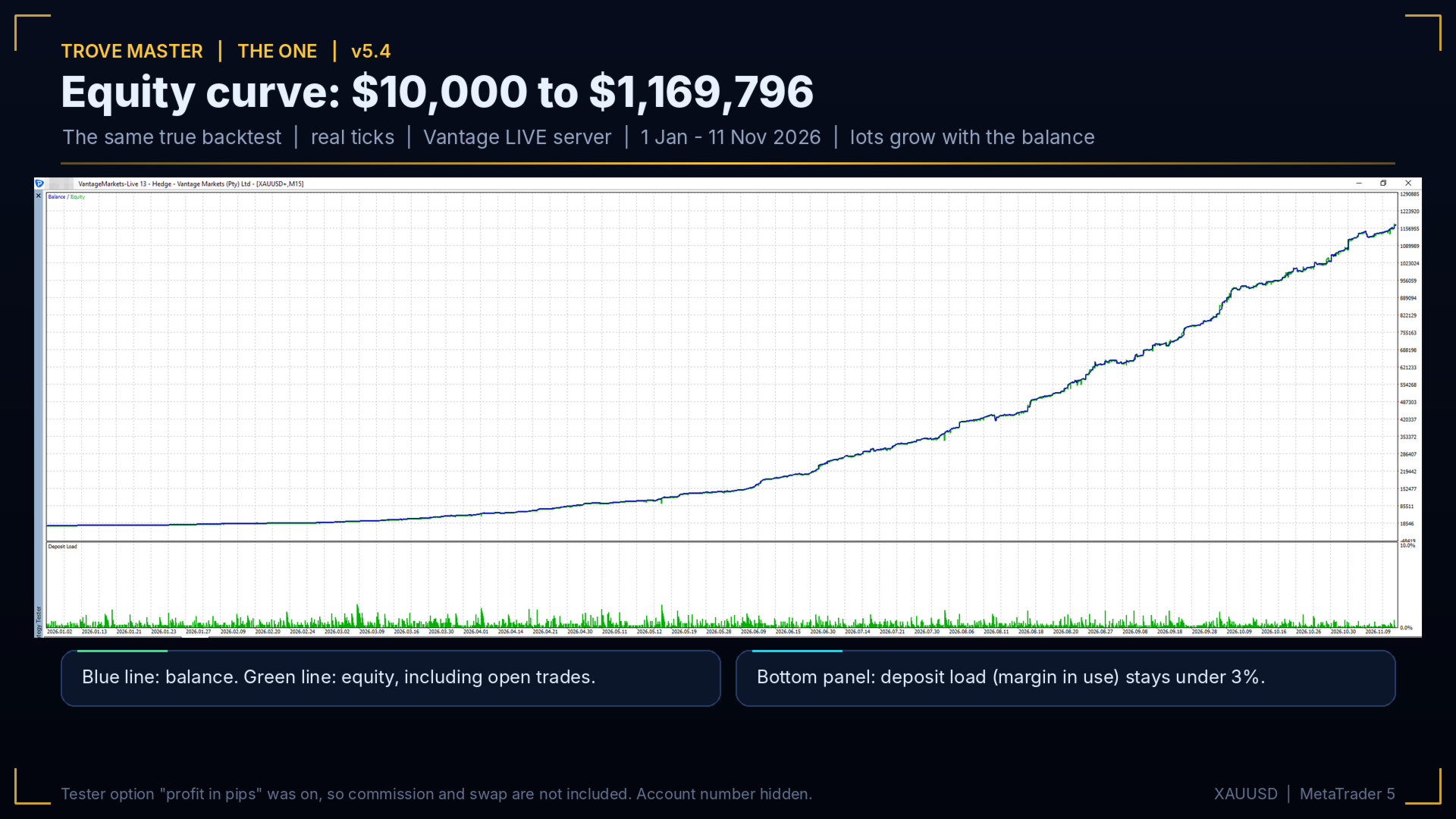
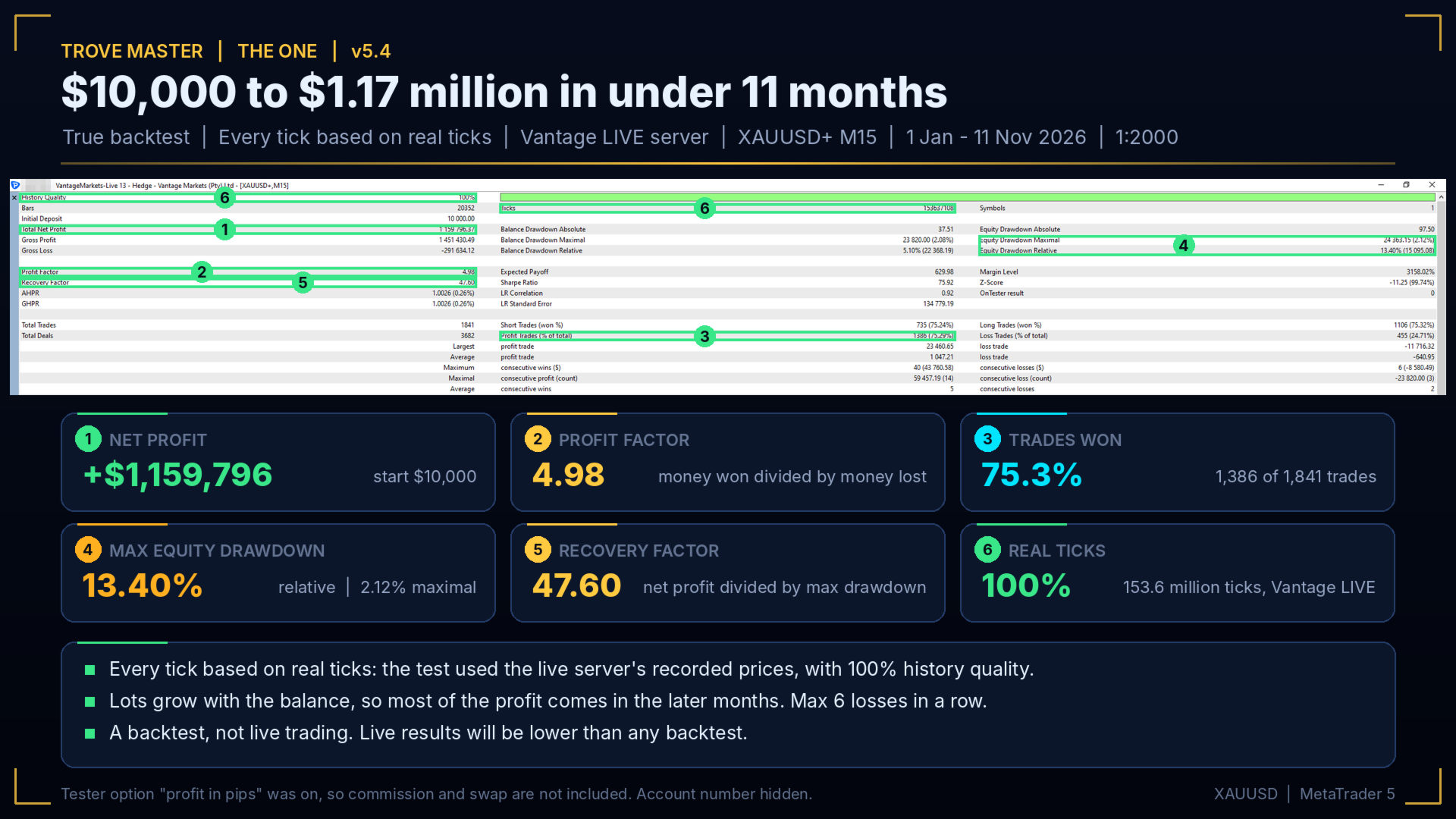
Both Live results and Back test results are done using medium risk. Back test data done on Every tick based on real tick  which can match the real result after commission.
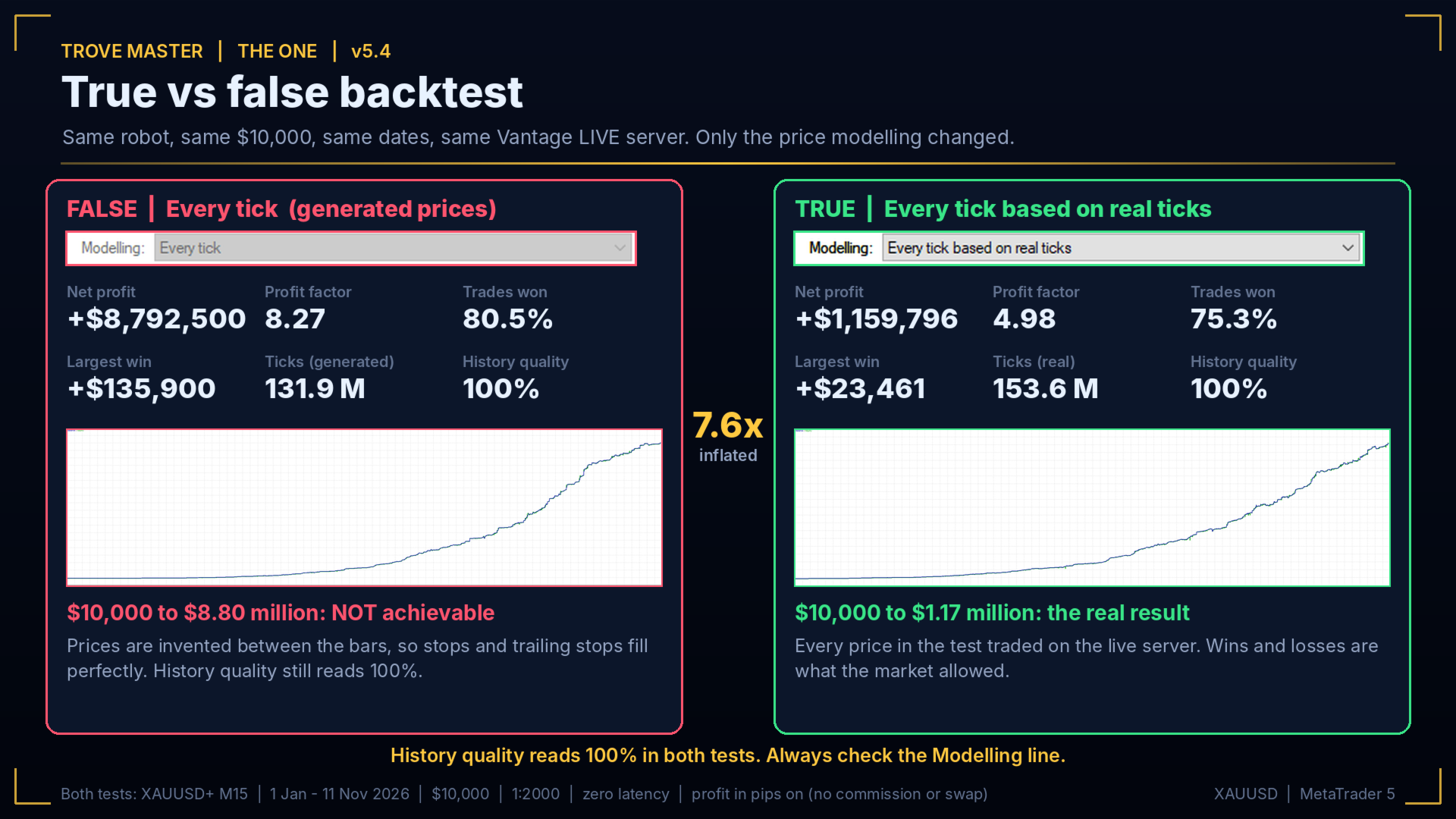
Every Tick is a fake result which shows 10X of results.

EA runs its full potential on the high speed current tick data's, Past year data's tends to have reduced tick by 100,000- 300,000.

first 10 Purchasers, Will receive exciting gifts. This Gift is purely for trusting us primarily.

Our promise
If you cannot reproduce our published tests with the settings we show, we refund your purchase in full.
In order to protect the strategy, We will sell only limited copies.
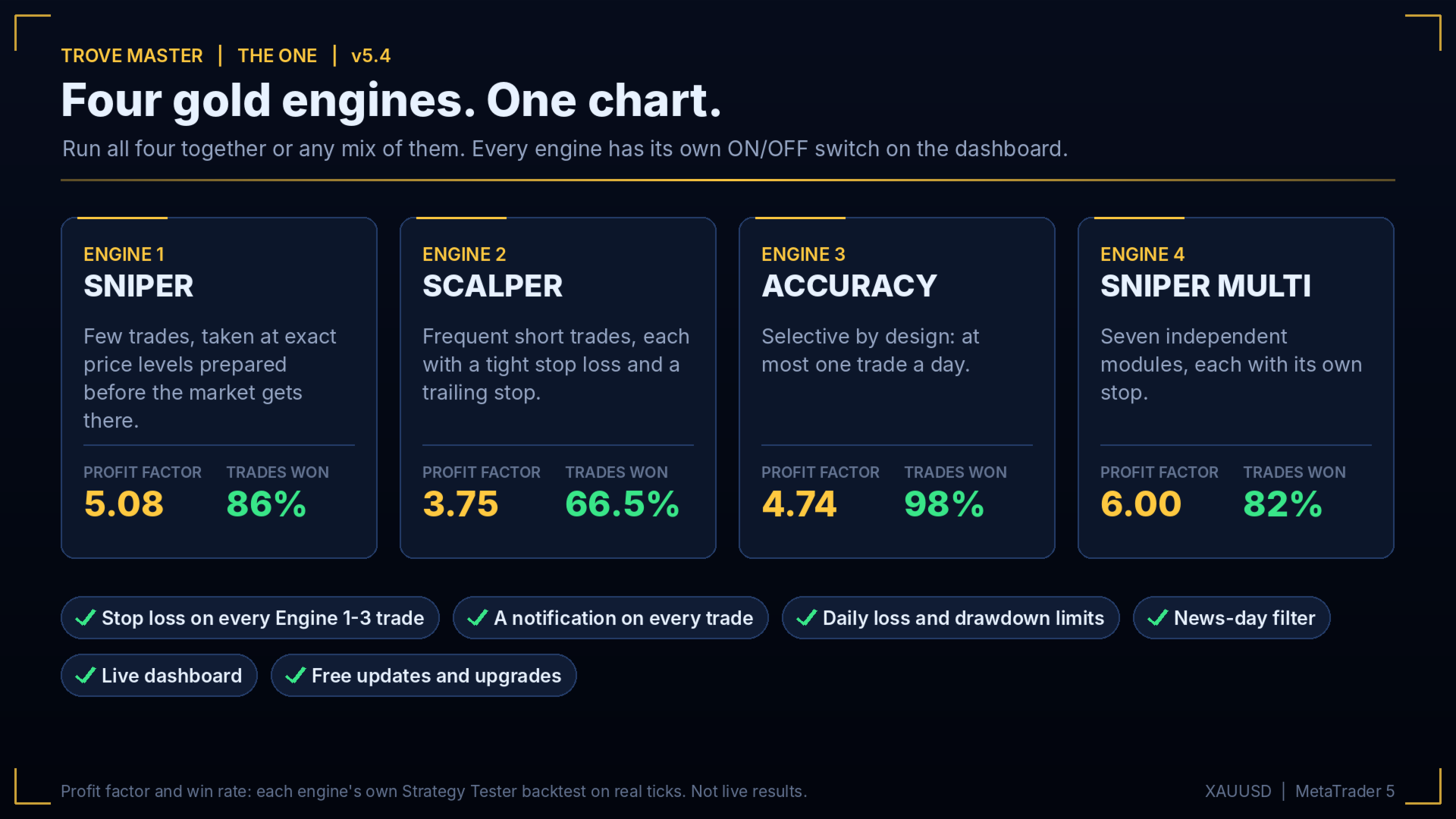
Trove Master runs four independent gold engines from one Expert Advisor on one XAUUSD chart: Engine 1 Sniper, Engine 2 Scalper, Engine 3 Accuracy and Engine 4 Sniper Multi. Each engine was built and tested on its own first. Here they share one dashboard, one set of protections and a notification on every trade. Switch any engine on or off at any time.
Precision
Entries follow fixed rules at exact prices or exact conditions, prepared before the market arrives. Nothing is discretionary and nothing is chased. Engine 3 takes at most one trade a day and won 284 of its 290 test trades.
What each engine showed in its own test
Strategy Tester backtests, every tick based on real ticks:
- Engine 1 Sniper: profit factor 5.08, 140 of 162 trades won, max drawdown 5.29% (1 Jan to 8 Nov 2026, $10,000, Medium-High risk, Ultra mode, Vantage live server)
- Engine 2 Scalper: profit factor 3.75, 871 of 1,310 trades won, max drawdown 4.23% (1 Jan to 8 Nov 2026, $10,000, Vantage live server)
- Engine 3 Accuracy: profit factor 4.74, 284 of 290 trades won, max drawdown 6.7% (18 months, $100,000)
- Engine 4 Sniper Multi: profit factor 6.00, 82% of 663 trades won, max drawdown 12.8% (18 months, $100,000)
Live account
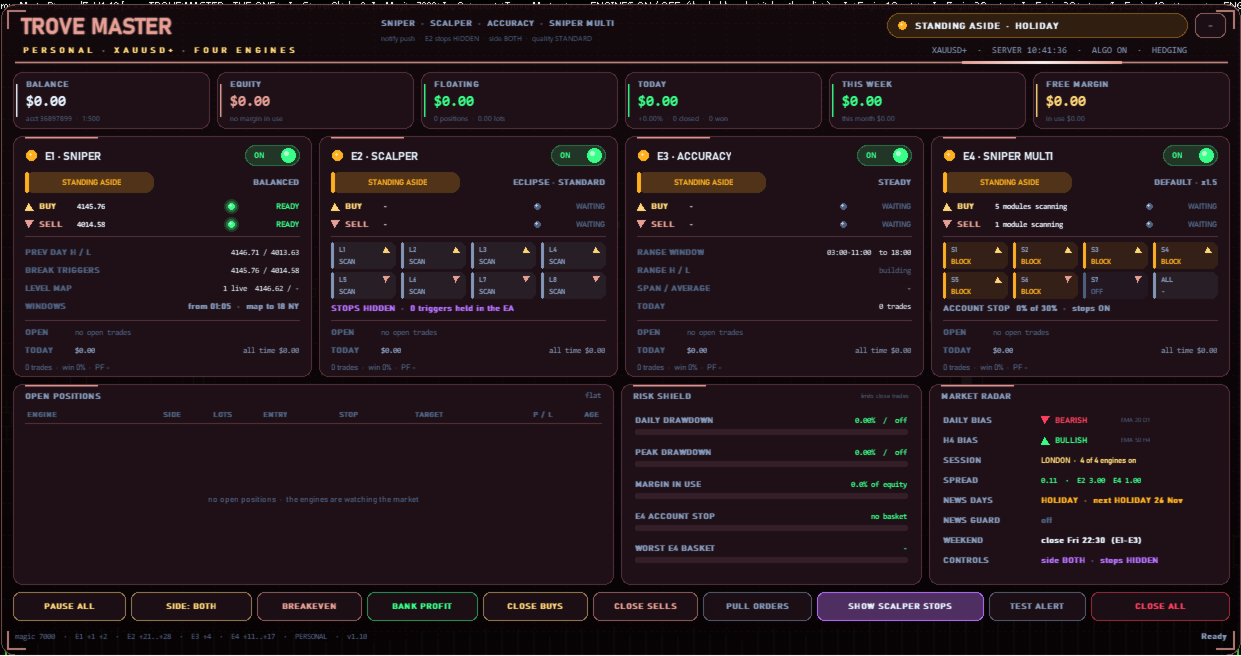
Screenshot 1-3 shows our live Vantage trading account.
Safety
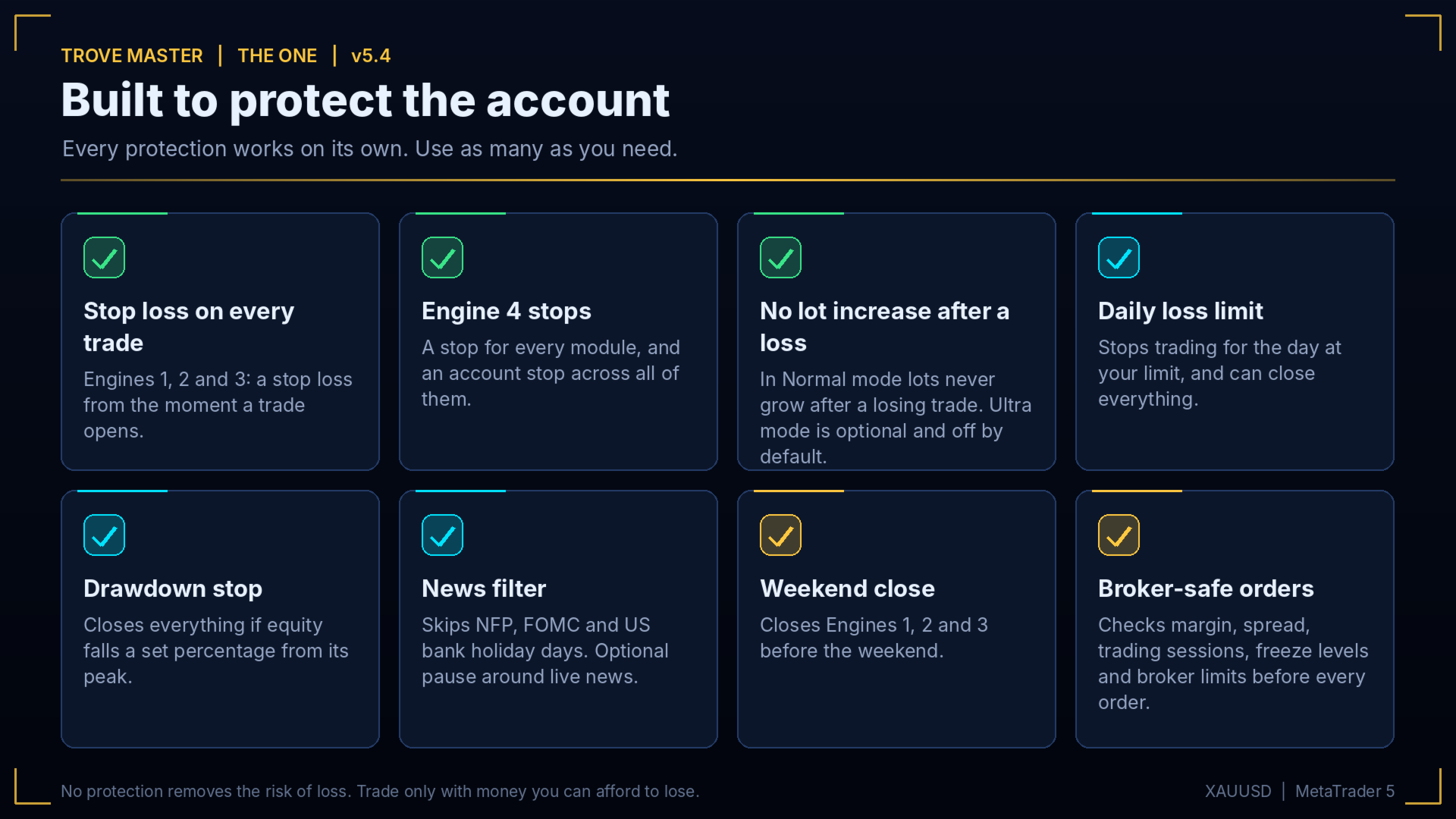
- Every trade from Engines 1, 2 and 3 has a stop loss from the moment it opens.
- Engine 4 has a stop for every module and an account stop across all of them.
- In Normal mode lots never increase after a loss. Ultra mode is optional and off by default.
- Optional daily loss limit and drawdown stop, weekend close, news-day filter (NFP, FOMC, US bank holidays), optional live news pause and a spread filter.
- Before every order the EA checks margin, trading sessions, freeze levels and broker limits.
Funded accounts
Trove Master can trade funded accounts. Use Master risk Low and Normal mode, set the daily loss limit and drawdown stop below your firm's limits (for example 4% and 8% where the firm allows 5% and 10%), and switch off any engine your firm's rules do not allow. A funded-account preset is included.
What you need
- XAUUSD, any timeframe, one chart, hedging account (on a netting account only Engine 3 trades).
- Raw spread or ECN account. Leverage 1:500 or higher recommended.
- Minimum capital $2,000 for all four engines, or $500 for Engines 1, 2 and 3 with Engine 4 off.
- A VPS, so the EA runs 24 hours a day, 5 days a week.
Broker and server time
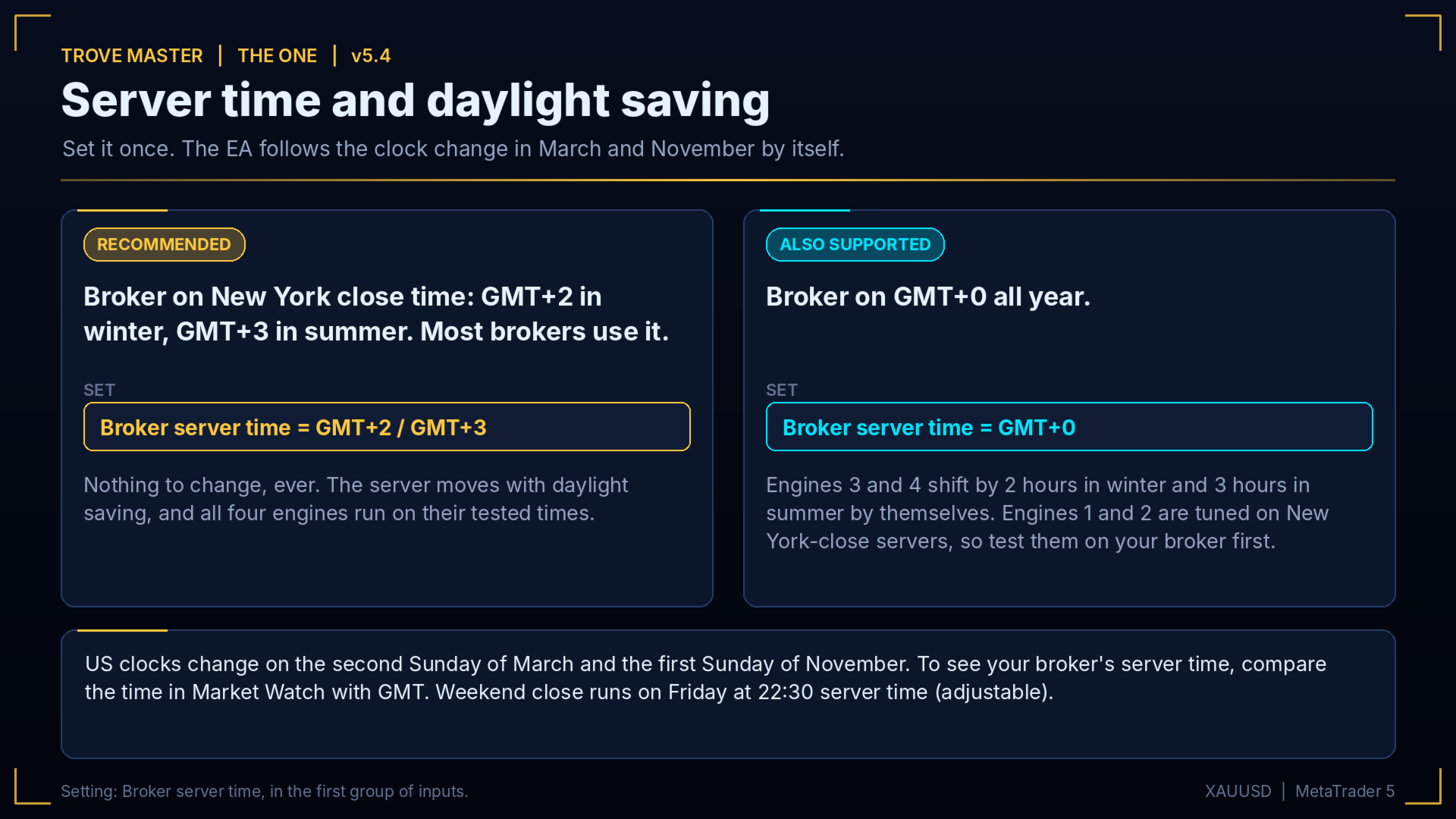
Tested on a Vantage Raw ECN live account. Any raw-spread broker works. Recommended server time is New York close (GMT+2 in winter, GMT+3 in summer), which most brokers use. Select "GMT+2 / GMT+3" in Broker server time and you never change anything for daylight saving. On a GMT+0 server select "GMT+0": Engines 3 and 4 adjust by themselves, and Engines 1 and 2 are tuned on New York-close servers, so test them on your broker first.
How to run a back test that matches ours
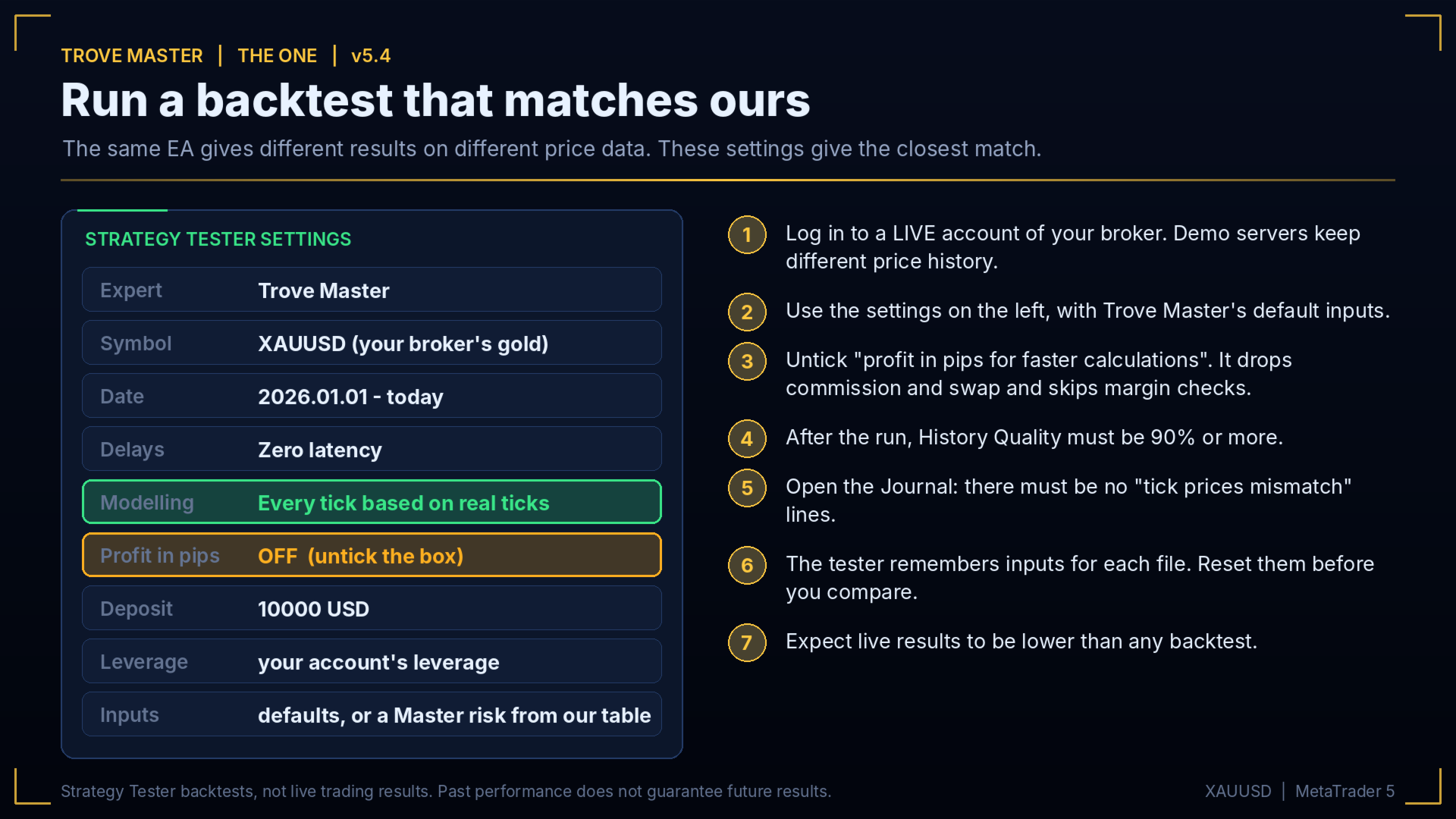
1. Log in to a live account of your broker. The tester uses the history of the server you are logged into, and demo servers can differ.
2. XAUUSD, any timeframe, 2026.01.01 to today, $10,000, your account's leverage.
3. Modelling: Every tick based on real ticks. Delays: Zero latency.
4. Default inputs, or a Master risk from the table.
5. After the run: History Quality 90% or more, and no "tick prices mismatch" lines in the Journal.
The tester remembers inputs for each file, so reset them to the defaults before you compare. Expect live results to be lower than any backtest.
How fake backtests are made
"Every tick", "1 minute OHLC" and "Open prices only" invent prices between bars, so tight stops and trailing stops look perfect. On the same data, Engine 2 alone shows +$923,444 and a profit factor of 7.30 on "Every tick", but +$90,659 and 3.75 on real ticks. History Quality can still read 100%, so always check the Modelling line. Also watch for settings optimised on the dates they are shown on, hidden martingales and demo accounts shown as live.
Tick price mismatch
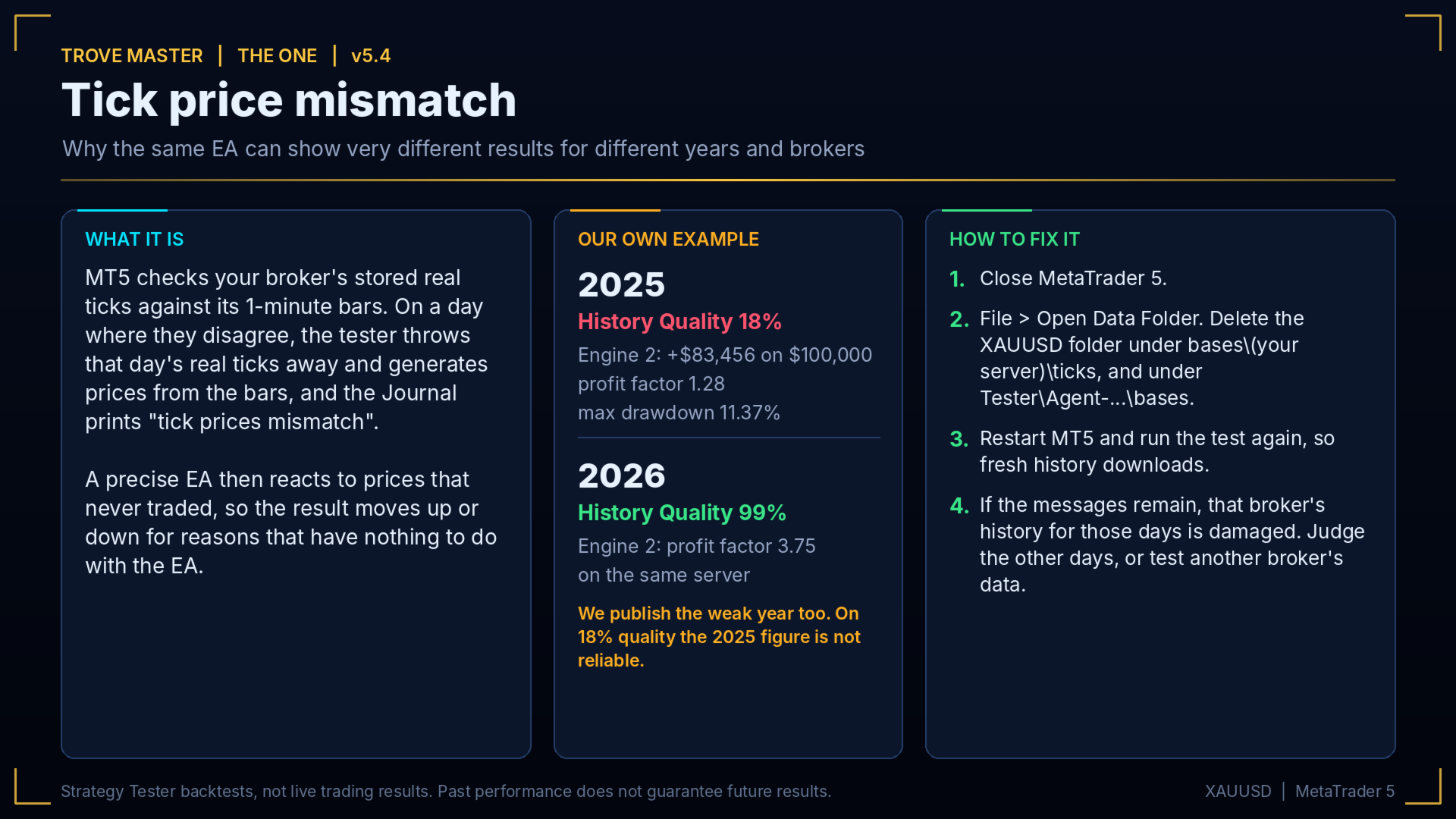
MT5 checks your broker's stored real ticks against its 1-minute bars. On days where they disagree, it discards that day's real ticks, generates prices from the bars and prints "tick prices mismatch" in the Journal. A precise EA then reacts to prices that never traded. Our 2025 test of Engine 2 ran at only 18% History Quality and shows +$83,456 on $100,000 (profit factor 1.28, max drawdown 11.37%). We publish it anyway, but on that data quality the figure is not reliable. Our 2026 tests run on 99% real ticks.
To fix it: close MT5, open File > Open Data Folder, delete the XAUUSD folder under bases\(your server)\ticks and under Tester\Agent-...\bases, restart and test again. If the messages remain, that broker's history for those days is damaged.
What you get
- Trove Master EA, version 5.4.
- User manual: installation, every setting and the back test guide.
- Complete setup on your account and VPS, with our help.
- Preset files: Default, Low risk, Funded account and High risk.
- Every update and upgrade, free.
- Updates that follow the market: our team watches how gold behaves, adjusts the EA when conditions change and sends each update to every buyer.
- Custom configuration to your requirements, such as risk, trading days, engine selection or prop-firm limits.
- You will feel the on-time help and connection with us
After purchase, message us through MQL5 for the manual, presets, setup and Gifts.
Quick start
1. Attach Trove Master to one XAUUSD chart and allow Algo Trading.
2. Choose Broker server time and Master risk.
3. For phone alerts, add your Meta Quotes ID in Tools > Options > Notifications and press TEST ALERT on the dashboard.
Dashboard
One panel shows balance, equity and today's result, a card for each engine with its ON/OFF switch, buy and sell status and trade record, open positions, risk meters and market status. Buttons: pause, side, breakeven, bank profit, close buys, close sells, pull orders, hide Engine 2 stop orders, test alert and close all. A push notification goes out for every opened and closed trade, plus a daily summary.
A good cause
We sell Trove Master to raise funds for a Good cause. When the target is reached, sales will close.