Statistical Edge Calculator
- ユーティリティ
- バージョン: 1.0
- アクティベーション: 5

Do you know your true mathematical trading edge, or are you just relying on a temporary run of luck?
A rising account balance can be deceptive. Oversized positions, favorable market regimes, or isolated winning streaks often mask deeply flawed strategies. The Statistical Edge Calculator removes all guesswork by auditing your terminal's closed trade history and calculating your true mathematical expectancy, win rates, and directional performance in seconds.
Zero manual data entry. Zero external spreadsheets. Pure empirical proof directly on your chart.
==================================================
THE MATHEMATICAL FORMULATION
==================================================
The utility measures performance using the classical mathematical expectancy model:
Edge = (Win Rate × Avg. Profit) − (Loss Rate × |Avg. Loss|)
A positive Edge represents the true monetary value you can expect to retain per executed trade based on your past statistical behavior.
==================================================
KEY CAPABILITIES & MULTI-ANGLE BREAKDOWN
==================================================
1. Global Account Edge:
Aggregates all closed orders to give you the master performance metric of your trading account.
2. Directional Decomposition (Long vs. Short):
Determines whether your buy setups are subsidizing unprofitable sell trades, or vice versa. Uncover hidden directional execution biases instantly.
3. Complete Currency Pair Breakdown:
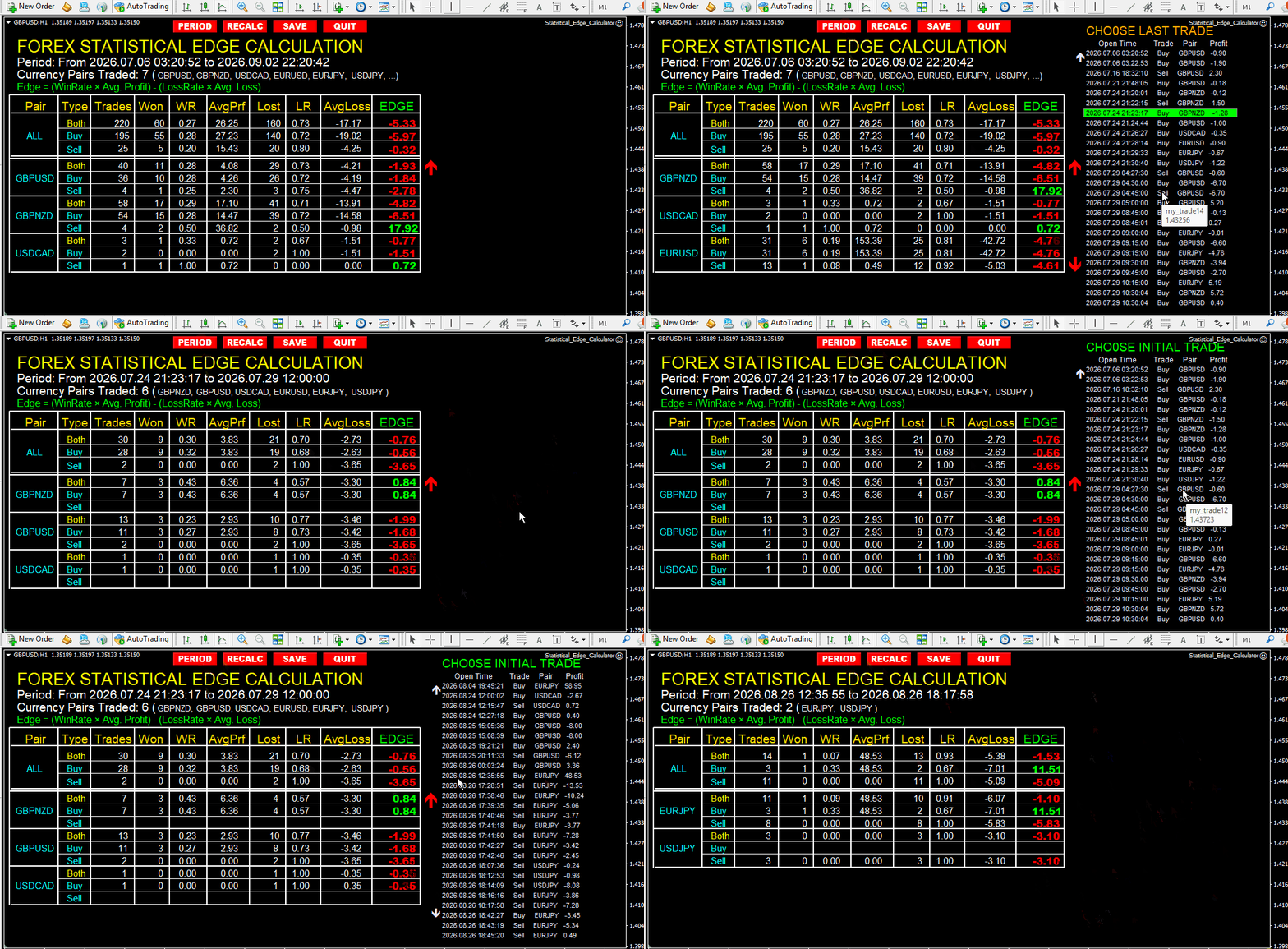
Isolates every traded symbol with its own dedicated Win Rate, Loss Rate, Average Profit/Loss, and directional Edge. Pinpoint high-expectancy pairs and eliminate toxic capital drains.
4. Interactive Period Picker (PERIOD Button):
Analyze specific blocks of trades with two clicks directly on the screen. Evaluate your edge month-by-month, isolate results during high-volatility events, or audit your system before and after changing indicator parameters.
5. Comprehensive CSV & Screenshot Exporter (SAVE Button):
While the on-screen table displays up to 3 individual pairs simultaneously for clean chart ergonomics (with intuitive scroll arrows), clicking SAVE exports:
- An exhaustive CSV file with metrics for EVERY SINGLE pair traded in your history into your Files directory.
- A high-resolution chart screenshot capturing the on-screen metrics.
6. Lightweight & Native Execution:
Pure MQL code with zero external DLL dependencies. Clean chart restoration upon exit (QUIT button).
==================================================
ON-SCREEN INTERFACE GUIDE
==================================================
- PERIOD: Opens an interactive list of your trade tickets to set custom start and end boundaries visually.
- RECALC: Refreshes and recomputes all statistics instantly.
- SAVE: Generates the full CSV report and screenshot inside the MQL/Files folder.
- QUIT: Safely removes the utility and cleanly restores your previous chart settings.
- Scroll Arrows: Smoothly navigate through all traded currency pairs when more than 3 symbols exist in the history.
==================================================
RECOMMENDED USAGE
==================================================
1. Attach the utility to any clean chart.
2. Ensure your terminal's "Account History" tab has your desired history window selected (e.g., All History, Last 3 Months, or Custom Period).
3. The table populates immediately.
4. Click SAVE to archive your CSV report for external logging or spreadsheet audits.
Stop trading on impressions. Verify your mathematical edge with precision.
A rising account balance can be deceptive. Oversized positions, favorable market regimes, or isolated winning streaks often mask deeply flawed strategies. The Statistical Edge Calculator removes all guesswork by auditing your terminal's closed trade history and calculating your true mathematical expectancy, win rates, and directional performance in seconds.
Zero manual data entry. Zero external spreadsheets. Pure empirical proof directly on your chart.
==================================================
THE MATHEMATICAL FORMULATION
==================================================
The utility measures performance using the classical mathematical expectancy model:
Edge = (Win Rate × Avg. Profit) − (Loss Rate × |Avg. Loss|)
A positive Edge represents the true monetary value you can expect to retain per executed trade based on your past statistical behavior.
==================================================
KEY CAPABILITIES & MULTI-ANGLE BREAKDOWN
==================================================
1. Global Account Edge:
Aggregates all closed orders to give you the master performance metric of your trading account.
2. Directional Decomposition (Long vs. Short):
Determines whether your buy setups are subsidizing unprofitable sell trades, or vice versa. Uncover hidden directional execution biases instantly.
3. Complete Currency Pair Breakdown:
Isolates every traded symbol with its own dedicated Win Rate, Loss Rate, Average Profit/Loss, and directional Edge. Pinpoint high-expectancy pairs and eliminate toxic capital drains.
4. Interactive Period Picker (PERIOD Button):
Analyze specific blocks of trades with two clicks directly on the screen. Evaluate your edge month-by-month, isolate results during high-volatility events, or audit your system before and after changing indicator parameters.
5. Comprehensive CSV & Screenshot Exporter (SAVE Button):
While the on-screen table displays up to 3 individual pairs simultaneously for clean chart ergonomics (with intuitive scroll arrows), clicking SAVE exports:
- An exhaustive CSV file with metrics for EVERY SINGLE pair traded in your history into your Files directory.
- A high-resolution chart screenshot capturing the on-screen metrics.
6. Lightweight & Native Execution:
Pure MQL code with zero external DLL dependencies. Clean chart restoration upon exit (QUIT button).
==================================================
ON-SCREEN INTERFACE GUIDE
==================================================
- PERIOD: Opens an interactive list of your trade tickets to set custom start and end boundaries visually.
- RECALC: Refreshes and recomputes all statistics instantly.
- SAVE: Generates the full CSV report and screenshot inside the MQL/Files folder.
- QUIT: Safely removes the utility and cleanly restores your previous chart settings.
- Scroll Arrows: Smoothly navigate through all traded currency pairs when more than 3 symbols exist in the history.
==================================================
RECOMMENDED USAGE
==================================================
1. Attach the utility to any clean chart.
2. Ensure your terminal's "Account History" tab has your desired history window selected (e.g., All History, Last 3 Months, or Custom Period).
3. The table populates immediately.
4. Click SAVE to archive your CSV report for external logging or spreadsheet audits.
Stop trading on impressions. Verify your mathematical edge with precision.