Btx MultiPair EA
- エキスパート
-
Wahyu Bintoro
 joint t.me/Boytrafx_Official
 - バージョン: 1.10
- アクティベーション: 5
BTX Strategy Screener – Multi-Symbol Confluence Dashboard
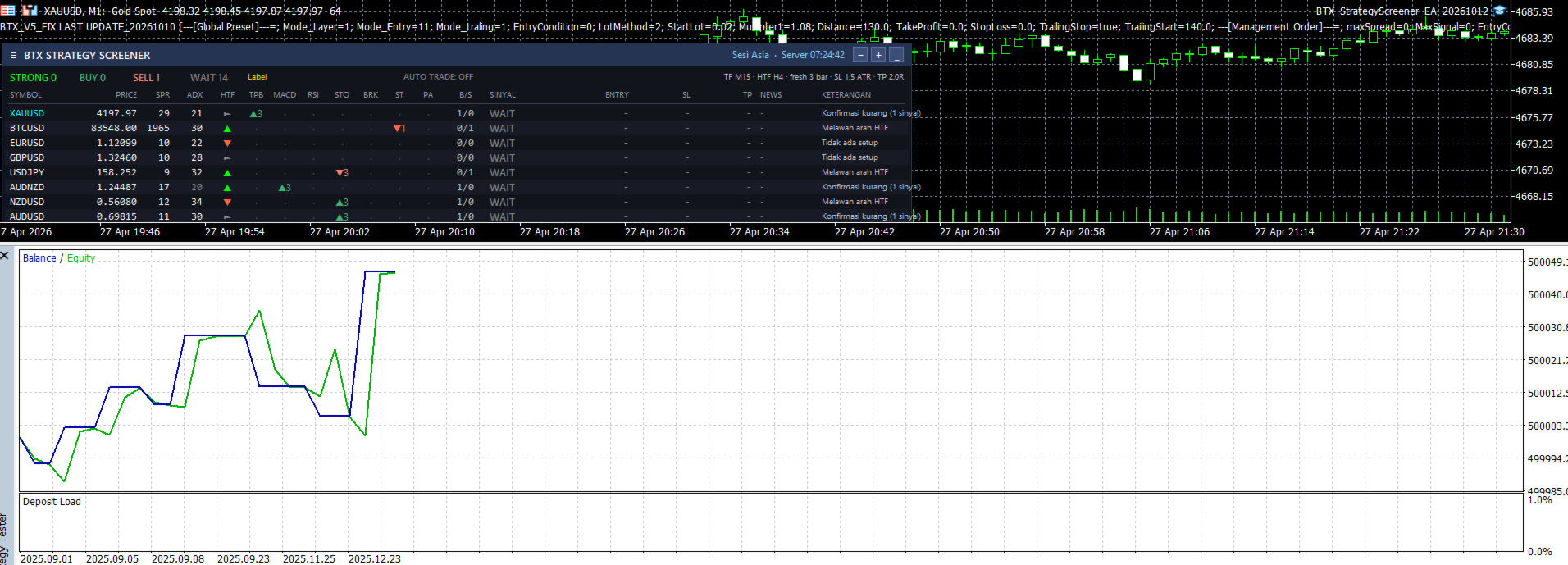
BTX Strategy Screener scans up to 30 symbols at once and shows, in one clean panel, which markets currently have a high-quality setup – and which ones you should leave alone.
Instead of relying on a single indicator, every symbol is checked by 7 independent strategies. A signal is only promoted to STRONG when several strategies agree, the higher timeframe trend confirms, and trend strength is rising.
ALL SIGNALS ARE CALCULATED ON CLOSED BARS – NO REPAINT.
Indicator values come from the standard MetaTrader 5 indicators, so every number on the panel matches what you see on your chart.
7 STRATEGIES PER SYMBOL
- TPB – Trend Pullback to EMA20 in the direction of EMA50/EMA200
- MACD – Main/Signal cross filtered by EMA200
- RSI – Exit from oversold/overbought zone with candle confirmation
- STO – Stochastic cross inside the <20 / >80 zone
- BRK – Close beyond the 20-bar high/low with range ≥ ATR
- ST – Supertrend direction flip
- PA – Engulfing / pin bar at 50-bar support or resistance
SIGNAL LOGIC
- BUY / SELL – at least 2 strategies agree and the higher timeframe is not against the trade
- STRONG BUY / STRONG SELL – at least 3 strategies agree, zero opposite signals, higher timeframe and signal timeframe aligned, price not overextended (≤1.5 ATR from EMA20), ADX ≥ 25 and rising
- WAIT – no clear setup, conflicting signals, high-impact news approaching, or abnormal spread
DASHBOARD FEATURES
- Fixed-order table with price, spread, ADX, HTF trend, all 7 strategy states and signal age
- Entry / SL / TP levels frozen at the signal bar (SL = ATR multiple, TP = Risk:Reward)
- High-impact news countdown from the built-in MQL5 Economic Calendar
- Automatic signal block before high-impact news and during abnormal spread
- Click a symbol to open it on the chart
- Draggable panel, resizable (– / +), minimize button, auto-scaling for high-DPI screens
- Lightweight: indicators are recalculated only when a new bar closes
NOTIFICATIONS (STRONG signals only)
- Terminal pop-up alert
- Push notification to MetaTrader 5 mobile
- Telegram – just enter your Bot Token, the chat ID is detected automatically
OPTIONAL AUTO TRADING (disabled by default)
When enabled, the EA opens one market position per symbol on new STRONG signals only, using the exact SL/TP shown on the panel. Before every entry it checks: algo trading permission, existing position, spread, price slippage from the signal level, broker stop level and free margin.
INPUTS
- Symbols – empty = chart symbol, comma-separated list, or ALL (Market Watch)
- Signal timeframe / Filter (HTF) timeframe
- Fresh signal bars
- SL ATR multiplier / Risk:Reward
- News block (minutes)
- Alert / Push / Telegram Bot Token
- Auto trading / Lot / Magic number
- Panel start position
REQUIREMENTS
- For Telegram: add https://api.telegram.org in Tools → Options → Expert Advisors → Allow WebRequest
- For push: enter your MetaQuotes ID in Tools → Options → Notifications
- Recommended: attach to a separate chart, not on a chart running another EA
IMPORTANT
This product is an analysis and decision-support tool. No indicator or strategy can guarantee profits. Always test on a demo account first and use proper risk management.