Ea Springers Mt5
- エキスパート
- バージョン: 1.11
- アクティベーション: 20

Springers MT5 is a fully automated MetaTrader 5 Expert Advisor designed to identify a specific 3-candle confirmation pattern and automatically deploy a structured Buy Stop and Sell Stop grid around the current market price.
The EA combines automated signal detection, multi-layer pending orders, basket-level profit management, trailing protection, margin safety controls, maximum lot protection, and an optional automatic trading timer.
Springers MT5 is designed primarily for Hedging accounts, where Buy and Sell positions can be managed independently as separate baskets.
Key Features
🔹 3-Candle Entry Confirmation
Springers MT5 waits for a specific market pattern
-
Followed by 3 candles
-
The confirmation is evaluated using closed candles
-
The EA automatically detects the pattern without manual intervention
Once the confirmation pattern is detected, Springers MT5 prepares the pending-order grid.
🔹 Automatic Buy Stop & Sell Stop Grid
After a valid signal, the EA automatically places:
-
Buy Stop pending orders above the current Ask price
-
Sell Stop pending orders below the current Bid price
-
Configurable number of grid layers
-
Configurable initial grid distance
-
Configurable distance between additional layers
This allows the EA to react automatically when price breaks in either direction.
🔹 Flexible Lot Management
Each grid layer can use a configurable lot calculation.
Available controls include:
-
Starting lot size
-
Lot multiplier per layer
-
Maximum lot per layer
-
Automatic adjustment to the broker's minimum, maximum, and volume-step requirements
The EA automatically normalizes the requested lot size according to the trading conditions provided by the broker.
🔹 Margin Protection
Springers MT5 includes a built-in margin safety mechanism before sending every pending order.
The EA:
-
Calculates the estimated margin requirement
-
Checks available free margin
-
Calculates remaining margin after the order
-
Compares it with the minimum required free-margin percentage
-
Skips an order when the available margin is considered insufficient
This helps reduce the risk of placing excessive pending orders when account margin is limited.
🔹 Basket Take Profit
Instead of managing each position individually, Springers MT5 calculates the weighted average entry price of the active Buy or Sell basket.
The basket can automatically close when the configured profit target is reached.
This provides centralized profit management for multiple positions belonging to the same EA.
🔹 Basket Trailing Protection
Springers MT5 supports optional basket trailing.
When the basket reaches the configured profit target:
-
Basket trailing becomes active.
-
A trailing level is calculated.
-
The trailing level follows favorable price movement.
-
If price reverses and reaches the trailing level, the basket is automatically closed.
The trailing level is displayed visually on the chart.
🔹 Automatic Grid Management
Springers MT5 monitors its own positions and pending orders using the configured Magic Number.
The EA can identify:
-
Active positions
-
Pending orders
-
Buy baskets
-
Sell baskets
-
Current EA state
Orders belonging to other EAs or manual trades are not included in the EA's basket calculations.
🔹 Optional All-Layers Cut Loss
For additional protection, Springers MT5 provides an optional All-Layers Cut Loss function.
When enabled, if all configured Buy Stop and Sell Stop orders have been triggered and no pending orders remain, the EA can automatically close all positions belonging to Springers MT5.
This feature is designed to prevent the EA from continuing to hold a fully activated two-sided grid indefinitely.
🔹 Automatic Trading Timer
The EA includes an optional automatic runtime limit.
For example, you can configure:
Maximum Run Time = 12 hours
When the timer expires:
-
The EA stops creating new grids.
-
Existing positions are allowed to continue.
-
Basket management remains active.
-
Basket TP and trailing logic continue operating.
-
Once the existing basket and pending orders are completely finished, the EA enters its final OFF state.
This allows the EA to finish an active trading cycle instead of immediately terminating its management functions.
🔹 Hedging Account Support
Springers MT5 is designed primarily for MetaTrader 5 Hedging accounts.
A Hedging account is recommended because the strategy can maintain Buy and Sell positions independently.
If the EA is attached to a Netting account, the EA will display a warning because Buy and Sell positions may be combined, reduced, or closed by the broker's netting system.
🔹 Real-Time Information Panel
The built-in chart panel displays important account and EA information, including:
-
Account Balance
-
Equity
-
Floating Profit/Loss
-
EA trading status
-
Buy Basket status
-
Sell Basket status
-
Number of pending orders
-
Number of active positions
-
Timer status
-
EA ON/OFF state
This allows traders to monitor the EA directly from the chart.
Main Input Parameters
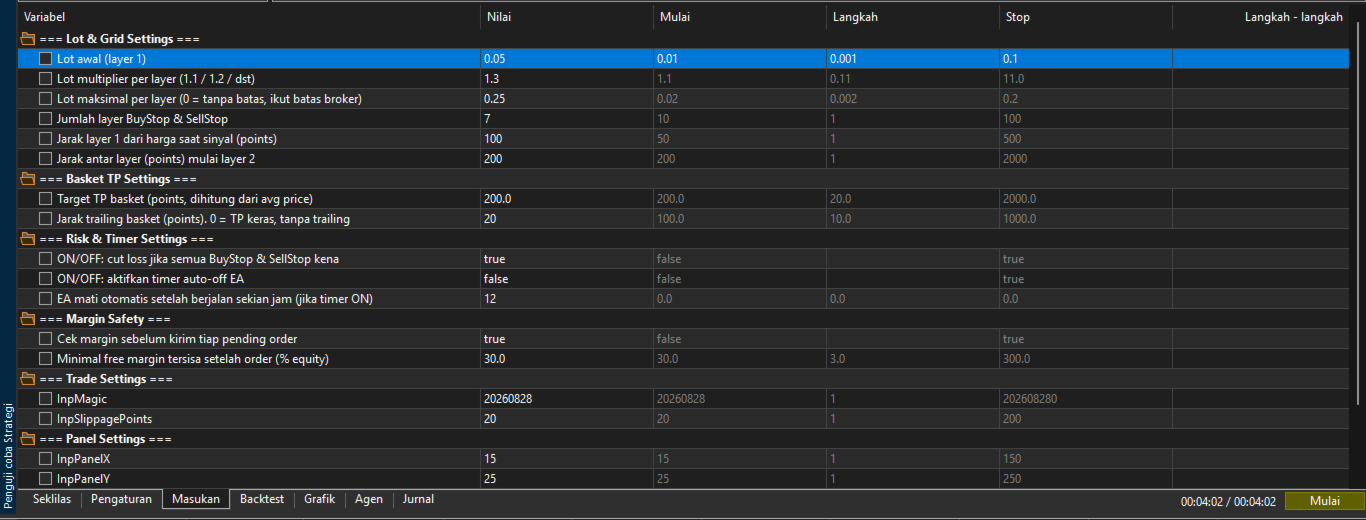
Lot & Grid Settings
-
Initial Lot – Starting lot size for the first grid layer.
-
Lot Multiplier – Multiplier applied to subsequent layers.
-
Maximum Lot – Maximum permitted lot size for each layer.
-
Grid Layers – Number of Buy Stop and Sell Stop layers.
-
Grid Start Distance – Distance of the first pending order from the current market price.
-
Grid Step Distance – Distance between additional layers.
Basket TP Settings
-
Basket TP Points – Target basket profit in points.
-
Trailing Basket Points – Basket trailing distance in points.
-
Set trailing distance to 0 to use a hard basket TP without trailing.
Risk & Timer Settings
-
All-Layers Cut Loss – Optional protection when every Buy Stop and Sell Stop has been triggered.
-
Use Timer – Enable or disable the automatic runtime limit.
-
Maximum Run Hours – Maximum active runtime before the EA stops accepting new trading cycles.
Margin Safety
-
Margin Check – Enable or disable pre-order margin verification.
-
Minimum Free Margin % – Minimum percentage of equity that should remain available after placing an order.
Trade Settings
-
Magic Number – Unique identifier used to distinguish Springers MT5 trades.
-
Slippage – Maximum allowed execution deviation in points.
How Springers MT5 Works
The basic trading workflow is:
Market Monitoring → 3-Candle Confirmation → Automatic Grid Placement → Buy/Sell Trigger → Basket Management → Basket TP/Trailing → Close Basket → Wait for Next Signal
The EA continuously monitors the market and only starts a new grid when the required confirmation pattern is detected and there is no existing Springers MT5 trading cycle.
Recommended Account Type
MetaTrader 5 Hedging Account
The EA can technically run on other account modes, but the strategy is specifically designed around independent Buy and Sell baskets. A Hedging account is therefore recommended for the intended behavior.
Risk Disclaimer
Springers MT5 is an automated trading system that uses pending-order grids. Grid-based strategies can increase exposure when multiple orders are triggered, especially during strong or prolonged market movements.
The Lot Multiplier, Grid Layers, Grid Distance, and Maximum Lot settings can significantly affect account risk.
Always test the EA on a demo account and perform your own backtesting before using it on a live account.
Use appropriate risk management and select settings according to your account balance, broker conditions, symbol specifications, and personal risk tolerance.
Past performance does not guarantee future results.
Why Choose Springers MT5?
Springers MT5 is built to provide a structured and automated trading workflow with:
✔ Fully automated signal detection
✔ 3-candle confirmation system
✔ Buy Stop + Sell Stop grid
✔ Multiple configurable layers
✔ Adjustable lot multiplier
✔ Maximum lot protection
✔ Margin safety verification
✔ Basket Take Profit
✔ Basket trailing protection
✔ Optional all-layer cut loss
✔ Automatic runtime control
✔ Hedging account support
✔ Real-time trading panel
✔ Automatic broker volume normalization
✔ No manual entry required
Springers MT5 — Automated Confirmation. Structured Grid. Intelligent Basket Management.