Second Chart the Time Frame in Seconds

50 USD
Versione demo scaricata:
741
Pubblicato:
3 marzo 2016
Versione attuale:
5.1
Non hai trovato un robot adatto?
Ordina il tuo
su Freelance
Vai alla sezione Freelance
Ordina il tuo
su Freelance
Come acquistare un Robot di Trading o un indicatore
Esegui il tuo EA
hosting virtuale
hosting virtuale
Prova un indicatore/robot di trading prima di acquistarlo
Vuoi guadagnare nel Market?
Come presentare un prodotto per venderlo con successo

Ti stai perdendo delle opportunità di trading:
- App di trading gratuite
- Oltre 8.000 segnali per il copy trading
- Notizie economiche per esplorare i mercati finanziari
Registrazione
Accedi
Accetti la politica del sito e le condizioni d’uso
Se non hai un account, registrati
Hello,
I have purchased the product.
Unfortunately custom indicators like Blahtech candle timer does not work at all.
This defeats the purpose of having a seconds time frame chart.
I would like to buy the MT5 version instead, but it seems I cannot get a refund for the MT4 version.
This is very awkward...
Beside the chart does not update at the start of a candle but only after the price has changed (screenshot attached).
Sincerely,
I have purchased the product.
Hello!
I will write for you a free, open-source analogue of the indicator, which shows the remaining time until the candle closes on a second chart.
Hello!
I will write for you a free, open-source analogue of the indicator, which shows the remaining time until the candle closes on a second chart.
That's very kind of you, I appreciate it but I don't want to hustle you.
I wonder if it would be possible to use custom indicators, like Blahtech candle timer on the MT5 version.
Regards,
Seconds Chart — new features.
The "Refresh Chart" indicator needs to be run on the standard chart of this symbol, where ticks need to be generated.
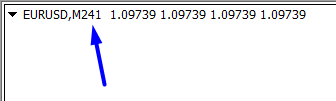
The indicator has one input variable — the timeframe. You need to specify the value that is indicated on the seconds chart.
The values must match.
In this example, the "Refresh Chart" indicator is running on the standard EURUSD chart, H1. The value 241 is specified for the input variable, exactly the same value as on the seconds chart for which ticks need to be generated.
To check, use a test Expert Advisor.
Run it on the second chart for which ticks are generated. You can make sure that after the first tick, the first buy position will be opened, after the second tick, the second sell position will be opened, and after the third tick, the EA will unload itself from the chart. Do such a test on a demo account.
In order for EA to open positions, you need to enable auto trading and allow the EA to trade.
Have a good trading on the financial markets!
Can't connect the MT5 tick database. seddenly only show the current data, no history data from MT5. Restart MT5 and MT4. Also reinstall the second chart EA and tick database in MT5. Still would not show the historical data.
Hello!
I have written you detailed instructions in private messages.
Check all the points and if the problem is solved, then share here what the problem was.
If you need to additionally solve other issues, I suggest doing this in private messages, and you can write about the results in one short message here.
Just purchased and it is not working. I also went to the process of installing the Tick Database to the MT5 terminal and I am not receiving any chart data to the MT4.
Where are the instructions? Seems like others are having issues as well.
Just purchased and it is not working.
Hello!
Make sure that all the necessary symbols are available in the market watch of your terminals. Open the M1 charts in both terminals. Check if the opening time of the last candle is the same. If there is a difference, then you can set the time offset.Example
We open M1 charts in both terminals.
In the MT4 terminal, the opening time of the last candle is one hour less than in the MT5 terminal.
To offset this difference, we specify a time offset of -1 hour.
Time Offset (hh) = -1
The default value is 0 when the time in the terminals is the same.
To get data from the MT5 terminal, you need to run the free "Tick Database" utility. After 1-2 minutes, you can run the "Seconds Chart" utility in the MT4 terminal. During this time, the tick database will already be prepared.
I have purchased this and confused on how it works with multiple pairs. Do I need it to be running on every individual pair, or just have it running on 1 pair and can swap out for a different at any time?
A list of all available symbols will open.

Hello! Click on the name of the symbol at the top of the toolbar.
A list of all available symbols will open.
Thank you for response.
Another question I have is why certain pairs have no data loaded while others already have data loaded?
For example, when trading USDJPY, my seconds timeframe has a chart full of data already loaded, but USDCAD just started loading data where I opened it.
Hi, i love this indicator but when i change charts the smiley face turns into a sad face. is it possible to code it a way to prevent this from happening?
i hope this is possible
greets Shadon.
oh yes and this indicator doesnt work with indices and gold on my platform is this normal? if so could you make it that it works?
thank you very much
greets Shadon
Hi, i love this indicator but when i change charts the smiley face turns into a sad face.
Hello!
Check the terminal settings.
oh yes and this indicator doesnt work with indices and gold on my platform is this normal? if so could you make it that it works?
The product works on all symbols, there are no restrictions. Are you using tick database import from MT5?
Hi, for some reason i dont have that check box (mine is in dutch), and look at the NAS100 it did work but it didn't load the full history and yes i have the free tick base loaded on mt5 other pairs do work besides gold and indices and now i figured usdjpy also didnt load full history on chart
Hi, for some reason i dont have that check box (mine is in dutch).
All the lower ones need to be disabled.
If any other Expert Advisors or indicators require import from the DLL, there will be a separate message about this in the terminal.
Only the topmost one is enabled (allow algo trading).