King Fx Mafia Trade Manager
- Utilità
- Versione: 1.0
- Attivazioni: 5

King Fx Mafia Trade Manager - a fast, low-lag trading cockpit for MetaTrader 5.
Open, protect and manage your trades from one clean dark panel. Every order goes out with your stop loss and take profit already attached, the panel shows exactly how much money you risk before you click, and the automation takes care of partial profits, break even and trailing while you focus on the chart.
Works on forex, gold, silver, indices, oil and crypto. The pip size is detected automatically for each symbol.
ONE-CLICK EXECUTION
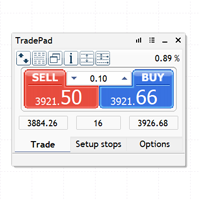
- Market BUY and SELL with SL and TP placed instantly (in pips)
- Buy Limit, Sell Limit, Buy Stop and Sell Stop at your chosen pip offset
- Risk line above the buttons: lot size and the exact money at risk if the SL is hit, in account currency and % of balance
- Fast asynchronous order sending and an anti double-click guard
- Stops are checked against the broker's stop level and freeze level, so orders and edits close to price are not rejected
AUTOMATION
- Auto partial close: when a trade reaches your partial pips, it closes your chosen % of the position
- Auto break even: at the same point the stop moves to entry + your BE pips
- Missing SL / TP fixer: any position on the symbol without a stop or target gets your SL and TP attached automatically, including trades opened from your phone or another tool
- Optional: move the other trades on the same side to break even when a take profit is hit
TRAILING STOP
- Turn it on or off from the panel with one click
- Pick the distance from the drop-down: 10, 15, 20, 30 or 50 pips
- Starts once profit equals the trail distance, so the first move puts SL at break even, and it only ever moves in your favour
PROTECTION
- Red news lock: BUY / SELL and pending buttons are locked from X minutes before to X minutes after high-impact news for your symbol's currencies (minutes are adjustable)
- Daily loss limit: when closed + floating loss for the day reaches your limit, the EA closes the symbol, cancels pending orders and locks trading until the next day
- Optional push notification to your phone when the lock is triggered
LIVE COCKPIT
- Three gauges: growth from your deposits, live floating P/L on this symbol, and all-time win rate
- Equity, today's P/L, margin level and drawdown, colored green or red
- Position counter: buys, sells, pending orders and today's trades
UPCOMING NEWS
- Red (and optionally orange) events from the built-in MT5 economic calendar with a live countdown
- Shown in your PC's local time; the countdown turns amber inside 15 minutes and shows LIVE at release
- Filter by all majors, the chart symbol only, or your own currency list
P/L CALENDAR
- Monthly calendar next to the panel with every day in green or red, the P/L and the number of trades
- Weekly totals, month P/L, win rate, best / worst day and winning / losing days
- Counts every symbol or only the current chart
COMFORT
- One-click break even, partial close, close buys, close sells, cancel pending and close all
- Minimize the panel to a single button that keeps showing your live P/L
- Drag the panel anywhere; position and settings are saved per symbol
- Optional chart theme that matches the panel with 7 candle styles; your original chart colors come back when the EA is removed
- MT5 trade sounds on or off, 22 title icons to choose from
HOW TO USE
- Attach the EA to the chart of the symbol you trade and allow Algo Trading.
- Open SETTINGS on the panel and set your lot, SL, TP, partial and break even values.
- Click BUY, SELL or a pending button. The automation manages the trade from there.
Note: the panel manages trades on the symbol of the chart it is attached to. Attach it to one chart per symbol.
INPUT PARAMETERS
- ShowPanel - show or hide the panel
- TitleIcon / TitleIconColor - icon on both sides of the title and its color
- DefaultLotSize - starting lot size
- DefaultStopLossPips / DefaultTakeProfitPips - starting SL and TP in pips
- DefaultPartialPips - profit in pips that triggers the partial close and break even
- DefaultPartialClosePercent - % of the position closed at the partial
- DefaultBreakevenPips - pips added beyond entry when moving to break even
- DefaultPendingOffsetPips - distance from price for limit and stop orders
- DefaultTrailPips - trailing stop distance in pips
- TrailStepPips - minimum improvement before the stop is moved again
- MoveBEAfterTP1 - when a TP is hit, move the other trades on that side to break even
- MaxDailyLoss - daily loss limit in account money (0 = off)
- NewsLock / NewsLockMinutesBefore / NewsLockMinutesAfter - red news lock and its window
- AdjustStopsToLevel - push stops out to the broker's minimum distance automatically
- EnableAutoManagement - turn the partial / break even / SL-TP automation on or off
- EnablePushNotification - send push notifications to your phone
- MaxSlippagePoints - maximum slippage for market orders
- FastAsyncExecution - send orders without waiting for the server reply
- TradeCooldownMs - anti double-click delay
- SoundStyle / ClickSounds - trade sounds and button clicks
- GaugeMaxGrowthPercent / GaugeMaxFloatPercent - full scale of the gauges
- ShowNews / NewsCurrencies / ShowOrangeNews / NewsMaxRows - news list options
- ApplyChartTheme / CandleStyle - chart colors and candle style
- ShowCalendar / CalendarAllSymbols - P/L calendar button and which symbols it counts
In the Strategy Tester the panel buttons cannot be clicked, so the EA opens small demo trades there to show the automation working. This never happens on a live or demo account.
Happy Trading!