Order Assistant MT4
- Utilità
- Versione: 1.0

Order Assistant is a easy to use trading utility designed to make trade planning, risk management, and order execution simple, fast, and intuitive.
The entire interface is built around one principle: keep trading simple and clear.
Instead of a complicated trading panel filled with unnecessary information and settings, Order Assistant provides the essential tools in a clean and easy-to-use interface. The goal is to let traders focus on the trade itself rather than managing the platform.
Simple and Clear Interface
Order Assistant has been designed with ease of use as a priority.
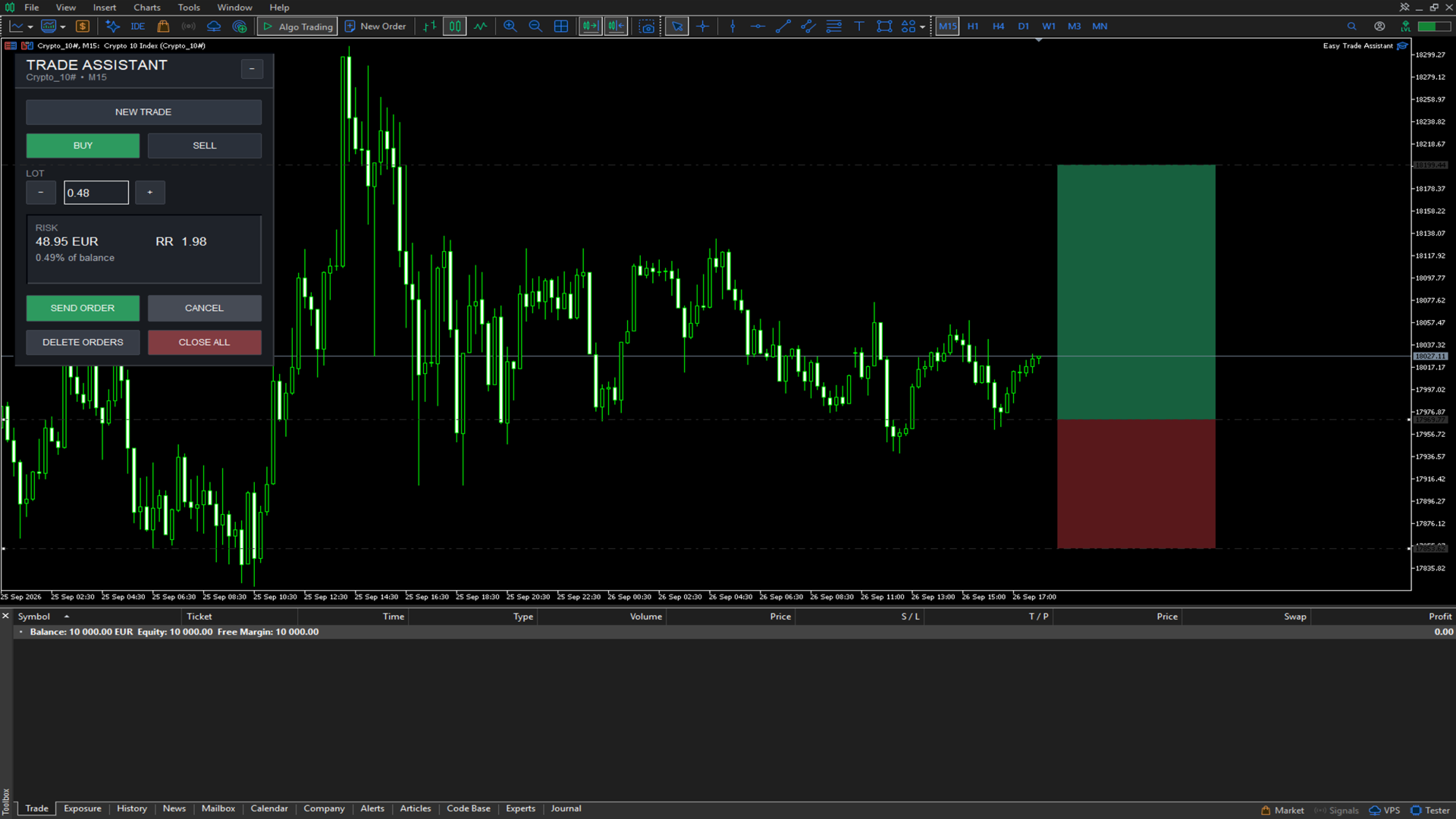
The modern interface provides quick access to the most important trading functions without unnecessary complexity. Buy and Sell direction, lot size, risk information, order execution, pending orders, and position management are all available directly from the panel.
The interface is designed to be understood immediately, even when markets are moving quickly.
Paper Trade Planning
Before sending an order to the market, Order Assistant allows you to create a visual paper trade directly on the chart.
The paper trade automatically calculates a potential Stop Loss and Take Profit based on ATR, giving you a clear visual representation of the planned trade.
The Entry, Stop Loss, and Take Profit levels can be adjusted directly from the chart using draggable lines.
This makes it easy to test and refine a trade idea before committing real capital.
Visual Risk Management
Order Assistant calculates the potential monetary risk of the planned trade based on the selected lot size and Stop Loss distance.
The panel displays:
-
Risk amount
-
Risk as a percentage of account balance
-
Risk-to-Reward ratio
-
Potential Take Profit distance
This gives the trader an immediate understanding of the trade's risk before execution.
ATR-Based Trade Planning
Paper trades can use ATR-based calculations to automatically determine initial Stop Loss and Take Profit levels.
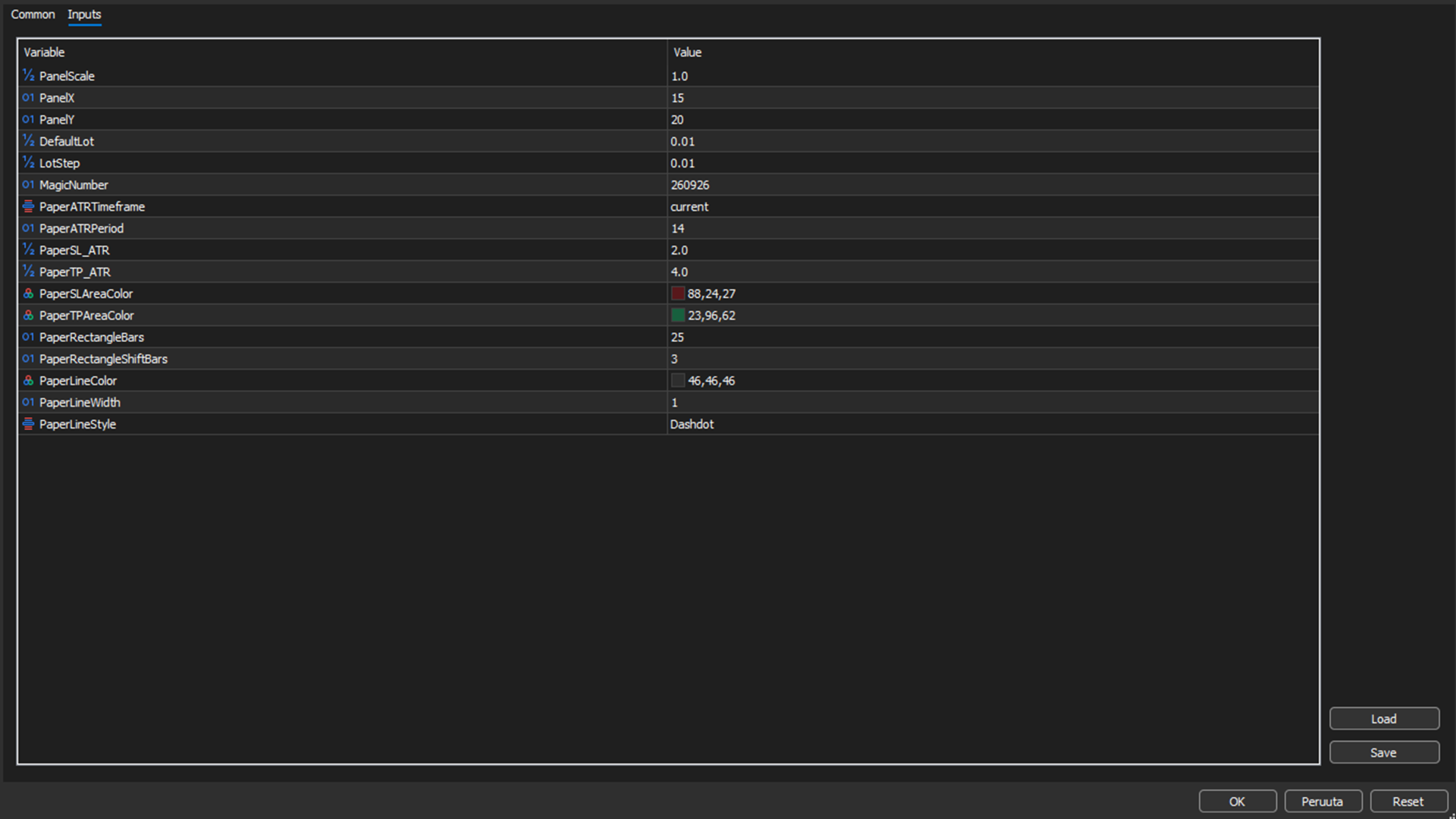
The ATR period, timeframe, and risk/reward multipliers can be configured according to the trader's strategy.
This provides a consistent starting point for trade planning while still allowing the trader to manually adjust the levels.
Flexible Lot Size
Lot size can be adjusted directly from the interface using simple increment and decrement controls.
The system automatically respects the broker's minimum lot, maximum lot, and lot step requirements.
This keeps position sizing quick and straightforward without requiring manual calculations.
Market and Pending Orders
Order Assistant can determine whether the planned entry should be executed as a market order or a pending order based on its position relative to the current market price.
Depending on the planned entry, the system can use:
-
Market Buy
-
Market Sell
-
Buy Limit
-
Sell Limit
-
Buy Stop
-
Sell Stop
This allows the trader to plan an entry directly on the chart and send the corresponding order without manually selecting the order type.
Fast Order Management
Order Assistant also provides direct controls for managing orders and positions.
From the panel, the trader can:
-
Send the planned order
-
Cancel the current paper trade
-
Delete pending orders
-
Close open positions
These functions are designed to minimize unnecessary steps and keep order management straightforward.
Built for Practical Trading
Order Assistant is not designed to overwhelm the trader with features.
Every element of the interface has a practical purpose. The focus is on providing a fast and clear workflow:
Plan → Visualize → Check Risk → Execute
The result is a trading assistant that combines visual trade planning, position sizing, risk calculation, and order execution into one simple interface.
Key Features
-
Clean and professional trading interface
-
Extremely simple and intuitive workflow
-
Visual paper trade planning
-
Draggable Entry, Stop Loss and Take Profit levels
-
ATR-based Stop Loss and Take Profit calculations
-
Configurable ATR timeframe and period
-
Configurable SL and TP multipliers
-
Automatic risk calculation
-
Risk percentage based on account balance
-
Risk-to-Reward calculation
-
Flexible lot size controls
-
Market order execution
-
Buy Limit and Sell Limit orders
-
Buy Stop and Sell Stop orders
-
Pending order management
-
One-click position management
-
Configurable paper trade projection
-
Visual risk and reward areas directly on the chart
-
Broker-compatible lot size normalization
Order Assistant is built to make the process of planning and executing a trade as clear and effortless as possible.