Elastic Grid

65 USD
Versione demo scaricata:
1 238
Pubblicato:
30 dicembre 2016
Versione attuale:
7.2
Non hai trovato un robot adatto?
Ordina il tuo
su Freelance
Vai alla sezione Freelance
Ordina il tuo
su Freelance
Come acquistare un Robot di Trading o un indicatore
Esegui il tuo EA
hosting virtuale
hosting virtuale
Prova un indicatore/robot di trading prima di acquistarlo
Vuoi guadagnare nel Market?
Come presentare un prodotto per venderlo con successo

Ti stai perdendo delle opportunità di trading:
- App di trading gratuite
- Oltre 8.000 segnali per il copy trading
- Notizie economiche per esplorare i mercati finanziari
Registrazione
Accedi
Accetti la politica del sito e le condizioni d’uso
Se non hai un account, registrati
OK, Thank you for getting back to me.
My strategy is simple, buy every 200 pips and sell every 170 pips. so before the next buy happens I have closed the previous one. If price reverses, i can only be left with one Buy which never made it to the TP< correct?
same going down.
Aldo
I think something like this can only happen if you disable autorecovery. But there may be many nuances here, and everything is probably not as simple as you think.
I advise you to spend some time and study how the strategy tester works in visual mode. Much will become much clearer to you, and in the end you will save a lot, a lot of time (and money) by choosing the optimal strategy for you with its help.
Double ordres.
Sorry for the trouble but why would I be getting double entries? What can I do to avoid this?
Thank you Aldo
I think something like this can only happen if you disable autorecovery. But there may be many nuances here, and everything is probably not as simple as you think.
I advise you to spend some time and study how the strategy tester works in visual mode. Much will become much clearer to you, and in the end you will save a lot, a lot of time (and money) by choosing the optimal strategy for you with its help.
My friend Where do I disable auto recovery?
Double ordres.
Sorry for the trouble but why would I be getting double entries? What can I do to avoid this?
Thank you Aldo
I think it was the slippage that worked. There is nothing you can do about this, it depends on the broker. The advisor places only pending orders and the price of the pending order (at which it was placed) can be seen in the comment column for the order. But to do this, you need to enable its display in the terminal.
My friend Where do I disable auto recovery?
Put false
Put false
You are a champ! Thank you.
Hi Aliaksandr. After 30 min of running i get constant error messages. How can i fix that?
Thanks in advance & best
Hi Aliaksandr. After 30 min of running i get constant error messages. How can i fix that?
Thanks in advance & best
Hello, I recommend restarting the terminal. And if the error persists, show here a screenshot of the alert with the full content.
Hi Aliaksandr... is it possible to close the market orders ahead of the pending orders once the target is reached? Thanks.
Hello,
Yes, you can choose to close market positions only (if I understood your question correctly)
Hi
all my charts are showing this error. Please assist
Grids are not been placed. EA not working. I don't think it's me because it's a problem across all my charts
Fixed it.
Sorry to trouble.
Thank you
Hi, I hope you are well
What do I need to do to not close existing orders for a loss when I am making changes to my grid? I have old grid orders set as true.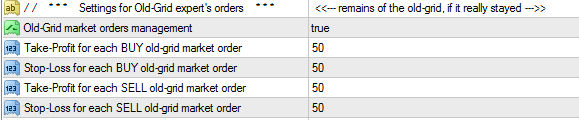
Thank you
Aldo
Hi, I hope you are well
What do I need to do to not close existing orders for a loss when I am making changes to my grid? I have old grid orders set as true.
Thank you
Aldo
Hello, the advisor made it so that LOSS-MAKING old grid market orders are not closed automatically. The settings from your screenshot do not affect this. Only profitable old positions with a take-profit lower than the new one can be closed automatically.
p.s. more useful information: https://www.mql5.com/en/blogs/post/752791
search words: Old-Grid
Hello, the advisor made it so that LOSS-MAKING old grid market orders are not closed automatically. The settings from your screenshot do not affect this. Only profitable old positions with a take-profit lower than the new one can be closed automatically.
p.s. more useful information: https://www.mql5.com/en/blogs/post/752791
search words: Old-Grid
Thank you for getting back to be. It was a good read but I can't find why some of my positions are closing out when changes are made to the grid
Thank you for getting back to be. It was a good read but I can't find why some of my positions are closing out when changes are made to the grid
Can you provide screenshots of the full alert messages that notify about closing with current loss and profit?
Can you provide screenshots of the full alert messages that notify about closing with current loss and profit?
The rest looks normal my friend. I just change grid spacing and lot size often and I am getting open orders that get closed
The rest looks normal my friend. I just change grid spacing and lot size often and I am getting open orders that get closed
Double click on each of these lines and show a screenshot of the full messages for these lines (which should be displayed above this entire list).

It should explain the reasons for closing the positions.Double click on each of these lines and show a screenshot of the full messages for these lines (which should be displayed above this entire list).
It should explain the reasons for closing the positions.thank you
thank you
That is, you need to monitor the new values of stop-loss and take-profit.
p.s. I rarely use the settings for old orders, so I should clarify that if their management is enabled, then of course you also need to take into account the values set in them for TP and SL.