Opening Range Breakouts MT5

58 USD
Versione demo scaricata:
223
Pubblicato:
9 maggio 2025
Versione attuale:
1.1
Non hai trovato un robot adatto?
Ordina il tuo
su Freelance
Vai alla sezione Freelance
Ordina il tuo
su Freelance
Come acquistare un Robot di Trading o un indicatore
Esegui il tuo EA
hosting virtuale
hosting virtuale
Prova un indicatore/robot di trading prima di acquistarlo
Vuoi guadagnare nel Market?
Come presentare un prodotto per venderlo con successo

Ti stai perdendo delle opportunità di trading:
- App di trading gratuite
- Oltre 8.000 segnali per il copy trading
- Notizie economiche per esplorare i mercati finanziari
Registrazione
Accedi
Accetti la politica del sito e le condizioni d’uso
Se non hai un account, registrati
because the opening range is GMT +3 , in my place GMT +7
How to change the GMT ?
because the opening range is GMT +3 , in my place GMT +7
This indicator uses your broker's server time to plot each trading session, but the strategy itself is described in GMT+0 for universal reference. To set it up correctly, you'll first need to check your broker's server time offset.
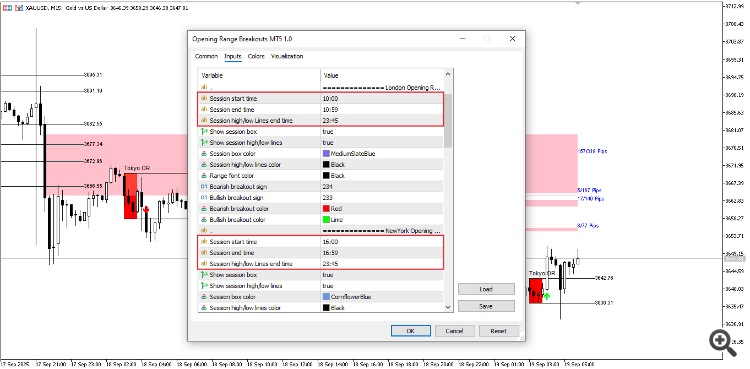
If your server is GMT+7, that same London session would become 14:00–15:00 your local server time.For example, if your server runs on GMT+3, you'd adjust the London session from 07:00–08:00 GMT to 10:00–11:00 server time.
The indicator’s default settings are aligned with GMT+3, so if your server uses a different timezone, you’ll need to convert each session manually. An online time zone converter can help make this easier. Always test these settings in demo first to make sure everything lines up as expected with your broker’s time.
Hey everyone, just wanted to give a quick update. The Opening Range Breakouts MT5 indicator has been doing really well lately in the MQL5 marketplace with great sales and rankings, and a huge thank you to everyone who left such kind 5 star reviews. It means a lot!
I did receive feedback from one trader about the chart lagging or reloading every 10–20 seconds, especially when using symbols like XAUUSD on M1. If anyone else is facing similar performance issues or seeing “indicator is too slow” messages, please DM me directly with details or screenshots of the errors. Your feedback is super valuable and helps me improve the tool for everyone.
I’m already looking into the code to optimize performance and will release a smoother, fixed version as soon as possible. Thanks again for your support and patience, you’re helping make this indicator better with each piece of feedback!
Strategy Sessions & Market Correlation
To really get why these breakout strategies use the specific time windows they do, it helps to line them up with the standard Forex market sessions. The big moves often happen when these sessions open or overlap. Let’s break it down.Based on standard Forex market hours (in GMT), here is how the strategy sessions correlate:
These strategies aren't random. They're built to exploit moments when a massive wave of new participants enters the market (a session open) or when two big waves combine (a session overlap). That's when you get the volume and momentum needed for a reliable breakout.
If you or anyone else is experiencing this, I'm actively looking into it and will be working on optimizations in the next update to improve performance. Thanks for letting me know, your reports really help make the tool better!